1. Sissejuhatus
This manual provides essential information for the installation, operation, maintenance, and troubleshooting of your PNY RTX 4000 Ada Generation 20GB DDR6 Quadro Graphics Card. This professional graphics card is designed for demanding applications such as 3D rendering, CAD/CAM, scientific simulations, and AI workflows, leveraging the NVIDIA Ada Lovelace architecture.
Key features include 6,144 CUDA cores, 48 RT Cores, 192 Tensor Cores, and 20GB of GDDR6 ECC memory, all within a single-slot, 130W design. It supports up to four 4K monitors or two 8K monitors via DisplayPort 1.4a.

Figure 1: PNY RTX 4000 Ada Generation Graphics Card overview, showing the single-slot design and an illustrative power connector icon.
2. Ohutusalane teave
Please read and follow all safety instructions carefully to prevent damage to the product or personal injury.
- Enne mis tahes komponentide paigaldamist või eemaldamist ühendage arvuti alati vooluvõrgust lahti.
- Wear an anti-static wrist strap or frequently touch a grounded metal object to discharge static electricity before handling the graphics card.
- Ülekuumenemise vältimiseks veenduge arvuti korpuses piisavas ventilatsioonis.
- Ärge jätke graafikakaarti niiskuse ega äärmuslike temperatuuride kätte.
- Handle the card by its edges; avoid touching the gold-plated connectors or components on the PCB.
3. Pakendi sisu
Veenduge, et tootepakendis on kõik esemed olemas:
- PNY RTX 4000 Ada Generation Graphics Card (VCNRTX4000ADA-PB)
- Documentation (this manual, quick start guide, etc.)
Note: Additional accessories such as display adapters or power cables may be sold separately or included depending on your region/retailer.
4. Seadistamine
4.1. Füüsiline paigaldus
- Valmistage oma süsteem ette: Power off your computer and disconnect the power cable from the wall outlet. Open your computer case.
- Locate a PCIe Slot: Identify an available PCI Express x16 slot on your motherboard. The RTX 4000 Ada Generation is a single-slot card.
- Eemaldage pesakatted: Eemaldage arvuti korpuse tagaküljelt metallist pesakate, mis vastab valitud PCIe pesale.
- Sisestage graafikakaart: Joondage graafikakaart ettevaatlikult PCIe pesaga ja vajutage kindlalt alla, kuni see on kindlalt paigas. Veenduge, et PCIe pesa kinnitusklamber lukustub oma kohale.
- Ühendage toide: The RTX 4000 Ada Generation requires an 8-pin PCIe power connector from your power supply. Connect this cable to the power connector on the top edge of the graphics card. Ensure a secure connection.
- Kinnitage kaart: Use a screw to fasten the graphics card's mounting bracket to the computer case.
- Sulgege ümbris ja ühendage ekraanid: Close your computer case. Connect your display monitor(s) to the DisplayPort outputs on the graphics card.
4.2. Draiveri installimine
- Toide sisse: Reconnect the power cable to your computer and power it on. Your system may boot with a basic display driver.
- Laadige alla draiverid: Navigate to the official PNY or NVIDIA website to download the latest drivers for the RTX 4000 Ada Generation. It is recommended to download drivers directly from the manufacturer's website for optimal performance and stability.
- PNY tugi: www.pny.com/support
- NVIDIA draiverid: www.nvidia.com/drivers
- Installige draiverid: Käivitage allalaaditud draiveri installija ja järgige ekraanil kuvatavaid juhiseid. Pärast installimist võib olla vajalik süsteemi taaskäivitamine.
- Kinnitage installimine: After restarting, open the NVIDIA Control Panel or NVIDIA Settings to confirm that the graphics card is recognized and operating correctly.

Figure 2: Display output section of the PNY RTX 4000 Ada Generation, showing four DisplayPort 1.4a connectors.
5. Graafikakaardi kasutamine
5.1. Põhitoimingud
Once installed and drivers are updated, your PNY RTX 4000 Ada Generation graphics card will automatically handle graphics processing for your system. Applications that benefit from GPU acceleration will utilize the card's capabilities.
- NVIDIA juhtpaneel: Use the NVIDIA Control Panel (Windows) or NVIDIA Settings (Linux) to adjust display settings, manage 3D application profiles, and monitor GPU status.
- Tarkvara ühilduvus: Ensure your professional applications (e.g., CAD, rendering software) are updated to versions that support NVIDIA Ada Lovelace architecture for optimal performance.
5.2. Mitme monitori seadistamine
The RTX 4000 Ada Generation supports up to four DisplayPort 1.4a outputs, allowing for flexible multi-monitor configurations.
- Connect your monitors to the available DisplayPort outputs on the graphics card.
- Access your operating system's display settings (e.g., Windows Display Settings) or the NVIDIA Control Panel to configure display arrangement, resolution, and refresh rates.
- The card supports resolutions up to 4K on four monitors simultaneously, or two 8K monitors.
6. Hooldus
6.1. Puhastamine
Regulaarne puhastamine aitab säilitada optimaalset jõudlust ja pikendab graafikakaardi eluiga.
- Toide välja: Enne puhastamist lülitage arvuti alati välja ja eemaldage see toiteallikast.
- Tolmu eemaldamine: Use compressed air to gently blow dust from the heatsink fins and fan blades. Hold the fan blades in place while blowing to prevent over-spinning and potential damage to the fan bearings.
- Väline puhastus: Wipe the exterior of the card with a soft, dry, lint-free cloth. Do not use liquid cleaners directly on the card.
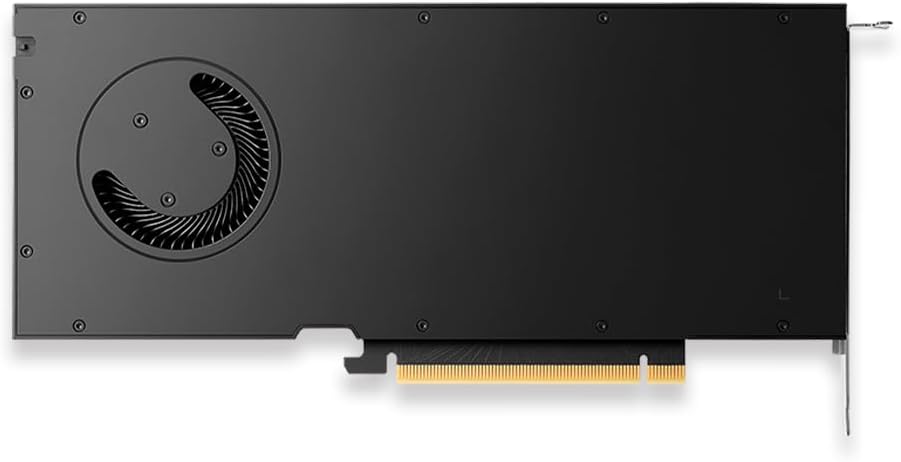
Joonis 3: Tagumine view of the PNY RTX 4000 Ada Generation, highlighting the cooling fan for maintenance reference.
6.2. Ladustamine
If storing the graphics card, place it in an anti-static bag and store it in a cool, dry environment away from direct sunlight and extreme temperatures.
7. Veaotsing
See jaotis käsitleb levinud probleeme, millega võite kokku puutuda.
- Ekraani väljund puudub:
- Veenduge, et monitor on sisse lülitatud ja ühendatud graafikakaardiga, mitte emaplaadi integreeritud graafikakaardiga.
- Verify the graphics card is fully seated in the PCIe slot and the power cable is securely connected.
- Proovi teist monitori või kaablit.
- Check your BIOS/UEFI settings to ensure the primary display output is set to PCIe graphics.
- Draiveri installimise probleemid:
- Uninstall any previous graphics drivers using a utility like Display Driver Uninstaller (DDU) in Safe Mode, then attempt a fresh installation of the latest drivers.
- Ensure you downloaded the correct drivers for your operating system and graphics card model.
- Süsteemi ebastabiilsus või krahhid:
- Veenduge, et teie toiteplokk (PSU) vastab minimaalsele võimsusnõudeletage requirements for your system, including the graphics card.
- Monitor GPU temperatures using software utilities. Excessive heat can cause instability. Ensure proper case airflow.
- Verify that your operating system and motherboard BIOS are up to date.
8. Tehnilised andmed
| Funktsioon | Detail |
|---|---|
| Kaubamärk | PNY |
| Mudeli number | VCNRTX4000ADA-PB |
| Graafika kaasprotsessor | NVIDIA Quadro RTX 4000 Ada põlvkond |
| Arhitektuur | NVIDIA Ada Lovelace |
| CUDA südamikud | 6,144 |
| RT tuumad | 48 (3. põlvkond) |
| Tensor tuumad | 192 (4th Generation) |
| Graafika RAM-i suurus | 20 GB GDDR6 ECC |
| Mälu liides | 160-bitine |
| Mälu ribalaius | 360 GB/s |
| GPU kellakiirus | 2220 MHz (võimendus) |
| Mälu kiirus | 2250 MHz |
| FP32 jõudlus | Up to 26.7 TFLOPS |
| Ray Tracing Performance | 61.8 TFLOPS |
| AI Performance (FP8) | 327.6 TFLOPS |
| Video väljundliides | 4x DisplayPort 1.4a |
| Maksimaalne ekraani eraldusvõime | 3840x2160 (4K) per display, up to 4 displays; 8K on 2 displays |
| Energiatarve | 130W |
| Vormitegur | Ühe pesaga |
| Toote mõõtmed (PxLxK) | 14.65 x 8.55 x 0.1 tolli |
| Kauba kaal | 1.85 naela |
9. Garantii teave
PNY products are covered by a manufacturer's warranty. The specific terms and duration of the warranty may vary by region and product type. Please refer to the official PNY website or your product's packaging for detailed warranty information.
For warranty claims or to register your product, visit: www.pny.com/support/warranty
10. Tehniline tugi
If you encounter issues that cannot be resolved using the troubleshooting steps in this manual, or require further assistance, please contact PNY Technical Support.
- PNY tugi Websait: www.pny.com/support
- Tugi website provides FAQs, driver downloads, and contact information for technical assistance.


