1. Sissejuhatus
The BUSICOM PC-SeaV15c is a 15-inch Windows IoT touch panel PC designed for commercial and industrial applications. This manual provides essential information for the safe and efficient setup, operation, and maintenance of your device. Please read this manual thoroughly before using the product and retain it for future reference.
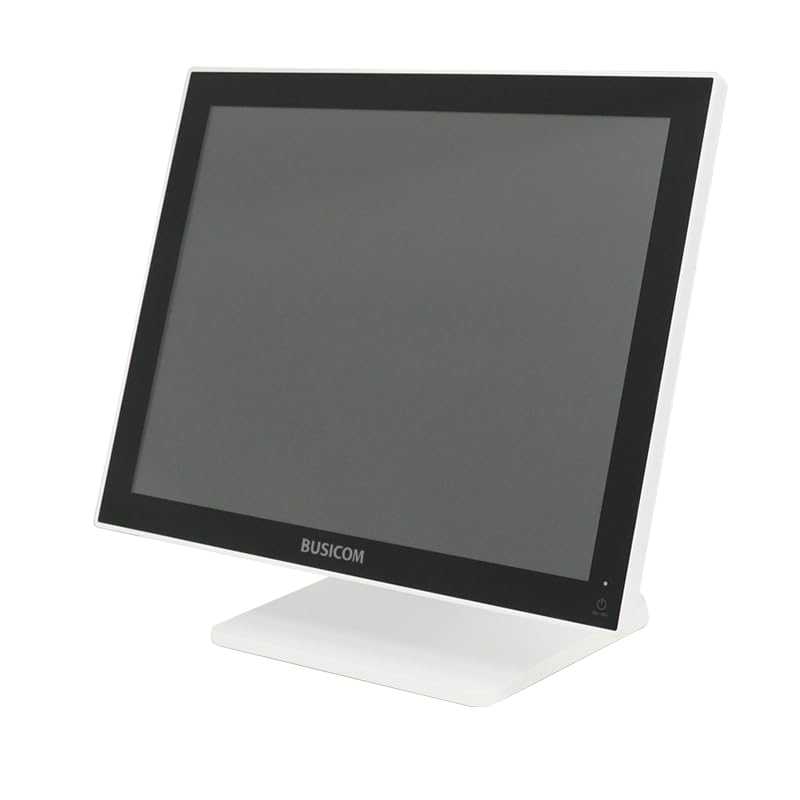
Joonis 1: Esiosa view of the BUSICOM PC-SeaV15c Touch Panel PC.
2. Toote lõppview
2.1 Põhifunktsioonid
- Täiustatud disain: Features an ultra-thin bezel and a highly durable 7H reinforced display for enhanced aesthetics and protection.
- Suurepärane jõudlus: Equipped with Microsoft Windows 10 IoT Enterprise, ensuring long-term support and reliable operation.
- Intuitive Touch Panel: Utilizes a capacitive touch method, offering a familiar and responsive touch experience similar to smartphones and tablets.
- Lihtne hooldus: Designed for simple RAM and SSD replacement, facilitating upgrades and servicing.
- Mitmekülgsed liidesed: Provides a wide range of connectivity options to integrate with various peripherals.
- Tõhus salvestusruum: SSD storage ensures fast processing speeds, quiet operation, and excellent shock resistance.
2.2 Komponendid
The package typically includes the BUSICOM PC-SeaV15c unit and a power adapter. Additional accessories may vary.

Joonis 2: Eesmine ja külgmine profile of the PC-SeaV15c unit.

Joonis 3: Tagumine view showing access panels for RAM and SSD components.
3. Seadistusjuhised
3.1 Lahtipakkimine
- Carefully remove the PC-SeaV15c from its packaging.
- Kontrollige nähtavaid kahjustusi. Kahjustuste korral võtke viivitamatult ühendust müüjaga.
- Veenduge, et kõik loetletud komponendid on olemas.
3.2 Välisseadmete ühendamine
Refer to the interface diagram below for port locations and types.

Figure 4: Detailed diagram of the PC-SeaV15c's rear and bottom interfaces.
- Toiteühendus: Connect the provided power adapter to the DC In port and then to a power outlet.
- USB-seadmed: Use the USB 2.0 (4 ports) and USB 3.0 (2 ports) for connecting keyboards, mice, printers, and other USB peripherals.
- Võrguühendus: Connect an Ethernet cable to the LAN port for wired network access.
- Heliväljund: Connect external speakers or headphones to the Audio Out port.
- Serial Ports (RJ45): Utilize COM1, COM2, COM3, and COM6 for connecting specialized POS peripherals such as barcode scanners or receipt printers.
- Cash Drawer (RJ11): Connect a compatible cash drawer to the RJ11 port.
- Väline ekraan: If an external monitor is required, connect it to the Mini DisplayPort.
- C-tüüpi USB: For compatible devices.
3.3 Sisse-/väljalülitamine
- Toide sisse: Press the power button located on the upper right side of the display bezel or the power mark on the rear panel.
- Toide välja: To safely shut down the system, use the standard Windows shutdown procedure. Avoid direct power disconnection during operation to prevent data loss.
4. Kasutusjuhised
4.1 Windows 10 IoT Enterprise
The PC-SeaV15c operates on Windows 10 IoT Enterprise 2021. Familiarize yourself with the Windows operating system for basic navigation, application management, and system settings.
4.2 Touch Panel Usage
The capacitive touch screen supports multi-touch gestures.
- Puudutage: Samaväärne hiireklõpsuga.
- Topeltkoputus: Samaväärne topeltklõpsuga.
- Vajutage ja hoidke all: Samaväärne paremklõpsuga.
- Pühkige: Kerimiseks või navigeerimiseks.
- Näpistamine suumimiseks: Suumimiseks või vähendamiseks kasutage kahte sõrme.
5. Hooldus
5.1 Seadme puhastamine
- Enne puhastamist lülitage seade alati välja ja eemaldage vooluvõrgust.
- Kasutage kergelt pehmet ebemevaba lappi dampveega või mitteabrasiivse ekraanipuhastusvahendiga.
- Do not spray liquids directly onto the screen or device.
- Vältige tugevate kemikaalide, lahustite või abrasiivsete materjalide kasutamist.
5.2 RAM and SSD Replacement
The PC-SeaV15c is designed for easy replacement of RAM and SSD components. Refer to Figure 3 for the access panel location. For detailed instructions on component replacement, consult a qualified technician or the BUSICOM support websaidile.
6. Veaotsing
See jaotis pakub lahendusi levinud probleemidele, millega võite kokku puutuda.
- Seade ei lülitu sisse:
- Veenduge, et toiteadapter oleks kindlalt ühendatud nii seadme kui ka töötava pistikupesaga.
- Veenduge, et pistikupesa töötab, ühendades sellega teise seadme.
- Puuteekraan ei reageeri:
- Taaskäivitage seade.
- Veenduge, et ekraan on puhas ja takistustest vaba.
- Kuvarit pole:
- Kontrollige, kas seade on sisse lülitatud.
- If an external display is connected, ensure the correct input source is selected on the external display.
- Peripheral not detected:
- Ensure the peripheral is correctly connected to the appropriate port (USB, LAN, COM).
- Proovige ühendada välisseade teise porti.
- Check the peripheral's own power supply, if applicable.
For further assistance, please contact BUSICOM customer support.
7. Tehnilised andmed
| Funktsioon | Detail |
|---|---|
| Kaubamärk | BUSICOM |
| Mudeli nimi | PC-SeaV15c |
| Värv | Valge |
| Ekraani suurus | 15 tolli |
| Resolutsioon | 1024x768 |
| Operatsioonisüsteem | Windows 10 IoT Enterprise 2021 |
| Protsessori bränd | Intel |
| Protsessori pistikupesa | Intel® N97 |
| CPU kiirus | 3.6 GHz |
| Mälu tüüp | DDR4 |
| Installitud RAM | 4 GB |
| Kõvaketta tüüp | SSD |
| SSD mahutavus | 128 GB (as per product title) |
| Graafikakaardi tüüp | Integreeritud |
| Videomälu tüüp | DDR4 SDRAM |
| VRAM-i maht | 4 GB |
| USB 2.0 pordid | 4 |
| USB 3.0 pordid | 2 |
| Optiline draiv | Mitte ühtegi |
| Toote kaal | 6 kilogrammi |
| Kõrgus (umbes) | 307.5 mm (as per dimension diagram) |

Joonis 5: Tagumine view of the PC-SeaV15c with approximate height dimension.
8. Garantii ja tugi
For warranty information and technical support, please refer to the warranty card included with your product or visit the official BUSICOM webveebisait. Hoidke ostutšekk ostutõendina garantiinõuete korral.
BUSICOM Official Websait: BUSICOM Store on Amazon.co.jp


