1. Sissejuhatus
Thank you for choosing the ErGear EGESD8 Electric Standing Desk. This manual provides essential information for the safe and efficient assembly, operation, and maintenance of your new desk. Please read these instructions carefully before use and retain them for future reference. This electric standing desk is designed to offer ergonomic flexibility, allowing you to easily switch between sitting and standing positions, promoting a healthier work environment.

ErGeari elektriline seisulaud, väljapanekasing its sleek design and spacious desktop in a contemporary workspace.
2. Ohutusjuhised
Ohutu töö tagamiseks ja kahjustuste vältimiseks pidage kinni järgmisest:
- Enne laua kasutamist veenduge, et kõik ühendused on kindlad.
- Hoidke lapsed ja lemmikloomad töötamise ajal lauast eemal.
- Do not place hands or other body parts near moving parts to avoid injury.
- Do not overload the desk. The maximum weight capacity is 80 kg.
- Vältige vedelike asetamist otse juhtpaneelile või elektriliste komponentide lähedusse.
- If the desk makes unusual noises or movements, discontinue use and consult the troubleshooting section or contact support.
- Kasutage ainult kaasasolevat toiteadapterit ja kaableid.

This image highlights the robust construction of the ErGear Electric Standing Desk, capable of supporting up to 80 kg, ensuring stability even under significant load.
3. Pakendi sisu
Palun kontrollige, et kõik komponendid oleksid olemas ja kahjustamata:
- Desktop Panels (assembled)
- Lauajalad (2)
- Jalapadjad (2)
- Külgklambrid (2)
- Crossbar
- Käigukang
- Juhtpaneel
- Toiteadapter ja kaabel
- Cable Grommets (2)
- Headphone Hooks (2)
- Monteerimisdetailid (kruvid, kuuskantvõti)
- Kasutusjuhend
4. Montaažijuhised
ErGeari elektrilise seisulaua kokkupanekuks järgige neid samme. Kokkupanekuks on soovitatav kaasata kaks inimest.
Official assembly video for the ErGear Electric Standing Desk, demonstrating step-by-step installation.
1. samm: pange raam kokku
- Attach the side brackets to the desk legs using the provided screws and Allen wrench.
- Secure the foot pads to the bottom of each leg.
- Connect the two leg assemblies with the crossbar, ensuring all screws are tightened.
Step 2: Fix the Transmission Rod
- Insert the transmission rod into the designated openings on both desk legs.
- Ensure the rod is properly seated and secured with the retaining clips or screws.
Step 3: Assemble the Desktop Panel
- Lay the desktop panels face down on a soft, clean surface.
- Align the panels and secure them together using the provided connectors and screws.
Step 4: Attach the Frame to the Desktop
- Carefully place the assembled desk frame onto the underside of the desktop.
- Align the pre-drilled holes and secure the frame to the desktop using the appropriate screws.
- Attach the control panel to the underside of the desktop in a convenient location using the provided screws.
- Install the headphone hooks to the underside of the desktop as desired.
5. samm: ühendage kaablid
- Connect the motor cables from the legs to the control box.
- Connect the control panel cable to the control box.
- Ühendage toiteadapter juhtpaneeliga ja seejärel pistikupessa.
Step 6: Fix the Cable Grommets
- Insert the cable grommets into the pre-cut holes on the desktop to manage cables.
5. Kasutusjuhised
Your ErGear Electric Standing Desk features an intuitive control panel for easy height adjustment.
Short video showcasing key features of the ErGear Electric Standing Desk, including height adjustment and stability.
Juhtpaneel läbiview

The desk's intelligent control panel features an LED display showing current height in centimeters, along with up/down arrows and four memory preset buttons for quick adjustments.
- Up/Down Arrows (▲ / ▼): Press and hold to adjust the desk height manually.
- LED-ekraan: Shows the current height of the desk in centimeters.
- Memory Presets (1, 2, 3, 4): Store and recall preferred height settings.
Kõrguse reguleerimine
The desk can be adjusted between 72 cm ja 118 cm.
- Käsitsi reguleerimine: Press and hold the up (▲) or down (▼) arrow button until the desk reaches your desired height.
- Using Memory Presets: Press the corresponding memory button (1, 2, 3, or 4) to automatically move the desk to the saved height.
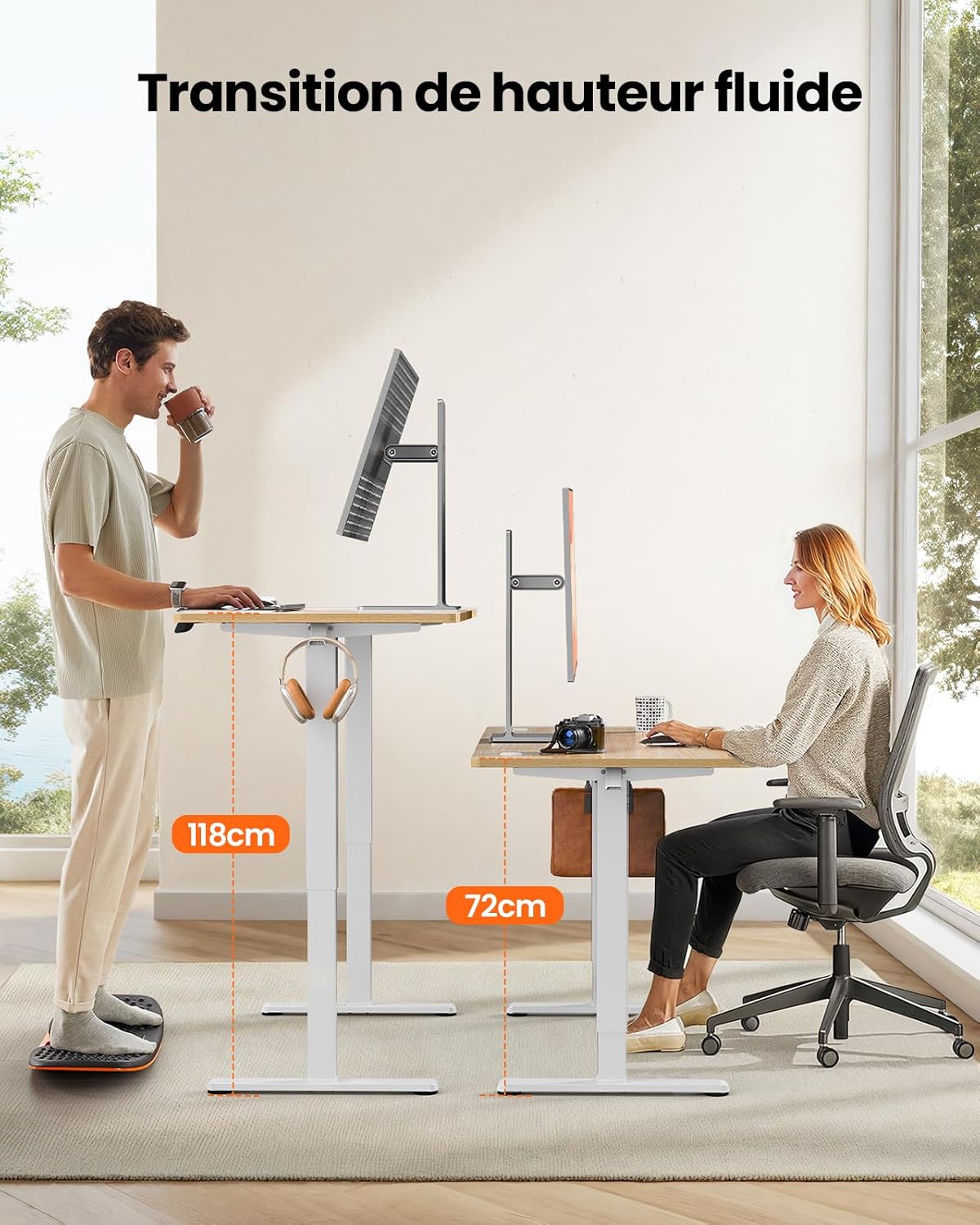
This image demonstrates the adjustable height range of the ErGear Electric Standing Desk, showing a user sitting at 72cm and standing at 118cm, emphasizing ergonomic flexibility.
Mälu eelseadete määramine
- Reguleerige laua kõrgust üles/alla noolte abil soovitud kõrgusele.
- Press the 'M' button (if available, or a 'Set' button) followed by the desired memory button (1, 2, 3, or 4). The display will typically flash or beep to confirm the setting is saved.
Vaikne töö
The desk operates with a quiet motor, producing a noise level of ≤ 55 dB, ensuring a peaceful work environment.

Illustrates the ultra-quiet operation of the ErGear Electric Standing Desk, with a noise level of 55dB, ensuring a peaceful and undisturbed work environment.
6. Hooldus
Regulaarne hooldus aitab pikendada teie laua eluiga:
- Puhastamine: Wipe the desk surface and legs with a soft, damp lapiga. Vältige tugevatoimelisi kemikaale või abrasiivseid puhastusvahendeid.
- Kaabli haldus: Periodically check that all cables are neatly organized and not pinched or tangled. Utilize the integrated cable grommets and hooks.
- Screw Tightness: Occasionally check and tighten any loose screws on the frame or desktop connections.
- Ülevaatus: Inspect the desk for any signs of wear or damage. If any issues are found, contact customer support.

Detail view of the desk's integrated cable grommets and convenient hooks, designed to help maintain a tidy and organized workspace by managing cables and accessories.
7. Veaotsing
If you encounter any issues with your desk, please refer to the following common problems and solutions:
| Probleem | Võimalik põhjus | Lahendus |
|---|---|---|
| Laud ei liigu. | Toitekaabel lahti ühendatud, mootorikaabel lahti, ülekoormus. | Check all power and motor connections. Reduce weight on the desk. |
| Laud liigub ebaühtlaselt. | Uneven load, loose screws, obstruction. | Distribute weight evenly. Check and tighten all assembly screws. Ensure no obstructions. |
| Desk stops during adjustment. | Overload protection activated, obstruction. | Remove some weight. Check for obstructions. Wait a few minutes before trying again. |
| Control panel not responding. | Control panel cable loose, power issue. | Check control panel cable connection. Verify power supply. |
If the problem persists after trying these solutions, please contact ErGear customer support.
8. Tehnilised andmed
| Funktsioon | Detail |
|---|---|
| Kaubamärk | ErGear |
| Mudeli number | EGESD8 |
| Värv | Beige and Natural |
| Lauaplaadi mõõtmed (P x L) | 120 cm x 60 cm |
| Kõrguse reguleerimise vahemik | 72 cm - 118 cm |
| Materjal | Wood (Desktop), Metal (Base) |
| Kaalu kandevõime | 80 kg |
| Mootori müratase | ≤ 55 dB |
| Eriomadused | Ergonomic, Electric, 4 Memory Presets, Cable Grommets, Headphone Hooks |
| Toote kaal | 19.05 kg |

A clear diagram illustrating the overall dimensions of the ErGear Electric Standing Desk, including its 120cm x 60cm desktop and adjustable height range of 72cm to 118cm.
9. Garantii ja tugi
ErGear products are designed for durability and performance. This product comes with a standard manufacturer's warranty. For specific warranty details, please refer to the warranty card included in your package or visit the official ErGear websaidile.
If you have any questions, require technical assistance, or need to report a missing or damaged part, please contact ErGear customer support through the retailer where you purchased the product or via the contact information provided on the official ErGear websaidile.
Please have your model number (EGESD8) and purchase information ready when contacting support.


