1. Sissejuhatus
This manual provides detailed instructions for the installation, operation, and maintenance of your Reobiux D20-1P 2K Outdoor Surveillance Camera. Please read this manual thoroughly before using the product to ensure proper functionality and safety.
2. Pakendi sisu
Veenduge, et kõik allpool loetletud esemed on teie pakendis. Kui mõni ese on puudu või kahjustatud, võtke ühendust klienditoega.
- 1x Reobiux D20-1P Solar PTZ Camera
- 1x Solar Collector
- 1x kasutusjuhend
- 1x paigaldusalus
- 1x Power Supply (for initial charging)
- 1x Screws Bag (for installation)
- 1x Type-C Charging Line
3. Toote lõppview
The Reobiux D20-1P is a 2K outdoor surveillance camera designed for comprehensive home security. It features dual lenses, 360° Pan-Tilt-Zoom (PTZ) capabilities, and operates wirelessly via Wi-Fi. Key features include PIR motion detection, color night vision, two-way audio, and an IP66 weatherproof rating, powered by a solar panel and rechargeable battery.
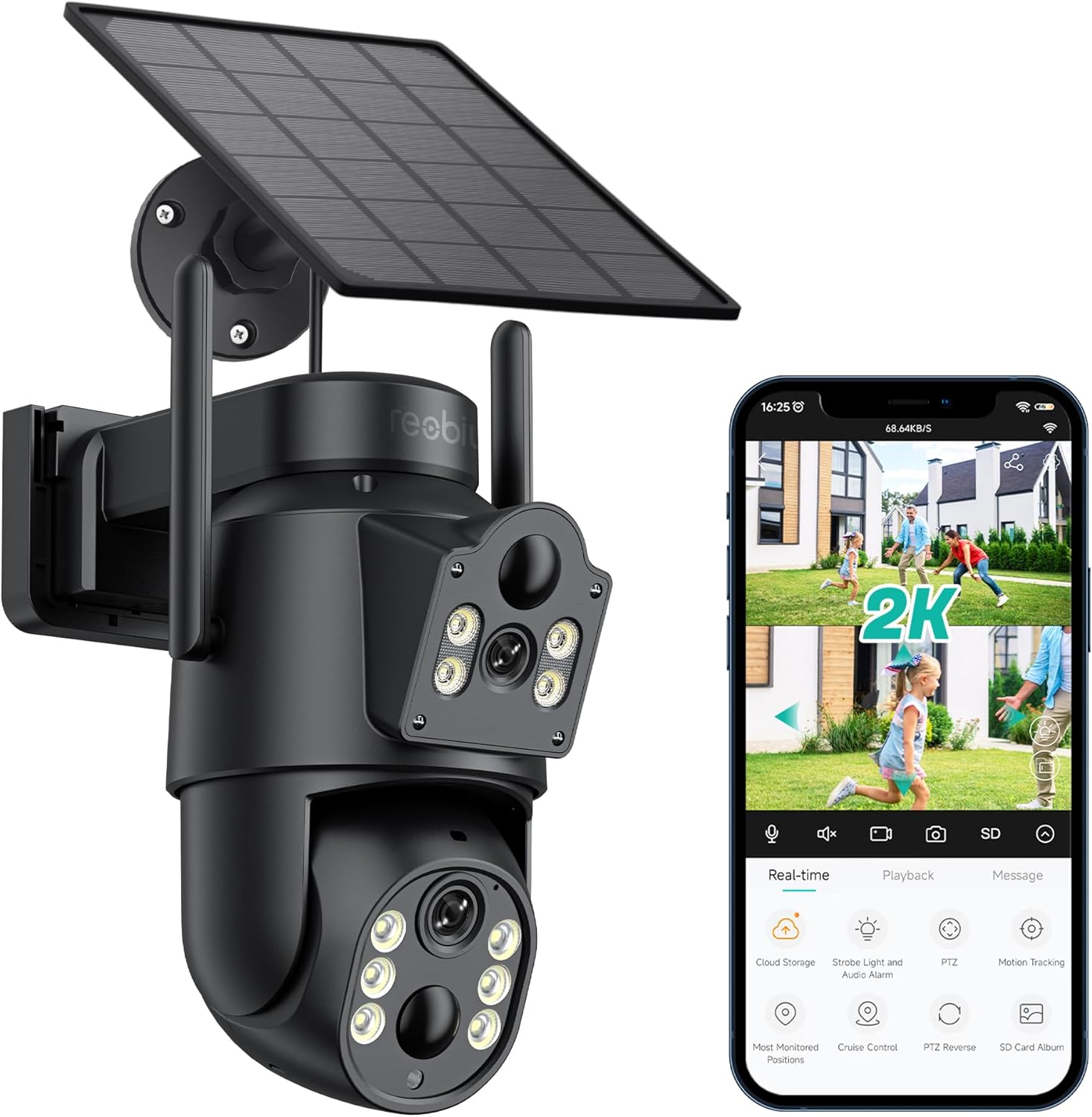
Joonis 3.1: Reobiux D20-1P Solar PTZ Camera and its mobile application interface showing real-time monitoring, playback, and various control options.
Peamised omadused:
- 2K QHD High Resolution: Pakub selget ja üksikasjalikku videofootage.
- Kahe objektiiviga disain: Combines a fixed lens with a rotating lens for comprehensive coverage.
- 360° PTZ Functionality: Allows remote control of pan, tilt, and zoom for flexible viewnurgad.
- Päikeseenergial töötav laetava akuga: Ensures continuous operation with minimal manual charging.
- PIR liikumistuvastus: Intelligently detects human movement to reduce false alarms.
- Värviline öönägemine: Offers full-color video even in low-light conditions, alongside infrared night vision.
- Kahesuunaline heli: Enables communication with visitors or deterrence of intruders.
- IP66 ilmastikukindel: Loodud taluma erinevaid välistingimustes tekkivaid ilmastikutingimusi.
- Wireless Wi-Fi Connectivity: Easy setup and remote access via smartphone.
4. Seadistusjuhend
4.1 Esmane laadimine
Before first use, fully charge the camera's internal battery using the provided Type-C charging line and power supply. This ensures the camera has sufficient power for initial setup and operation, especially if solar charging conditions are not optimal immediately after installation.
4.2 Rakenduse installimine ja konto loomine
- Laadige alla iCSee app from your smartphone's app store (iOS App Store or Google Play Store).
- Installige rakendus ja avage see.
- Follow the on-screen instructions to create a new account or log in if you already have one.
4.3 Camera Connection to Wi-Fi
- Veenduge, et teie kaamera on sisse lülitatud.
- In the iCSee app, tap the "+" icon to add a new device.
- Select the option for "Wi-Fi Camera" or "Add Device by AP Hotspot" (refer to app for exact wording).
- Follow the app's instructions to connect the camera to your 2.4GHz Wi-Fi network. You may need to scan a QR code displayed on your phone with the camera, or listen for a sound prompt.
- Pärast ühenduse loomist saate oma kaamerale nime panna ja jälgimist alustada.
4.4 Kaamera paigaldamine
Choose a location that provides optimal surveillance coverage and receives direct sunlight for the solar panel. Ensure the camera is within range of your Wi-Fi network.
- Vali asukoht: Identify a suitable wall or surface for mounting. Consider the camera's viewing angle (355° pan, 90° tilt) and the solar panel's exposure to sunlight.
- Märkige puurimispunktid: Use the mounting base as a template to mark the screw holes on the wall.
- Puurida augud: Drill pilot holes at the marked positions. Insert wall anchors if necessary.
- Kinnitage kinnitusalus: Secure the mounting base to the wall using the provided screws.
- Kaamera kinnitamine: Mount the camera onto the secured base.
- Reguleerige päikesepaneeli: Position the solar panel to maximize sunlight exposure throughout the day.

Joonis 4.1: Illustration of the camera mounted with its solar panel, highlighting the fixed and rotating lenses and the benefit of continuous solar power.
5. Kasutusjuhised
5.1 Otseülekanne View ja taasesitus
Open the iCSee app and select your camera to access the live viewSiit saate teha järgmist.
- Reaalajas jälgimine: View otsevideo voog.
- PTZ juhtimine: Use the on-screen joystick to pan (355°) and tilt (90°) the camera.
- Digitaalne suum: Pinch to zoom on the live feed.
- Taasesitus: Juurdepääs salvestatud foo-letage stored on the SD card or cloud storage.

Joonis 5.1: Demonstrates the superior clarity of 2K QHD resolution compared to 1080P, providing more details for monitoring.
5.2 Liikumistuvastus ja märguanded
The camera utilizes PIR (Passive Infrared) intelligent detection to identify human movement, minimizing false alarms from pets or swaying branches.
- Luba/Keela: Activate or deactivate motion detection in the app settings.
- Tundlikkuse reguleerimine: Adjust the PIR sensor's sensitivity to suit your environment.
- Häireteated: Receive instant push notifications on your smartphone when motion is detected.
- Heli- ja valgusalarm: Configure the camera to trigger a strobe light and audible alarm upon detection.

Joonis 5.2: The camera's PIR intelligent detection distinguishes human movement from other objects, reducing unnecessary alerts.

Joonis 5.3: When motion is detected, the camera can send real-time push notifications and activate a sound and light alarm to deter intruders.
5.3 Öönägemise režiimid
The camera offers two night vision modes for clear visibility in the dark:
- Spotlight Full Color Night Vision: Kasutab sisseehitatud prožektoreid, et pakkuda täisvärvilist videot hämaras valguses.
- Spotlight Infrared Night Vision: Uses infrared LEDs for black-and-white video in complete darkness, with a range of up to 30 meters.
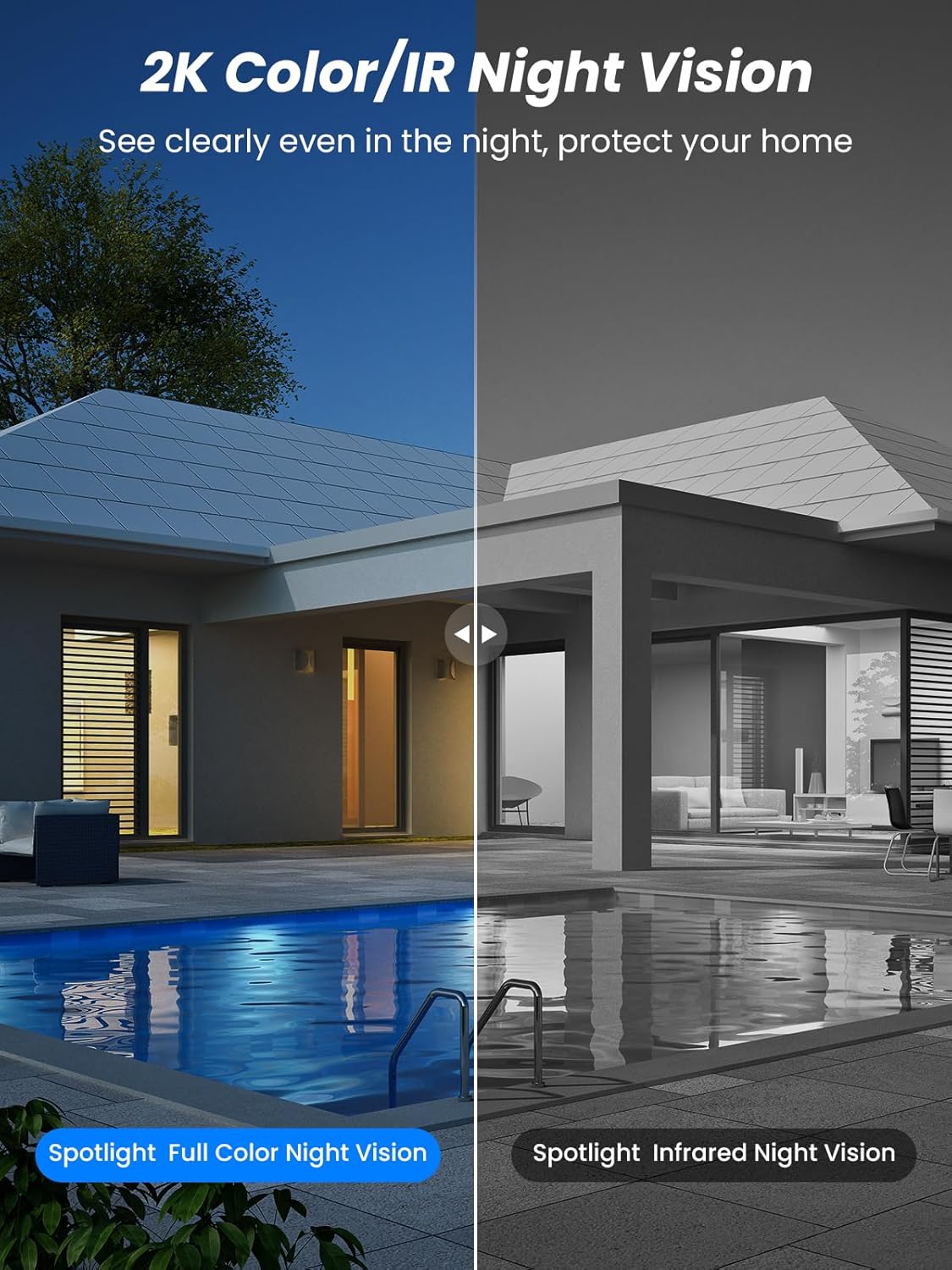
Joonis 5.4: Illustrates the difference between full-color night vision, enabled by spotlights, and traditional infrared night vision.
5.4 Kahesuunaline heli
The integrated microphone and speaker allow for two-way communication.
- Rääkige: Kaamera kõlarisse rääkimiseks puudutage rakenduses mikrofoniikooni.
- Kuulake: Kaamera mikrofon jäädvustab ümbruskonna heli.

Joonis 5.5: The two-way audio function allows for direct communication through the camera, useful for interacting with visitors or delivery personnel.
6. Hooldus
- Puhastamine: Puhastage kaamera objektiivi ja päikesepaneeli regulaarselt pehme lapigaamp lapiga, et tagada optimaalne jõudlus ja selge pildikvaliteet. Vältige abrasiivseid puhastusvahendeid.
- Aku seisund: While solar-powered, extreme weather or prolonged periods of low sunlight may require manual charging. Monitor battery levels via the app.
- Püsivara värskendused: Check the iCSee app regularly for available firmware updates to ensure your camera has the latest features and security enhancements.
- Ilmastikukaitse: The camera is IP66 weatherproof, designed to withstand rain, snow, and sun. However, ensure all connections are secure to maintain water resistance.

Joonis 6.1: The IP66 rating ensures the camera's durability and functionality in various outdoor weather conditions, including snow, rain, and direct sunlight.
7. Veaotsing
- Kaamera ei loo ühendust WiFi-ga:
- Ensure the camera is within range of your 2.4GHz Wi-Fi network. 5GHz networks are not supported.
- Veenduge, et teie WiFi-parool on õige.
- Taaskäivitage ruuter ja kaamera.
- If issues persist, try resetting the camera (refer to app or product for reset button location).
- Battery not charging or draining quickly:
- Veenduge, et päikesepaneel oleks puhas ja saaks otsest päikesevalgust mitu tundi päevas.
- Kontrollige päikesepaneeli ja kaamera vahelist ühendust.
- If in a low-light environment, manually charge the camera using the Type-C cable.
- Frequent motion detection events or live view streaming can consume battery faster. Adjust settings if needed.
- False motion detection alarms:
- Adjust the PIR motion detection sensitivity in the iCSee app.
- Ensure the camera is not pointed at areas with constant movement (e.g., busy roads, swaying trees) if not intended for monitoring.
- Halb pildikvaliteet:
- Puhastage kaamera objektiiv.
- Ensure sufficient lighting for optimal image capture, especially at night.
- Check your Wi-Fi signal strength; a weak signal can affect video streaming quality.
8. Tehnilised andmed
| Funktsioon | Detail |
|---|---|
| Mudeli nimi | D20-1P |
| Video jäädvustamise eraldusvõime | 2.5K |
| Tõhus video eraldusvõime | 2K QHD |
| Traadita side tehnoloogia | WiFi (2.4 GHz) |
| Vormitegur | Kuppel |
| Viewing | 355 kraadi (panoram), 90 kraadi (kalle) |
| Installi tüüp | Seinale paigaldatav |
| Öise nägemise ulatus | 30 meetrit |
| Kaadrisagedus | 25 kaadrit sekundis |
| Materjal | Plastikust |
| Voltage | 12 volti (DC) |
| Wattage | 5 vatti |
| Toiteallikas | Akutoitel, päikeseenergial töötav |
| Patareid | 3 liitium-ioon aku (kaasas) |
| Ühenduvusprotokoll | Wi-Fi |
| Kontrolleri tüüp | iCSee rakendus |
| Eriomadused | Night Vision (Color/IR), PIR Motion Detection, Two-Way Audio, IP66 Weatherproof |
| Kauba kaal | 1.06 kg |
| Paki mõõtmed | 21.7 x 19.5 x 13.8 cm |
9. Garantii ja tugi
Reobiux offers a 1-aastane garantii for this product. For any issues or inquiries, please do not hesitate to reach out to our customer service. We provide 20 hours of online service to assist you.
For support, please refer to the contact information provided with your purchase or within the iCSee application.


