1. Sissejuhatus
Tänan ostu eestasing the AceGamer RGB Charging Dock for PlayStation Portal. This portable charging station is designed to provide a stable and efficient charging solution for your PlayStation Portal console, featuring customizable RGB lighting and essential protection features. Please read this manual carefully before use to ensure proper operation and maintenance.
2. Pakendi sisu
- AceGamer RGB Charging Dock (1 unit)
- C-tüüpi laadimiskaabel (1 ühik)
- Kasutusjuhend (see dokument)
3. Toote omadused
- Dedicated Charging: Specifically designed for the PlayStation Portal console.
- RGB valgustus: Features 7 distinct lighting modes for personalized aesthetics.
- Kiire laadimine: Efficient power delivery for fast charging.
- Ohutuskaitsed: Sisseehitatud ülevool, ülevoltage, ja all-voltage kaitse.
- Ergonoomiline disain: 30-degree comfortable viewing angle for the PlayStation Portal.
- Stabiilne alus: Equipped with anti-slip mats for secure placement.
- Ühenduvus: USB Type-C input for power.
4. Seadistusjuhised
- Ühendage toide: Insert the provided Type-C charging cable into the charging dock's input port and connect the other end to a suitable USB power adapter (not included).

Figure 4.1: Connecting the Type-C power cable to the charging dock.
- Place PlayStation Portal: Carefully align your PlayStation Portal console with the charging connector on the dock and gently place it into position. Ensure a secure connection for charging. The dock is designed to hold the Portal at a 30-degree angle for optimal viewing.

Figure 4.2: PlayStation Portal placed on the charging dock at a 30-degree angle.
- Anti-slip Stability: The base of the charging dock is equipped with anti-slip mats to prevent accidental movement. Ensure the dock is placed on a flat, stable surface.
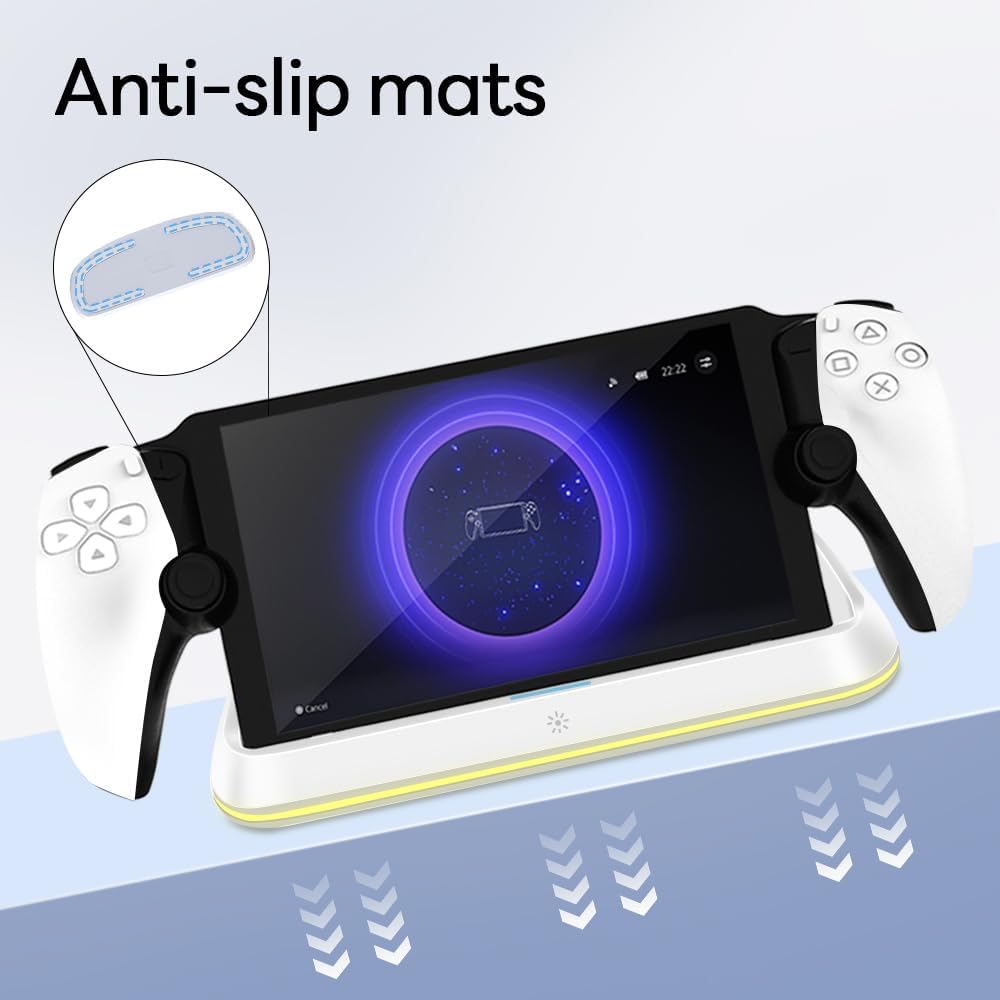
Figure 4.3: Anti-slip mats on the charging dock for enhanced stability.
- Visuaalne juhend: For a visual demonstration of the setup process, please refer to the video below.
Video 4.1: Demonstration of connecting the power supply and placing the PlayStation Portal onto the charging dock.
5. Kasutusjuhised
- Charging the PlayStation Portal: Once the PlayStation Portal is correctly seated on the dock and the dock is powered, charging will begin automatically. A full charge typically takes approximately 3.5 hours. The dock includes protection against over-current, over-voltage, ja all-voltage to safeguard your device.

Figure 5.1: Charging indicators and safety protection features.
- RGB valgustuse juhtimine: The charging dock features a touch-sensitive button to control the RGB lighting. Press the button to cycle through 7 different lighting modes or to turn the lights off.

Figure 5.2: RGB lighting modes and touch control button.
6. Hooldus
- Keep the charging dock clean and free from dust. Use a soft, dry cloth for cleaning.
- Vältige seadme jätmist äärmuslike temperatuuride, niiskuse või otsese päikesevalguse kätte.
- Ärge kasutage abrasiivseid puhastusvahendeid ega lahusteid, kuna need võivad pinda kahjustada.
- Ensure the charging port and connector are free of debris before placing the PlayStation Portal.
7. Veaotsing
- Seade ei lae:
- Ensure the Type-C cable is securely connected to both the dock and the power adapter.
- Veenduge, et toiteadapter töötab korralikult ja on ühendatud vooluvõrku.
- Check if the PlayStation Portal is properly seated on the charging connector.
- Proovige kasutada teist C-tüüpi kaablit või toiteadapterit.
- RGB tuled ei tööta:
- Ensure the charging dock is powered on.
- Press the touch light button to cycle through modes or turn the lights on.
- Unstable placement:
- Ensure the dock is placed on a flat, level surface.
- Check if the anti-slip mats are clean and intact.
8. Tehnilised andmed
| Kaubamärk | AceGamer |
| Mudeli number | PS-P-White |
| Ühilduvad seadmed | PlayStationi portaal |
| Sisend Voltage | 5 volti |
| Wattage | 7 vatti |
| Ühenduse tüüp | USB Type-C (for power input) |
| Eriomadused | RGB Lighting, Fast Charging, Over-current Protection, Over-voltage-kaitse, alarõhktage Kaitse |
| Mõõtmed | Ligikaudu 22.5 x 8.9 x 8.4 cm |
| Kaal | Umbes 290 g |
9. Garantii ja tugi
AceGamer products are designed and manufactured to the highest quality standards. For warranty information or technical support, please contact the retailer where you purchased the product or visit the official AceGamer webKlienditeeninduse kontaktandmed leiate veebisaidilt. Palun hoidke ostutõend garantiinõuete esitamiseks alles.


