1. Sissejuhatus
Thank you for choosing the Baseus 12-in-1 Laptop Docking Station. This versatile hub is designed to expand the connectivity of your laptop, providing a comprehensive solution for multitasking, data transfer, and charging. Please read this manual carefully to ensure proper installation and optimal performance of your device.
2. Toote lõppview
The Baseus 12-in-1 Laptop Docking Station is an all-in-one expansion device that transforms your laptop into a powerful workstation. It features multiple ports including USB-A, USB-C, HDMI, DisplayPort, Gigabit Ethernet, and card readers, allowing for seamless connectivity and enhanced productivity. Its ergonomic design also serves as a laptop stand, promoting better posture and improved heat dissipation.

Image: The Baseus 12-in-1 Laptop Docking Station in use, connected to a laptop and various peripherals.
3. Põhiomadused
- 12-in-1 All-in-One Expansion: Equipped with 3 USB-A 3.0 ports, 1 USB-C 3.0 port, Gigabit Ethernet, 4K HDMI, 4K DP, TF/SD card readers, audio jack, and a 100W PD charging port.
- Kolmekordse 4K ekraani tugi: Connect both HDMI and DP displays to enjoy ultra-clear 4K resolution on up to three monitors, ideal for multitasking and immersive entertainment.
- Gigabit Ethernet for Stable Speed: Provides a fast and reliable wired internet connection, perfect for video calls and large downloads.
- 100 W PD kiirlaadimine: The USB-C PD port supports up to 100W input and delivers up to 85W output to your laptop, ensuring efficient charging.
- Ergonomic Stand Design: Innovative design improves heat dissipation and elevates your device for better posture, keeping your workspace organized.
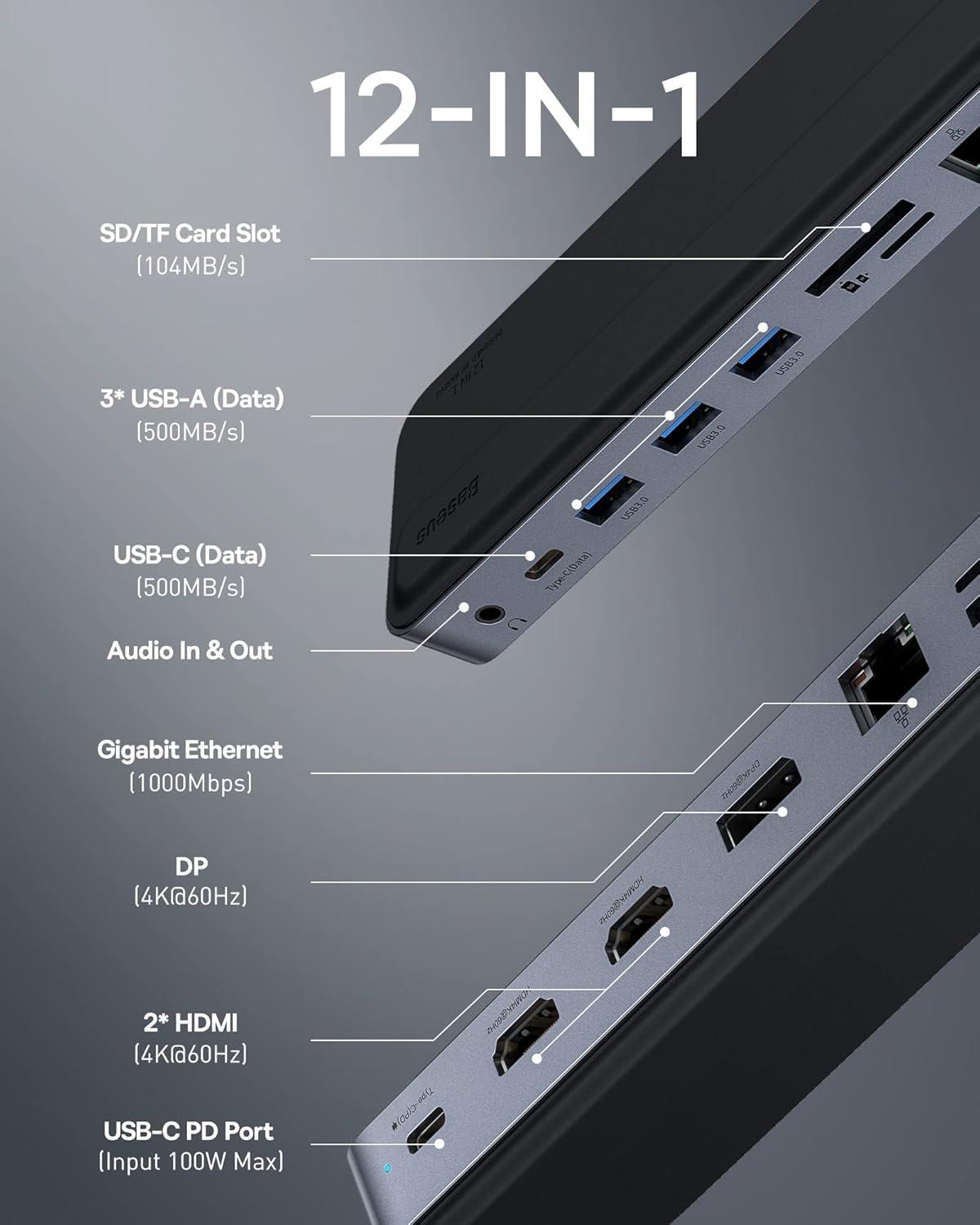
Image: Detailed diagram illustrating all 12 ports and their functions on the docking station.
4. Pakendi sisu
Palun kontrollige paki sisu avamisel. Kui mõni ese on puudu või kahjustatud, võtke ühendust klienditoega.
- Baseus 12-in-1 Laptop Docking Station
- Kasutusjuhend
5. Seadistusjuhend
Follow these steps to set up your Baseus 12-in-1 Laptop Docking Station:
- Ühenda sülearvutiga: Ühendage dokkimisjaama integreeritud USB-C-kaabel sülearvuti ühilduvasse USB-C-porti.
- Toiteühendus (valikuline, kuid soovitatav): For stable performance and laptop charging, connect your laptop's power adapter to the 100W PD USB-C port on the docking station.
- Väliste kuvarite ühendamine: Use HDMI or DisplayPort cables to connect your monitors to the corresponding ports on the docking station. Ensure your cables support 4K resolution if desired.
- Ühendage välisseadmed: Plug in your USB devices (keyboard, mouse, external hard drives) into the USB-A or USB-C data ports.
- Võrguühendus: For a stable internet connection, connect an Ethernet cable from your router to the Gigabit Ethernet port on the docking station.
- Heliseadmed: Ühendage kõrvaklapid või kõlarid 3.5 mm audiopesaga.
- Mälukaardid: Insert SD or TF cards into the respective slots for data transfer.

Image: A laptop connected to three external monitors, demonstrating the triple 4K display capability.
6. Kasutusjuhised
Once connected, your operating system should automatically detect the docking station and connected devices. No additional drivers are typically required for most functions (Plug and Play).
6.1. Kuvarežiimid
The docking station supports various display configurations for both macOS and Windows operating systems.
6.1.1. Mac OS Display Modes
Mac OS only supports Single-Stream Transport (SST) and does not support Multi-Stream Transport (MST) in extended mode. This means that while you can extend your display across multiple monitors, the content on the extended monitors will be mirrored or a single extended desktop, not independent extended desktops for each monitor.
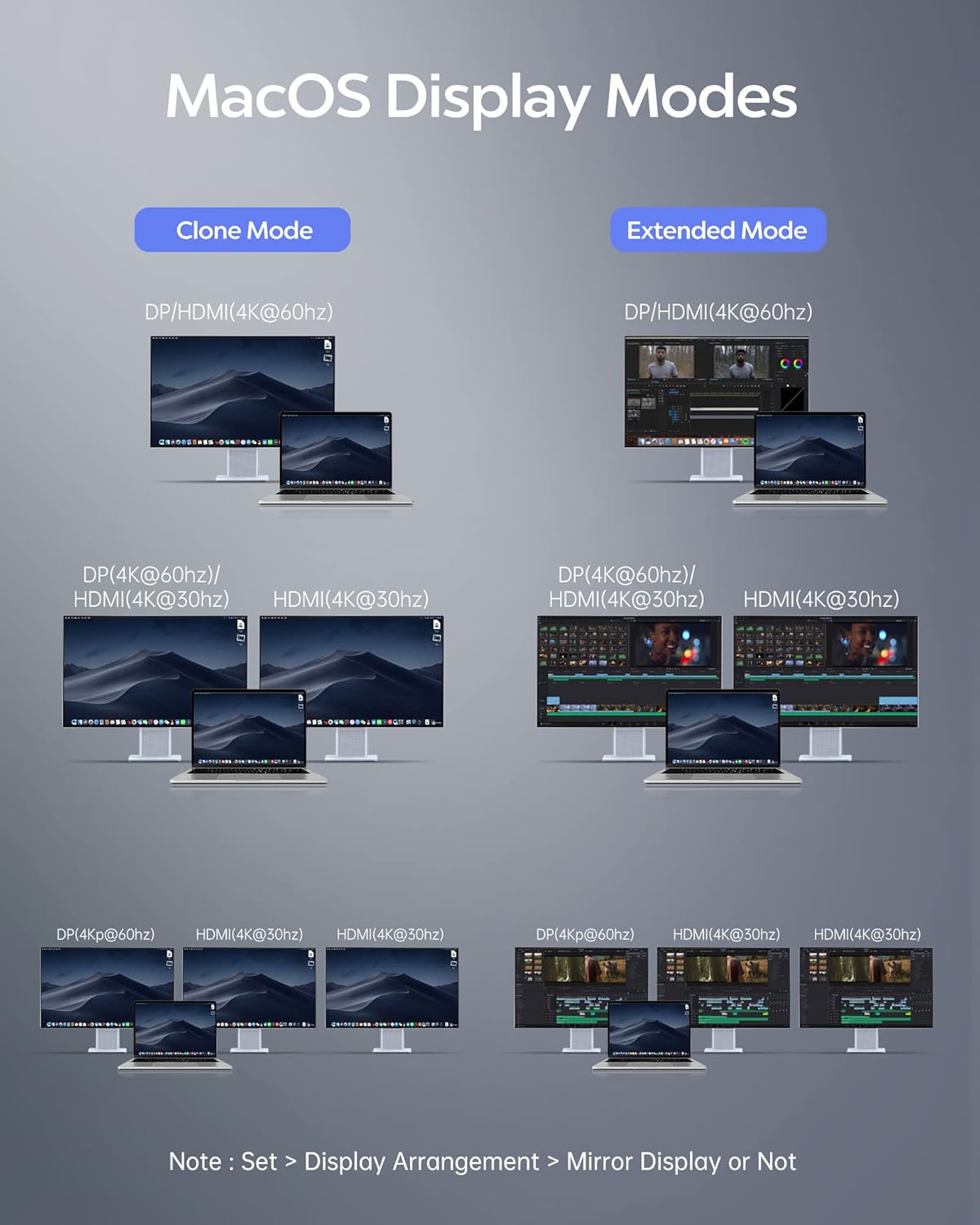
Image: Visual guide for configuring display modes on Mac OS, showing mirror and extended display options.
6.1.2. Windows Display Modes
Only computers with DP1.4 and AMD processor can realize 4 screens when using WIN system. Resolution (AMD + DP1.4), the video output will be 4K. For Intel graphics cards, you can achieve up to 3 screens.

Image: Visual guide for configuring display modes on Windows, showing mirror and extended display options.
To quickly select the display mode on Windows, press "WIN + P".
6.2. Pordi funktsionaalsus
- SD/TF-kaardi pesa: Supports high-speed data transfer up to 104MB/s for SD and TF (MicroSD) cards.
- USB-A (Data) & USB-C (Data): Three USB-A 3.0 ports and one USB-C 3.0 port provide data transfer speeds up to 500MB/s for connecting various peripherals.
- Heli sisend ja väljund: A 3.5mm audio jack for connecting headphones, speakers, or microphones.
- Gigabaidine Ethernet: RJ45 port for a stable 1000Mbps wired internet connection.
- DP (4K@60Hz) & 2* HDMI (4K@60Hz): Multiple video output ports for connecting external monitors with high resolution.
- USB-C PD Port (Input 100W Max): Power Delivery port for charging your laptop while using the docking station.

DP and HDMI Ports

USB 3.0 pordid

3.5 mm helipistik

SD/TF-kaardi pesad

100W PD Charging Port

Gigabit Etherneti port
7. Hooldus
- Puhastamine: Dokkimisjaama pinna puhastamiseks kasutage pehmet ja kuiva lappi. Vältige vedelate puhastusvahendite või aerosoolide kasutamist.
- Hoiustamine: Hoidke seadet jahedas ja kuivas kohas, eemal otsesest päikesevalgusest ja äärmuslikest temperatuuridest.
- Käitlemine: Avoid dropping or subjecting the docking station to strong impacts. Do not attempt to disassemble or modify the device.
- Soojuse hajumine: Ensure proper airflow around the docking station, especially when used as a laptop stand, to prevent overheating.
8. Veaotsing
Kui teil tekib dokkimisjaamaga probleeme, vaadake palun järgmisi levinud probleeme ja lahendusi.
- Ekraani väljund puudub:
- Ensure the docking station is securely connected to your laptop's USB-C port.
- Check that the HDMI/DP cables are firmly connected to both the docking station and the monitors.
- Verify that your laptop's display settings are configured correctly for extended or mirror mode.
- Proovige sülearvuti taaskäivitada.
- Välisseadmeid ei tuvastatud:
- Ensure USB devices are properly plugged into the docking station's USB ports.
- Try connecting the device to a different USB port on the docking station or directly to your laptop to rule out device issues.
- Ensure the docking station is receiving sufficient power, especially if multiple power-hungry devices are connected.
- Aeglane laadimine või laadimata jätmine:
- Confirm that your laptop's original power adapter is connected to the PD USB-C port on the docking station.
- Kontrollige, kas toiteadapter ja kaabel töötavad korralikult.
- Veenduge, et teie sülearvuti toetab USB-C toiteallikat.
- Etherneti ühenduse probleemid:
- Veenduge, et Etherneti kaabel on kindlalt ühendatud nii dokkimisjaama kui ka ruuteri/modemiga.
- Kontrollige oma sülearvuti võrguühenduse seadeid.
- Proovige teist Etherneti kaablit.
- Seadme ülekuumenemine:
- Ensure the docking station is placed on a flat, stable surface with adequate ventilation.
- Vältige ventilatsiooniavade blokeerimist.
- Reduce the number of connected power-hungry devices if possible.
9. Tehnilised andmed
| Atribuut | Väärtus |
|---|---|
| Kaubamärk | Baseus |
| Mudel | B0D7GX6FMS |
| Operatsioonisüsteemi ühilduvus | Linux, Windows, macOS |
| Kauba kaal | 12.6 untsi |
| Pakendi mõõtmed | 12.48 x 3.11 x 1.06 tolli |
| Värv | Hõbedane |
| Eriomadused | Anti-Slip, Fast Charging, Fast Data Transfer, Heat Resistant, Plug and Play |
| Ühilduvad seadmed | Sülearvutid |
| USB-pordid kokku | 4 (3 USB-A 3.0, 1 USB-C 3.0) |
| Videoväljund | 2x HDMI (4K@60Hz), 1x DisplayPort (4K@60Hz) |
| Ethernet | Gigabit Ethernet (RJ45) |
| Kaardilugeja | TF/SD kaardilugeja |
| Heli | 3.5 mm helipistik |
| Toitevarustus | 100W PD Input (85W Output to Laptop) |
10. Garantii ja tugi
Baseus products come with a limited warranty. For detailed warranty information, please refer to the warranty card included with your product or visit the official Baseus website. If you require technical assistance or have any questions, please contact Baseus customer support through their official channels.
Klienditugi: Please refer to the contact information provided on the product packaging or the official Baseus websait toetuse saamiseks.


