1. Toote lõppview
The VIVOTEK FD9383-HTV is a high-performance 5-megapixel outdoor network dome camera designed for robust surveillance applications. It features a 2.8-12mm motorized varifocal lens, providing flexibility in field of view, and integrated IR LEDs for clear night vision up to 98 feet. This camera is built to withstand harsh outdoor conditions with IP66 and IK10 ratings, ensuring protection against dust, water, and vandalism. It also includes a built-in microphone for audio monitoring.
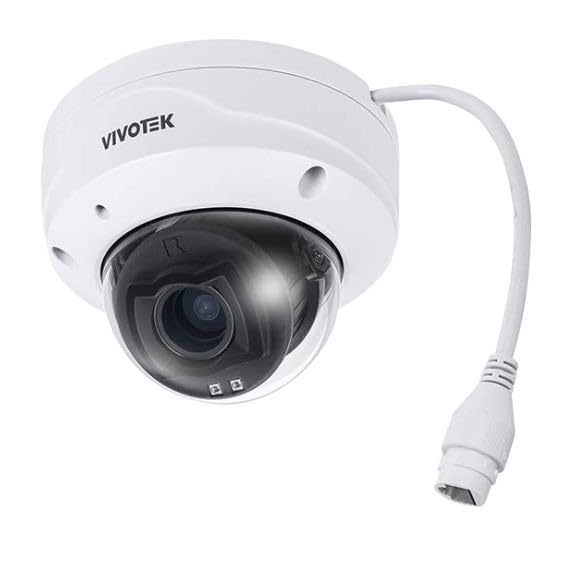
Pilt 1.1: esikülg view of the VIVOTEK FD9383-HTV 5MP Outdoor Network Dome Camera.
Peamised omadused:
- 2560 x 1920 Resolution at 30 fps for high-quality video.
- IR LEDs for Night Vision up to 98 feet (30 meters).
- 2.8-12mm Motorized Varifocal Lens for flexible viewnurgad.
- 95.4 to 28.7° Horizontal Angle of View.
- Built-In Microphone for audio capture.
- IP66-Rated for outdoor use, protecting against dust and water.
- IK10-Rated for vandal resistance.
- Supports microSD Cards up to 1TB for local storage.
- RJ45 Ethernet with Power over Ethernet (PoE) Technology.
- Complies with ONVIF Profiles G, S, T for broad compatibility.
2. Pakendi sisu
Verify that all items are present and in good condition. If any items are missing or damaged, contact your vendor immediately.
- VIVOTEK FD9383-HTV Network Dome Camera
- Mounting Screw Kit (screws, wall anchors)
- Veekindlate pistikute komplekt
- Alignment Sticker/Drill Template
- Kiirpaigaldusjuhend
- Tarkvara CD (või allalaadimislingi teave)
3. Ohutusalane teave
Palun lugege enne seadme kasutamist hoolikalt läbi need ohutusjuhised, et vältida enda või teiste vigastamist ning seadme kahjustamist. Hoidke see juhend edaspidiseks kasutamiseks alles.
- Paigaldamine: Paigaldamist peaksid teostama ainult kvalifitseeritud töötajad ja see peab vastama kõigile kohalikele eeskirjadele.
- Toiteallikas: Use only the specified power source (PoE or 12V DC adapter, if applicable) to avoid fire or electric shock.
- Keskkond: Do not expose the camera to extreme temperatures, humidity, or corrosive environments beyond its specified operating conditions.
- Puhastamine: Enne puhastamist ühendage seade vooluvõrgust lahti. Kasutage pehmet ja kuiva lappi. Ärge kasutage vedelaid ega aerosoolpuhastusvahendeid.
- Teenindus: Ärge proovige seda toodet ise hooldada. Andke kõik hooldustööd kvalifitseeritud hooldustöötajatele.
4. Seadistamine
4.1 Füüsiline paigaldus
The FD9383-HTV camera is designed for wall or ceiling mounting. Ensure the mounting surface is strong enough to support the camera's weight.
- Valmistage ette paigalduspind: Use the provided drill template to mark the screw holes on the desired mounting location.
- Puurida augud: Drill pilot holes for the mounting screws and, if necessary, for the network cable. Insert wall anchors if mounting on drywall or masonry.
- Kinnitage kinnitusklamber: Kinnitage kaamera kinnitusklamber kaasasolevate kruvide abil pinnale.
- Ühendage kaablid: Route the Ethernet cable through the mounting surface or cable entry point. Connect the RJ45 connector to the camera's network port. If not using PoE, connect a 12V DC power adapter (sold separately) to the power input. Ensure waterproof connections for outdoor installations.
- Secure Camera Body: Attach the camera body to the mounting bracket. Adjust the camera's orientation and angle as needed.
- Viige installimine lõpule: Secure all covers and ensure the camera is firmly mounted and protected from the elements.

Image 4.1: Illustrative diagram of camera mounting and cable connection.
4.2 Võrguühendus
The camera supports Power over Ethernet (PoE) for simplified installation, allowing both power and data to be transmitted over a single Ethernet cable.
- Connect the camera to a PoE-enabled switch or a PoE injector using a standard Ethernet cable.
- Alternatively, connect to a standard network switch and use a separate 12V DC power adapter.
- Ensure your network is configured to assign an IP address to the camera (DHCP recommended for initial setup).
4.3 Esialgne konfiguratsioon
After physical installation and network connection, you need to access the camera's web interface for initial configuration.
- Avasta kaamera: Use VIVOTEK's IP Search utility (available on their website) or a network scanner to find the camera's IP address on your network.
- Juurdepääs Web Liides: Avage a web browser (e.g., Chrome, Firefox) and enter the camera's IP address in the address bar.
- Logi sisse: The default username is typically 'root' and the password is 'pass'. You will be prompted to change the password upon first login for security reasons.
- Põhiseaded: Configure essential settings such as date/time, network settings (if not using DHCP), and user accounts.
5. Töötamine
5.1 Accessing the Camera Interface
Once configured, you can access the camera's live view and settings through its web interface or compatible VIVOTEK software/NVR systems.
- Enter the camera's IP address in your web brauser.
- Log in with your configured username and password.
- The interface provides access to live video, recording settings, motion detection, and other advanced features.
5.2 Adjusting Lens and Focus
The FD9383-HTV features a motorized varifocal lens, allowing remote adjustment of zoom and focus.
- Navigate to the 'Video' or 'Lens' settings section in the web liides.
- Use the zoom controls to adjust the focal length (2.8mm to 12mm) to achieve the desired field of view.
- Utilize the focus controls to sharpen the image. Many VIVOTEK cameras offer a one-touch focus feature for automatic adjustment.
5.3 Night Vision Settings
The camera automatically switches to night vision mode in low-light conditions using its IR LEDs.
- In the 'Image' or 'IR' settings, you can configure the IR illuminator's behavior (e.g., auto, manual on/off).
- Adjust IR intensity if available, to prevent overexposure or underexposure in specific scenarios.
5.4 Salvestamine ja salvestamine
The camera supports various recording methods, including local storage on a microSD card and network video recording (NVR).
- MicroSD-kaart: Insert a compatible microSD card (up to 1TB) into the camera's slot. Format the card via the web interface. Configure recording schedules and triggers (e.g., continuous, motion-triggered).
- NVR/NAS: Connect the camera to a VIVOTEK NVR or a compatible Network Attached Storage (NAS) device. Configure recording settings on the NVR/NAS.
5.5 Liikumistuvastus
Configure motion detection to trigger recordings, send alerts, or activate other actions.
- Access the 'Event' or 'Motion Detection' settings in the web liides.
- Define detection zones within the camera's field of view.
- Valehäirete minimeerimiseks reguleerige tundlikkuse taset.
- Set up actions to be taken when motion is detected (e.g., record video, send email notification).
6. Hooldus
6.1 Puhastamine
Regulaarne puhastamine aitab säilitada optimaalset pildikvaliteeti ja pikendab kaamera eluiga.
- Objektiiv: Pühkige objektiivi õrnalt pehme, ebemevaba lapiga. Kangekaelse mustuse korral kasutage spetsiaalselt optilistele pindadele mõeldud objektiivipuhastuslahust. Vältige abrasiivseid materjale.
- Eluase: Pühkige kaamera korpus reklaamigaamp riie. Ärge kasutage tugevatoimelisi puhastusvahendeid ega lahusteid.
- Kupli kate: If applicable, carefully clean the dome cover to ensure clear visibility.
6.2 Püsivara värskendused
Kontrollige VIVOTEKi regulaarselt website for firmware updates. Firmware updates often include bug fixes, performance improvements, and new features.
- Download the latest firmware for your FD9383-HTV model from the official VIVOTEK support page.
- Juurdepääs kaamerale web interface and navigate to the 'System' or 'Maintenance' section.
- Püsivara üleslaadimiseks ja installimiseks järgige ekraanil kuvatavaid juhiseid. Ärge lülitage kaamerat värskendamise ajal välja.
7. Veaotsing
This section provides solutions to common issues you might encounter with your VIVOTEK FD9383-HTV camera.
| Probleem | Võimalik põhjus | Lahendus |
|---|---|---|
| Kaamera ei lülitu sisse | No power from PoE switch/injector; faulty power adapter; loose cable connection. | Check PoE status on switch; verify power adapter functionality; ensure all cables are securely connected. |
| Kaamerale ei pääse võrgu kaudu ligi | Incorrect IP address; network cable issue; firewall blocking access; camera not receiving an IP address. | Verify IP address; check network cable integrity; temporarily disable firewall; use IP Search utility to find camera. |
| Halb pildikvaliteet (udune, tume) | Lens out of focus; dirty lens/dome; insufficient lighting; incorrect image settings. | Fookuse reguleerimine web interface; clean lens/dome; check IR settings; reset image settings to default. |
| Liikumistuvastus ei tööta | Detection zones not configured; sensitivity too low; event actions not set up. | Configure detection zones; increase sensitivity; ensure event actions (e.g., record, notify) are enabled. |
| MicroSD-kaart ei salvesta | Card not formatted; card full; recording schedule not active; faulty card. | Format microSD card in camera settings; check recording schedule; replace card if faulty. |
8. Tehnilised andmed
Detailed technical specifications for the VIVOTEK FD9383-HTV camera.
| Funktsioon | Spetsifikatsioon |
|---|---|
| Pildi andur | 1/2.8" Type CMOS |
| Resolutsioon | 2560 x 1920 kiirusega 30 kaadrit sekundis |
| Fookuskaugus | 2.8 to 12mm Motorized Varifocal Lens |
| Horisontaalne nurk View | 95.4 kuni 28.7° |
| Öine nägemine | IR LEDs up to 98 feet (30 meters) |
| Heli | Sisseehitatud mikrofon |
| Säilitamine | Supports microSD Cards up to 1TB |
| Võrgu liides | 1x RJ45 Input (PoE) |
| Keskkonnahinnang | IP66 (tolmu- ja veekindel) |
| Vandaalide vastupanu | IK10-Rated |
| ONVIF-i vastavus | Profiles G, S, T |
| Toote mõõtmed | 5.3 x 4.1 x 4.1 tolli (13.5 x 10.4 x 10.4 cm) |
| Kauba kaal | 1.9 naela (0.86 kg) |
9. Garantii ja tugi
VIVOTEKi toodetele kehtib piiratud garantii. Täpsemate garantiitingimuste kohta vaadake tootega kaasasolevat garantiikaarti või külastage VIVOTEKi ametlikku veebisaiti. websaidile.
For technical support, product documentation, and software downloads, please visit the VIVOTEK official support portal:
https://www.vivotek.com/support
When contacting support, please have your camera's model number (FD9383-HTV) and serial number ready.


