1. Sissejuhatus
Thank you for choosing the Mibro Earbuds AC1 Wireless Earbuds. These earbuds combine an elegant design with exceptional audio performance, offering clear, immersive sound for your favorite music. With stable Bluetooth connectivity and a comfortable ergonomic fit, they are designed for convenience and quality audio on the go. This manual provides detailed instructions to help you get the most out of your new earbuds.
2. Ohutusalane teave
Please read all safety instructions before using this product.
- Ärge jätke kõrvaklappe ega laadimisümbrist äärmuslike temperatuuride, niiskuse ega vedelike kätte.
- Vältige seadme maha kukkumist, lööke ega lahtivõtmist.
- Hoida lastest ja lemmikloomadest eemal.
- Kasutage ainult kaasasolevat või sertifitseeritud laadimiskaablit.
- Pikaajaline suure helitugevusega kuulamine võib põhjustada kuulmiskahjustusi.
3. Pakendi sisu
Veenduge, et pakis on kõik esemed olemas:
- Mibro Earbuds AC1 (Left and Right)
- Laadimisümbris
- Laadimiskaabel
- Kasutusjuhend (see dokument)
4. Toote lõppview
Familiarize yourself with the components of your Mibro Earbuds AC1.

Joonis 4.1: Mibro Earbuds AC1 removed from their open charging case, displaying the earbuds and the case.
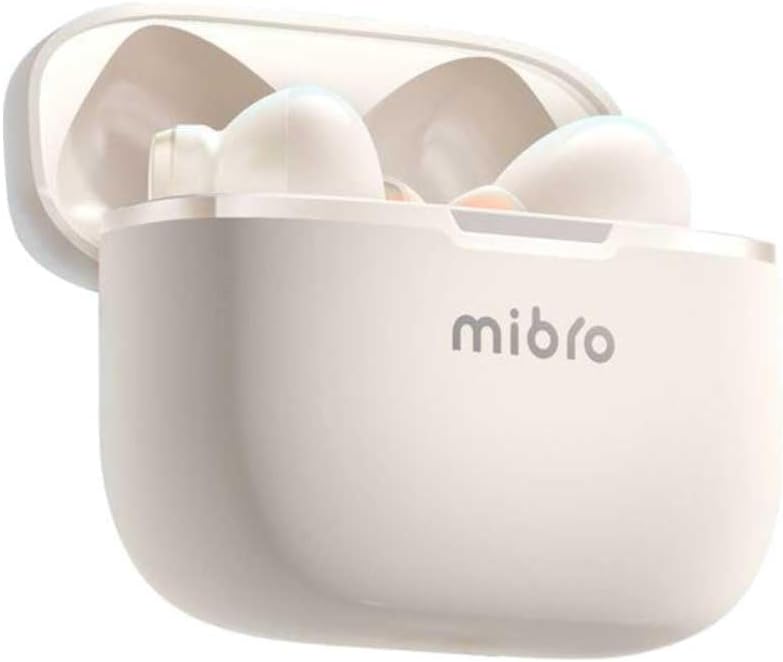
Joonis 4.2: Mibro Earbuds AC1 placed inside their open charging case, showing the compact design.
The earbuds feature an ergonomic design for a secure and comfortable fit. The charging case protects the earbuds and recharges them on the go.
5. Seadistamine
5.1 Kõrvaklappide ja ümbrise laadimine
Enne esmakordset kasutamist laadige kõrvaklapid ja laadimisümbris täielikult.
- Asetage kõrvaklapid laadimisümbrisesse.
- Connect the charging cable to the charging port on the case and to a USB power source.
- The indicator light on the case will show charging status. A full charge may take up to 1 day (Note: This is an unusual specification, typically measured in hours. Please refer to product packaging for precise charging time).
- Pärast täielikku laadimist ühendage kaabel lahti.
5.2 Bluetooth-seadmega sidumine
To connect your Mibro Earbuds AC1 to your smartphone or other Bluetooth-enabled device:
- Veenduge, et kõrvaklapid on laetud ja laadimisümbrisesse asetatud.
- Ava laadimisümbrise kaas. Kõrvaklapid lülituvad automaatselt sidumisrežiimi (indikaatortuled vilguvad).
- Avage oma seadmes Bluetoothi seaded ja lülitage Bluetooth sisse.
- Otsi available devices and select "Mibro AC1" from the list.
- Kui ühendus on loodud, lakkavad kõrvaklappide märgutuled vilkumast.
- Kõrvaklapid ühenduvad ümbrisest eemaldamisel automaatselt viimati seotud seadmega uuesti, kui seadmes on Bluetooth lubatud.
6. Kasutusjuhised
6.1 Toide sisse/välja
- Toide sisse: Ava laadimisümbrise kaas või võta kõrvaklapid ümbrisest välja. Need lülituvad automaatselt sisse.
- Toide välja: Asetage kõrvaklapid tagasi laadimiskarpi ja sulgege kaas. Need lülituvad automaatselt välja ja hakkavad laadima.
6.2 Muusika taasesitus
Use the touch controls on the earbuds to manage music:
- Esita/peata: Üks puudutus kummalgi kõrvaklapil.
- Järgmine lugu: Topeltpuudutage paremat kõrvaklappi.
- Eelmine lugu: Topeltpuudutage vasakul kõrvaklapil.
6.3 Kõnede haldamine
Manage phone calls with the touch controls:
- Kõnele vastamine/lõpetamine: Üks puudutus kummalgi kõrvaklapil.
- Keeldu kõnest: Vajutage ja hoidke kumbagi kõrvaklappi 2 sekundit all.
6.4 Mürasummutus
The Mibro AC1 Earbuds feature noise cancellation. Specific controls for activating or deactivating this feature are typically managed via a long press or a specific tap sequence. Refer to the quick start guide included in your package for precise instructions, as these can vary.
7. Hooldus
7.1 Puhastamine
- Pühkige kõrvaklappe ja laadimisümbrist pehme, kuiva ja ebemevaba lapiga.
- Ärge kasutage abrasiivseid puhastusvahendeid, alkoholi ega keemilisi lahusteid.
- Veenduge, et laadimiskontaktid on puhtad ja kuivad.
7.2 Säilitamine
Kui kõrvaklappe ei kasutata, hoidke neid laadimisümbrises, et neid kaitsta ja laetuna hoida. Hoidke jahedas, kuivas ja otsese päikesevalguse eest kaitstud kohas.
8. Veaotsing
If you encounter issues with your Mibro Earbuds AC1, try the following solutions:
| Probleem | Lahendus |
|---|---|
| Kõrvaklapid ei ühendu |
|
| Kõrvaklappidest pole heli |
|
| Kõrvaklapid ei lae |
|
9. Tehnilised andmed
| Funktsioon | Detail |
|---|---|
| Mudeli nimi | XPEJ010WW (AC1) |
| Kaubamärk | Mibro |
| Ühenduvustehnoloogia | Juhtmeta (Bluetooth) |
| Eriomadused | Mürasummutus |
| Värv | Soe valge |
| Vormitegur | Kõrvasisene |
| Materjal | Plastikust |
| Veekindluse tase | Ei ole veekindel |
| Laadimisaeg | Up to 1 day (Note: This is an unusual specification, typically measured in hours. Please refer to product packaging for precise charging time.) |
10. Garantii ja tugi
Mibro products are designed and manufactured to the highest quality standards. For detailed warranty information, please refer to the warranty card included with your purchase or visit the official Mibro websaidile.
For further assistance, technical support, or to explore other Mibro products, please visit the Mibro pood Amazonis.


