1. Sissejuhatus
The NIIMBOT D11H is a compact, portable, and inkless thermal label printer designed for various labeling needs. It connects wirelessly via Bluetooth to your smartphone, allowing for easy creation and printing of high-resolution labels. This manual provides essential information for setting up, operating, and maintaining your device.
2. Pakendi sisu
Veenduge, et kõik allpool loetletud esemed on teie pakendis olemas:
- 1x NIIMBOT D11H Label Printer
- 1x Label Roll (pre-installed or included)
- 1x USB Type-C laadimiskaabel
- 1x User Manual (Japanese)

3. Seadistamine
3.1. Sildipaberi laadimine
- Slide the cover button on the side of the printer to open the paper compartment.
- Insert the label roll into the compartment with the labels facing upwards, ensuring it is correctly aligned.
- Pull a small portion of the label paper out through the printer's exit slot.
- Sulgege kate kindlalt.

3.2. Sisselülitamine
Press and hold the power button located on the front of the printer for 3 seconds until the indicator light turns green, indicating the device is powered on.
3.3. Rakenduse allalaadimine ja Bluetooth-ühendus
- Download the "NIIMBOT" app from the App Store (iOS) or Google Play Store (Android).
- Lubage oma nutitelefonis Bluetooth.
- Open the NIIMBOT app and tap on the "Connect" or "Printer Connection" option. The app will automatically scan for nearby devices.
- Select your NIIMBOT D11H printer from the list of available devices to establish a Bluetooth connection.

4. Kasutusjuhised
4.1. Creating Labels
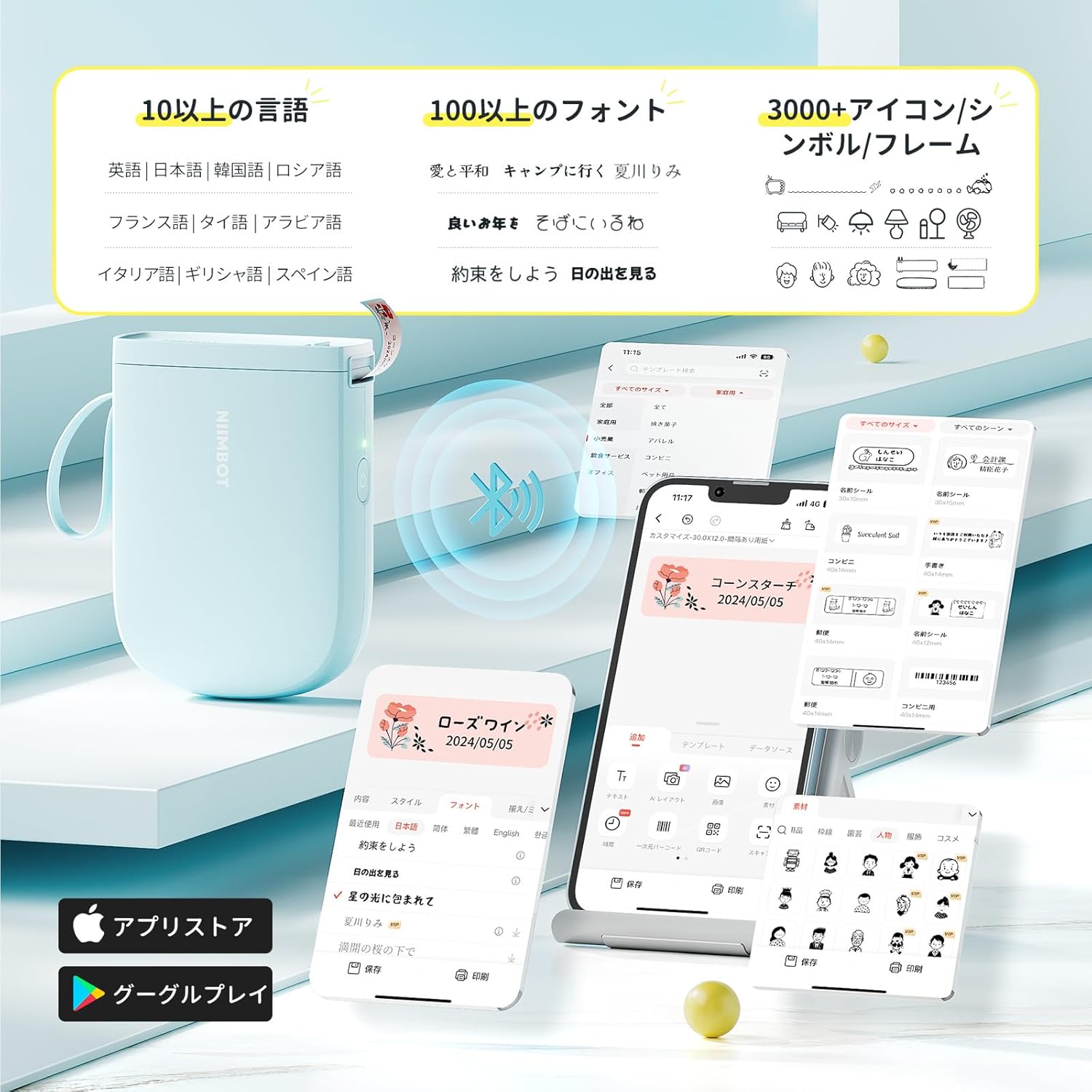
The NIIMBOT app offers a wide range of features for label creation:
- Teksti sisestus: Easily type and customize text with over 20 fonts and various styles.
- Mallid: Utilize automatic template matching and thousands of image elements for quick design.
- Kujutise tuvastamine: Import images for printing.
- Triipkood/QR-kood: Genereerige ja printige vöötkoode ja QR-koode.
- Partii trükkimine: Print multiple labels efficiently.

4.2. Etikettide printimine
Once your label design is complete in the app, tap the "Print" button. You can adjust the number of copies and print density before confirming. The printer will automatically feed and cut the labels.
4.3. Mitmekülgsed rakendused
The NIIMBOT D11H is suitable for a wide range of uses, including organizing documents, creating name tags, hind tags, date reminders for food, and labeling items in the kitchen, office, or warehouse.


5. Hooldus
To ensure optimal performance and longevity of your NIIMBOT D11H label printer, follow these maintenance guidelines:
- Puhastamine: Regularly clean the print head with a soft, lint-free cloth moistened with alcohol. Ensure the printer is off before cleaning.
- Hoiustamine: Hoidke printerit jahedas ja kuivas kohas, eemal otsesest päikesevalgusest ja äärmuslikest temperatuuridest.
- Aku: Laadige printerit regulaarselt, isegi kui seda sageli ei kasutata, et säilitada aku seisukord.
6. Veaotsing
If you encounter issues with your NIIMBOT D11H, refer to the following common troubleshooting steps:
- Printer ei ühendu: Ensure Bluetooth is enabled on your smartphone and the printer is powered on. Try restarting both devices and reconnecting through the app.
- Kehv prindikvaliteet: Check if the label paper is loaded correctly and is a genuine NIIMBOT thermal label. Clean the print head if necessary. Adjust print density in the app settings.
- Paberi ummistus: Open the paper compartment, carefully remove any jammed paper, and reload the label roll correctly.
- Printer ei reageeri: Ensure the battery is charged. If the device is unresponsive, try resetting it by holding the power button for an extended period (e.g., 10-15 seconds).
7. Tehnilised andmed
| Funktsioon | Spetsifikatsioon |
|---|---|
| Kaubamärk | NIIMBOT |
| Mudeli nimi | D11H |
| Ühenduvustehnoloogia | Bluetooth |
| Trükitehnoloogia | Termiline |
| Maksimaalne printimisresolutsioon (mustvalge) | 300 XNUMX DPI |
| Maksimaalne printimiskiirus (ühevärviline) | 40.0 mm/s |
| Maksimaalne kandja (paberi) suurus | 15 mm (laius) |
| Toote mõõtmed | 11 x 3 x 7 cm |
| Kauba kaal | 360 g |
| Ühilduvad seadmed | Nutitelefonid (Android ja iOS) |
| Värv | Sinine |
8. Garantii ja tugi
For warranty information or technical support, please refer to the official NIIMBOT webveebisaidilt või võtke ühendust edasimüüjaga. Hoidke ostutšekk ostutõendina alles.


