1. Toote lõppview
The MOES Smart WiFi Thermostat PJ02-GC is designed for controlling gas boiler and underfloor heating systems. It offers intelligent temperature regulation, remote control via a smartphone app, and voice control compatibility with popular assistants like Amazon Alexa and Google Home. This thermostat helps optimize energy consumption through programmable scheduling and user-friendly features.
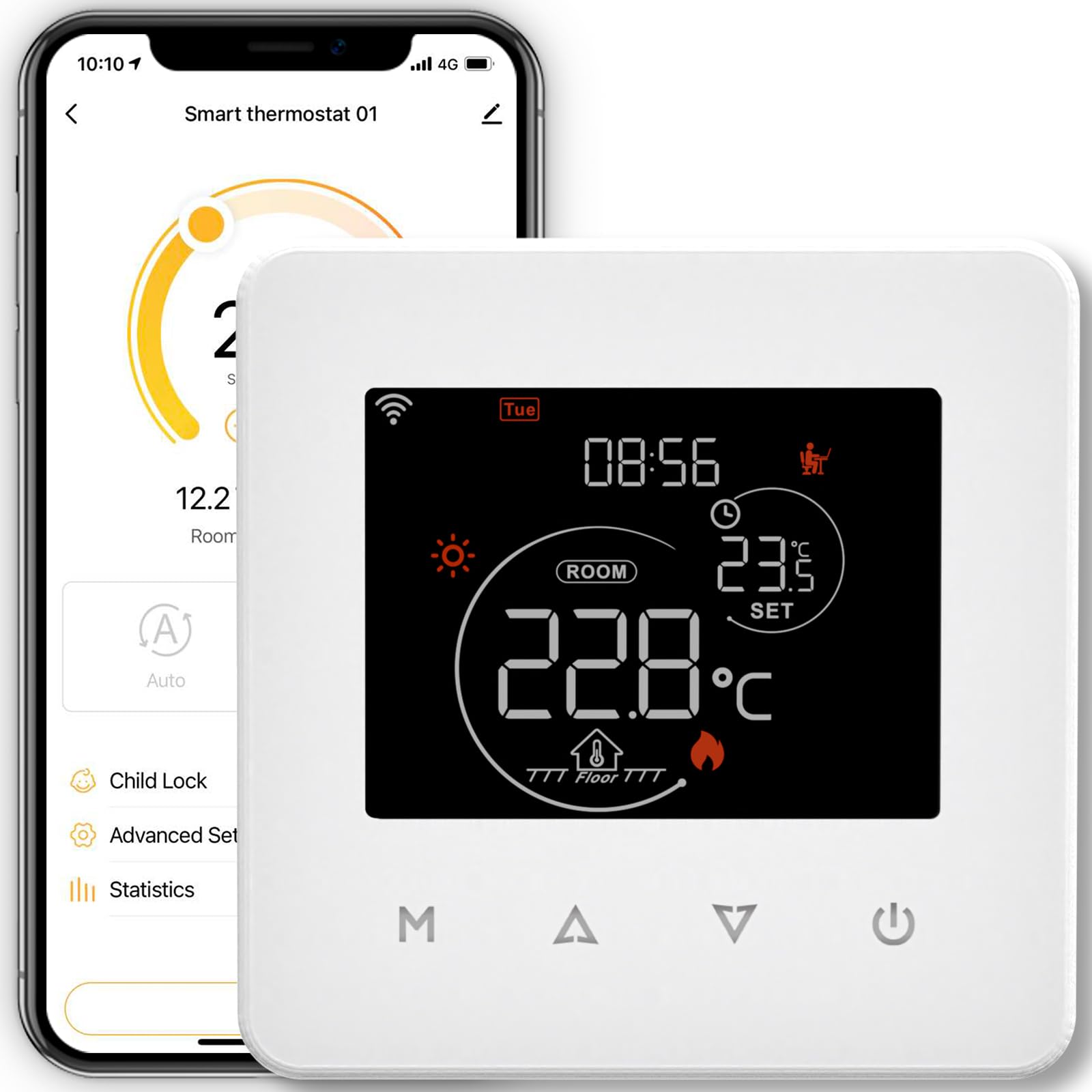
See pilt näitab esikülge view of the MOES Smart WiFi Thermostat PJ02-GC, featuring its touch screen display.
Peamised omadused:
- Nutikas juhtimine: Wi-Fi enabled for remote management via Moes, Tuya, or Smart Life apps (2.4 GHz Wi-Fi required).
- Energiasääst: Supports 5+1+1 programmable schedules with six temperature periods per day to optimize energy use.
- Voice Assistanti ühilduvus: Works with Amazon Alexa and Google Home for convenient voice control.
- Kasutajasõbralik liides: Touch screen display with adjustable backlight and screen lock function to prevent accidental changes.
- Kaitse voolukatkestuse eest: All settings are securely stored in case of a power outage.
- Ilmateabe kuvamine: Can retrieve and display local weather data.
2. Ohutusalane teave
Please read all safety instructions before installation and operation. Failure to follow these instructions may result in electric shock, fire, or other hazards.
- Paigaldamise peab tegema kvalifitseeritud elektrik.
- Disconnect power at the circuit breaker before installation or maintenance.
- Ensure the thermostat is compatible with your heating system (gas boiler or underfloor heating).
- Ärge jätke seadet vee ega liigse niiskuse kätte.
- Hoida lastele kättesaamatus kohas.
3. Paigaldamine ja seadistamine
3.1 Mis on karbis
- MOES Smart WiFi Thermostat PJ02-GC
- Paigaldustugi
- Toitekaabel
- Kasutusjuhend (see dokument)
3.2 Ühendusskeem
The thermostat operates on 230 Volts AC. Refer to the specific wiring diagram provided in the packaging for your heating system type (gas boiler or underfloor heating). Ensure all connections are secure and comply with local electrical codes. If you are unsure, consult a professional electrician.
3.3 Termostaadi paigaldamine
Mount the thermostat in a central location away from direct sunlight, drafts, or heat sources that could affect temperature readings. Use the included mounting support to secure the thermostat to the wall. Ensure proper ventilation around the device.
3.4 Rakendusega ühenduse loomine
- Download the Moes, Tuya Smart, or Smart Life app from your smartphone's app store.
- Registreeruge või logige sisse oma kontole.
- Ensure your smartphone is connected to a 2.4 GHz Wi-Fi network. The thermostat does not support 5 GHz Wi-Fi.
- Follow the in-app instructions to add a new device. This typically involves putting the thermostat into pairing mode.
3.5 WiFi-ga sidumine
To put the thermostat into pairing mode, usually, you need to press and hold a specific button (often labeled 'M' or a Wi-Fi icon) on the thermostat until the Wi-Fi indicator starts blinking rapidly. Refer to the app's specific pairing guide for detailed steps, as the exact procedure may vary slightly.
4. Kasutusjuhised
4.1 Põhilised juhtnupud
The thermostat features a touch screen for direct control. You can adjust the target temperature, switch between manual and automatic modes, and access settings directly from the display.
4.2 Programmeerimisgraafik
The thermostat supports a 5+1+1 weekly programming schedule, allowing you to set different temperature profiles for weekdays, Saturday, and Sunday. Each day can have up to six distinct time periods with corresponding temperature settings. This feature helps in energy saving by adjusting heating based on your daily routine.
- Access the scheduling menu via the app or directly on the thermostat.
- Set desired start times and temperatures for each of the six periods.
- Apply the schedule to weekdays (5 days), Saturday (1 day), and Sunday (1 day) as needed.
4.3 Hääljuhtimise integreerimine
Once connected to your smart home ecosystem (Amazon Alexa or Google Home), you can control the thermostat using simple voice commands. For example:
- "Alexa, seada termostaat 22 kraadi peale."
- "Hey Google, what is the temperature in the living room?"
4.4 Backlight and Screen Lock
- Taustvalgustuse reguleerimine: The brightness of the screen backlight can be adjusted in the settings. You can also configure the duration after which the backlight automatically turns off to save energy.
- Screen Lock (Child Lock): Activate the screen lock feature to prevent unauthorized or accidental changes to the thermostat settings, particularly useful in households with children.
5. Hooldus
The MOES Smart WiFi Thermostat requires minimal maintenance. To ensure optimal performance and longevity:
- Puhastage ekraani ja välispinda pehme kuiva lapiga. Ärge kasutage abrasiivseid puhastusvahendeid ega lahusteid.
- Ensure the area around the thermostat is free from dust and obstructions.
- Periodically check for firmware updates through the Moes/Tuya/Smart Life app to ensure you have the latest features and improvements.
6. Veaotsing
If you encounter issues with your MOES Smart WiFi Thermostat, refer to the following table for common problems and solutions:
| Probleem | Võimalik põhjus | Lahendus |
|---|---|---|
| Termostaat ei loo ühendust WiFi-ga | Incorrect Wi-Fi band (5GHz), weak signal, incorrect password, pairing mode not active. | Ensure your router is broadcasting a 2.4 GHz Wi-Fi signal. Move the thermostat closer to the router. Re-enter Wi-Fi password carefully. Activate pairing mode on the thermostat as per app instructions. |
| Inaccurate temperature readings or inconsistent heating | Thermostat placement, incorrect hysteresis (Switch Deviation) setting. | Ensure the thermostat is not in direct sunlight or near heat sources/drafts. Adjust the 'Switch Deviation' (hysteresis) setting in the advanced menu, typically to 0.5 degrees, to fine-tune temperature control. |
| Hääljuhtimine ei tööta | Not linked to voice assistant, incorrect device name, internet connectivity issues. | Ensure the Moes/Tuya/Smart Life skill/action is enabled in your Alexa or Google Home app. Verify the thermostat's name in the app. Check your home internet connection. |
| Ekraan ei reageeri või hangub | Ajutine tarkvaratõrge. | Try restarting the thermostat by temporarily cutting power at the circuit breaker. If the issue persists, contact support. |
7. Tehnilised andmed
| Spetsifikatsioon | Detail |
|---|---|
| Kaubamärk | MOES |
| Mudeli number | PJ02-GC (3cc1548c-59eb-497b-a080-8b65aa8f3589) |
| Värv | Must |
| Materjal | Plastikust |
| Voltage | 230 volti (AC) |
| Toiteallikas | Kaabelelektrik |
| Ühenduvustehnoloogia | WiFi (2.4 GHz) |
| Kontrolleri tüüp | Amazon Alexa, Google Home |
| Temperatuuri reguleerimise tüüp | Küte |
| Konkreetsed kasutusalad | Gas Boiler, Underfloor Heating |
| Kauba kaal | 220 g |
| Pakendi mõõtmed | 10.1 x 9.7 x 6.9 cm |
| Kaasatud komponendid | Mounting Support, Power Cable |
8. Garantii ja tugi
For warranty information and technical support, please refer to the documentation provided with your purchase or contact the seller directly. You can typically find support contact details on the manufacturer's official website or through the Moes/Tuya/Smart Life app.


