Toode läbiview
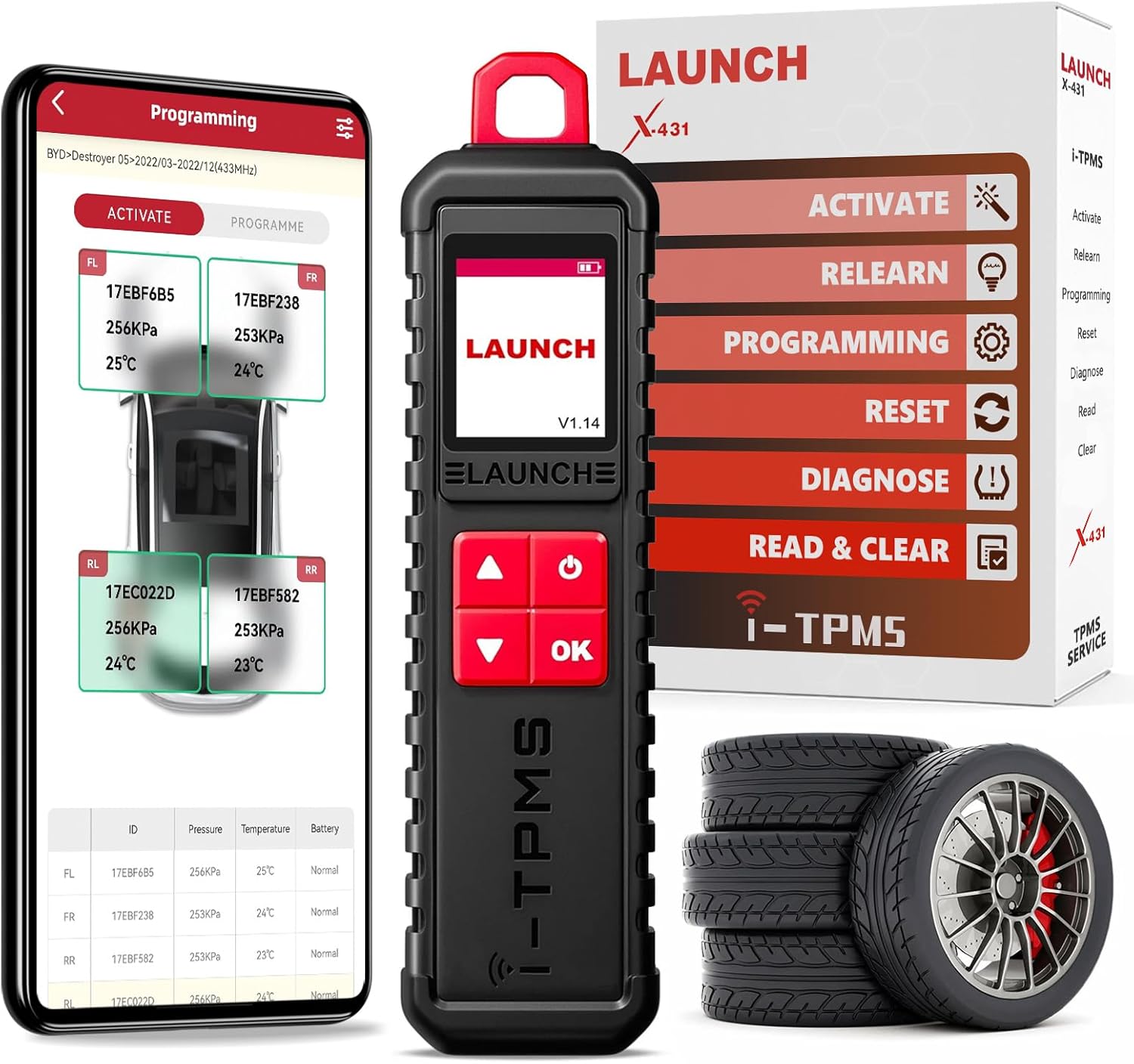
The LAUNCH X-431 i-TPMS is a professional tire pressure service tool designed for comprehensive TPMS sensor management. It integrates activation, reading, learning, and programming functionalities for tire pressure monitoring systems. This tool is engineered to activate and read tire pressure information by receiving signals at both low and high frequencies, enabling timely detection of abnormal conditions to prevent tire pressure-related issues.
It supports all 315/433MHz sensors and can program LAUNCH LTR RF sensors an unlimited number of times to replace original equipment (OE) sensors. The device provides instant and accurate sensor data, including sensor ID, tire pressure, tire temperature, and battery status.
The i-TPMS tool is capable of programming up to 8 LAUNCH brand sensors (such as LTR-03/TSENSOR-03, TSENSOR-05) simultaneously, without vehicle model limitations, as long as the LAUNCH X-431 tablet supports the model.
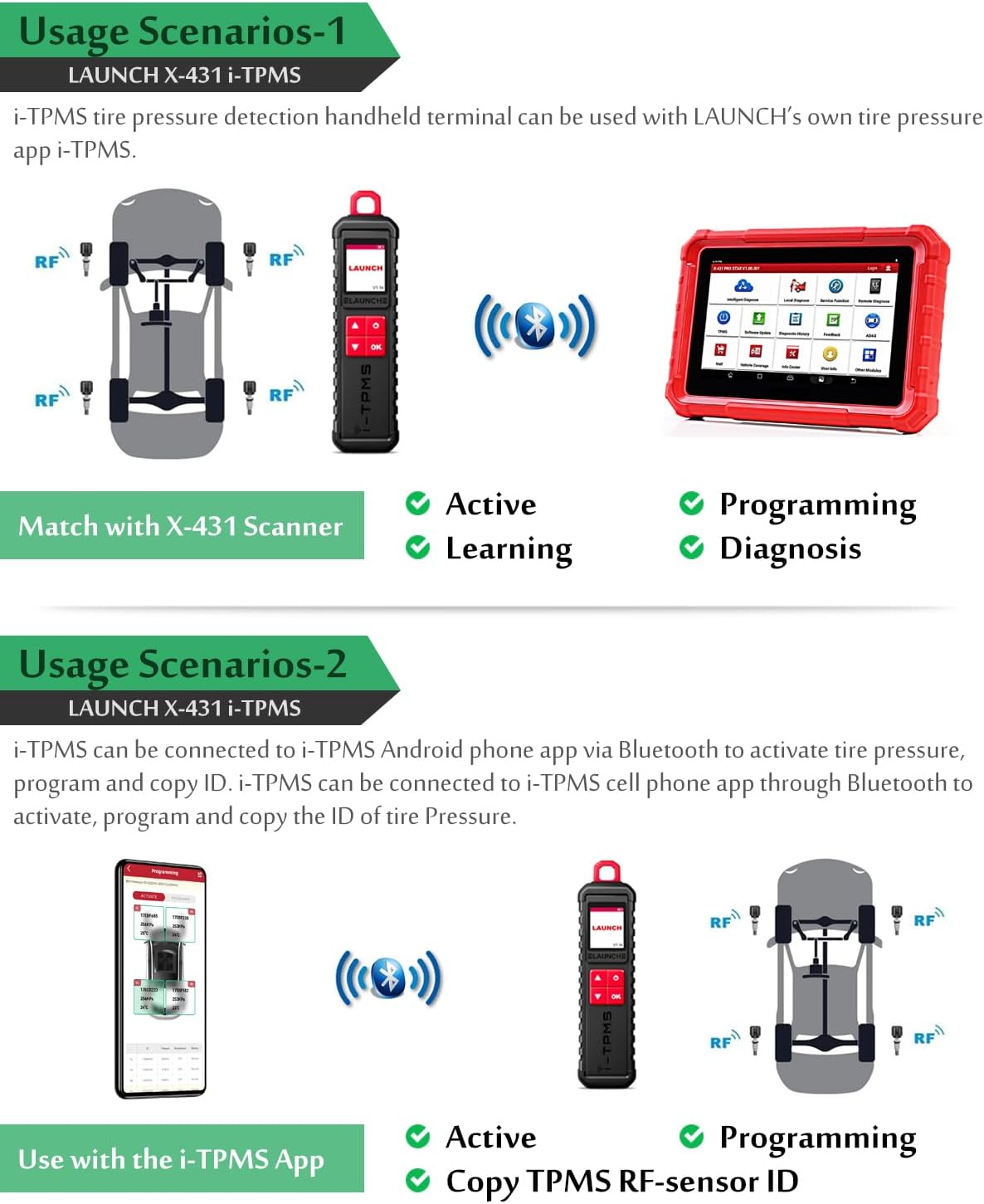
This upgraded version of the TSGUN offers the additional function of connecting to an Android phone, allowing users to perform tire pressure activation, programming, and ID copying conveniently. Please note that this feature is not currently supported for iPhone devices.
The tool is compatible with various LAUNCH X431 series tablets, including X431 V/V+, PAD III/V/VII, PRO 5, PRO 3S+, PRO S, PRO STAR, and PRO Elite, covering approximately 99% of global vehicles equipped with a tire pressure system.
LAUNCH officially recommends using LAUNCH LTR03/TSENSOR-03 and TSENSOR-05 TPMS RF sensors, which are compatible with i-TPMS and serve as perfect replacements for OE-sensors.
Seadistamine ja esmane kasutamine
The LAUNCH X-431 i-TPMS tool can be paired with a LAUNCH X-431 series tablet or an Android phone for operation. Ensure the device is charged using the provided USB cable.
Pairing with a LAUNCH X-431 Tablet:
- Power on the i-TPMS tool. The screen will display "LAUNCH" and the software version.
- On your LAUNCH X-431 tablet, open the TPMS application.
- Navigate to the "Switch Device" option within the TPMS application.
- Select the i-TPMS tool by its serial number to establish a Bluetooth connection.
- Once connected, the tablet will display the TPMS interface, allowing you to select vehicle make, model, and year.
Pairing with an Android Phone:
- Power on the i-TPMS tool.
- Download the i-TPMS app to your Android phone. The app can typically be found by scanning a QR code provided in the product packaging or user manual. Note: Ensure your phone settings allow installation from unknown sources if downloading outside of official app stores.
- Open the i-TPMS app and follow the on-screen prompts to connect via Bluetooth. The device will appear as a faded red box with its serial number; tap it and confirm.
- Once connected, you can perform activation, programming, and ID copying functions directly from your phone.
Operating the i-TPMS Tool
TPMS Sensor Activation:
To activate a TPMS sensor, hold the i-TPMS tool near the tire valve stem. Press the activation button on the tool. The tool will emit a tone and display the sensor's ID, pressure, temperature, and battery status on its screen and the connected tablet/phone.

TPMS Sensor Programming:
The i-TPMS tool supports various programming methods for LAUNCH brand sensors:
- Auto Create Sensor ID: When the original sensor ID is unknown, the i-TPMS can automatically generate a new ID.
- Manual Create Sensor ID: Allows users to manually input a sensor ID.
- Kopeerimine aktiveerimise teel: Kopeerib ID olemasolevalt aktiveeritud andurilt.
- Kopeerimine OBD-ga: Copies the ID from the vehicle's ECU via the OBD-II port (requires connection to a LAUNCH X-431 tablet).

TPMS Relearn Procedures:
After replacing or programming TPMS sensors, they must be relearned to the vehicle's ECU. The i-TPMS tool, when connected to a LAUNCH X-431 tablet, supports different relearn types:
- OBD Relearn: Writes TPMS sensor IDs to the TPMS module through the OBD connector. This is often the most comprehensive method.
- Automaatne taasõpe: Completed by driving the vehicle under specific conditions.
- Statsionaarne uuesti õppimine: Requires placing the vehicle in a specific relearn mode and using the tool to trigger each sensor.
For OBD relearning, ensure all tires are inflated to the pressure listed on the tire placard (located in the door jamb of your vehicle). Turn the ignition to the ON position. Connect the TPMS tool to the OBD-II port and then use the tool to trigger each sensor in the specified order (Left Front, Right Front, Right Rear, Left Rear, and full-size spare if applicable). A message will confirm successful learning.

Reading and Clearing Fault Codes:
The i-TPMS tool can read and clear TPMS fault codes, helping to diagnose and resolve issues indicated by the TPMS warning light on the dashboard.

Hooldus
To ensure the longevity and optimal performance of your LAUNCH X-431 i-TPMS tool, follow these maintenance guidelines:
- Puhastamine: Use a soft, dry cloth to clean the device. Avoid abrasive cleaners or solvents that could damage the casing või ekraan.
- Hoiustamine: Store the tool in a cool, dry place away from direct sunlight, extreme temperatures, and high humidity.
- Aku hooldus: Recharge the lithium-ion battery regularly, even if the tool is not in frequent use, to maintain battery health. Avoid fully discharging the battery for extended periods.
- Tarkvaravärskendused: Periodically check for and install software updates for both the i-TPMS tool firmware and the connected tablet/phone application. Updates often include bug fixes, new vehicle coverage, and improved functionalities.
- Kaabli haldamine: Handle the USB cable with care to prevent damage to the connectors or wiring.
Veaotsing
If you encounter issues with your LAUNCH X-431 i-TPMS tool, consider the following troubleshooting steps:
- Ühenduse probleemid:
- Ensure Bluetooth is enabled on your tablet/phone and the i-TPMS tool is powered on and within range.
- Verify that the correct serial number of the i-TPMS tool is selected for pairing.
- Restart both the i-TPMS tool and the connected device.
- Sensor Activation Failure:
- Confirm the tool is held correctly near the valve stem, typically with the orange square opening around the valve.
- Ensure the tire pressure is correct and the sensor battery is not depleted.
- Check for any physical obstructions or damage to the sensor or valve stem.
- Programmeerimisprobleemid:
- Verify that you are using LAUNCH brand sensors (LTR-03/TSENSOR-03, TSENSOR-05) as the tool is designed to program only these.
- Ensure the connected tablet/phone app is up-to-date.
- App Functionality (Android):
- If the app requires unusual permissions (e.g., internet history, call/text history), exercise caution. While some diagnostic tools may require broad permissions for full functionality, users should be aware of data privacy implications.
- Ensure the app is downloaded from a trusted source, ideally the official LAUNCH website or a verified app store.
- Püsivara värskenduse probleemid:
- Ensure a stable internet connection and sufficient battery charge on both devices.
- Follow the on-screen instructions carefully during the update process.
Tehnilised andmed
| Nimi | Parameeter |
|---|---|
| Mudel | LAUNCH X-431 i-TPMS |
| Ekraan | 1.77 tolli |
| Resolutsioon | 168 x 128 pikslit |
| Aku | 2000 mAh (1 Lithium Ion batteries required) |
| Alalisvoolu sisend Voltage | 5 V |
| Töövool | ≤1 A |
| Töötemperatuur | -10 ℃ ~ 50 ℃ |
| Säilitustemperatuur | -20 ℃ ~ 60 ℃ |
| Pakendi mõõtmed | 10 x 3.39 x 2.13 tolli |
| Kauba kaal | 10.5 untsi |
| Päritoluriik | Hiina |
| Autode sobivuse tüüp | Universaalne sobivus |

Mis on karbis
- 1 x LAUNCH X-431 i-TPMS device
- 1 x USB kaabel
- 1 x kasutusjuhend
Garantii ja tugi
The LAUNCH X-431 i-TPMS tool comes with a 2-year warranty. LAUNCH provides 7*24 technical support and a team of professionals for any post-sales issues and technical instruction.


