1. Sissejuhatus
The Pronomic DX-50 USB MKII is a professional 4-channel DJ mixer designed for a wide range of applications, including discos, parties, restaurants, and presentations. Its user-friendly design ensures that both experienced and less experienced users can fully utilize its features. This manual provides detailed instructions for setting up, operating, and maintaining your mixer.
Key features include a recording function, integrated Bluetooth interface, USB player with transport controls, and multiple input channels.
2. Olulised ohutusjuhised
- Lugege juhiseid: Enne toote kasutamist lugege läbi kõik ohutus- ja kasutusjuhised.
- Säilitage juhised: Hoidke ohutus- ja kasutusjuhised edaspidiseks kasutamiseks alles.
- Pange tähele hoiatusi: Järgige kõiki tootel ja kasutusjuhendis toodud hoiatusi.
- Järgige juhiseid: Järgige kõiki kasutus- ja kasutusjuhiseid.
- Vesi ja niiskus: Do not use this apparatus near water (e.g., bathtub, washbowl, kitchen sink, laundry tub, wet basement, or swimming pool).
- Ventilatsioon: Ärge blokeerige ühtegi ventilatsiooniava. Paigaldage vastavalt tootja juhistele.
- Kuumus: Ärge paigaldage soojusallikate, näiteks radiaatorite, küttekehade, ahjude või muude seadmete (sh amptõsteseadmed), mis toodavad soojust.
- Toiteallikad: Use only power sources specified by the manufacturer.
- Toitejuhtme kaitse: Kaitske toitejuhet selle peale kõndimise või muljumise eest, eriti pistikute, pistikupesade ja nende seadmest väljumise kohta.
- Puhastamine: Puhastage ainult kuiva lapiga.
- Teenindus: Ärge püüdke seda toodet ise hooldada, kuna kaante avamine või eemaldamine võib teid ohustadatage või muud ohud. Andke kõik hooldustööd kvalifitseeritud teeninduspersonalile.
3. Pakendi sisu
Please check that all items listed below are included in your package. If any items are missing or damaged, contact your dealer immediately.
- Pronomic DX-50 USB MKII DJ Mixer
- Toiteadapter (vahelduvvool 12 V)
- USB Stick (32 GB, if included in your specific bundle)
- Kasutusjuhend (see dokument)
4. Toote lõppview
Familiarize yourself with the various controls and connections on your DX-50 USB MKII mixer.
4.1 Esipaneeli juhtnupud
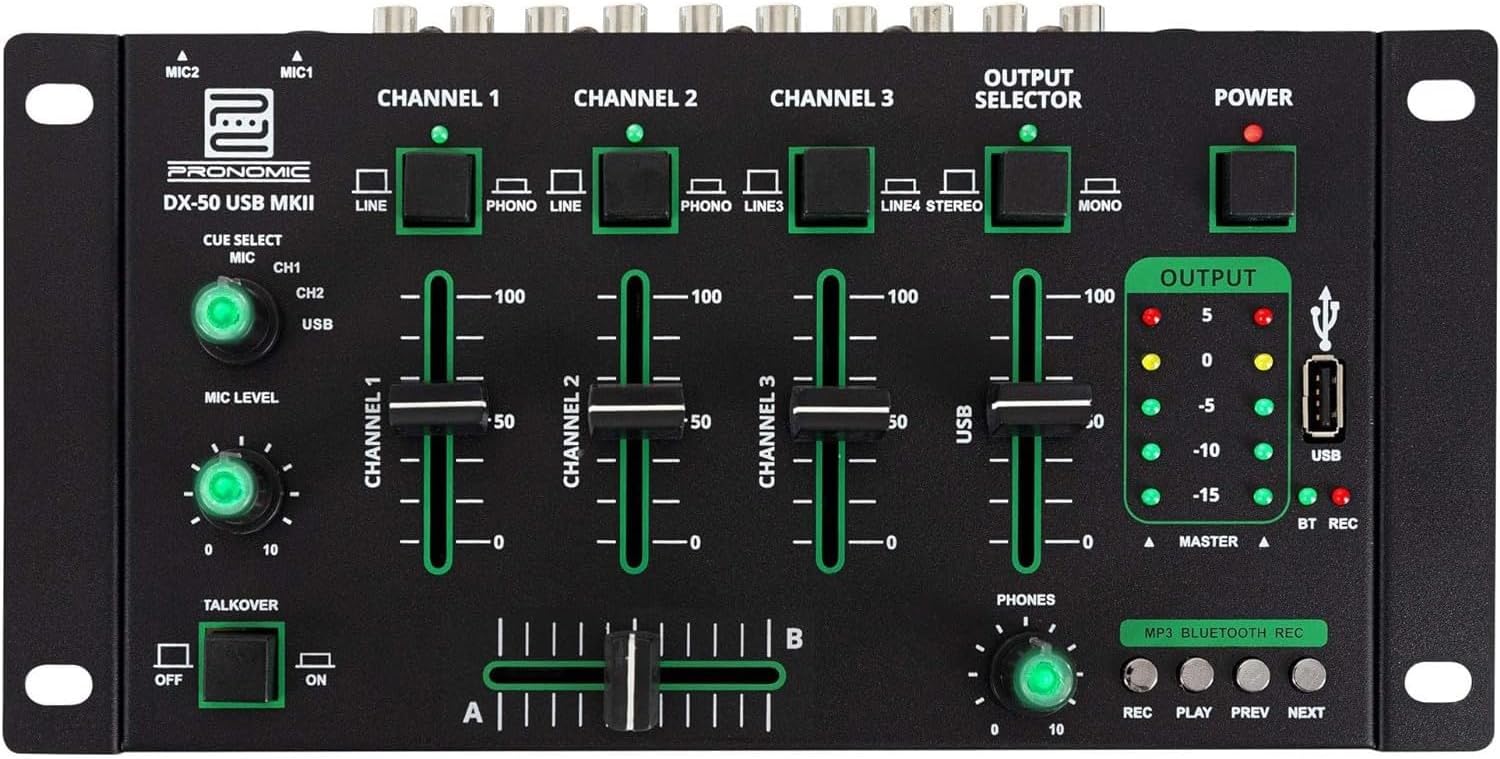
- MIC 1/2 Inputs: Connect microphones.
- Channel 1-4 Input Selectors: Switch between LINE, PHONO, or USB/Bluetooth inputs for each channel.
- Kanali faderid: Reguleerige iga kanali helitugevust.
- CUE Select Buttons: Route specific channels to the headphone output for monitoring.
- MIC Level Knob: Adjust the volume of the microphone inputs.
- Talkover Switch: Activates the talkover function, which automatically lowers music volume when speaking into the microphone.
- Väljundi valija: Choose between Stereo or Mono master output.
- Toitelüliti: Lülitab mikseri sisse/välja.
- Väljundtaseme mõõturid: LED indicators showing the master output level.
- USB-port: Connect a USB drive for MP3 playback and recording.
- MP3/Bluetooth/REC Player Controls: Buttons for Play/Pause, Previous, Next, and Record functions for the integrated player.
- Telefonide taseme nupp: Reguleerib kõrvaklappide väljundi helitugevust.
- Crossfader (A/B): Blends between channels assigned to A and B.
4.2 Tagapaneeli ühendused

- AC 12V Power Input: Ühendage kaasasolev toiteadapter siia.
- PHONES väljund: 6.3 mm pesa kõrvaklappide ühendamiseks.
- MASTER OUT L/R (RCA): Ühenda oma peamise võrguga amptõsteseade või toitega kõlarid.
- Channel 1 & 2 Inputs (RCA Line/Phono): Connect turntables (Phono) or other line-level devices (CD players, media players). Use the front panel selector to switch.
- Channel 3 & 4 Inputs (RCA Line): Connect line-level devices.
- MIC 1 & 2 Inputs (6.3mm Jack): Connect microphones.
5. Seadistamine
Follow these steps to set up your Pronomic DX-50 USB MKII mixer:
- Toiteühendus: Ensure the mixer's power switch is in the OFF position. Connect the supplied AC 12V power adapter to the "AC 12V" input on the rear panel of the mixer. Plug the adapter into a suitable power outlet.
- Master Output Connection: Connect the "MASTER OUT L/R" RCA outputs on the rear panel to the inputs of your amptõsteseade või toitega kõlarid.
- Sisendseadme ühendus:
- Plaadimängijad: Connect turntables to the "CHANNEL 1" or "CHANNEL 2" RCA inputs. Set the corresponding input selector on the front panel to "PHONO".
- CD Players/Line Devices: Connect CD players, media players, or other line-level devices to "CHANNEL 1", "CHANNEL 2", "CHANNEL 3", or "CHANNEL 4" RCA inputs. Set the corresponding input selector on the front panel to "LINE".
- Mikrofonid: Connect microphones to the "MIC 1" or "MIC 2" 6.3mm jack inputs on the rear panel.
- Kõrvaklappide ühendus: Connect your headphones to the "PHONES" 6.3mm jack on the rear panel.
- USB Drive (Optional): If using a USB drive for playback or recording, insert it into the "USB" port on the front panel.
- Toide sisse: Once all connections are made, switch the mixer's power switch to the ON position. The power indicator LED will illuminate.
6. Kasutusjuhised
6.1 Basic Mixing
- Valige sisend: For each channel, use the input selector switch (LINE/PHONO/USB/BT) to choose the desired audio source.
- Kanali helitugevuse reguleerimine: Use the vertical faders for each channel to adjust its individual volume level.
- Põhiväljund: Monitor the "OUTPUT" LED meters and adjust the master volume knob (if present, otherwise rely on channel faders and amplifier volume) to achieve a suitable overall output level without clipping.
- Crossfader: Use the crossfader to smoothly transition between channels assigned to A and B. Channels 1 and 2 are typically assigned to the crossfader.
6.2 Mikrofoni kasutamine
- Connect your microphone to one of the MIC inputs on the rear panel.
- Adjust the "MIC LEVEL" knob on the front panel to control the microphone's volume.
- Kõnefunktsioon: Activate the "TALKOVER" switch to automatically reduce the volume of the music when you speak into the microphone. This is useful for announcements.
6.3 USB-taasesitus ja -salvestus
- USB taasesitus: Sisestage MP3-d sisaldav USB-draiv files into the "USB" port. Select "USB" as the input source for the dedicated USB channel. Use the "PLAY/PAUSE", "PREV", and "NEXT" buttons to control playback.
- USB salvestus: Press the "REC" button to start recording the master output to the connected USB drive. Press "REC" again to stop recording. Ensure your USB drive has sufficient free space and is formatted correctly (FAT32 is commonly supported).
6.4 Bluetooth-ühenduvus
- Bluetoothi aktiveerimine: Select "BT" as the input source for the dedicated Bluetooth channel. The mixer will enter pairing mode.
- Siduge seade: On your Bluetooth-enabled device (smartphone, tablet, etc.), search for available Bluetooth devices. Select "Pronomic DX-50 USB MKII" (or similar name) from the list to pair.
- Esita heli: Once paired, you can play audio from your device through the mixer. Control playback from your device or using the mixer's transport controls (if supported by your device).
6.5 Monitoring with Headphones
- Connect headphones to the "PHONES" output.
- Use the "CUE SELECT" buttons to choose which channels you want to monitor in your headphones without affecting the main output.
- Adjust the "PHONES" level knob to set your desired headphone volume.
7. Hooldus
- Puhastamine: Disconnect the power before cleaning. Use a soft, dry cloth to wipe the surface of the mixer. Do not use liquid cleaners, aerosols, or solvents.
- Hoiustamine: Hoidke mikserit jahedas ja kuivas kohas, eemal otsesest päikesevalgusest ja äärmuslikest temperatuuridest.
- Faderi ja nuppude hooldus: Avoid excessive force when operating faders and knobs. Periodically check for dust or debris accumulation around moving parts.
- Kaabli haldamine: Ensure cables are not kinked or strained, which can lead to damage.
8. Veaotsing
| Probleem | Võimalik põhjus | Lahendus |
|---|---|---|
| Pole jõudu | Power adapter not connected; Power switch off; Faulty power outlet. | Check power adapter connection; Ensure power switch is ON; Try a different power outlet. |
| No sound from main output | Master volume too low; Amplifier/speakers off or disconnected; Incorrect input selection; Channel faders down. | Increase master volume; Check amplifier/speaker connections and power; Verify correct input selected for channels; Raise channel faders. |
| Kõrvaklappidest pole heli | Headphone volume too low; Headphones not connected; No CUE selected. | Increase PHONES level; Connect headphones properly; Press CUE button for desired channel. |
| Bluetoothi ei siduta | Mixer not in pairing mode; Device too far; Interference. | Ensure BT input is selected; Bring device closer; Restart mixer and device. |
| USB taasesitus ei tööta | USB drive not inserted correctly; Incorrect file format; USB drive not formatted correctly. | Sisestage USB-mäluseade uuesti; veenduge, et files are MP3; Format USB drive to FAT32. |
9. Tehnilised andmed
| Mudel | Pronomic DX-50 USB MKII |
| Kanalite arv | 4 |
| Ühenduvustehnoloogia | Bluetooth, USB |
| Helisisend | RCA (line/phono), 6.3mm microphone, Bluetooth, USB |
| Väljundühenduse tüüp | RCA (Master Out), 6.3mm (Phones) |
| Toiteallikas | Electric Cable (AC 12V adapter) |
| Dimensions (without corner brackets and controls) | 222 x 129 x 28 mm (laius x sügavus x kõrgus) |
| Total Dimensions (with corner brackets and controls) | 267 x 136 x 51 mm (laius x sügavus x kõrgus) |
| Kaal | 790 g |
10. Garantii ja tugi
Garantiiteabe ja tehnilise toe saamiseks lugege ostuga kaasas olnud dokumente või võtke ühendust edasimüüjaga. Hoidke ostutõendit alles garantiinõuete esitamiseks.
For further assistance, you may also visit the official Pronomic websaidil või võtke ühendust oma klienditeenindusega.


