1. Sissejuhatus
This manual provides detailed instructions for the installation, setup, operation, and maintenance of your Intelbras MFR 7000 Smart Embedded Deadbolt with Handleset. Please read this manual thoroughly before installation and use to ensure proper function and safety. Keep this manual for future reference.
2. Ohutusalane teave
- Enne paigaldamist veenduge, et kõik komponendid on olemas ja kahjustamata.
- Ärge proovige lukku lahti võtta ega muuta. See võib tühistada garantii ja kahjustada turvalisust.
- Use only specified AA alkaline batteries. Do not mix old and new batteries or different types of batteries.
- Hoidke füüsilisi võtmeid turvalises kohas väljaspool kinnisvara.
- Protect your passwords and biometric data. Do not share them with unauthorized individuals.
- This lock is designed for indoor use or protected outdoor environments. Avoid direct exposure to extreme weather conditions.
3. Pakendi sisu
Veenduge, et teie pakendis on kõik järgmised esemed:
- 1 x Digital Lock (MFR 7000 unit)
- 4 x AA patareid
- 1 x paigaldusmall
- 1 x Fixing Kit (screws and mounting hardware)
- 1 x Kasutusjuhend (käesolev dokument)
- 2 füüsilist võtit
- 3 x kleebis Tags
- 3 x Proximity Tags
- 1 x Installation Manual (separate guide for physical installation)
4. Toote lõppview
The Intelbras MFR 7000 is a smart embedded deadbolt with a handleset, offering multiple access methods for enhanced security and convenience. It integrates with the Intelbras Mibo ecosystem for smart home functionalities when paired with a compatible automation hub.
Peamised omadused:
- Multiple Access Methods: Biometrics (up to 100), Proximity Tags (up to 100), Passwords (up to 15), and Physical Keys.
- Smart Home Integration: Remote access and management via the Mibo app (requires MCA 1001 Automation Hub, sold separately).
- Auto-Lock Function: Automatically locks the door after closing.
- Non-Disturb Function: Prevents external access for privacy.
- Reversible Lever: Adaptable for left or right-handed doors.
- Standard Mortise: Compatible with ABNT 14913 standard mortise for easy replacement.
Toote komponendid:
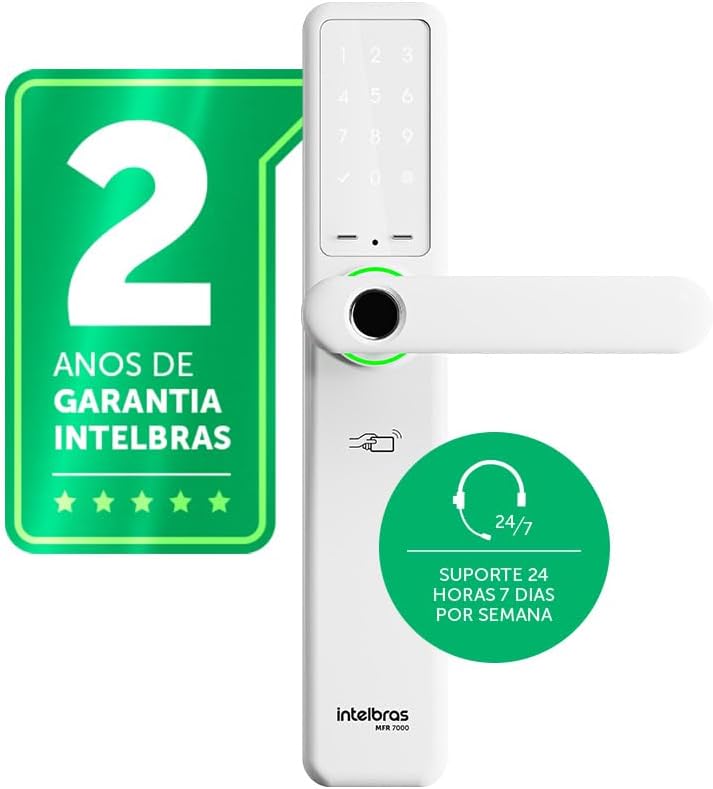
Joonis 4.1: Esiosa view of the Intelbras MFR 7000 Smart Embedded Deadbolt, showing the keypad, fingerprint reader, and handleset.

Joonis 4.2: Külg view of the MFR 7000, illustrating its slim profile.

Joonis 4.3: Tagasi view of the MFR 7000, showing the interior handleset and battery compartment.
5. Paigaldamine
The MFR 7000 is designed for straightforward installation, compatible with doors from 30mm to 60mm thick and utilizing the ABNT 14913 standard mortise. For detailed physical installation steps, refer to the separate Installation Manual included in your package. Professional installation is recommended.
Üldised installietapid:
- Valmistage uks ette: If replacing an existing lock, remove the old lock mechanism. Ensure the door meets the thickness requirements and mortise standard.
- Paigaldage tapp: Insert the MFR 7000 mortise mechanism into the door edge.
- Mount the Handleset: Attach the exterior and interior handleset components, ensuring proper alignment and cable connections.
- Lukusta lukustamine: Use the provided fixing kit to secure all components firmly.
- Testi funktsionaalsus: After installation, test the mechanical operation of the handleset and deadbolt before proceeding with electronic setup.

Joonis 5.1: Diagram illustrating the easy installation process with the ABNT 14913 standard mechanism. This image shows the steps: remove old lock, insert MFR 7000 mechanism, and finalize installation.

Joonis 5.2: The MFR 7000 Smart Deadbolt handleset installed on a door, demonstrating its integrated appearance.
6. Setup and User Management
After physical installation, proceed with the electronic setup and user registration.
6.1 Initial Power-Up and Master Code Setup
- Insert the 4 AA batteries into the battery compartment on the interior unit.
- The lock will power on and prompt for initial setup. Follow the voice prompts or display instructions to set a master password. This master password is crucial for managing other users and settings.
6.2 Registering Users
The MFR 7000 supports up to 100 biometrics, 100 proximity tags, and 15 passwords.
- Biometric Registration: Access the user management menu using your master password. Select the option to add a new biometric user. Follow the on-screen prompts to scan the fingerprint multiple times for accurate registration.
- Lähedus Tag Registreerimine: In the user management menu, select to add a new tag. Present the sticker tag or proximity tag to the designated reader area on the lock.
- Password Registration: From the user management menu, choose to add a new password. Enter a 6-10 digit password and confirm it.
Tähtis: For remote access, user management, and smart home integration features, you must purchase and connect the MCA 1001 Automation Hub (sold separately) and use the Intelbras Mibo app.
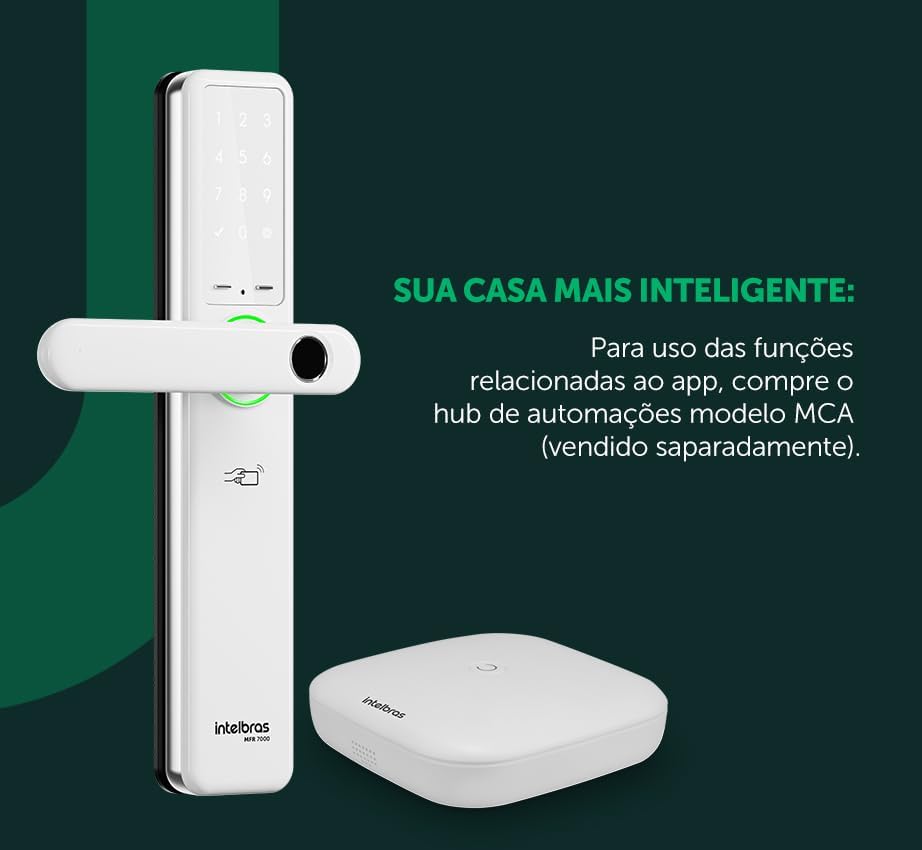
Joonis 6.1: The MFR 7000 Smart Deadbolt shown alongside the Mibo Automation Hub, which is required for app-related smart functions.
7. Kasutusjuhised
7.1 Ukse lukust avamine
- Using Biometrics: Asetage registreeritud sõrm sõrmejäljelugejale. Lukk avaneb, kui sõrmejälg tuvastatakse.
- Using Proximity Tags: Present a registered proximity tag juurde tag reader area on the lock. The lock will unlock.
- Using a Password: Enter your registered password on the keypad, then press the '#' or 'Enter' key. The lock will unlock.
- Using Physical Keys: In case of battery depletion or electronic malfunction, insert the physical key into the keyhole and turn to unlock.
- Remote Unlocking (with Mibo Hub): Open the Intelbras Mibo app on your smartphone and select the MFR 7000 lock to remotely unlock it.
7.2 Ukse lukustamine
- Automaatne lukustus: The MFR 7000 features an auto-lock function that engages the deadbolt automatically a few seconds after the door is closed.
- Käsitsi lukustamine: From the exterior, press the '#' key on the keypad. From the interior, turn the thumb-turn or lift the handleset (if applicable for manual deadbolt engagement).
- Remote Locking (with Mibo Hub): Use the Intelbras Mibo app to remotely lock the door.
7.3 Non-Disturb Function
Activate the non-disturb function from the interior unit to prevent external access, even with valid credentials. This provides enhanced privacy and security when inside.
8. Hooldus
8.1 Aku vahetamine
- The lock is powered by 4 AA alkaline batteries, providing an average duration of 10 months (based on 10 daily accesses).
- The lock will provide a low battery warning when replacement is needed.
- To replace, open the battery compartment on the interior unit, remove old batteries, and insert new ones, ensuring correct polarity.
8.2 Puhastamine
- Clean the lock's exterior surfaces with a soft, dry cloth.
- Ärge kasutage abrasiivseid puhastusvahendeid, lahusteid ega keemilisi pihusteid, kuna need võivad kahjustada viimistlust ja elektroonilisi komponente.
- Keep the fingerprint sensor and keypad clean for optimal performance.
9. Veaotsing
| Probleem | Võimalik põhjus | Lahendus |
|---|---|---|
| Lock does not respond / No power. | Tühjad või valesti paigaldatud patareid. | Vahetage kõik 4 AA-patareid, jälgides õiget polaarsust. |
| Sõrmejälge ei tuvastatud. | Finger is wet, dirty, or improperly placed; fingerprint not registered; sensor is dirty. | Ensure finger is clean and dry. Place the entire pad of the registered finger firmly on the sensor. Clean the sensor. Re-register fingerprint if issues persist. |
| Parooli ei aktsepteerita. | Incorrect password entered; password not registered. | Verify the password and re-enter. Ensure the password has been correctly registered. |
| Lähedus tag ei tööta. | Tag not registered; tag kahjustatud. | Tagada tag is registered. Try another registered tag. If still not working, the tag võib olla kahjustatud. |
| Automaatne lukustus ei rakendu. | Door not fully closed; auto-lock feature disabled. | Ensure the door is completely closed. Check lock settings to confirm auto-lock is enabled. |
| Remote functions not working. | MCA 1001 Automation Hub not connected or configured; network issues. | Ensure the MCA 1001 Hub is properly installed and connected to your network. Verify the Mibo app is updated and connected to the hub. |
10. Tehnilised andmed
| Funktsioon | Detail |
|---|---|
| Mudel | MFR 7000 |
| Kaubamärk | Intelbras |
| Juurdepääsumeetodid | Biometrics (up to 100), Proximity Tags (up to 100), Passwords (up to 15), Physical Keys |
| Toiteallikas | 4 x AA leelispatareid |
| Aku tööiga | Approx. 10 months (based on 10 daily accesses) |
| Ukse paksuse ühilduvus | 30 mm kuni 60 mm |
| Mortise Standard | ABNT 14913 |
| Mõõtmed (toode) | 8 x 5 x 27 cm |
| Kaal (ese) | 2.89 kilogrammi |
| Värv | Valge |
| Eriomadused | MCA 1001 Automation Hub Required (Sold Separately) for smart functions, Reversible Lever |
11. Garantii ja tugi
- Garantii: The Intelbras MFR 7000 Smart Embedded Deadbolt comes with a 2-aastane Intelbrase garantiiPalun hoidke oma ostutõend garantiinõuete esitamiseks alles.
- Tehniline tugi: Intelbrase pakkumised 24/7 tehniline tugi for its products. For assistance, please refer to the contact information provided on the Intelbras official website or your regional support channels.
- Interneti-ressursid: Visit the official Intelbras website for updated manuals, FAQs, and additional support resources.


