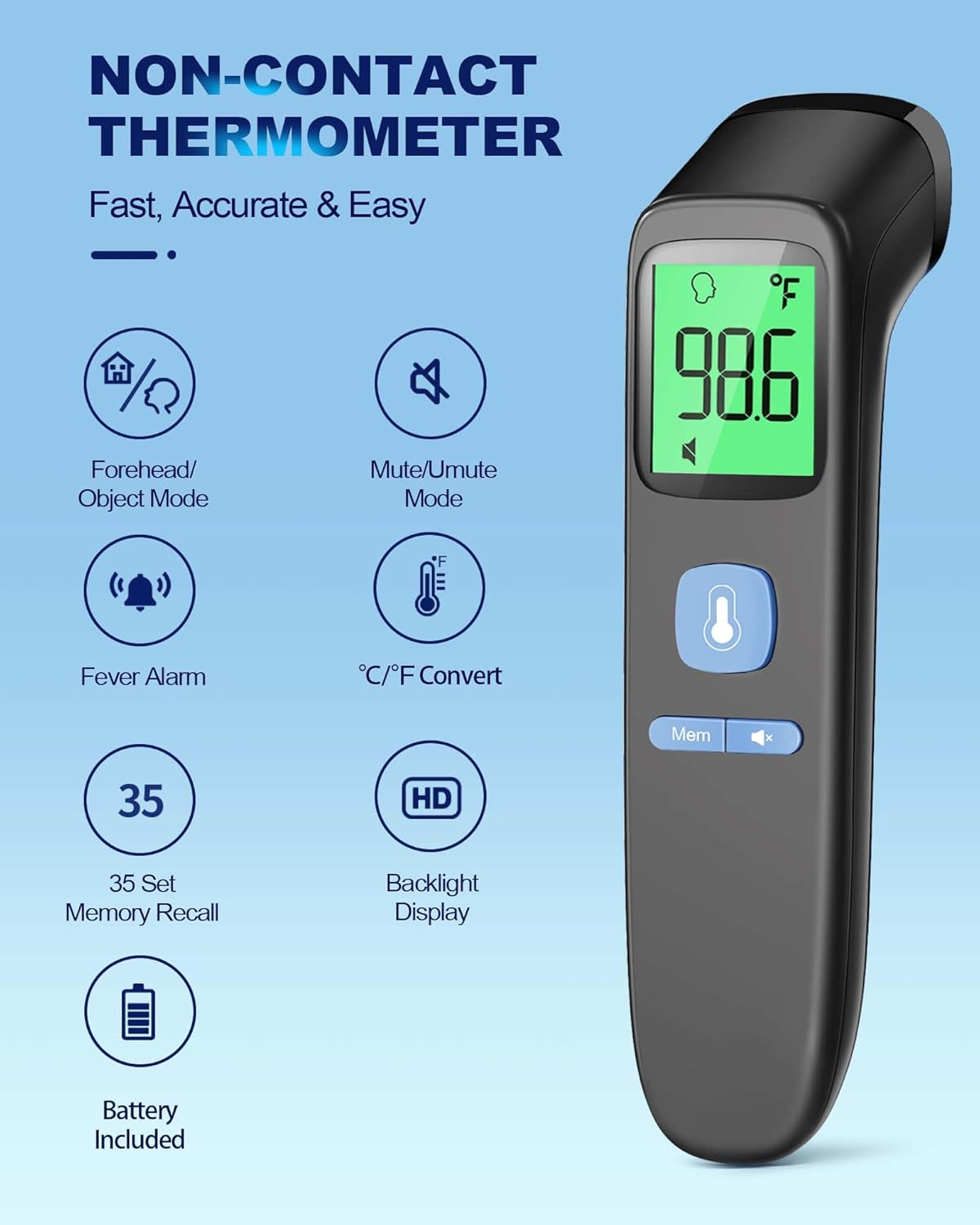
The ANMEATE No-Touch Forehead Thermometer is designed for swift, accurate, and reliable temperature measurements for individuals of all ages, including adults, kids, and babies. Its non-contact design ensures hygienic use, making it ideal for monitoring body temperature without physical contact. This manual provides comprehensive instructions for setup, operation, maintenance, and troubleshooting to ensure optimal performance and longevity of your device.
Key features include 1-second rapid readings, rigorous clinical testing for accuracy, and a user-friendly design. The device also incorporates a large display with 3 backlight indicators (Green, Yellow, Red) to visually communicate temperature levels, a one-touch mute mode for quiet operation, and a memory recall function to store up to 35 previous readings. A fever warning alarm is also integrated for immediate alerts.
Põhifunktsioonid
Swift 1-Second Readings: Obtain accurate temperature readings rapidly.
Reliable and Accurate Measurements: Clinically tested for precision with a tiny error margin.
3 Backlight Indicators: Green (normal), Yellow (slightly elevated), Red (fever/abnormal) for easy interpretation.
35 Sets of Memory Storage: Track temperature trends over time.
One-Touch Mute Mode: For quiet operation, especially useful for sleeping individuals.
Fahrenheit/Celsius Switchable: Temperatuuriühikute vahel on lihtne vahetada.
Fever Warning Alarm: Audible alert for abnormal temperatures.
Kasutajasõbralik disain: Ergonomic and suitable for all ages (adults, kids, and babies).
Täielik pakett: Includes thermometer, 2 AAA batteries, and user manual.
Seadistamine
Aku paigaldamine
Your ANMEATE thermometer comes with 2 AAA batteries included. To install or replace batteries:
Leidke termomeetri tagaküljel olev patareipesa kate.
Sahtli avamiseks libistage kaant allapoole.
Sisestage 2 AAA patareid, veendudes õiges polaarsuses (+ ja -), nagu on näidatud patareipesa sees.
Lükake akupesa kate tagasi oma kohale, kuni see kindlalt klõpsatab.
Image: Battery compartment with AAA batteries.
Video: Demonstrates how to install batteries and use the thermometer.
Kasutusjuhised
Taking Temperature (Forehead Mode)
Kehatemperatuuri mõõtmiseks:
Ensure the thermometer is in Forehead Mode (indicated by a human head icon on the display). If not, refer to "Switching Temperature Modes" below.
Hold the thermometer 0.3-1.5 inches (1-3 cm) away from the center of the forehead.
Press the measurement button (large button with thermometer icon).
The temperature reading will appear on the display within 1 second, accompanied by a corresponding backlight color.
Image: Non-contact forehead temperature measurement.
Video: Demonstrates how to use the thermometer for forehead temperature readings.
Taking Temperature (Object/Room Mode)
To measure the temperature of objects or a room:
Ensure the thermometer is in Object/Room Mode (indicated by a house icon on the display). If not, refer to "Switching Temperature Modes" below.
Suuna termomeeter objektile või alale, mida soovid mõõta.
Vajutage mõõtmise nuppu.
Kuvatakse temperatuuri näit.
Image: Multiple uses including object and room temperature measurement.
Video: Demonstrates switching between forehead and object/room temperature modes.
Switching Temperature Modes (Forehead/Object)
To switch between Forehead Mode and Object/Room Mode, ensure the device is OFF. Press and hold the 'Mem' button for approximately 3 seconds until the mode icon changes on the display (human head for forehead, house for object/room).
Switching Temperature Units (Fahrenheit/Celsius)
To switch between Fahrenheit (℉) and Celsius (℃) units, ensure the device is ON. Press and hold the 'Mute' button (speaker icon) for approximately 3 seconds until the unit changes on the display.
Video: Demonstrates how to switch between Fahrenheit and Celsius units.
Vaigista režiim
The thermometer features a one-touch mute mode for silent operation. This is particularly useful when taking temperatures of sleeping infants or children to avoid disturbance. Press the 'Mute' button (speaker icon) briefly to toggle the sound on or off.
Image: Silent mode for undisturbed temperature checks.
Video: Highlights the mute mode and memory recall features.
Mälu meenutamine
The thermometer can store up to 35 sets of previous temperature readings. To access memory recall, press the 'Mem' button briefly. Each press will cycle through the stored readings. This feature is useful for tracking temperature changes over time.
Backlight Indicators
The display features a color-coded backlight to indicate temperature status:
Punane: High temperature, indicating a fever or abnormal reading, often accompanied by an alarm.
Image: Visual representation of backlight indicators.
Hooldus
Puhastamine
To ensure hygienic use and accurate readings, clean the thermometer regularly. Wipe the device with a soft, dry cloth. For disinfection, use an alcohol swab (70% isopropyl alcohol) to gently wipe the sensor and the body of the thermometer. Do not immerse the thermometer in water or any cleaning solutions.
Säilitamine
Store the thermometer in a cool, dry place away from direct sunlight, extreme temperatures, and humidity. Keep it out of reach of children. The included pouch can be used for convenient and protective storage.
Video: Demonstrates the thermometer's features, including its compact size for storage.
Veaotsing
Probleem
Võimalik põhjus
Lahendus
Kuvatakse "Lo" või "Hi"
Temperatuur on väljaspool mõõdetavat vahemikku.
Ensure proper distance from the forehead (0.3-1.5 inches). Ensure the environment temperature is within operating limits.
Ebatäpsed näidud
Improper measurement distance, dirty sensor, or unstable environment.
Verify correct distance. Clean the sensor. Avoid measuring in drafts or extreme temperature changes. Allow the thermometer to acclimate to room temperature for 30 minutes before use if moved from a different environment.
Ekraan ei lülitu sisse
Tühjad või valesti paigaldatud patareid.
Kontrollige patareide polaarsust. Vajadusel vahetage patareid.
No sound in mute mode
Vaigistatud režiim on aktiveeritud.
Press the 'Mute' button to toggle sound on.
Tehnilised andmed
Funktsioon
Detail
Toote mõõtmed
6.43 x 1.54 x 1.56 tolli; 3 untsi
Kauba mudeli number
FC-IR202
Patareid
Vaja on 2 AAA patareid (kaasas)
Tootja
ANMEEERI
Erifunktsioon
Non-Contact, Low Battery Indicator, Ultra Clear Screen With Backlit, Fast Reading System, High Accuracy
Värv
Must
Vanusevahemik (kirjeldus)
Adult, Kid & Baby
Kaasatud komponendid
1*Thermometer, 2*AAA Batteries, 1*User Manual, 1*Quick User Guide
Väline materjal
Plastikust
Spetsifikatsioon Met
FDA, CE, ISO 13485
Kuva tüüp
Digitaalne
Toote hooldusjuhised
Pühi puhtaks
Ühikute arv
1.0 Arv
Garantii ja tugi
Your ANMEATE No-Touch Forehead Thermometer comes with lifetime support. For any questions, concerns, or technical assistance, please refer to the contact information provided in your Quick User Guide or visit the official ANMEATE websaidile.