Sissejuhatus
Thank you for choosing the RAINPOINT 2-Outlet Water Timer. This digital sprinkler timer is designed to simplify your watering routine, offering precise control over your garden and lawn irrigation. With its dual-zone programming, rain delay, and manual watering options, you can ensure efficient and effective watering while conserving water.
This manual provides detailed instructions for installation, operation, maintenance, and troubleshooting to help you get the most out of your new water timer.
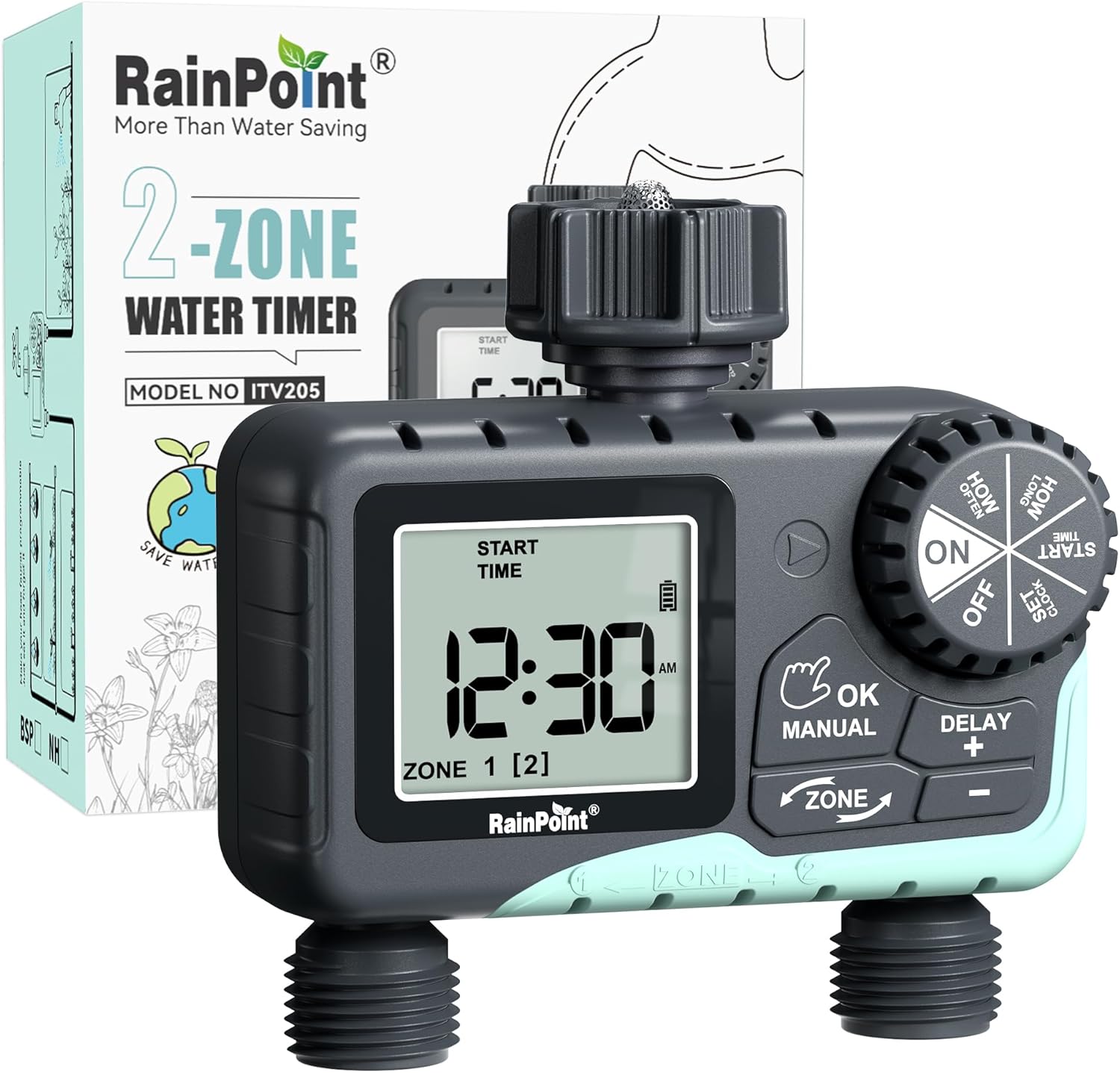
Image: The RAINPOINT 2-Outlet Water Timer, showing the device and its retail packaging. This timer features a digital display and intuitive controls for managing two separate watering zones.
Põhifunktsioonid
- Kahetsooniline juhtimine: Independently program two separate watering zones for customized irrigation.
- Paindlik programmeerimine: Set start times, watering duration (1 minute to 3 hours 59 minutes), and frequency (hourly to weekly).
- Käsitsi kastmisrežiim: Instantly water for a specified duration (1 minute to 8 hours) for Zone 1, Zone 2, or both.
- Vihma viivitusfunktsioon: Skip watering for 24, 48, or 72 hours to conserve water during rainy periods.
- Suur LCD-ekraan: Easy-to-read 2.5-inch screen shows watering time, next irrigation plans, and power status.
- Low Power Auto Shutoff: Alerts when battery is below 5% and automatically closes the valve to prevent water wastage.
- Vastupidav konstruktsioon: Made from IP54 high-impact plastic with a built-in metal filter and 2-generation valve diaphragm for longevity.
- 360° Rotatable Interface: Designed for easy installation and access.

Image: Illustration demonstrating the independent programming capabilities of Zone 1 and Zone 2, allowing for different start times and durations for each watering area.
Pakendi sisu
Palun kontrollige paki sisu, et kõik esemed oleksid olemas:
- 1 x RAINPOINT 2-Outlet Water Timer (Model: G-ITV205NH)
- 1 x kasutusjuhend
- (Batteries not included - requires 2 x AA batteries)
Seadistusjuhend
1. Aku paigaldamine
- Leidke taimeri tagaküljel olev patareipesa.
- Avamiseks libistage aku katet allapoole.
- Insert two (2) new AA alkaline batteries, ensuring correct polarity (+/-).
- Close the battery cover securely. The added seal ring helps prevent water leaks.
Tähtis: Replace batteries when the low battery indicator appears on the LCD screen. The valve will automatically close to prevent water wastage when power is critically low.

Image: The water timer display showing a low battery warning, indicating the need for battery replacement to ensure continuous operation.
2. Segistiga ühendamine
- Ensure your outdoor faucet is turned off.
- Screw the timer's top connector (with the 3/4" internal thread and built-in filter) onto your standard outdoor faucet. Hand-tighten only. Do not overtighten.
- The 360° rotatable interface allows for easy positioning of the timer.
3. Voolikute ühendamine
- Attach your garden hoses to the two NH3/4" outlet fittings at the bottom of the timer.
- Lekete vältimiseks veenduge tihedas ühenduses.

Image: The RAINPOINT 2-Outlet Water Timer installed on an outdoor faucet, with two hoses connected to its independent outlets, demonstrating its dual-zone capability.

Image: A detailed diagram labeling the various parts of the RAINPOINT water timer, including the 3/4" internal thread, 2.5" LCD screen, control dial, buttons, and outlet fittings.
Kasutusjuhised
The RAINPOINT water timer features a large dial for mode selection and several buttons for setting parameters. The dial has positions for ON, OFF, HOW OFTEN, HOW LONG, START TIME, and SET CLOCK.
1. Kella seadistamine
- Keerake ketas asendisse SEADISTA KELL.
- Kasutage + ja - buttons to adjust the current time.
- Vajutage OK/MANUAL to confirm and move to the next setting (e.g., AM/PM).
- Once the time is set, turn the dial to ON salvestamiseks ja väljumiseks.
2. Kastmisgraafikute programmeerimine (automaatrežiim)
You can program independent schedules for Zone 1 and Zone 2. Use the TSOON button to switch between zones.
a. Set Start Time
- Keerake ketas asendisse ALGUSE AEG.
- Vajutage nuppu TSOON button to select either Zone 1 or Zone 2.
- Kasutage + ja - to set the desired start time for the selected zone.
- Vajutage OK/MANUAL kinnitamiseks.
b. Set How Long (Watering Duration)
- Keerake ketas asendisse KUI KAUA.
- Vajutage nuppu TSOON button to select either Zone 1 or Zone 2.
- Kasutage + ja - to set the watering duration (from 1 minute to 3 hours 59 minutes).
- Vajutage OK/MANUAL kinnitamiseks.
c. Set How Often (Watering Frequency)
- Keerake ketas asendisse KUI TIHTI.
- Vajutage nuppu TSOON button to select either Zone 1 or Zone 2.
- Kasutage + ja - to set the watering frequency (e.g., every 12 hours, every 2 days, etc.).
- Vajutage OK/MANUAL kinnitamiseks.
Note: After setting all parameters, turn the dial to ON to activate the programmed schedule.

Image: The water timer display showing options for setting watering duration (1 min - 3h 59m) and frequency (1 hour - 7 days), illustrating the flexibility of automatic scheduling.
3. Käsitsi kastmisrežiim
This mode allows for immediate, temporary watering without affecting your programmed schedule.
- Ensure the dial is in the ON positsiooni.
- Vajutage nuppu OK/MANUAL button. The display will show "MANUAL".
- Vajutage nuppu TSOON button to cycle through watering options: Zone 1, Zone 2, or BOTH ZONE.
- Kasutage + ja - to set the desired manual watering duration (from 1 minute to 8 hours).
- Vajutage OK/MANUAL again to start watering. The timer will count down the duration.
- Käsitsi kastmise enneaegseks peatamiseks vajutage OK/MANUAL uuesti või keerake nuppu asendisse VÄLJAS ja siis tagasi ON.
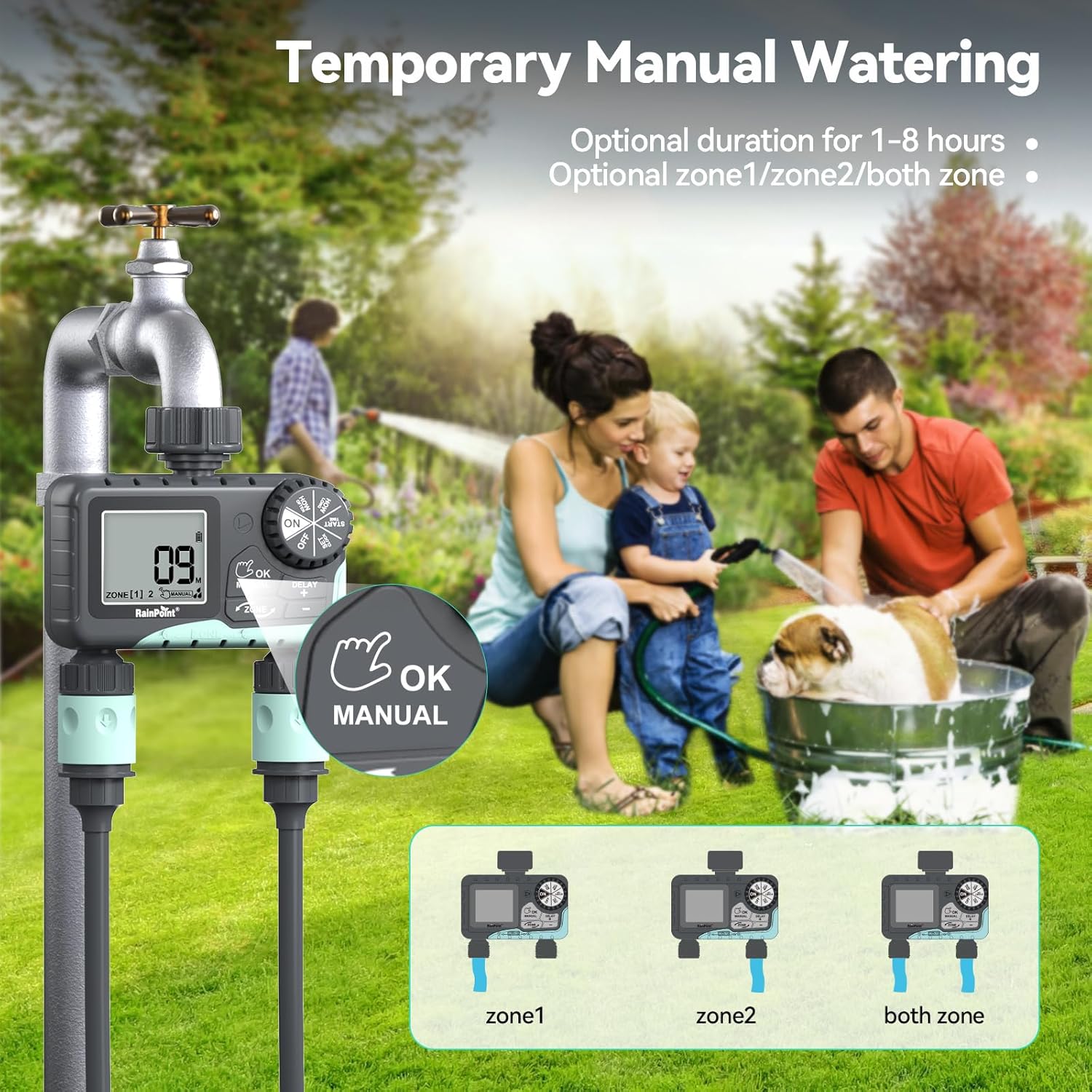
Image: The water timer display showing the manual watering mode, with options to select Zone 1, Zone 2, or both zones for immediate watering, and setting the duration.
4. Vihma viivitusfunktsioon
The rain delay function allows you to pause your watering schedule for a set period, preventing overwatering during rainfall.
- Ensure the dial is in the ON positsiooni.
- Vajutage ja hoidke all nuppu DELAY + button for approximately 3 seconds until "DELAY" appears on the screen.
- Kasutage + ja - buttons to select the delay duration: 24 hours, 48 hours, or 72 hours.
- Vajutage OK/MANUAL to confirm the rain delay. The timer will resume its schedule automatically after the delay period.
- To cancel the rain delay, press and hold the DELAY + nuppu uuesti 3 sekundit.
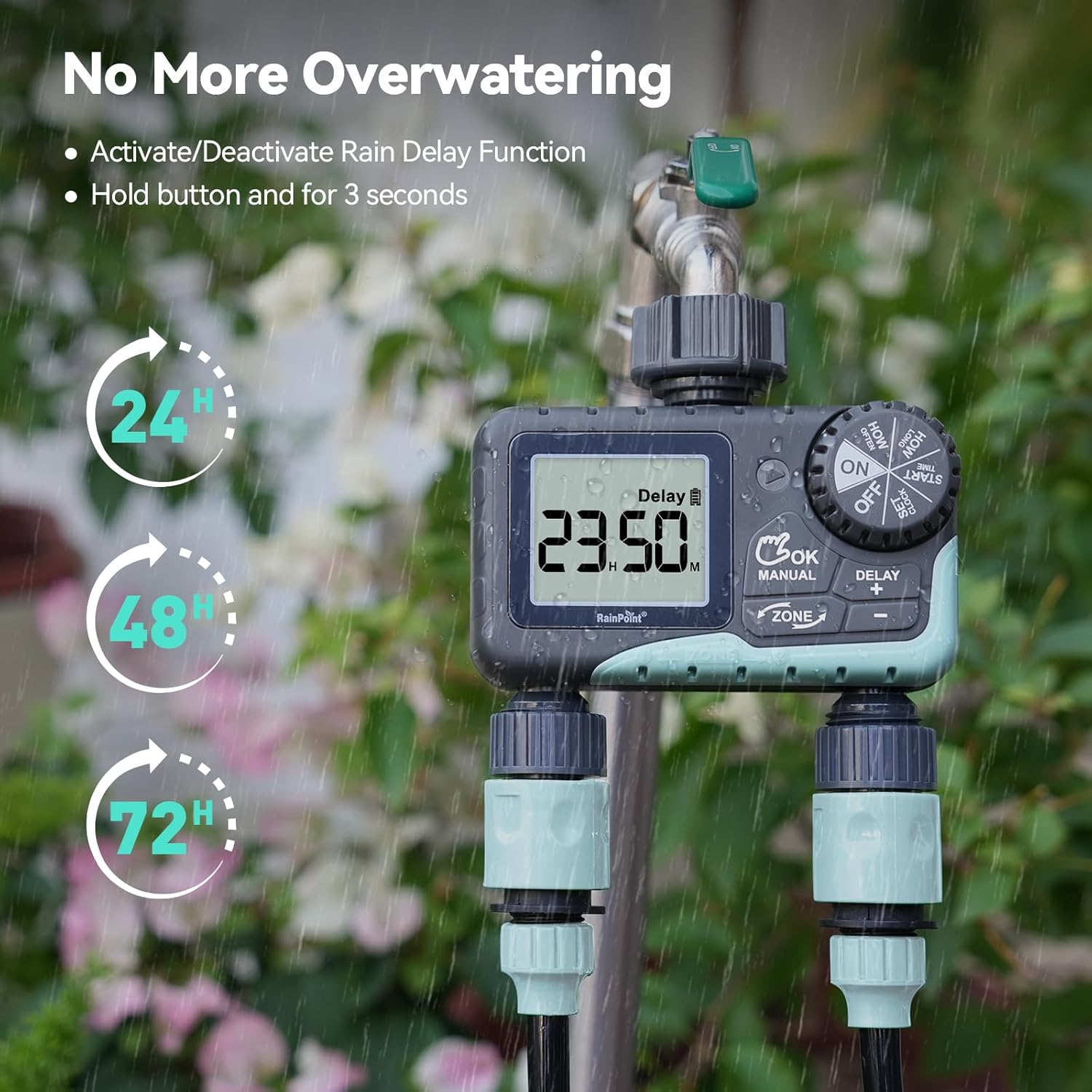
Image: The water timer display showing the rain delay function activated, with options for 24, 48, or 72-hour delays to prevent overwatering during rainy conditions.
5. Taimeri väljalülitamine
Kastmise ja programmeerimise peatamiseks keerake ketas asendisse VÄLJAS. All active programs will be paused.
Hooldus
1. Filtri puhastamine
The timer has a built-in metal filter to prevent debris from entering the unit. Periodically check and clean this filter to ensure optimal water flow and prevent blockages.
- Keerake taimer kraani küljest lahti.
- Remove the filter screen from the top connector.
- Loputage filtrit voolava vee all, et eemaldada kogunenud praht.
- Pange puhas filter tagasi ja kinnitage taimer kraani külge.
2. Aku vahetamine
Vahetage patareid, kui LCD-ekraanile ilmub patareide tühjenemise indikaator. Kasutage alati uusi AA-tüüpi leelispatareisid.
- Keerake ketas asendisse VÄLJAS.
- Avage patareipesa.
- Remove old batteries and insert new ones, observing polarity.
- Sulgege patareipesa kindlalt.
- The timer will retain your programming for a short period during battery replacement.
3. Talveks ettevalmistamine
To prevent damage from freezing temperatures, remove the water timer from the faucet before the first frost.
- Disconnect the timer from the faucet and hoses.
- Eemaldage patareid.
- Hoidke taimerit siseruumides kuivas ja külmavabas kohas.
Veaotsing
| Probleem | Võimalik põhjus | Lahendus |
|---|---|---|
| Taimer ei lülitu sisse/ekraan on tühi. | Tühjad või valesti paigaldatud patareid. | Vahetage patareid uute AA-tüüpi leelispatareide vastu, jälgides õiget polaarsust. |
| Veevool puudub. | Faucet is off; timer is in OFF mode; low battery; clogged filter; incorrect programming. | Turn on faucet; turn dial to ON; replace batteries; clean filter; check programming (start time, duration, frequency). |
| Ühendustest lekib vett. | Lahtised ühendused; kulunud seibid. | Ensure all connections are hand-tight; check and replace rubber washers if damaged. |
| Taimer ei kasta ettenähtud ajal. | Incorrect clock setting; incorrect program settings; rain delay active. | Verify current time; re-check start time, duration, and frequency for each zone; check if rain delay is active. |
| Display shows "LOW BATT". | Patareid on tühjad. | Replace batteries immediately to prevent valve closure and program loss. |
Tehnilised andmed
| Mudeli number | G-ITV205NH |
| Toote mõõtmed | 5.36" P x 5.92" L x 5.55" K |
| Materjal | High-impact Plastic, Metal |
| Värv | Must ja sinine |
| Toiteallikas | 2 x AA leelispatareid (ei kuulu komplekti) |
| Veesurve vahemik | Up to 35 kg (approx. 500 PSI) |
| Voolukiirus | 5-35 l/min |
| Kastmise kestus | 1 minutit kuni 3 tundi 59 minutit |
| Kastmise sagedus | Hourly (up to 12 hours) or Daily (up to 7 days) |
| Käsitsi kastmise kestus | 1 minut kuni 8 tundi |
| Rain Delay Options | 24, 48, 72 tundi |
| Veekindluse reiting | IP54 |
Garantii ja tugi
RAINPOINT products are designed for durability and performance. For warranty information and customer support, please refer to the official RAINPOINT websaidilt või võtke otse ühendust nende klienditeenindusega.
Täiendava abi saamiseks külastage: www.rainpointonline.com
Or contact customer support via email: support@rainpointonline.com


