1. Sissejuhatus
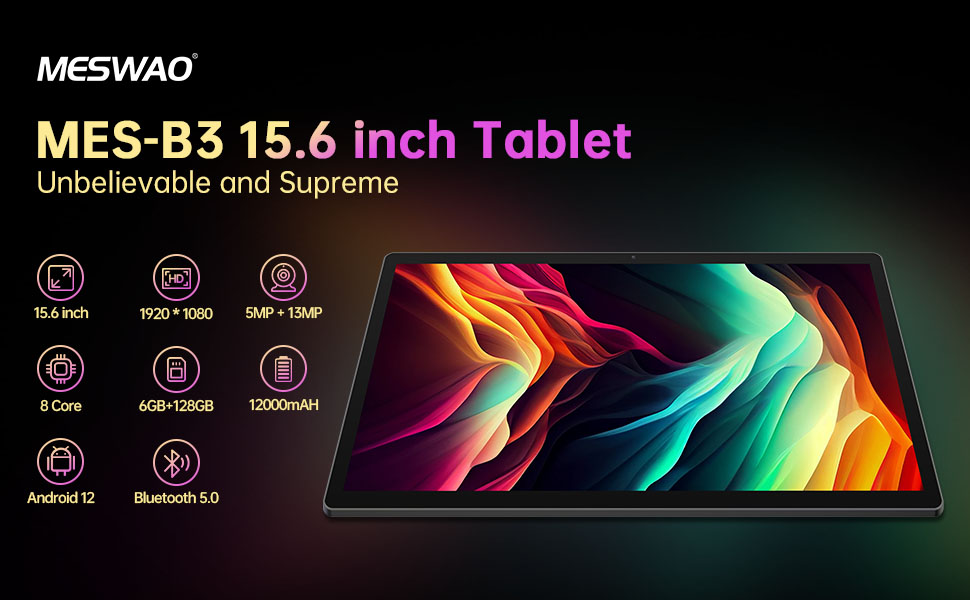
Welcome to the user manual for your MESWAO MES-B3 15.6-inch Android 13 Tablet. This document provides essential information for setting up, operating, maintaining, and troubleshooting your device. The MES-B3 tablet features a large 15.6-inch IPS HD display, an Octa-Core processor, 6GB RAM, 128GB internal storage (expandable), and a 12000mAh battery, designed for a versatile user experience.

Figure 1: MESWAO MES-B3 Tablet Overview
2. Ohutusalane teave
Please read all safety instructions carefully before using your tablet to prevent injury or damage to the device. Keep this manual for future reference.
- Aku ohutus: Do not attempt to replace the battery yourself. Do not expose the tablet to extreme temperatures, direct sunlight, or fire. Do not puncture, drop, or disassemble the battery.
- Vesi ja niiskus: This tablet is not waterproof. Avoid exposing it to water, rain, or high humidity.
- Puhastamine: Use a soft, dry cloth to clean the tablet. Do not use liquid cleaners or aerosols.
- Käitlemine: Avoid dropping the tablet or subjecting it to strong impacts.
- Kuulmiskaitse: When using headphones, set the volume to a moderate level to avoid hearing damage.
3. Pakendi sisu
Veenduge, et pakendis on kõik esemed olemas:
- MESWAO MES-B3 15.6-inch Android 13 Tablet
- Toiteadapter
- USB-C kaabel
- Kasutusjuhend (see dokument)
4. Seade üleview
Familiarize yourself with the physical components of your MESWAO MES-B3 tablet.

Figure 2: Buttons and Connectors
- Toitenupp: Press and hold to turn the tablet on or off. Press briefly to turn the screen on or off.
- Helitugevuse nupud: Reguleerige helitugevust.
- Esikaamera: Videokõnede ja selfide jaoks (5MP).
- Rear Camera with Flashlight: Fotode ja videote tegemiseks (13MP).
- C-tüüpi tüüp: Tahvelarvuti laadimiseks ja arvutiga ühendamiseks.
- TF-kaardi pesa: Insert a MicroSD card to expand storage.
- Stereokõlarid: Pakkuge heliväljundit.
5. Seadistamine
5.1 Tahvelarvuti laadimine
Before first use, fully charge your tablet. Connect the USB-C cable to the tablet's Type-C port and the other end to the power adapter. Plug the adapter into a wall outlet. The battery indicator on the screen will show charging status.
5.2 Sisse-/väljalülitamine
- Sisselülitamiseks: Press and hold the Power Button until the MESWAO logo appears.
- Väljalülitamiseks: Press and hold the Power Button until the power options appear, then select 'Power off'.
- Taaskäivitamiseks: Press and hold the Power Button until the power options appear, then select 'Restart'.
5.3 Esialgse seadistuse viisard
Upon first power-on, the tablet will guide you through an initial setup process:
- Valige eelistatud keel.
- Ühendage Wi-Fi võrguga.
- Logi sisse oma Google'i kontoga või loo uus.
- Review ja nõustuge tingimustega.
- Ekraaniluku seadistamine (PIN-kood, muster, parool).
5.4 MicroSD-kaardi sisestamine
To expand the tablet's storage, you can insert a MicroSD card (up to 256GB, as per some product information, though 1TB is also mentioned in images, please verify with product packaging for exact maximum). Locate the TF card slot on the side of the tablet. Gently insert the MicroSD card with the gold contacts facing down until it clicks into place.

Figure 3: Storage Expansion with MicroSD Card
6. Tahvelarvuti kasutamine
6.1 Lihtne navigeerimine
The MESWAO MES-B3 runs on Android 13, offering an intuitive touch interface.
- Puudutage: Valige üksus või avage rakendus.
- Pühkige: Liikuge ekraanide vahel, kerige loendeid või sulgege teatised.
- Näpistamine suumimiseks: Suurenda või vähenda ekraanil kuvatavat sisu.
- Avakuva: Access your apps and widgets. Swipe down from the top for notifications and quick settings.
Joonis 4: Android 13 liides
6.2 Wi-Fi-ühendus
- Mine aadressile Seaded > Võrk ja internet > Internet.
- Lülitage Wi-Fi sisse.
- Valige loendist soovitud võrk ja sisestage parool, kui seda küsitakse.
6.3 Bluetoothi sidumine
The tablet supports Bluetooth 5.0 for connecting wireless accessories.
- Mine aadressile Seaded > Ühendatud seadmed > Ühenduse eelistused > Bluetooth.
- Lülitage Bluetooth sisse.
- Veenduge, et teie Bluetooth-seade oleks sidumisrežiimis.
- Select your device from the 'Available devices' list and follow on-screen prompts to pair.
6.4 Rakenduste haldus
- Installige rakendused: Ava Google Play poe rakendus, otsi üles soovitud rakendus ja puuduta nuppu „Installi”.
- Rakenduste desinstallimine: Press and hold an app icon on the home screen or app drawer, then drag it to 'Uninstall' or select 'App info' and choose 'Uninstall'.
- Rakenduste haldamine: Mine aadressile Seaded > Rakendused juurde view, force stop, or clear data for installed applications.
6.5 Ekraani seaded
Kohandage oma viewkogemus:
- Mine aadressile Seaded > Ekraan.
- Kohandage Heleduse tase.
- Määra Ekraani ajalõpp (sleep duration).
- Muuda Fondi suurus ja Ekraani suurus.
- Luba Tume teema silmade koormuse vähendamiseks.
6.6 Akuhaldus
The MES-B3 features a 12000mAh battery for extended use.

Joonis 5: Pikendatud aku tööiga
- Mine aadressile Seaded > Aku juurde view usage and optimize settings.
- Luba Akusäästja mode to extend battery life when needed.
- Sulgege taustal töötavad kasutamata rakendused.
- Vähendage ekraani heledust.
7. Hooldus
7.1 Puhastamine
- Ekraani ja korpuse õrnalt pühkimiseks kasutage pehmet, ebemevaba lappi.
- Kangekaelsete plekkide korral kergelt dampLoputage lappi veega või spetsiaalselt elektroonika jaoks mõeldud ekraanipuhastusvahendiga.
- Avoid using abrasive materials, alcohol, or chemical solvents.
7.2 Säilitamine
- Hoidke tabletti jahedas ja kuivas kohas, eemal otsesest päikesevalgusest ja äärmuslikest temperatuuridest.
- If storing for an extended period, ensure the battery is charged to about 50% to prolong its lifespan.
7.3 Tarkvaravärskendused
Optimaalse jõudluse ja turvalisuse tagamiseks kontrollige regulaarselt tarkvarauuendusi.
- Mine aadressile Seaded > Süsteem > Süsteemi värskendus.
- Tahvelarvuti kontrollib saadaolevaid värskendusi. Järgige ekraanil kuvatavaid juhiseid värskenduste allalaadimiseks ja installimiseks.
8. Veaotsing
Siin on lahendused levinud probleemidele, millega võite kokku puutuda:
| Probleem | Lahendus |
|---|---|
| Tahvelarvuti ei lülitu sisse | Ensure the tablet is charged. Connect it to the charger for at least 30 minutes, then try powering it on again. |
| Wi-Fi ühenduse probleemid | Restart your Wi-Fi router and the tablet. Go to Settings > Network & internet > Internet, forget the network, and reconnect. |
| Aeglane jõudlus | Close unused apps. Clear cache for frequently used apps (Settings > Apps > [App Name] > Storage & cache > Clear cache). Restart the tablet. |
| Aku tühjeneb kiiresti | Reduce screen brightness. Disable Wi-Fi/Bluetooth when not in use. Close background apps. Check battery usage in Settings > Battery to identify power-hungry apps. |
| Rakendused jooksevad kokku või hanguvad | Force stop the app (Settings > Apps > [App Name] > Force stop). Clear the app's cache. If the problem persists, uninstall and reinstall the app. |
9. Tehnilised andmed
Detailed technical specifications for the MESWAO MES-B3 tablet:

Joonis 6: Peamised omadused ja tehnilised andmed
| Funktsioon | Spetsifikatsioon |
|---|---|
| Kaubamärk | MESWAO |
| Mudeli number | MES-B3 |
| Operatsioonisüsteem | Android 13 |
| Protsessor | MediaTek Octa-Core (MTK6789) |
| RAM | 6 GB |
| Sisemälu | 128 GB |
| Laiendatav salvestusruum | Up to 256 GB (via TF/MicroSD card) |
| Ekraani suurus | 15.6 tolli |
| Ekraani eraldusvõime | 1920 x 1080 pikslit (IPS HD) |
| Esikaamera | 5 MP |
| Tagumine kaamera | 13 MP |
| Aku mahutavus | 12000 mAh |
| Aku tööiga | Approximately 10 hours (usage dependent) |
| Ühenduvus | Bluetooth 5.0, Wi-Fi (802.11ac, 2.4G/5G) |
| Sadamad | USB Type-C, TF Card Slot |
| Värv | Hall |
| Mõõdud (P x L x K) | 36.85 x 22.25 x 0.93 cm |
| Kaal | 1.1 kilogrammi |
10. Garantii ja tugi
Your MESWAO MES-B3 tablet is covered by a standard manufacturer's warranty. Please refer to the warranty card included in your package for specific terms and conditions, including warranty duration and coverage details.
For technical support, troubleshooting assistance beyond this manual, or warranty claims, please contact MESWAO customer service through the retailer where you purchased the product or visit the official MESWAO websait kontaktteabe saamiseks.


