1. Sissejuhatus
Thank you for choosing the Defender Enjoy S200 Portable Bluetooth Speaker. This manual provides essential information for setting up, operating, and maintaining your speaker to ensure optimal performance and longevity. Please read this manual thoroughly before use.
The Defender Enjoy S200 is a versatile portable speaker featuring Bluetooth 5.3 connectivity, True Wireless Stereo (TWS) pairing, an integrated FM radio, and MP3 playback capabilities via USB flash drive or microSD card. It also includes an LED light and supports hands-free calling. Designed for portability, it offers up to 9 hours of playback on a single charge and convenient USB Type-C charging.
2. Toote lõppview
2.1 Põhifunktsioonid
- Bluetooth 5.3: Stabiilse ja tõhusa juhtmevaba heli voogedastuse jaoks.
- True Wireless Stereo (TWS): Connect two Enjoy S200 speakers for a stereo sound experience.
- Mitu taasesitusrežiimi: Bluetooth, FM Radio, USB Flash Drive, MicroSD Card (up to 32GB).
- Integreeritud LED-valgusti: Provides visual ambiance.
- Käed-vabad helistamine: Sisseehitatud mikrofon telefonikõnede jaoks.
- Pikk aku tööiga: Up to 9 hours of continuous music playback.
- USB-tüüpi C laadimine: Moodne ja mugav laadimisport.
- Kaasaskantav disain: Compact and lightweight with a carrying strap.
2.2 Pakendi sisu
- Defender Enjoy S200 Portable Bluetooth Speaker
- C-tüüpi laadimiskaabel
- Kiirjuhend
- Kanderihm

Image: The Defender Enjoy S200 Portable Bluetooth Speaker, showcasing its compact design and front grille with an illuminated LED ring.

Image: An infographic highlighting key features such as multi-colored LED lighting, True Wireless Stereo (TWS) pairing, Bluetooth 5.3, MP3 player, FM receiver, and hands-free calling.
3. Seadistamine
3.1 Kõlari laadimine
- Locate the Type-C charging port on the back of the speaker.
- Connect the provided Type-C charging cable to the speaker and the other end to a USB power adapter (not included) or a computer's USB port.
- LED-indikaator näitab laadimise olekut. Täielik laadimine võtab tavaliselt umbes 3–4 tundi.
- Kui aku on täielikult laetud, ühendage kaabel lahti.
3.2 Sisse-/väljalülitamine
- To power on, slide the ON/OFF switch located on the back of the speaker to the 'ON' position.
- Väljalülitamiseks libistage ON/OFF lüliti asendisse „OFF”.
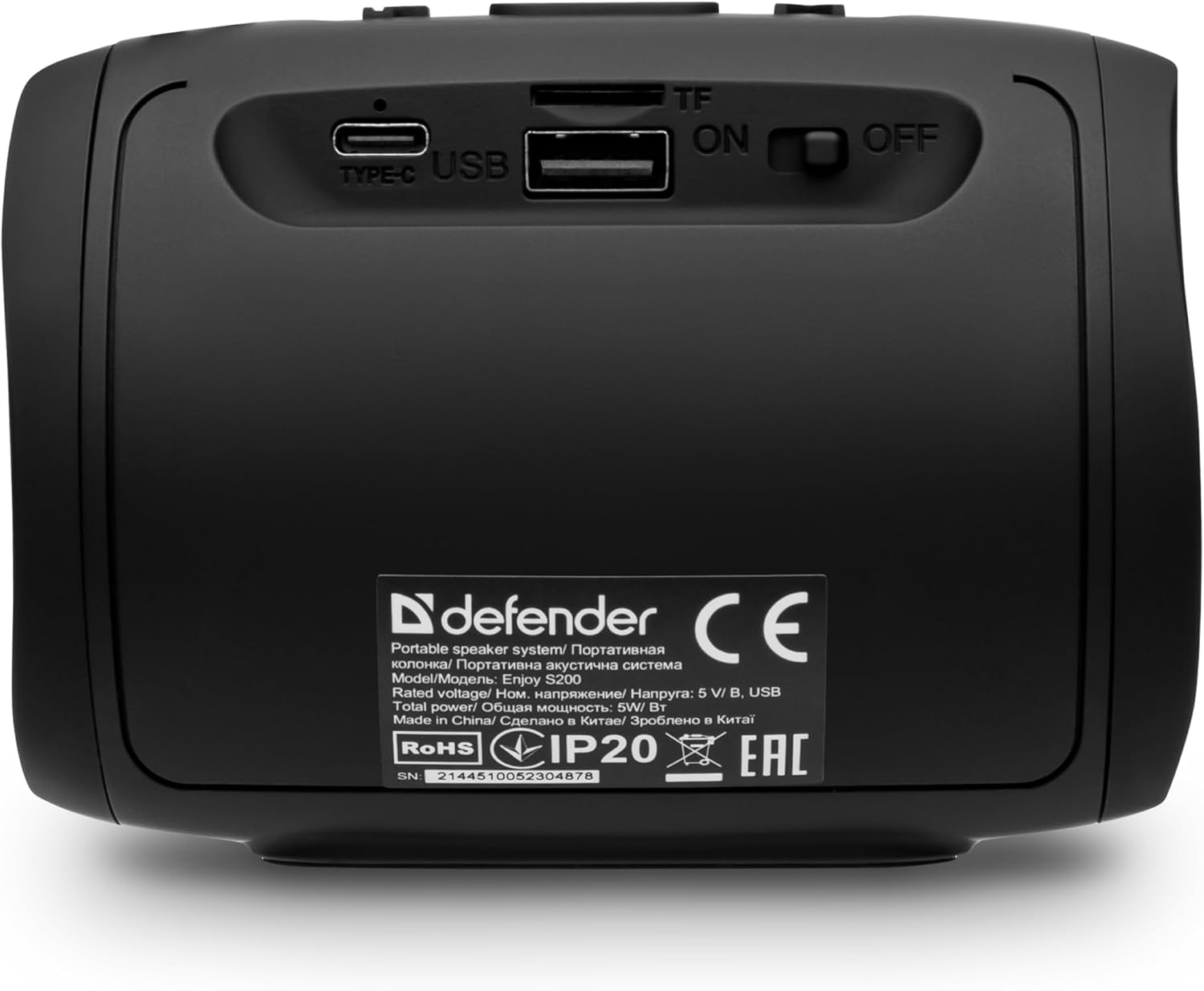
Pilt: Tagumine view of the Defender Enjoy S200 speaker, showing the Type-C charging port, USB port, TF (microSD) card slot, and the ON/OFF power switch.
3.3 Bluetoothi sidumine
- Veenduge, et kõlar on sisse lülitatud ja Bluetoothi sidumisrežiimis (seda näitab vilkuv LED-tuli).
- Luba oma seadmes (nutitelefon, tahvelarvuti jne) Bluetooth ja otsi saadaolevaid seadmeid.
- Select "Defender Enjoy S200" from the list of devices.
- Pärast sidumist kostab kinnitusheli ja LED-tuli lõpetab vilkumise.
3.4 Tõeliselt traadita stereo (TWS) sidumine
To pair two Defender Enjoy S200 speakers for stereo sound:
- Veenduge, et mõlemad kõlarid on sisse lülitatud ja pole ühendatud ühegi Bluetooth-seadmega.
- On one speaker (this will be the primary speaker), press and hold the TWS button (often indicated by a double-arrow icon) until you hear a pairing tone.
- The two speakers will automatically search and connect to each other. A confirmation tone will sound once connected.
- Now, connect your device to the primary speaker via Bluetooth as described in section 3.3. Audio will play in stereo through both speakers.

Image: A visual representation of two Defender Enjoy S200 speakers pairing wirelessly to create a True Wireless Stereo system, alongside icons for Bluetooth 5.3, MP3 player, FM receiver, and hands-free calling.
4. Kasutusjuhised
4.1 Button Functions (Refer to top panel controls)
- Toitenupp: Long press to power on/off. Short press to play/pause in music mode, or answer/end calls.
- Helitugevuse suurendamine (+): Short press to increase volume. Long press for next track/station.
- Hääl maha (-): Short press to decrease volume. Long press for previous track/station.
- Režiimi (M) nupp: Short press to switch between Bluetooth, FM Radio, USB, and MicroSD modes.
- LED -valgusnupp: Short press to cycle through LED light modes or turn off the LED.
4.2 Bluetoothi taasesitus
After successful Bluetooth pairing (Section 3.3), open your music application on your device and begin playback. Use the speaker's volume buttons or your device's volume controls to adjust the audio level.
4.3 FM-raadiorežiim
- Press the 'M' (Mode) button until you hear the FM radio prompt.
- Saadaval olevate FM-jaamade automaatseks skannimiseks ja salvestamiseks vajutage pikalt nuppu Esita/Paus.
- Use the Volume Up (+) and Volume Down (-) buttons (long press) to navigate between saved stations.
4.4 USB/MicroSD taasesitus
- Insert a USB flash drive or a microSD card (up to 32GB) containing MP3 audio files into the respective port on the back of the speaker.
- Press the 'M' (Mode) button until the speaker automatically switches to USB or MicroSD mode and begins playback.
- Use the speaker's control buttons for play/pause, next track, and previous track.
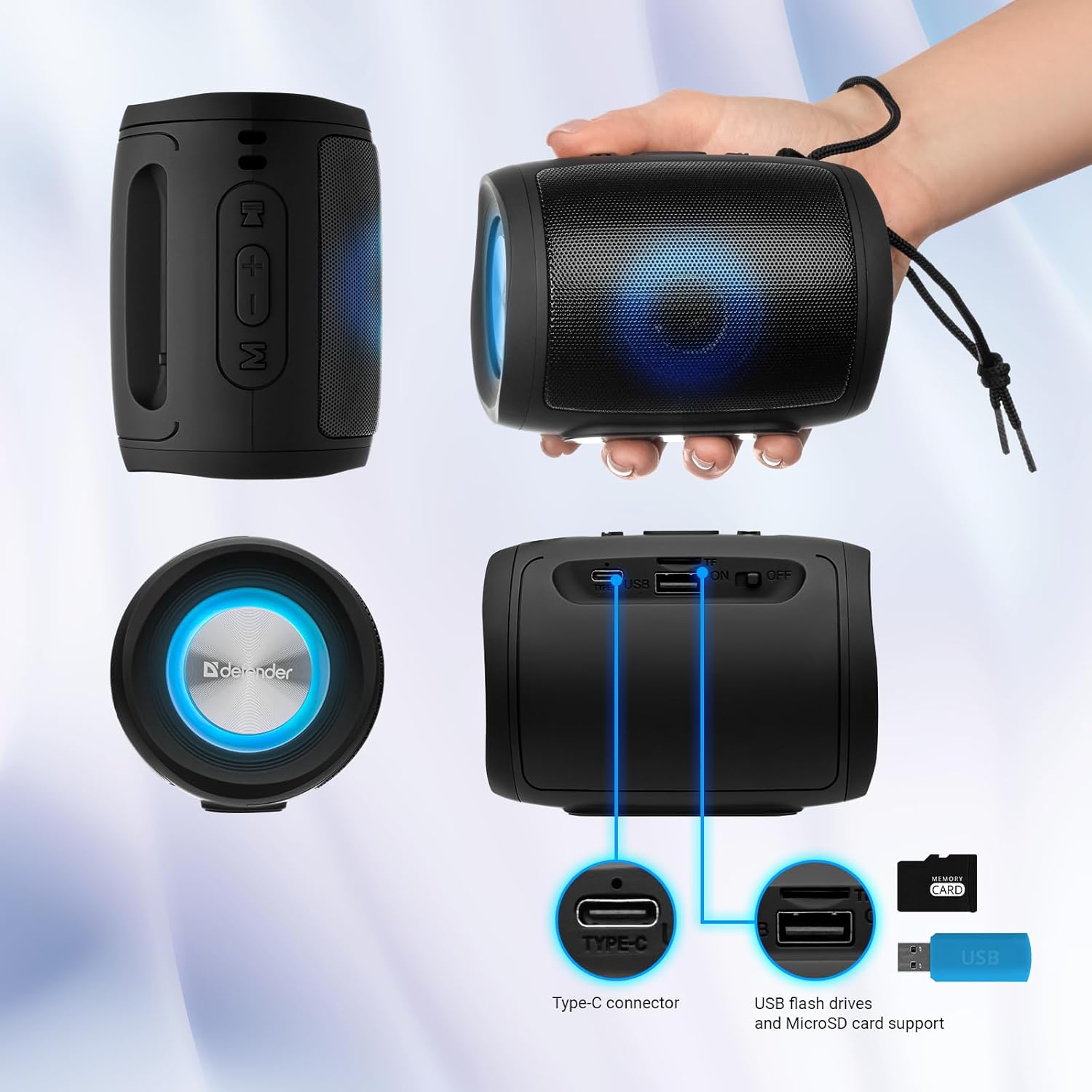
Image: A detailed diagram illustrating the Type-C connector, USB flash drive port, and MicroSD card slot on the Defender Enjoy S200 speaker.
4.5 Käed-vabad kõned
When connected to your smartphone via Bluetooth, the speaker's built-in microphone allows for hands-free calls.
- Vasta kõnele: Vajutage lühidalt nuppu Esita/Paus.
- Kõne lõpetamine: Vajutage lühidalt nuppu Esita/Paus.
- Keeldu kõnest: Vajutage kaua nuppu Esita/Paus.
5. Hooldus
- Puhastamine: Kõlari pinna puhastamiseks kasutage pehmet ja kuiva lappi. Ärge kasutage abrasiivseid puhastusvahendeid ega lahusteid.
- Hoiustamine: Hoidke kõlarit jahedas ja kuivas kohas, eemal otsesest päikesevalgusest ja äärmuslikest temperatuuridest.
- Veekindlus: The speaker has an IP20 rating, meaning it is protected against solid objects larger than 12.5mm but has no protection against water. Avoid exposure to rain, splashes, or immersion in water.
- Aku hooldus: Aku tööea pikendamiseks laadige kõlar enne esmakordset kasutamist täielikult ja laadige seda vähemalt kord kolme kuu jooksul, kui seda regulaarselt ei kasutata.
6. Veaotsing
- Toide puudub: Ensure the speaker is charged. Connect the Type-C cable and allow it to charge for a few minutes before attempting to power on again.
- Heli puudub: Check the volume levels on both the speaker and your connected device. Ensure the speaker is in the correct mode (Bluetooth, FM, USB, MicroSD).
- Bluetoothi sidumisprobleemid: Ensure the speaker is in pairing mode. Turn off Bluetooth on your device and turn it back on. Try unpairing and re-pairing the speaker. Move closer to the speaker to ensure you are within the 10-meter range.
- FM-raadio vastuvõtt on halb: Ensure you are in an area with good signal. The charging cable can sometimes act as an antenna; try connecting it for improved reception.
- USB/MicroSD Not Playing: Veenduge heli files are in a compatible format (e.g., MP3). Check that the USB drive or microSD card is inserted correctly and is not corrupted.
7. Tehnilised andmed
| Mudeli nimi | Nautige S200 |
| Kauba mudeli number | 65200 |
| Kaubamärk | Kaitsja |
| Ühenduvustehnoloogia | Bluetooth 5.3, USB |
| Traadita side tehnoloogia | Bluetooth, raadiosagedus |
| Kõlari tüüp | Multimeedia |
| Kõlari suurus | 2 tolli |
| Toiteväljund | 5 vatti |
| Heliväljundi režiim | Stereo |
| Toiteallikas | Akutoitel (1 liitiumioonaku on komplektis) |
| Eriomadused | Integrated Microphone, USB Port, Portable Bluetooth, LED Light, FM Radio, MicroSD Card Support, TWS |
| Toote mõõtmed (P x L x K) | 8 x 11 x 8 cm |
| Kaal | 330 grammi |
| Maksimaalne vahemik | 10 meetrit |
| IP reiting | IP20 |
8. Garantii ja tugi
8.1 Garantii teave
Täpsemad garantiitingimused on tavaliselt esitatud ostudokumentides või tootja ametlikul teabelehel. website. Please refer to these resources for information regarding warranty coverage and duration.
8.2 Klienditugi
For technical assistance, troubleshooting beyond this manual, or inquiries about your Defender Enjoy S200 speaker, please contact Defender Global customer support. Contact information can usually be found on the product packaging, the manufacturer's websaidilt või ostutšekilt.


