1. Sissejuhatus
Thank you for choosing the techno line WT2600 Digital Calendar. This device provides accurate time, date, indoor temperature, and humidity readings, along with alarm functions. This manual will guide you through the setup, operation, and maintenance of your new digital calendar.
2. Ohutusalane teave
- Ärge jätke seadet äärmuslike temperatuuride, otsese päikesevalguse ega kõrge õhuniiskuse kätte.
- Vältige seadme maha pillamist ega tugevate löökide saamist.
- Ärge proovige seadet ise lahti võtta ega parandada. Pöörduge kvalifitseeritud hooldustöötaja poole.
- Kõrvaldage kasutatud patareid vastutustundlikult vastavalt kohalikele eeskirjadele.
- Hoidke seadet lastele kättesaamatus kohas.
3. Pakendi sisu
Palun kontrollige, kas pakis on kõik esemed olemas:
- techno line WT2600 Digital Calendar Unit
- Kasutusjuhend (see dokument)
- Batteries (may be included depending on region)
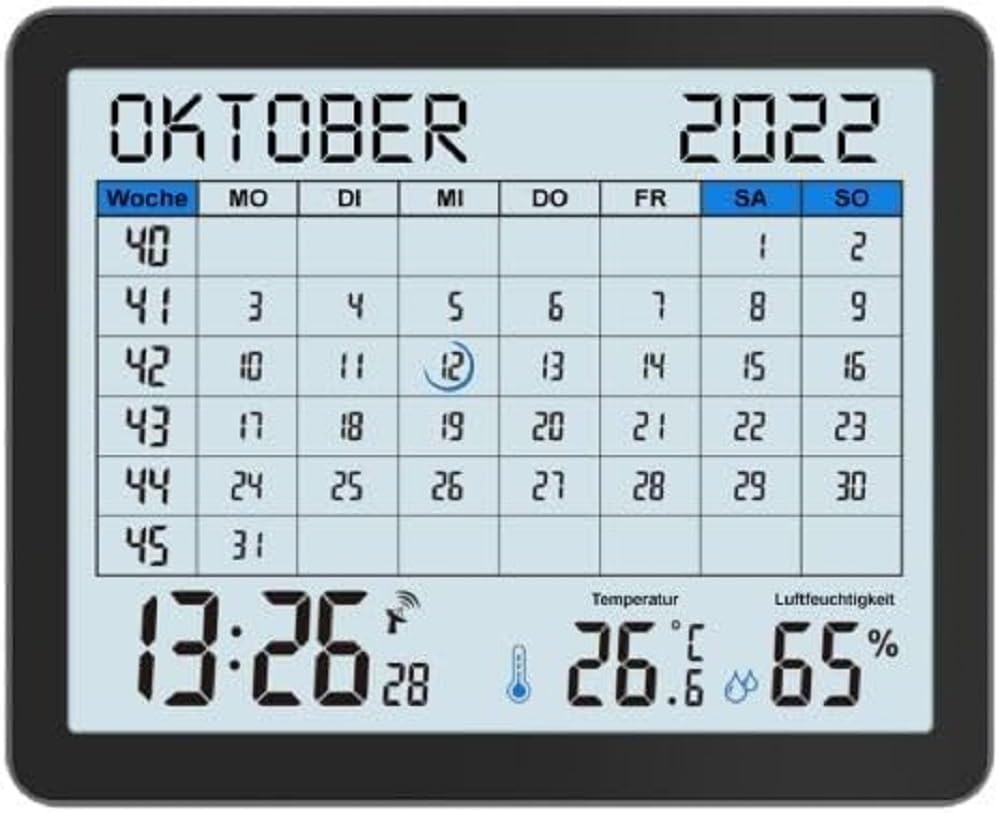
Image of the techno line WT2600 Digital Calendar packaging, showing the device and its key features.
4. Toote omadused
The techno line WT2600 Digital Calendar offers the following key features:
- DCF-77 raadio teel juhitav kell: Automatic time synchronization for precise timekeeping, with an option for manual setting.
- 12/24 Hour Time Display: Select your preferred time format.
- Kalendri ekraan: Shows the current date, day of the week, and month.
- 7-Language Month Display: Choose from seven languages for the month display.
- Sisetemperatuuri näidik: Shows indoor temperature in Celsius (°C) or Fahrenheit (°F).
- Indoor Humidity Display: Displays the current indoor humidity level.
- MIN/MAX Display: Records and displays the minimum and maximum temperature and humidity values.
- Dual Alarms with Snooze: Set two independent alarms with a convenient snooze function.
- Aku tühjenemise indikaator: Annab märku, kui patareid vajavad vahetamist.
- Mitmekülgne paigutus: Designed for both wall mounting and table standing.

Esiosa view of the techno line WT2600 Digital Calendar display, showing the calendar grid, current time, temperature, and humidity.
5. Seadistamine
5.1 Aku paigaldamine
- Otsige üles patareipesa seadme tagaküljel.
- Avage patareipesa kaas.
- Insert the required batteries (e.g., 2 x AAA, not specified in data, common for such devices) according to the polarity markings (+ and -).
- Sulgege akupesa kaas kindlalt.
5.2 Initial Power On and DCF-77 Signal Reception
Upon battery insertion, the device will power on and automatically begin searching for the DCF-77 radio signal. This process may take several minutes. For optimal reception, place the unit near a window and away from electronic interference.
- A signal icon (e.g., an antenna symbol) will flash during signal search.
- Once the signal is received, the time and date will be set automatically, and the signal icon will become solid.
- If no signal is received after 10-15 minutes, try repositioning the unit.
5.3 Kellaaja ja kuupäeva käsitsi seadistamine
If automatic synchronization is not desired or unsuccessful, you can set the time and date manually.
- Press and hold the 'SET' button (or similar, refer to device buttons) for a few seconds to enter manual setting mode.
- Vilkuva väärtuse (nt tund, minut, aasta, kuu, päev) reguleerimiseks kasutage nuppe '+' või '-'.
- Press 'SET' again to confirm the current setting and move to the next adjustable parameter.
- Korda, kuni kõik seaded on tehtud.
5.4 Keele seadistus
To change the display language for the month:
- Enter the setting mode (e.g., by pressing 'SET').
- Navigate through the settings until the language option appears.
- Use the '+' or '-' buttons to cycle through the available 7 languages.
- Kinnitage oma valik.
6. Töötamine
6.1 ViewKellaaja, kuupäeva, temperatuuri ja niiskuse kuvamine
The main display continuously shows the current time, date, indoor temperature, and indoor humidity. You can switch between 12-hour and 24-hour time formats by pressing a dedicated button (e.g., '12/24H' or 'MODE').
6.2 Häirete seadistamine
The device features two independent alarms.
- Press the 'ALARM' button (or similar) to view Äratus 1 korda.
- Press and hold 'ALARM' to enter Alarm 1 setting mode.
- Use '+' or '-' to adjust the hour and minute, pressing 'ALARM' to confirm each.
- Repeat for Alarm 2.
- To activate/deactivate an alarm, press 'ALARM' repeatedly until the alarm icon appears/disappears.
6.3 Edasilükkamise kasutamine
When an alarm sounds, press the 'SNOOZE' button (or similar, often a large button on top) to temporarily silence the alarm. The alarm will sound again after a few minutes (typically 5-10 minutes). To stop the alarm completely, press any other button.
6.4 MIN/MAX Display Function
The device records the minimum and maximum temperature and humidity values since the last reset.
- Press the 'MIN/MAX' button (or similar) once to view maksimaalsed registreeritud väärtused.
- Press it again to view minimaalsed registreeritud väärtused.
- To reset the MIN/MAX records, press and hold the 'MIN/MAX' button while viewrekordite ülekandmine.

Close-up of the techno line WT2600 Digital Calendar display, highlighting the time, temperature, and humidity readings.
7. Hooldus
7.1 Puhastamine
Pühkige seadet pehme, damp lapiga. Ärge kasutage abrasiivseid puhastusvahendeid ega lahusteid, kuna need võivad ekraani või korpust kahjustada.asing.
7.2 Aku vahetamine
When the low battery indicator appears on the display, replace all batteries with new ones of the same type. Follow the battery installation steps in Section 5.1.
8. Veaotsing
- Kuvarit pole: Check battery polarity and ensure batteries are fresh.
- Vale kellaaeg/kuupäev: Ensure the DCF-77 signal icon is solid. If not, reposition the unit or set the time manually (Section 5.3). Check your time zone setting if applicable (not explicitly mentioned in data, but common).
- Temperature/Humidity Readings Seem Inaccurate: Ensure the unit is placed in a location with good air circulation, away from direct heat sources or drafts. Allow some time for readings to stabilize after initial setup or relocation.
- Alarm ei kõla: Verify that the alarm is activated (alarm icon displayed) and the alarm time is set correctly.
9. Tehnilised andmed
| Funktsioon | Spetsifikatsioon |
|---|---|
| Mudeli number | WT2600 |
| Mõõdud (P x L x K) | 17.3 x 3.81 x 14 cm |
| Kaal | 380 g |
| Värv | Must |
| Materjal | Plastikust |
| Toiteallikas | Akutoitel |
| Kuva tüüp | Digitaalne |
| Kasutamine siseruumides/välistingimustes | Siseruumides |
10. Garantii ja tugi
Information regarding product warranty and customer support was not available in the provided product data. Please refer to the retailer or manufacturer's official webLisateavet garantii ja tugivõimaluste kohta leiate veebisaidilt.


