1. Sissejuhatus
This manual provides essential information for setting up, operating, and maintaining your SAMSUNG Galaxy Tab S9 (Model SM-X710). Please read this manual thoroughly to ensure proper use and to maximize the performance of your device.
The Galaxy Tab S9 features an 11-inch AMOLED display, a powerful Snapdragon 8 Gen 2 processor, 128GB of storage, and runs on the Android operating system. It supports Wi-Fi 6E and Bluetooth 5.3 connectivity.
2. Seadistamine
2.1 Karbist väljavõtmine ja esialgne laadimine
Carefully remove all components from the packaging. The box should contain the SAMSUNG Galaxy Tab S9 and a charging cable. Before first use, fully charge the tablet using the provided charging cable and a compatible power adapter (sold separately).

Pilt: Esikülg view of the SAMSUNG Galaxy Tab S9 tablet.
2.2 Sisse-/väljalülitamine
- Sisselülitamiseks: Vajutage ja hoidke tahvelarvuti küljel asuvat toitenuppu all, kuni ilmub Samsungi logo.
- Väljalülitamiseks: Press and hold the Power button, then tap "Power off" on the screen. Alternatively, swipe down from the top of the screen to open the Quick Settings panel, tap the Power icon, and select "Power off".
- Taaskäivitamiseks: Vajutage ja hoidke toitenuppu all, seejärel puudutage ekraanil nuppu „Taaskäivita”.
2.3 Esialgse seadistuse viisard
Esimesel sisselülitamisel juhendab tahvelarvuti teid esmase seadistamise protsessis. Järgige ekraanil kuvatavaid juhiseid, et teha järgmist.
- Valige eelistatud keel.
- Ühendage Wi-Fi võrguga.
- Logi sisse oma Google'i kontoga või loo uus.
- Turvafunktsioonide seadistamine (nt PIN-kood, muster, sõrmejälg).
- Review ja nõustuge tingimustega.
3. Tahvelarvuti kasutamine
3.1 Lihtne navigeerimine
- Avakuva: Avakuvade vahel liikumiseks libista vasakule või paremale. Rakenduse avamiseks puuduta selle ikooni.
- Rakenduse sahtel: Kõigile installitud rakendustele juurdepääsemiseks libistage avakuva allosast üles.
- Teavitused ja kiirseaded: Pühkige ekraani ülaosast alla kuni view notifications and access quick settings toggles (Wi-Fi, Bluetooth, brightness, etc.).
- Viimased rakendused: Swipe up from the bottom of the screen and hold, then release to view hiljuti avatud rakendused.
3.2 WiFi ja Bluetooth-ühenduvus
- WiFi: Mine aadressile Seaded > Ühendused > WiFi. Turn Wi-Fi on and select your desired network. Enter the password if prompted.
- Bluetooth: Mine aadressile Seaded > Ühendused > Bluetooth. Turn Bluetooth on and select a device from the list to pair.
3.3 S-pliiatsi kasutamine
The Galaxy Tab S9 is compatible with the S Pen (sold separately or included with some bundles). The S Pen allows for precise writing, drawing, and navigation. It magnetically attaches to the back of the tablet for charging and storage.

Image: SAMSUNG Galaxy Tab S9 with S Pen.

Pilt: Tagasi view of the SAMSUNG Galaxy Tab S9, highlighting the S Pen storage area.
- Õhuväejuhatus: Hover the S Pen over the screen and press the S Pen button to open the Air Command menu for quick access to S Pen features like Create note, Smart select, and Screen write.
- Laadimine: Attach the S Pen to the magnetic strip on the back of the tablet to charge it.
4. Hooldus
4.1 Seadme puhastamine
Tahvelarvuti puhastamiseks kasutage pehmet ja ebemevaba lappi. Kangekaelsete plekkide korral nühkige seda kergelt.ampLoputage lappi veega või spetsiaalselt elektroonika jaoks mõeldud ekraanipuhastusvahendiga. Vältige karmide kemikaalide, abrasiivsete materjalide ja liigse niiskuse kasutamist.
4.2 Tarkvaravärskendused
Optimaalse jõudluse, turvalisuse ja uutele funktsioonidele juurdepääsu tagamiseks hoidke oma tahvelarvuti tarkvara ajakohasena. Minge aadressile Seaded > Tarkvarauuendus > Laadi alla ja installi värskenduste kontrollimiseks ja rakendamiseks.
4.3 Aku hooldus
To prolong battery life, avoid extreme temperatures. It is recommended to keep the battery charge between 20% and 80% for long-term health. Use only Samsung-approved charging accessories.
5. Veaotsing
Kui teil tekib Galaxy Tab S9-ga probleeme, vaadake järgmisi levinud lahendusi.
- Seade ei reageeri: Seadme taaskäivitamiseks vajutage ja hoidke samaaegselt umbes 7–10 sekundit all toitenuppu ja helitugevuse vähendamise nuppu.
- WiFi-ühenduse probleemid: Try restarting your Wi-Fi router and the tablet. Ensure you are within range of the Wi-Fi signal.
- S-pliiats ei tööta: Ensure the S Pen is properly charged by attaching it to the magnetic strip on the back of the tablet. Check if the S Pen features are enabled in Seaded > Lisafunktsioonid > S Pen.
- Rakenduste krahhid: Clear the cache of the problematic app via Seaded > Rakendused > [Rakenduse nimi] > Salvestusruum > Tühjenda vahemäluKui probleem püsib, proovige rakendus uuesti installida.
- Aeglane jõudlus: Close unnecessary background apps. Check for available software updates. Consider freeing up storage space.
- Tehase lähtestamine (viimane abinõu): Kui probleemid püsivad, peate võib-olla tehase lähtestama. Hoiatus: See kustutab kõik teie tahvelarvutis olevad andmed. Enne jätkamist varundage olulised andmed. Mine aadressile Seaded > Üldine haldus > Lähtestamine > Tehaseandmete lähtestamine.
6. Tehnilised andmed
Below are the key technical specifications for the SAMSUNG Galaxy Tab S9 (SM-X710):
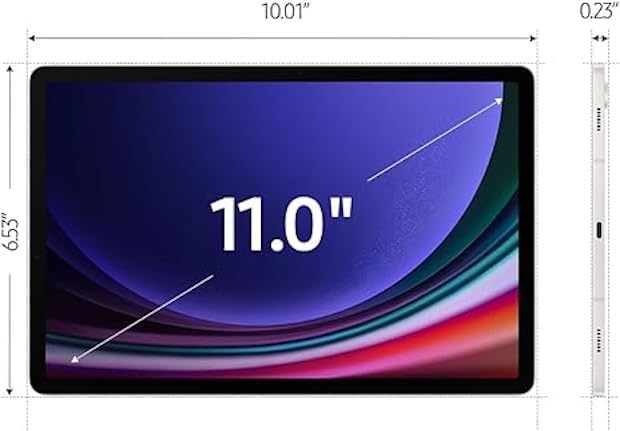
Image: Dimensions of the SAMSUNG Galaxy Tab S9.
| Funktsioon | Detail |
|---|---|
| Mudeli nimi | Galaxy Tab S9 |
| Mudeli number | SM-X710 |
| Ekraani suurus | 11 tolli |
| Kuva tüüp | AMOLED |
| Ekraani eraldusvõime | 2560 x 1600 pikslit |
| Protsessor | Qualcomm Snapdragon 8 Gen 2 (up to 3.2 GHz) |
| RAM-mälu | 8 GB |
| Salvestusmaht | 128 GB |
| Operatsioonisüsteem | Android |
| Juhtmevaba tehnoloogia | WiFi 6E (802.11ax), Bluetooth 5.3 |
| Aku mahutavus | 8000 miljonitamp Hours (14 Hours Average Life) |
| Kaamera | Front, Rear (FHD 1080p Video Capture) |
| Heli | Quad speakers with Dolby Atmos technology |
| Mõõtmed (P x L x K) | 8.3" P x 4.9" L x 0.3" Paksus |
| Kauba kaal | 1.1 naela |
| Kaasas karbis | Laadimiskaabel |
7. Garantii ja tugi
7.1 Garantii teave
This SAMSUNG Galaxy Tab S9 (SM-X710) comes with a 90-Day GarantiiPalun hoidke oma ostutõend garantiinõuete esitamiseks alles. Garantii katab tootmisdefektid ja talitlushäired tavapäraste kasutustingimuste korral.
For detailed warranty terms and conditions, please refer to the documentation provided with your purchase or visit the official Samsung support websaidile.
7.2 Klienditugi
Lisateabe, tehnilise toe või teenuste kohta lisateabe saamiseks võtke ühendust Samsungi klienditeenindusega. Kontaktandmed ja lisaressursid leiate Samsungi ametlikust tugilehest. websait:
https://www.samsung.com/us/support/
When contacting support, please have your model number (SM-X710) and serial number ready.


