Sissejuhatus
This manual provides essential instructions for the installation, operation, and maintenance of your Fermax Sup Milo Digital Intercom System. Please read this manual thoroughly before installation and use to ensure proper function and safety. Keep this manual for future reference.
The Fermax Sup Milo Digital Intercom System is designed to provide clear communication and enhanced security for residential and commercial premises. It integrates advanced technology with a robust design to offer reliable access control and communication solutions.
Ohutusteave
Always follow basic safety precautions to reduce the risk of fire, electric shock, and injury to persons. This product should only be installed and serviced by qualified personnel.
- Enne paigaldamist või hooldust ühendage toide lahti.
- Ärge jätke seadet vihma või niiskuse kätte.
- Veenduge, et kõik juhtmestikuühendused on kindlad ja vastavad kohalikele elektrieeskirjadele.
- Ärge proovige seadet ise parandada. Jätke kogu hooldus kvalifitseeritud hooldustöötajate juurde.
Pakendi sisu
Enne paigaldamise alustamist veenduge, et kõik komponendid on olemas. Pakend sisaldab tavaliselt järgmist:
- Fermax Sup Milo Digital Intercom Unit (Aluminum Plate)
- Paigaldusriistvara
- Connection cables (may vary by kit)
- Kasutusjuhend (see dokument)
Note: Specific components may vary based on the purchased kit.
Seadistamine ja installimine
This section outlines the general steps for installing the Fermax Sup Milo Digital Intercom System. Professional installation is recommended.
1. Saidi ettevalmistamine
- Choose a suitable mounting location, typically near an entrance, at an accessible height.
- Veenduge, et pind oleks tasane ja stabiilne.
- Verify access to necessary power and communication wiring.
2. Seadme paigaldamine
- Carefully remove the front panel of the intercom unit to access mounting holes.
- Position the unit and mark the drilling points on the wall.
- Vajadusel puurige augud ja paigaldage sobivad seinaankrud.
- Secure the intercom unit to the wall using the provided mounting screws.
3. Juhtmete ühendused
Refer to the wiring diagram specific to your system configuration. General connections include:
- Toiteallikas: Connect to a stable 100V power source. Ensure correct polarity.
- Communication Bus: Connect the digital bus lines to the indoor units and central control unit.
- Ukse avamine: Connect the door release mechanism (e.g., electric strike) to the designated terminals.
- Abisisendid/väljundid: Connect any additional devices such as external cameras or sensors as required.
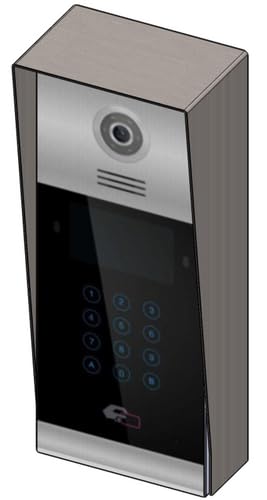 Pilt 1: esikülg view of the Fermax Sup Milo Digital Intercom System, showing the aluminum plate and digital keypad. This image illustrates the exterior design of the main unit.
4. Esmane käivitamine ja seadistamine
- Once all wiring is complete and secure, restore power to the system.
- The unit will perform a self-test. Observe any indicator lights or sounds.
- Follow the system's programming guide (usually provided separately or accessible via a master unit) to configure apartment numbers, access codes, and other settings.
Kasutusjuhised
Making a Call from the Outdoor Panel
- To call an apartment: Enter the apartment number using the digital keypad.
- Press the "Call" button (often represented by a bell icon or similar).
- The indoor unit will ring. Once answered, communication can begin.
Receiving a Call and Opening the Door (Indoor Unit)
- When the indoor unit rings, press the "Answer" button to establish communication with the visitor.
- To open the door, press the "Door Release" button on your indoor unit.
- Uks avaneb lühikeseks ajaks.
Using Access Codes
If configured, authorized users can enter a pre-programmed access code on the outdoor digital keypad to unlock the door without needing to call an indoor unit.
- Enter your personal access code using the digital keypad.
- Press the "Enter" or "Door Release" button.
- Uks läheb lukust lahti.
Hooldus
Regular maintenance ensures the longevity and optimal performance of your Fermax intercom system.
Puhastamine
- Puhastage seadme välispinda pehme, damp riie.
- Ärge kasutage abrasiivseid puhastusvahendeid, lahusteid ega keemilisi pihusteid, kuna need võivad kahjustada viimistlust ja elektroonilisi komponente.
- Veenduge, et seadme avadesse ei satuks vedelikku.
Ülevaatused
- Periodically check for any visible damage to the unit or wiring.
- Veenduge, et kõik kinnituskruvid on kindlalt paigas.
- Test the communication and door release functions regularly.
Tarkvaravärskendused
If applicable, consult your installer or Fermax support for information on firmware updates that may improve performance or add new features.
Veaotsing
Selles jaotises käsitletakse levinud probleeme, millega võite kokku puutuda. Keerukamate probleemide korral võtke ühendust tehnilise toega.
| Probleem | Võimalik põhjus | Lahendus |
|---|---|---|
| No communication with indoor unit. |
|
|
| Ukse avamine ei tööta. |
|
|
| Klahvistik ei reageeri. |
|
|
Tehnilised andmed
Technical specifications for the Fermax Sup Milo Digital Intercom System (Model: 8424299951713).
- Mudel: Fermax Sup Milo Digital Intercom System
- Osa number: 8424299951713
- Tootja: Fermax
- Mõõdud (pakett): Ligikaudu 0.1 x 0.1 x 0.1 cm
- Weight (Unit): 108 grammi
- Materjal: Metal, Plastic, Polycarbonate (Aluminum Plate)
- Toiteallikas: External Power Supply (100V)
- Voltage: 100V
- Wattage: 100W
- Vajalikud patareid: Ei
- Värv: Multicolored (referring to internal components or subtle design elements, main plate is aluminum)
Garantii teave
Fermax products are manufactured to high-quality standards. For specific warranty terms and conditions, please refer to the warranty card included with your product or visit the official Fermax webveebisait. Hoidke ostutõendit garantiinõuete esitamiseks.
Typically, warranty covers manufacturing defects for a specified period from the date of purchase. Damage due to improper installation, misuse, or unauthorized repairs is generally not covered.
Klienditugi
If you require technical assistance, have questions about your product, or need to report a problem, please contact your local Fermax distributor or visit the official Fermax webtugiressursside sait.
Websait: www.fermax.com
Palun hoidke klienditoega ühendust võttes käepärast oma mudelinumber (8424299951713) ja ostuandmed.


