1. Sissejuhatus
This manual provides detailed instructions for the installation, operation, and maintenance of your Diamond Audio DMD600.4D 4-Channel Digital Amplifier. Please read this manual thoroughly before attempting installation or operation to ensure proper use and to prevent damage to the unit or connected components. Keep this manual for future reference.
2. Ohutusjuhised
Vigastuste või kahjustuste vältimiseks järgige järgmisi ohutusnõudeid:
- Toiteallikas: Ühendage ampÜhendage tõstuk ainult 12 V alalisvoolu negatiivse maandusega elektrisüsteemiga.
- Juhtmed: Ensure all wiring is correctly connected and insulated to prevent short circuits. Use appropriate gauge wires for power and ground connections.
- Paigaldamine: Paigaldage ampkindlalt kohas, mis tagab piisava ventilatsiooni ning on kaitstud niiskuse ja liigse kuumuse eest.
- Helitugevuse tasemed: Prolonged exposure to high volume levels can cause hearing damage. Adjust volume responsibly.
- Professionaalne paigaldus: Kui te pole paigalduse mis tahes aspektis kindel, pidage nõu kvalifitseeritud spetsialistiga.
3. Pakendi sisu
Veenduge, et pakendis on kõik esemed olemas:
- Diamond Audio DMD600.4D Ampelujõulisem
- Kinnitusdetailid (kruvid, seibid)
- Kasutusjuhend (see dokument)
4. Toote omadused
The Diamond Audio DMD600.4D amplifier pakub järgmisi põhifunktsioone:
- 800W RMS power output.
- 4-channel configuration, suitable for various audio setups.
- Waterproof design for marine and motorsport applications.
- Compact size for flexible installation.
- Vastupidav konstruktsioon pikaajaliseks tööks.
5. Seadistamine ja installimine
Nõuetekohane paigaldamine on optimaalse jõudluse ja ohutuse tagamiseks ülioluline. Järgige neid samme hoolikalt.
5.1 Paigaldamine Ampelujõulisem
- Choose a mounting location that is dry, well-ventilated, and secure. Avoid areas exposed to direct sunlight or excessive heat.
- Kasutage amplifier as a template to mark the mounting screw locations.
- Drill pilot holes if necessary, ensuring not to damage any vehicle components behind the mounting surface.
- Kindlustage amplifier, kasutades kaasasolevaid kinnitusvahendeid.
5.2 Juhtmete ühendamine
Refer to the diagrams below for proper wiring connections. Ensure the vehicle's battery is disconnected before making any power connections.
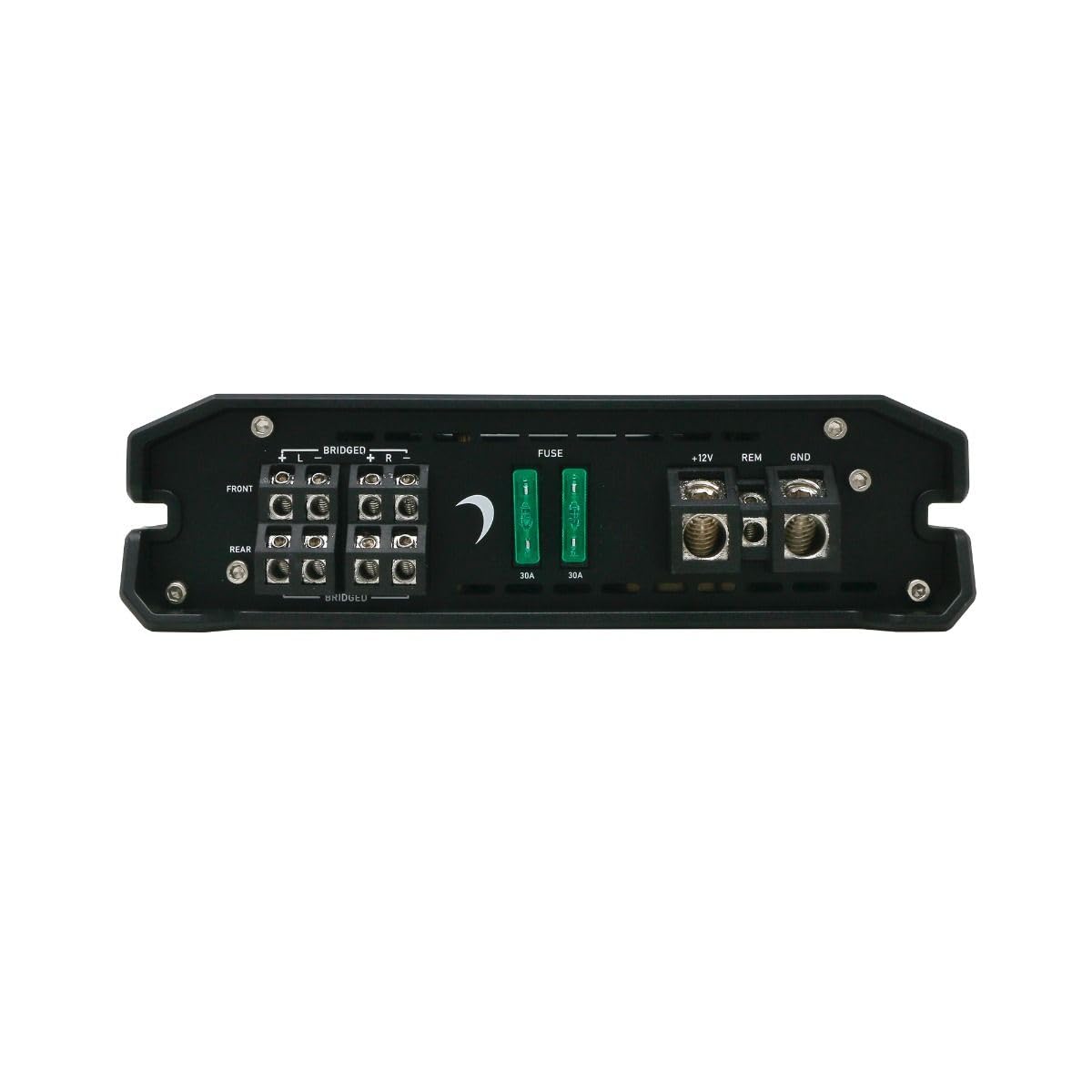
Joonis 1: Rear panel connections for power, ground, remote, and speaker outputs.
- Power (B+ / +12V): Connect a suitable gauge power cable directly from the positive terminal of the vehicle's battery to the +12V terminal on the amplifier. Install an in-line fuse (not supplied) within 18 inches of the battery.
- Maapind (GND): Connect a suitable gauge ground cable from the GND terminal on the ampKinnitage liimimisvahend sõiduki šassii puhtale, värvimata metallpinnale. Veenduge, et ühendus oleks kindel ja väikese takistusega.
- Kaugjuhtimispult (REM): Ühenda peakomplekti kaugjuhtimisväljundi kaugjuhtimisjuhe raadiojaama REM-pesaga. ampSee traat pöörab ampLifteri sisse ja välja lülitamine peakomplekti abil.
- Kõlarite väljundid: Connect your speakers to the designated speaker terminals (FRONT L/R, REAR L/R). Observe correct polarity (+ to + and - to -). For bridged mode, refer to the specific bridging instructions on the amplifier or in the specifications section.
- RCA sisendid: Ühendage RCA-kaablid oma peakomplekti eelpesadestamp outputs to the FRONT and REAR RCA input jacks on the ampelujõulisem.

Joonis 2: Front panel with RCA inputs and audio control adjustments.
6. Kasutusjuhised
Pärast paigaldamist reguleerige ampoptimaalse helikvaliteedi saavutamiseks mõeldud elustamisseaded.
6.1 Esialgne seadistamine ja reguleerimine
The DMD600.4D features various controls for fine-tuning your audio system:
- GAIN Control: Reguleerib sisendi tundlikkust ampvõimendust, et see sobiks teie peakomplekti väljundiga. Alustage minimaalse võimendusega ja suurendage seda aeglaselt, kuni saavutatakse soovitud helitugevus ilma moonutusteta.
- X-OVER (Crossover) Control: Allows you to set the frequency range that the amplifier sends to your speakers.
- HPF (kõrgpääsfilter): Allows frequencies above the set point to pass through. Useful for full-range speakers to prevent low-frequency distortion.
- LPF (madalpääsfilter): Allows frequencies below the set point to pass through. Typically used for subwoofers.
- MODE lüliti: Selects the operating mode (e.g., 2-channel, 4-channel, bridged). Refer to the specific markings on the amplifier for available modes.
Tähtis: Make adjustments incrementally and listen for clarity. Over-driving the amplifier or speakers can cause damage.
7. Hooldus
The Diamond Audio DMD600.4D ampPikaajalise jõudluse tagamiseks vajab lifier minimaalset hooldust.
- Puhastamine: Pühkige perioodiliselt ampPuhastage seadme välispind pehme ja kuiva lapiga. Ärge kasutage tugevatoimelisi kemikaale ega abrasiivseid puhastusvahendeid.
- Ventilatsioon: Veenduge, et ampLifieri jahutusribid on tolmust ja prahist vabad, et tagada nõuetekohane soojuse hajumine.
- Ühendused: Kontrollige aeg-ajalt kõiki juhtmestiku ühendusi tiheduse ja korrosiooni suhtes. Lõdvad ühendused võivad põhjustada halba jõudlust või kahjustusi.
8. Veaotsing
Kui teil on probleeme oma amplifier, consult the following table before seeking professional service.
| Probleem | Võimalik põhjus | Lahendus |
|---|---|---|
| Ei voolu / AmpElutaja ei lülitu sisse | Blown fuse; Loose power/ground/remote wire; Faulty remote turn-on signal. | Kontrollige liinisisest kaitset ja amplifier fuses; Verify all power, ground, and remote connections are secure; Test remote wire for 12V signal. |
| Heliväljund puudub | Loose RCA cables; Incorrect gain setting; Speaker wires disconnected; Amptõsteseade kaitserežiimis. | Check RCA connections; Adjust gain; Verify speaker wiring; Check for short circuits in speaker wiring. |
| Moonutatud heli | Gain set too high; Incorrect crossover settings; Damaged speakers. | Reduce gain; Adjust crossover settings; Inspect speakers for damage. |
| AmpElu ülekuumenemine | Insufficient ventilation; Impedance too low; Prolonged high volume. | Tagage piisav õhuvool ümber amplifier; Verify speaker impedance matches amplifier specifications; Reduce volume. |
9. Tehnilised andmed
Technical specifications for the Diamond Audio DMD600.4D Ampelujõulisem:
| Funktsioon | Detail |
|---|---|
| Mudeli number | DMD600.4D |
| Kaubamärk | Teemantheli |
| Kanalite arv | 4 |
| Väljundvõimsus | 800 vatti (RMS) |
| Paigaldustüüp | Pinnakinnitus |
| Pakendi mõõtmed | 9 x 9 x 4 tolli |
| Kaal | 4 naela |
10. Garantii ja tugi
Diamond Audio products are designed and manufactured to the highest quality standards. This product is covered by a limited warranty against defects in materials and workmanship. For specific warranty terms, duration, and claim procedures, please refer to the warranty card included with your product or visit the official Diamond Audio websaidile.
For technical support or service inquiries, please contact Diamond Audio customer service through their official channels. Do not attempt to repair the amplifier yourself, as this may void your warranty.


