1. Toote lõppview
The charmast 20000mAh Portable Charger (Model C2065) is a high-capacity power bank designed to charge multiple devices on the go. It features built-in USB-C, Lightning, and Micro-USB cables, along with additional USB-A and USB-C ports, providing versatile charging options for a wide range of electronic devices. A digital display indicates the remaining battery percentage.

Image 1.1: The charmast 20000mAh Portable Charger (Model C2065) in Navy.
2. Mis on karbis
Paki avamisel veenduge, et kõik esemed on olemas:
- 1 x charmast 20000mAh Portable Charger (Model C2065)
- 1 x kasutusjuhend
- 1 x reisikott
3. Tehnilised andmed
| Funktsioon | Detail |
|---|---|
| Mudeli number | C2065 |
| Aku mahutavus | 20000 miljonitamp Tunnid (mAh) |
| Toote mõõtmed | 6.3 x 2.85 x 0.75 tolli |
| Kauba kaal | 12 untsi |
| Väljundpordid | Built-in USB-C, Lightning, Micro-USB cables; 2x USB-A ports; 1x USB-C port (Input/Output) |
| Kiire laadimine | 22.5W PD kiirlaadimine |
| Eriomadused | Built-in cables, Digital Display, Fast Charging, High Capacity, Slim design |
4. Seadistamine
4.1 Akupanga esmane laadimine
Before first use, fully charge the power bank. The digital display will show the charging progress from 0% to 100%.
- Sisseehitatud USB-C-kaabli kasutamine: Connect the built-in USB-C cable to a compatible USB wall adapter (not included). Charging time is approximately 6 hours.
- Using the Built-in USB-A Cable: Connect the built-in USB-A cable to a compatible USB wall adapter (not included). Charging time is approximately 12 hours.
- Using an External Cable (USB-C Input): Connect a USB-C cable (not included) to the power bank's USB-C input port and a compatible 18W PD/QC wall adapter. Charging time is approximately 6 hours.
- Using an External Cable (Micro-USB Input): Connect a Micro-USB cable (not included) to the power bank's Micro-USB input port and a compatible 18W PD/QC wall adapter. Charging time is approximately 6 hours.

Image 4.1: Methods for recharging the power bank.
5. Kasutusjuhised
5.1 Laadimisseadmed
Akupank pakub seadmete laadimiseks mitut võimalust:
- Sisseehitatud kaablite kasutamine: The power bank includes built-in Lightning, USB-C, and Micro-USB cables. Simply pull out the appropriate cable and connect it directly to your device.
- USB-A-portide kasutamine: Connect your device's USB-A charging cable to one of the two USB-A output ports on the power bank.
- USB-C-pordi kasutamine: Connect your device's USB-C charging cable to the USB-C output port on the power bank. This port also supports input for recharging the power bank.

Image 5.1: Built-in cables for various devices.
5.2 Samaaegne laadimine
The power bank can charge up to six devices simultaneously using a combination of its built-in cables and external USB ports.

Image 5.2: Charging multiple devices.
5.3 Kiirlaadimine
The power bank supports 22.5W PD fast charging. When connected to a compatible device, it can charge up to 50% in approximately 30 minutes. Ensure your device and cable support fast charging for optimal performance.
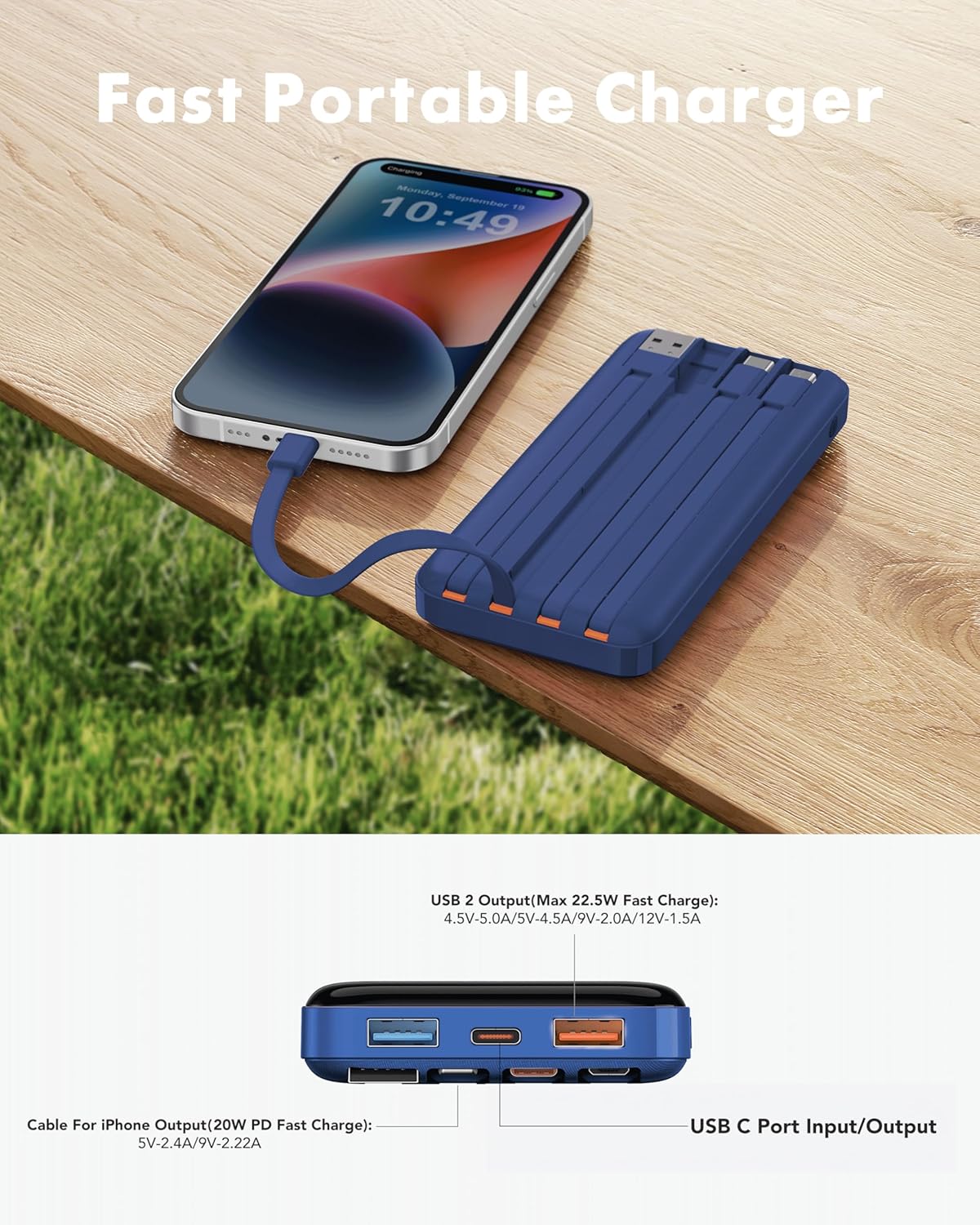
Image 5.3: Fast charging in action.
5.4 Digitaalne ekraan
The integrated digital display shows the precise remaining battery percentage (0-100%) of the power bank. This allows for accurate monitoring of the power bank's charge level.

Image 5.4: Digital display showing battery percentage.
5.5 Nõrkvoolurežiim
For charging low-power devices such as Bluetooth earphones, smartwatches, or fitness trackers, activate the low-current mode. Press and hold the power button for 5 seconds to engage this mode, ensuring safe and efficient charging for smaller electronics.
6. Ohutusalane teave
- Do not expose the power bank to extreme temperatures (hot or cold), direct sunlight, or fire.
- Vältige seadme maha kukkumist, lahtivõtmist või muutmist.
- Hoida eemal veest ja kõrgest õhuniiskusest.
- Hoida jahedas ja kuivas kohas, kui seda ei kasutata.
- Hoida lastele kättesaamatus kohas.
- Flight Travel: This power bank meets airline safety standards for carry-on luggage. Always pack it in your carry-on bag; never place it in checked luggage.

Image 6.1: The power bank is flight-friendly.
7. Hooldus
- Puhastage akupanka pehme ja kuiva lapiga. Ärge kasutage tugevaid kemikaale ega abrasiivseid materjale.
- Kui välist akupanka pikemat aega ei kasutata, laadige seda iga kolme kuu tagant umbes 50–75% ulatuses, et aku heas seisukorras hoida.
- Avoid storing the power bank in extreme temperatures or direct sunlight.
8. Veaotsing
8.1 Välispatarei ei lae
- Ensure the charging cable is securely connected to both the power bank's input port/built-in cable and the wall adapter.
- Veenduge, et seinakontakti adapter töötab korralikult ja on ühendatud vooluvõrku.
- Proovige teist laadimiskaablit või seinakontakti adapterit.
8.2 Seade ei lae akupangast
- Kontrollige, kas välisel akul on piisavalt laetud (vt digitaalset näidikut).
- Ensure the cable connecting the device to the power bank is securely plugged in at both ends.
- Try a different output port or built-in cable on the power bank.
- Veenduge, et teie seadme laadimisport on puhas ja prahist vaba.
- If charging a low-power device, ensure Low-Current Mode is activated (press and hold power button for 5 seconds).
8.3 Aeglane laadimine
- Veenduge, et nii varupatarei kui ka teie seade toetaksid kiirlaadimise protokolle.
- Kasutage kvaliteetset ja kiirlaadimisega ühilduvat kaablit.
- Väldi mitme seadme samaaegset laadimist, kui vajad ühe seadme jaoks maksimaalset kiirust.
9. Garantii ja tugi
The charmast 20000mAh Portable Charger comes with 24 months of support and lifetime technical support. For assistance, please refer to the contact information provided in your product packaging or visit the official charmast websaidile.


