1. Toote lõppview
The eX-Mars Connect AI Robot Smart Cube is an advanced puzzle cube designed to enhance problem-solving skills through interactive play. It features AI technology for learning and self-solving capabilities, offering various modes for both beginners and experienced users. This manual provides instructions for the Cube Ver. 2 model.

2. Mis on karbis
Upon unboxing your eX-Mars Connect AI Robot Smart Cube, verify that all components are present:
- 1 x eX-Mars Smart Cube
- 1 x Lithium-ion Battery (pre-installed or separate)
- 1x laadimiskaabel
- 1 x Quick Guide Manual

3. Seadistamine ja esmane kasutamine
3.1. Charging the Cube
Before first use, ensure the eX-Mars Smart Cube is fully charged. Locate the charging port on the cube (as indicated in Image 2.1) and connect it to a power source using the provided charging cable. The LED indicators on the cube may change to show charging status.
3.2. Sisselülitamine ja režiimi valimine
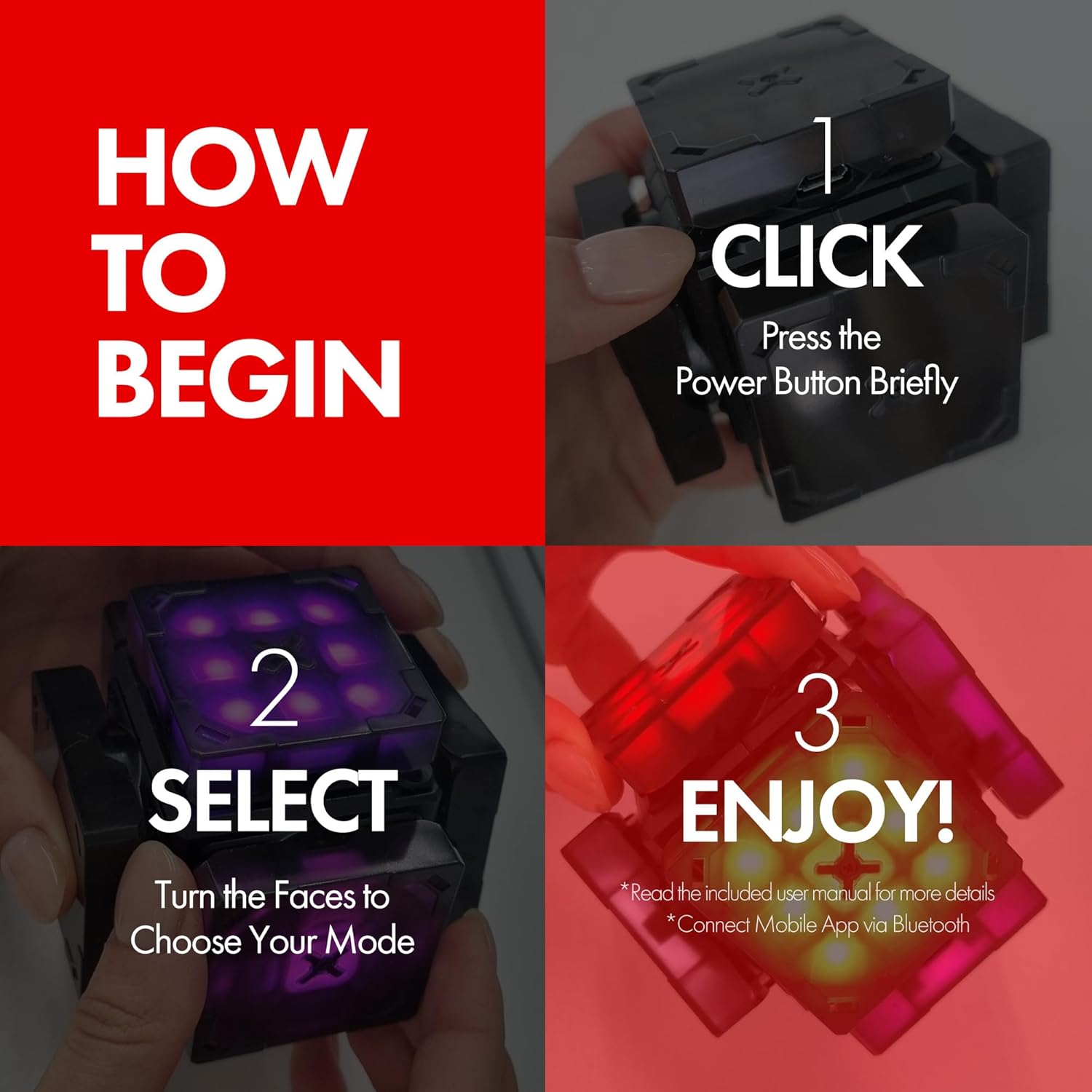
To begin using your eX-Mars Smart Cube:
- Klõpsake: Press the power button briefly to turn on the cube.
- Valige: Turn the faces of the cube to cycle through and choose your desired operating mode.
- Nautige: The cube is now ready for use. Refer to the operating sections for detailed mode descriptions.
4. Töörežiimid ja funktsioonid
The eX-Mars Smart Cube offers a variety of features and modes to cater to different skill levels and preferences.
4.1. Core Capabilities
- Tehisintellekti tehnoloogia: The cube utilizes AI to provide hints and guidance, assisting users in learning how to solve the puzzle.
- Self-Solving: The cube can demonstrate solutions by solving itself.
- Auto-Scrambling: The cube can automatically scramble itself for a new challenge.
- Sisseehitatud taimer: Automatically tracks your solving performance.
- Motored Wheels: Equipped with 6 auto-turning motored wheels, allowing for both manual and automatic turns.


4.2. Puzzle Types and Solving Modes
The cube supports multiple puzzle configurations and solving modes:
- Puzzle Types: Includes 2x2, 3x3, and Diamond modes, with a total of 17 distinct puzzle modes.
- Õpperežiim: Provides hints to help beginners learn solving techniques.
- Half-Blind Mode: Challenges users to solve with limited visual cues.
- Blind Mode: For advanced users, requiring solving without visual input.
- Short Moves Mode: Focuses on efficiency in solving.

4.3. Lisafunktsioonid
- Dice Function: Functions as a digital dice for included games.
- Muusika taasesitus: Capable of playing music, such as "Jingle Bells."

5. eX-Mars Mobile Application
While the eX-Mars Smart Cube does not require an app for basic functionality, a companion mobile application is available for iOS and Android devices to unlock additional features and enhance the user experience. The app provides:
- Two-Way Mode: Allows you to turn the cube by swiping on your smartphone screen, offering real-time synchronization.
- Competitions: Participate in online competitions with other users globally.
- Statistika andmed: Jälgi ja uuendaview your solving time records and progress.
- AI 1-on-1 Battle: Challenge an AI opponent with 12 exciting levels to conquer.


6. Tehnilised andmed
| Funktsioon | Detail |
|---|---|
| Toote mõõtmed | 3.9 x 3.9 x 5.5 tolli |
| Kauba kaal | 10.2 untsi |
| ASIN | B0CF4BPXCK |
| Tootja soovituslik vanus | 8 aastat ja rohkem |
| Patareid | 1 mittestandardne aku (nõutav) |
| Tootja | SMARTCUBELABS Corp. |
7. Hooldus
To ensure the longevity and optimal performance of your eX-Mars Smart Cube:
- Keep the cube clean by wiping it with a soft, dry cloth.
- Avoid exposing the cube to extreme temperatures or direct sunlight.
- Do not immerse the cube in water or any other liquids.
- Store the cube in a safe place to prevent physical damage.
8. Veaotsing
If you encounter any issues with your eX-Mars Smart Cube, consider the following general troubleshooting steps:
- Cube not powering on: Ensure the battery is fully charged. Connect the charging cable and allow it to charge for at least 30 minutes before attempting to power on again.
- Cube not responding: Try restarting the cube by turning it off and then on again. If the issue persists, ensure the battery is adequately charged.
- Rakenduse ühenduvusprobleemid: Ensure Bluetooth is enabled on your mobile device and that the cube is within range. Try restarting both the cube and the app.
- Ootamatu käitumine: Refer to the quick guide manual for specific error codes or reset procedures, if available.
Lisateabe saamiseks võtke ühendust klienditoega.
9. Garantii ja tugi
The eX-Mars Smart Cube comes with a standard manufacturer's warranty. Please refer to the warranty information provided in the packaging or on the official eX-Mars webLisateavet katvuse ja kestuse kohta leiate veebisaidilt.
For technical support, product inquiries, or warranty claims, please visit the official eX-Mars support page or contact their customer service department through the contact information provided in your product documentation.


