1. Sissejuhatus
Thank you for choosing the Acekool Portable Air Conditioner. This 3-in-1 unit provides powerful cooling, efficient dehumidification, and effective air circulation through its fan mode. Designed for convenience and portability, it is ideal for cooling rooms up to 35 square meters. Please read this manual thoroughly before operation to ensure proper use, maintenance, and safety.
2. Ohutusalane teave
Tulekahju, elektrilöögi või vigastuste ohu vähendamiseks kliimaseadme kasutamisel järgige neid põhilisi ettevaatusabinõusid.
- Always plug the unit into a grounded 220V AC outlet. Do not use extension cords or adapter plugs.
- Ärge kasutage seadet kahjustatud juhtme või pistikuga.
- Ärge blokeerige õhu sisse- ega väljalaskeavasid. Tagage seadme ümber piisav vaba ruumi, et tagada korralik õhuvool.
- Hoidke seadet eemal soojusallikatest, otsesest päikesevalgusest ja tuleohtlikest materjalidest.
- Ärge pistke sõrmi ega võõrkehi õhu sisse- ega väljalaskeavadesse.
- Enne puhastamist või hooldustööde tegemist eemaldage seade vooluvõrgust.
- See seade ei ole mõeldud kasutamiseks isikutele (kaasa arvatud lapsed), kellel on füüsilised, sensoorsed või vaimsed võimed või kogemuste ja teadmiste puudumine, välja arvatud juhul, kui nende ohutuse eest vastutav isik on neid jälginud või seadme kasutamist juhendanud.
- Veenduge, et seade oleks asetatud tasasele ja stabiilsele pinnale, et vältida ümberminekut.
3. Toote omadused
- Võimas ja tõhus: Delivers strong cooling power to quickly and effectively cool your room. Enjoy personal comfort at the touch of a button.
- Flexible and Mobile: Equipped with wheels for easy movement between rooms. Provides a pleasant climate in bedrooms, living rooms, or offices. Adjustable settings allow customization of cooling needs.
- Easy to Use and Control: Features an intuitive control panel and remote control for setting temperature, timer, and fan speed. The convenient timer function allows pre-programming for energy saving.
- Energy-efficient and Environmentally Friendly: Designed for low power consumption, helping to reduce energy costs. Uses R290 refrigerant, contributing to environmental protection.
- Elegantne ja kompaktne: Boasts a sleek and modern design that blends seamlessly into any room, making it an attractive addition to your home or office.

Image: The unit's compact size delivers high cooling performance, suitable for rooms up to 300 sq. ft. with 9000 BTU cooling capacity and 350m³/h airflow.

Image: The unit uses environmentally friendly R290 refrigerant, promoting energy efficiency and cost savings.

Image: The 3-in-1 operation system includes cooling (down to 16°C), dehumidifying (up to 42L/day), and fan (2 speeds) functions.
4. Toote spetsifikatsioonid
| Spetsifikatsioon | Väärtus |
|---|---|
| Kaubamärk | Acekool |
| Mudeli number | CF9 |
| Toote mõõtmed (P x L x K) | 45 x 89 x 44 cm |
| Kaal | 26 kilogrammi |
| Energiatõhususe reiting | A |
| Jahutusvõimsus | 9000 BTU |
| Niiskuse eemaldamise võime | 42 liitrit päevas |
| Aastane elektritarbimine | 1000 vatti |
| Müra tase | 55 dB |
| Installi tüüp | Aken |
| Erifunktsioon | Õhukuivati |
| Värv | Must |
| Voltage | 220 volti |
| Võimsus | 1000 vatti |
| Hooajaline energiatõhususe suhtarv (SEER) | 2.6 |
5. Pakendi sisu
Palun kontrollige, et kõik komponendid oleksid olemas ja heas seisukorras:
- Acekool Portable Air Conditioner Unit
- Väljalaskevoolik
- Window Seal Kit (includes window slider kit and adapter)
- Kaugjuhtimispult
- Drain Hose (for continuous drainage in dehumidifier mode)
- Kasutusjuhend (see dokument)
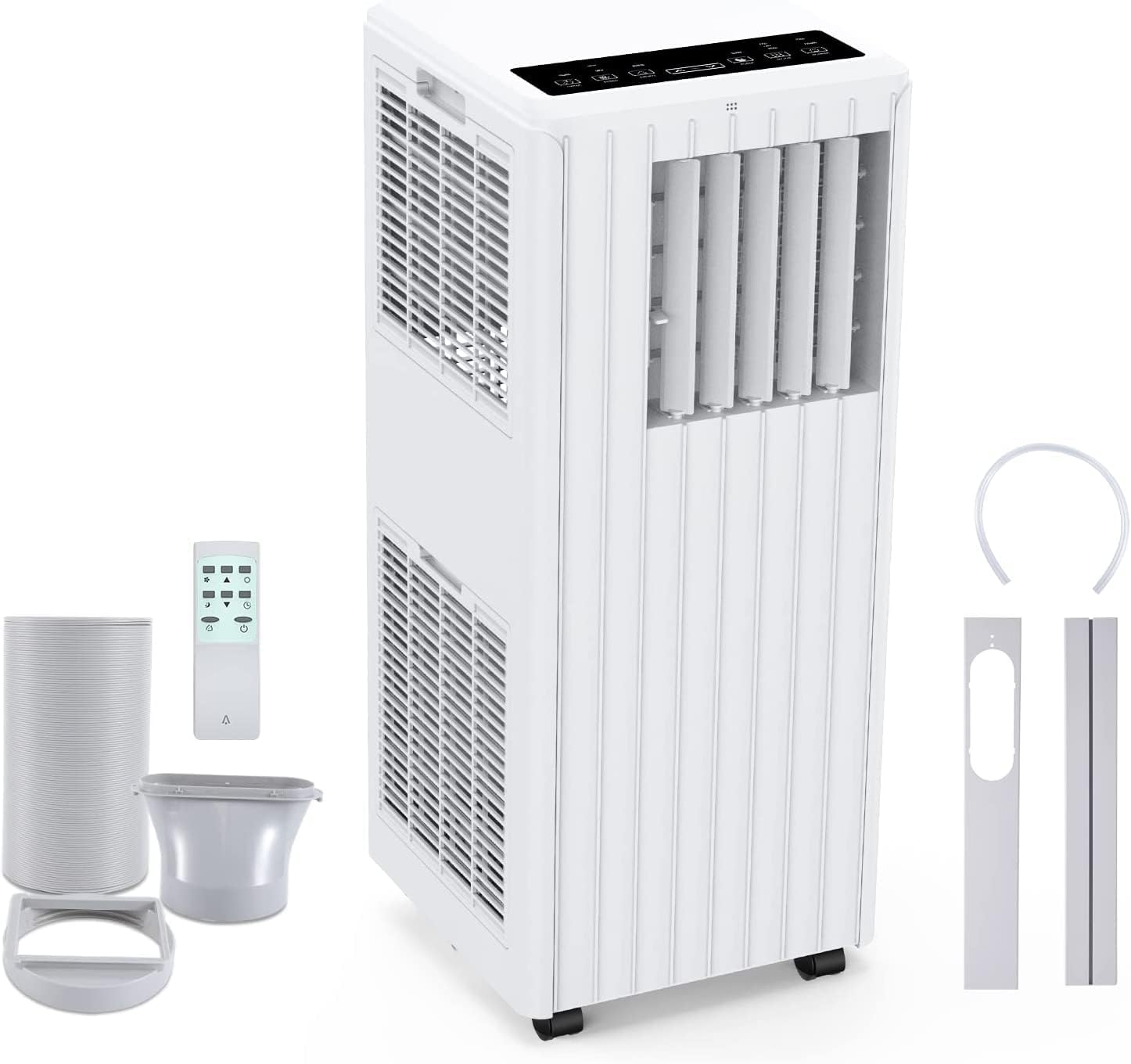
Image: All components included in the package: the main unit, exhaust hose, window sealing plate, remote control, and drain bucket.
6. Seadistamine ja installimine
Kaasaskantava kliimaseadme seadistamiseks järgige neid samme:
- Positsioneerimine: Place the air conditioner on a flat, stable surface near a window and a grounded electrical outlet. Ensure there is at least 20 cm (8 inches) of space around the unit for proper airflow.
- Ühendage väljalaskevoolik: Screw one end of the exhaust hose into the air outlet on the back of the unit.
- Install Window Seal Kit: Reguleeri aknaliuguri komplekt aknaavale sobivaks. Kinnita see oma kohale.
- Connect Exhaust Hose to Window Kit: Attach the other end of the exhaust hose to the adapter on the window slider kit, ensuring a tight seal to prevent hot air from re-entering the room.
- Toiteühendus: Ühendage toitejuhe maandatud 220 V vahelduvvoolu pistikupessa.

Image: Visual guide for easy installation, showing how to connect the exhaust hose to the unit and the window sealing plate.
7. Kasutusjuhised
Your Acekool Portable Air Conditioner can be operated using the control panel on the unit or the included remote control.
Juhtpaneel ja kaugjuhtimispult
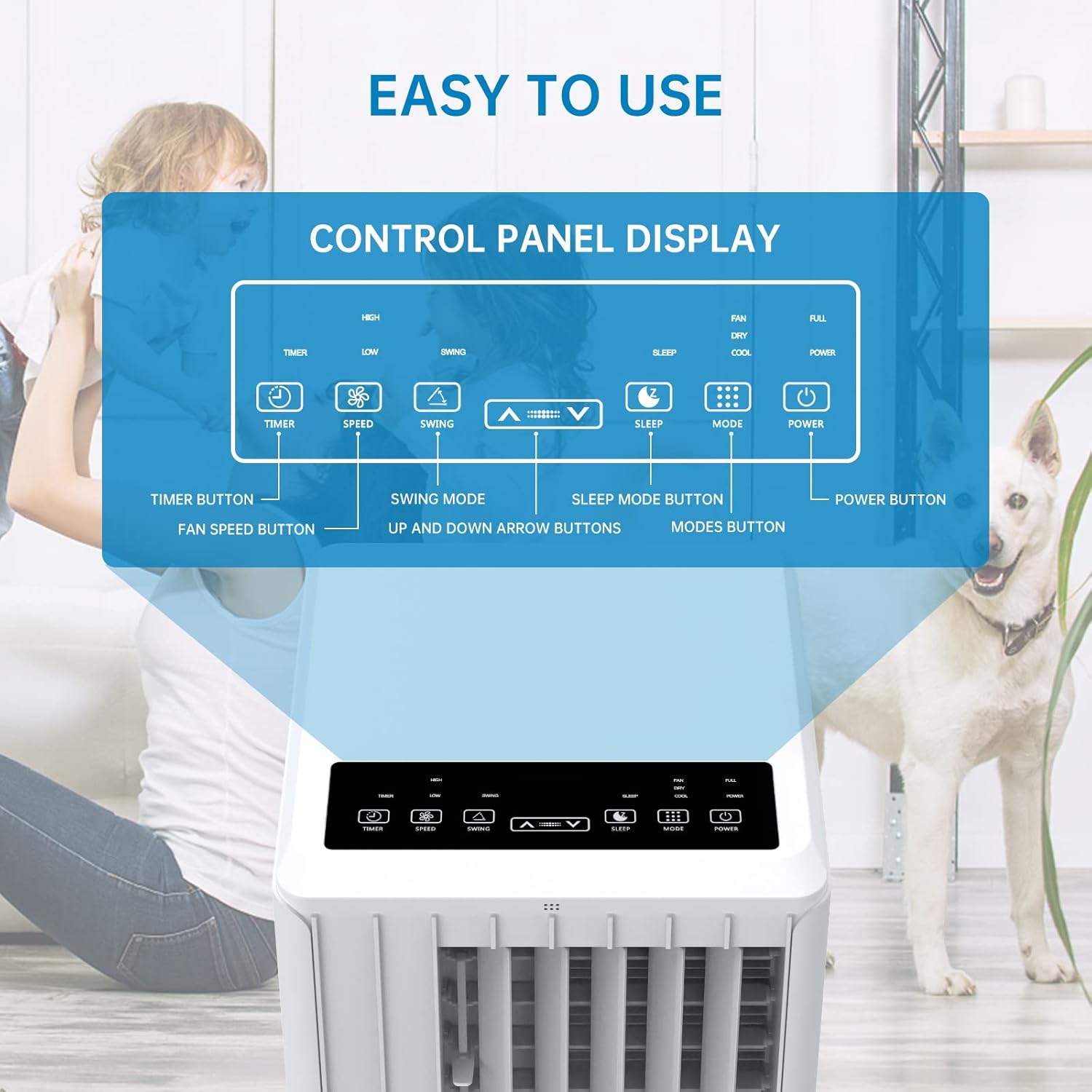
Pilt: Detailne view of the control panel display, indicating buttons for Timer, Speed, Swing, Sleep, Mode, and Power.

Image: The unit can be conveniently controlled via the remote control, and features a swing mode for wider air distribution.
Töörežiimid

Pilt: Üleview of the main operating modes: Cool, Fan, Dry (Dehumidifying), and Sleep, along with smart timer functionality.
- Jahutusrežiim: Press the "Mode" button until the snowflake icon appears. Use the Up/Down arrows to set your desired temperature (16°C - 30°C). The unit will cool the room to the set temperature.
- Ventilaatori režiim: Press the "Mode" button until the fan icon appears. In this mode, the unit circulates air without cooling. Use the "Speed" button to adjust fan speed (Low/High).
- Niiskuse eemaldamise režiim (kuiv): Press the "Mode" button until the water drop icon appears. The unit will remove excess moisture from the air. In this mode, the fan speed cannot be adjusted. Ensure the continuous drainage hose is connected for prolonged use.
- Puhkerežiim: Press the "Sleep" button. In this mode, the unit operates quietly and gradually increases the temperature by 1°C after the first hour and another 1°C after the second hour, maintaining this temperature for 6 hours before returning to normal operation. This mode is ideal for nighttime use.

Image: The sleep mode offers automatic shut-off, quiet operation (55dB), and a 24-hour smart timer for comfortable nighttime use.
Lisafunktsioonid
- Taimeri funktsioon: Press the "Timer" button to set the desired operating time (1-24 hours) for automatic turn on/off.
- Ventilaatori kiirus: In Cool or Fan mode, press the "Speed" button to cycle through Low and High fan speeds.
- Kiigutamise funktsioon: Press the "Swing" button to activate or deactivate the automatic vertical oscillation of the air louvers, distributing air more evenly.
8. Hooldus
Regulaarne hooldus tagab optimaalse jõudluse ja pikendab kliimaseadme eluiga. Enne puhastamist eemaldage seade alati vooluvõrgust.
Õhufiltri puhastamine
Õhufiltrit tuleks puhastada iga kahe nädala tagant või sagedamini, olenevalt kasutusest ja õhukvaliteedist.
- Eemaldage õhufilter seadme tagaküljelt.
- Peske filtrit sooja seebiveega. Loputage hoolikalt.
- Enne filtri seadmesse tagasi paigaldamist laske sellel täielikult õhu käes kuivada.
Vee ärajuhtimine
The unit has an internal water tank that collects condensed water. When the tank is full, the unit will stop operating and display a "FULL" indicator. You will need to drain the water manually.
- Place a shallow pan or bucket under the drain port at the bottom rear of the unit.
- Eemaldage äravoolukork, et vesi saaks välja voolata.
- Kui õli on tühjendatud, keerake tühjenduskork kindlalt tagasi.
For continuous dehumidification, attach the provided drain hose to the continuous drain port.
Seadme välispinna puhastamine
Pühkige seadme välispinda pehme, damp riie. Ärge kasutage tugevatoimelisi kemikaale ega abrasiivseid puhastusvahendeid.
Säilitamine
Kui seadet pikemat aega hoiustatakse:
- Tühjendage seadmest kogu vesi.
- Puhastage õhufilter.
- Hoidke seadet kuivas, jahedas ja otsese päikesevalguse eest kaitstud kohas.
9. Veaotsing
Enne klienditoega ühenduse võtmist lugege palun järgmist tõrkeotsingu juhendit levinud probleemide lahendamiseks.
| Probleem | Võimalik põhjus | Lahendus |
|---|---|---|
| Seade ei lülitu sisse | No power supply; Power cord unplugged; Circuit breaker tripped; Water tank full. | Check power outlet; Plug in power cord securely; Reset circuit breaker; Drain water tank. |
| Seade ei jahuta tõhusalt | Air filter dirty; Exhaust hose not properly installed/sealed; Room too large; Doors/windows open; Air inlet/outlet blocked. | Clean air filter; Ensure exhaust hose is properly installed and sealed; Close doors/windows; Clear obstructions from air inlets/outlets. |
| Seade on mürarikas | Seade ei ole tasasel pinnal; õhufilter on määrdunud; sisemised komponendid vibreerivad. | Place unit on a flat, stable surface; Clean air filter; If noise persists, contact customer support. |
| Seadmest lekib vett | Drain plug loose; Continuous drain hose not properly connected or blocked. | Ensure drain plug is secure; Check continuous drain hose for proper connection and clear any blockages. |
| Kaugjuhtimispult ei tööta | Patareid on tühjad või valesti sisestatud; Takistus puldi ja seadme vahel. | Replace batteries; Ensure line of sight between remote and unit. |
10. Garantii ja tugi
For warranty information and customer support, please refer to the warranty card included with your product or visit the official Acekool website. Do not attempt to repair the unit yourself, as this may void the warranty and pose safety risks. For any issues not covered in this manual, please contact Acekool customer service.


