1. Sissejuhatus
This manual provides detailed instructions for the installation, operation, and maintenance of your SECULINK C17-4MP Dual-Band WiFi Dome Security Camera. This camera is designed for outdoor surveillance, featuring 4MP resolution, pan/tilt/zoom capabilities, automatic tracking, human detection, and color night vision. Please read this manual thoroughly before use to ensure proper functionality and safety.
2. Pakendi sisu
Veenduge, et pakis on kõik esemed olemas:
- SECULINK C17-4MP Dome Security Camera
- Toiteadapter (laadija)
- Kinnituskruvid ja seinatüüblid
- Võrgukaabli veekindla komplekti (kui see on olemas)
- Kiirjuhend
3. Toote lõppview
The SECULINK C17-4MP camera features a robust dome design suitable for outdoor environments. Key components include:
- Kaamera objektiiv: Jäädvustab foo videotage.
- Infrapuna LED-id: Tagage öise nägemise jaoks valgustus.
- White Light LEDs (Floodlight): Parandab värvilist öist nägemist ja toimib heidutusvahendina.
- Mikrofon: Helisisendi ja kahesuunalise suhtluse jaoks.
- Kõlar: Heli väljundi ja kahesuunalise suhtluse jaoks.
- Antennid: For dual-band 2.4GHz/5GHz Wi-Fi connectivity.
- Micro SD kaardi pesa: Toetab kuni 256 GB suurust kohalikku salvestusruumi.
- Lähtestamisnupp: Tehase lähtestamiseks.
- Toiteport: DC 12V toite sisend.

Pilt 3.1: läbiview of the SECULINK C17-4MP camera and its mobile application interface.
4. Seadistamine
4.1 Rakenduse allalaadimine ja konto registreerimine
- Laadige alla SECUEYE mobile application from the App Store (iOS) or Google Play Store (Android).
- Avage rakendus ja järgige ekraanil kuvatavaid juhiseid uue konto registreerimiseks või sisselogimiseks, kui teil see juba on.
4.2 Kaamera sisselülitamine
Connect the provided power adapter to the camera's power port and plug it into an electrical outlet. The camera will initiate its self-test sequence, indicated by a rotating motion and status light changes.
4.3 Wi-Fi-ga ühenduse loomine
The SECULINK C17-4MP supports dual-band Wi-Fi (2.4GHz and 5GHz) for flexible network connectivity.
- Ensure your mobile device is connected to the same Wi-Fi network you intend to connect the camera to.
- In the SECUEYE app, tap the "Add Device" or "+" icon.
- Select your camera model or scan the QR code on the camera (if available).
- Follow the app's instructions to enter your Wi-Fi network name (SSID) and password.
- The app will guide you through the pairing process, which may involve scanning a QR code displayed on your phone with the camera lens or listening for an audio prompt.
- Once connected, the camera's status light will indicate a successful connection (refer to the app or quick start guide for specific light indicators).
4.4 Kaamera paigaldamine
The camera is designed for wall mounting and is IP65/IP66 weatherproof, making it suitable for outdoor installation.
- Valige sobiv paigalduskoht, mis tagab soovitud viewvaatenurga all ja on Wi-Fi levialas.
- Use the mounting template (if provided) or the camera base to mark the drill holes on the wall.
- Puurige augud ja sisestage seinatüüblid.
- Kinnitage kaamera alus kaasasolevate kruvide abil seina külge.
- Attach the camera body to the base.
- Veenduge, et kõik kaabliühendused on kindlad ja ilmastiku eest kaitstud, kasutades vajadusel veekindlat komplekti.
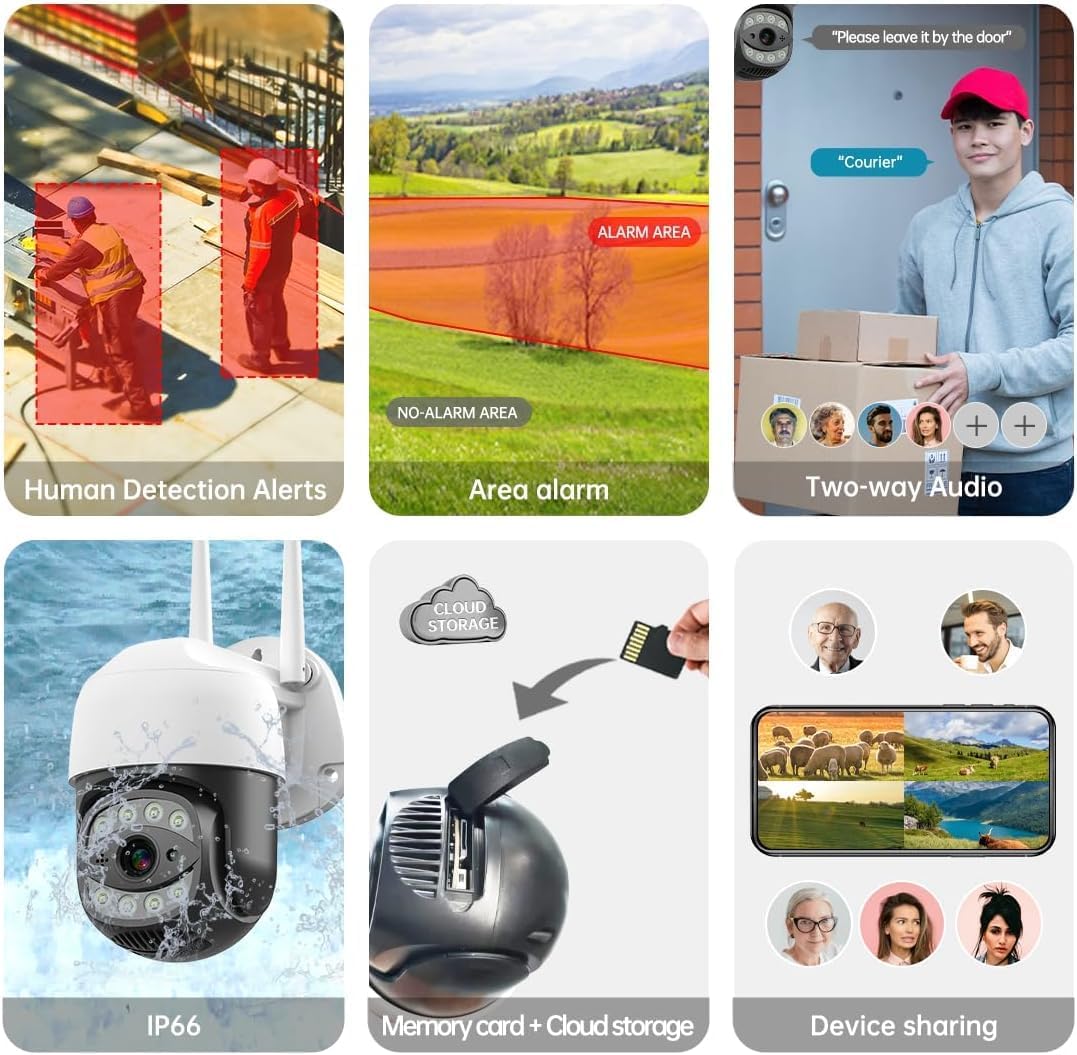
Image 4.1: The SECULINK C17-4MP camera is rated IP66 for dust and water resistance, suitable for various weather conditions.
5. Kasutusjuhised
5.1 Otseülekanne View ja taasesitus
Access the live video feed and review salvestatud footage through the SECUEYE app. The camera provides 4MP (2560x1440p) resolution for clear images.

Image 5.1: Visual comparison demonstrating the enhanced clarity of 5MP resolution over lower resolutions.
5.2 Pan, Tilt, and Digital Zoom (PTZ)
Kaamera juhtimine viewing angle remotely using the SECUEYE app. The camera offers:
- Horisontaalne pööramine: 335 kraadi
- Vertikaalne kalle: 90 kraadi
- Digitaalne suum: 10x suurendus
Use pinch-to-zoom gestures on your mobile device to digitally zoom in on specific areas of interest.

Image 5.2: Demonstrates controlling the camera's pan and tilt functions via the mobile app.

Image 5.3: Illustration of the 10x digital zoom feature, allowing closer inspection of details.
5.3 Automatic Tracking and Human Motion Detection
The camera features intelligent detection capabilities to enhance security monitoring.
- Automaatne jälgimine: When enabled, the camera will automatically detect and follow moving human figures within its field of view, recording their path.
- Inimese liikumise tuvastamine: Advanced algorithms distinguish human activity from other movements (e.g., pets, swaying branches), reducing false alarms.
- Märguanded: Upon detection, the camera can send real-time alerts to your mobile phone.
- Floodlight and Sound Alarm: Built-in spotlights activate upon motion detection at night, and a security siren can be triggered as an additional deterrent.

Image 5.4: The camera's AI Humanoid Detection identifies human presence and sends alerts.
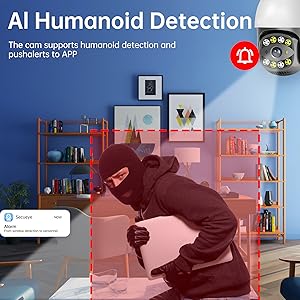
Image 5.5: The camera's automatic tracking capability follows detected human movement.

Image 5.6: Illustrates the camera's ability to differentiate human activity from other movements, reducing false alarms.
5.4 Öönägemise režiimid
The camera offers multiple night vision options for clear surveillance in low-light conditions:
- Infrapuna (IR) öönägemine: Uses IR LEDs to provide black and white video in complete darkness, with a range of up to 100ft (30m).
- Värviline öönägemine: Utilizes white light LEDs (floodlight) to capture full-color video at night when motion is detected or manually activated.
- Starlight Sensor: Enhances low-light performance to produce clearer images even without additional illumination.

Image 5.7: Demonstrates the different night vision modes: infrared (black and white), white light (color), and full-color night vision.

Image 5.8: The camera's infrared night vision provides visibility up to 20 meters in darkness.
5.5 Kahesuunaline heli
The built-in microphone and speaker allow for real-time two-way communication through the SECUEYE app. You can listen to audio from the camera's location and speak through the camera's speaker.
5.6 Salvestusvõimalused
The camera supports two primary storage methods for recorded footage:
- Micro SD kaart: Insert a Micro SD card (up to 256GB, sold separately) into the designated slot for local storage. The camera can record 24/7 or motion-triggered videos.
- Pilvesalvestus: Optional cloud storage services are available through the SECUEYE app for secure, remote backup of your recordings.
5.7 Seadme ühiskasutus
You can share access to your camera's live feed and recordings with family members or trusted individuals through the SECUEYE app, allowing multiple users to monitor the property simultaneously.
6. Hooldus
To ensure optimal performance and longevity of your SECULINK C17-4MP camera, consider the following maintenance tips:
- Puhastage objektiiv: Periodically wipe the camera lens with a soft, clean, lint-free cloth to remove dust, dirt, or water spots that may affect image clarity. Avoid abrasive cleaners.
- Kontrollige toiteühendust: Ensure the power adapter and cable remain securely connected and free from damage, especially in outdoor environments.
- Püsivara värskendused: Regularly check the SECUEYE app for available firmware updates. Updates often include performance improvements, new features, and security enhancements.
- Kontrollige paigaldust: Periodically check the camera's mounting for stability, especially after severe weather conditions.
7. Veaotsing
If you encounter issues with your SECULINK C17-4MP camera, refer to the following common troubleshooting steps:
7.1 Kaamera ei ühendu WiFi-ga
- Kontrollige Wi-Fi signaali: Ensure the camera is within range of your Wi-Fi router. Weak signals can cause connection issues.
- Verify Network Credentials: Double-check that the Wi-Fi network name (SSID) and password entered in the app are correct.
- Ruuteri ühilduvus: Confirm your router supports 2.4GHz or 5GHz bands, and that the camera is attempting to connect to a compatible band.
- Taaskäivitage seadmed: Power cycle both your Wi-Fi router and the camera.
- Lähtesta kaamera: If issues persist, perform a factory reset on the camera (refer to the quick start guide for reset button location and procedure) and attempt the setup process again.
7.2 Halb pildikvaliteet
- Puhas objektiiv: Veenduge, et kaamera objektiiv oleks puhas ja plekkide või mustusevaba.
- Võrgu ribalaius: A slow internet connection can affect live stream quality. Check your network speed.
- Valgustustingimused: Ensure adequate lighting for optimal image quality, especially for color night vision.
7.3 Liikumistuvastus ei tööta või on liiga tundlik
- Reguleerige tundlikkust: In the SECUEYE app settings, adjust the motion detection sensitivity level.
- Tuvastamistsoonid: Configure specific detection zones to monitor only relevant areas and exclude areas with frequent irrelevant motion (e.g., public roads, swaying trees).
- Check Schedule: Ensure motion detection is enabled for the desired time periods in the app.
7.4 No Recording to SD Card
- Insert SD Card Correctly: Ensure the Micro SD card is inserted properly into the slot.
- Vormindage SD-kaart: Format the SD card through the camera settings in the SECUEYE app.
- Card Capacity/Health: Ensure the SD card is not full or corrupted. Try a different, known-good SD card if necessary.
- Salvestusseaded: Verify that continuous recording or motion-triggered recording is enabled in the app settings.
8. Tehnilised andmed
| Funktsioon | Spetsifikatsioon |
|---|---|
| Mudel | C17-4MP |
| Resolutsioon | 4MP (2560x1440p Max) |
| Pildi andur | CMOS |
| Fookuskaugus | 3.6 mm |
| Panor pöörlemisnurk | 335° horisontaalne |
| Kallutamise pöördenurk | 90 ° vertikaalne |
| Digitaalne suum | 10x |
| Öine nägemine | IR-Cut, Starlight, LED (Color Night Vision) |
| Infrapuna kaugus | Kuni 100 jalga (30 meetrit) |
| Heli | Built-in Microphone and Speaker (Two-Way Audio) |
| Veekindlus | IP65, IP66 (Waterproof) |
| Ühenduvus | Dual-Band Wi-Fi (2.4GHz/5GHz), Wired Ethernet |
| Säilitamine | Micro SD-kaart (kuni 256 GB), pilvesalvestus |
| Võimsus | DC 12V, 9 Watts |
| Töötemperatuur | -10 °C kuni +50 °C (14 °F kuni 122 °F) |
| Rakenduste ühilduvus | SECUEYE (iOS, Android) |
| Mõõtmed | 7 x 7 x 5 tolli (pakend) |
| Kauba kaal | 1.2 naela |
9. Garantii ja tugi
For warranty information and technical support, please refer to the official SECULINK webveebisaidilt või võtke otse ühendust nende klienditeenindusega. Hoidke ostutšekk ostutõendina garantiinõuete korral.
Tootja: SECULINK