1. Sissejuhatus ja lõppview
The Acer Aspire 3 A314-36P-35UU is a slim and lightweight laptop designed for everyday productivity and multitasking. Featuring a 14.0-inch Full HD IPS display, an Intel Core i3-N305 Processor, 8GB LPDDR5 memory, and a 128GB NVMe SSD, it offers reliable performance for various tasks. This manual provides essential information for setting up, operating, and maintaining your laptop.

The Acer Aspire 3 A314-36P-35UU laptop, open and ready for use.
Peamised omadused:
- Purposeful Design: Thin and light for easy portability.
- Ready-to-Go Performance: Powered by an Intel Core i3-N305 Processor for efficient multitasking.
- Visually Stunning Display: 14.0" Full HD IPS screen with narrow bezels for clear visuals.
- Internal Specifications: 8GB LPDDR5 Onboard Memory and 128GB NVMe SSD for storage.
- Täiustatud suhtlus: HD front-facing camera with Acer TNR and PurifiedVoice technology for clear video calls.
- Traadita ühenduvus: Wi-Fi 6 (802.11ax) for strong and consistent wireless signals.
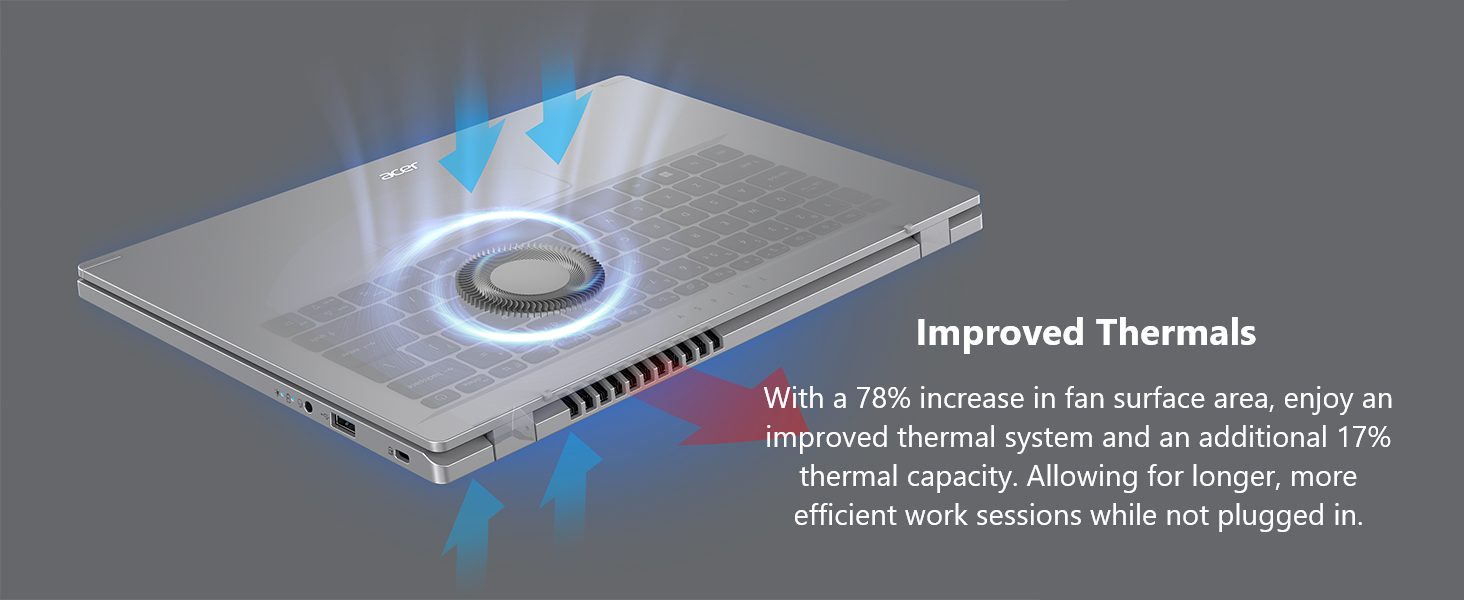
- Improved Thermals: Enhanced thermal system for efficient cooling during extended use.
- Operatsioonisüsteem: Windows 11 Home in S mode.
2. Mis on karbis
Upon unpacking your Acer Aspire 3 laptop, please ensure all the following items are present:
- Acer Aspire sülearvuti
- Vahelduvvoolu adapter
- Toitejuhe
3. Seadistamine
Follow these steps to set up your new Acer Aspire 3 laptop:
- Paki sülearvuti lahti: Eemaldage sülearvuti ja kõik lisaseadmed ettevaatlikult pakendist.
- Ühendage toide: Plug the AC adapter into the laptop's DC-in jack and then into a power outlet. It is recommended to fully charge the battery before first use.
- Esialgne käivitamine: Open the laptop lid and press the power button. The laptop will guide you through the initial Windows 11 setup process. Follow the on-screen instructions to configure your region, language, network, and user account.
- Ühendage välisseadmed: Connect any external devices such as a mouse, external keyboard, or monitor to the available ports.

The laptop features multiple ports for connectivity, including USB Type-C, USB 3.2, and HDMI.
4. Sülearvuti kasutamine
Toide sisse/välja:
- To power on, press the power button located on the keyboard.
- To power off, click the Start button in Windows, then select Power > Shut down.
Puuteplaadi kasutamine:
The touchpad functions as a mouse. Use single-finger taps for left-clicks and two-finger taps for right-clicks. You can also use multi-touch gestures for scrolling and zooming.
Wi-Fi-ga ühenduse loomine:
Your laptop supports Wi-Fi 6 for fast and stable wireless connections. To connect:
- Klõpsake tegumiribal WiFi ikooni.
- Valige loendist soovitud võrk.
- Sisestage võrguparool, kui seda küsitakse, ja klõpsake nuppu Loo ühendus.
Enjoy fast and reliable internet with Wi-Fi 6 connectivity.
Windows 11 Home in S Mode:
Your laptop comes with Windows 11 Home in S mode, which is a version of Windows streamlined for security and performance. In S mode, you can only install apps from the Microsoft Store, and you must use Microsoft Edge for safe browsing. You can switch out of S mode at any time, but you cannot switch back.
This video demonstrates the powerful tools available with Microsoft 365, enhancing productivity on your Windows 11 device.
This video showcases Windows AI Photos, demonstrating how to easily enhance and manage your images.
This video illustrates the Windows 11 AI Snipping tool, allowing for easy text extraction and sensitive information protection.
This video demonstrates Windows AI Paint, highlighting its enhanced features for drawing and digital creation, including background removal.
This video introduces Microsoft Windows Copilot, your everyday AI companion for enhancing creativity and productivity.
5. Hooldus
Nõuetekohane hooldus tagab teie sülearvuti pikaealisuse ja optimaalse jõudluse:
- Puhastamine: Ekraani ja välispinna puhastamiseks kasutage pehmet, ebemevaba lappi. Kangekaelsete plekkide korralampNiisutage lappi veega või ekraanisõbraliku puhastusvahendiga. Vältige tugevatoimelisi kemikaale.
- Aku hooldus: To maximize battery life, avoid fully discharging the battery frequently. Store the laptop in a cool, dry place when not in use for extended periods.
- Tarkvaravärskendused: Turvalisuse ja jõudluse tagamiseks värskendage regulaarselt oma Windowsi operatsioonisüsteemi ja draivereid.
- Soojusjuhtimine: The Aspire 3 features improved thermals. Ensure the vents are not obstructed to allow for proper airflow and prevent overheating. Avoid using the laptop on soft surfaces like beds or couches that can block ventilation.

The laptop's improved thermal design helps maintain optimal operating temperatures.
6. Veaotsing
Kui teil tekib sülearvutiga probleeme, proovige järgmisi põhilisi tõrkeotsingu samme.
- Toide puudub: Veenduge, et vahelduvvooluadapter oleks kindlalt ühendatud nii sülearvuti kui ka töötava pistikupesaga. Kontrollige, kas pistikupesa on töökorras.
- Süsteem ei reageeri: If the laptop freezes, press and hold the power button for 10-15 seconds to force a shutdown. Wait a few moments, then restart the laptop.
- WiFi-ühenduse probleemid: Restart your router and modem. On your laptop, turn Wi-Fi off and then on again. Ensure you are selecting the correct network and entering the correct password.
- Kuvamisprobleemid: If the screen is blank or flickering, try connecting an external monitor to the HDMI port to determine if the issue is with the laptop's display or graphics output.
- Aeglane jõudlus: Close unnecessary applications, check for malware, and ensure your operating system is up to date. Consider freeing up disk space if your storage is nearly full.
Keerukamate probleemide korral vaadake Aceri tugiteenust websaidil või võtke ühendust klienditeenindusega.
7. Tehnilised andmed
Below are the detailed specifications for the Acer Aspire 3 A314-36P-35UU Slim Laptop:
| Funktsioon | Spetsifikatsioon |
|---|---|
| Mudeli nimi | A314-36P-35UU |
| Ekraani suurus | 14 tolli |
| Ekraani eraldusvõime | 1920 x 1080 pikslit (Full HD IPS) |
| Protsessor | Intel Core i3-N305 (3.8 GHz) |
| RAM | 8 GB LPDDR5 |
| Mälu kiirus | 2400 MHz |
| Kõvaketas | 128 GB NVMe SSD |
| Graafika kaasprotsessor | Intel UHD graafikakaart (integreeritud) |
| Traadita tüüp | 802.11ax (Wi-Fi 6), Bluetooth |
| USB 3.0 pordid | 3 (1x USB Type-C 3.2 Gen 2, 2x USB 3.2 Gen 1) |
| HDMI port | 1 (HDMI 2.1 with HDCP support) |
| Operatsioonisüsteem | Windows 11 Home S-režiimis |
| Kauba kaal | 3.09 naela |
| Toote mõõtmed | 12.93 x 0.74 x 8.55 tolli |
| Värv | Hõbedane |
8. Garantii ja tugi
Täpsema garantiiteabe saamiseks vaadake tootega kaasasolevat garantiikaarti või külastage Aceri ametlikku tugilehte. webGarantii katab tavaliselt tootmisdefektid kindlaksmääratud aja jooksul alates ostukuupäevast.
If you require technical assistance or have questions not covered in this manual, please contact Acer customer support through their official channels. Have your laptop's model number (A314-36P-35UU) and serial number ready when contacting support.


