1. Sissejuhatus
This manual provides detailed instructions for the installation, operation, maintenance, and troubleshooting of your XPG CORE Reactor II VE 650W Power Supply Unit (PSU). Please read this manual thoroughly before using the product to ensure proper functionality and safety.
2. Ohutusalane teave
- Enne toiteploki paigaldamist, eemaldamist või puhastamist eemaldage alati toitejuhe seinakontaktist.
- Ärge avage toiteplokki (PSU)asing. Suur mahttages are present inside, which can cause electric shock. The warranty will be void if the casing on avatud.
- Paigaldage toiteplokk hästi ventileeritavasse kohta, eemale soojusallikatest, otsesest päikesevalgusest ja niiskusest.
- Ensure all cables are securely connected. Loose connections can cause damage to components.
- Use only the modular cables provided with this PSU. Using third-party cables may cause damage and void the warranty.
- See toode on mõeldud kasutamiseks ainult arvutisüsteemides. Ärge kasutage seda muul otstarbel.
3. Pakendi sisu
Veenduge, et teie tootepakendis on olemas kõik allpool loetletud esemed:
- XPG CORE Reactor II VE 650W Power Supply Unit
- Modular Cable Set (including 12V-2x6 cable)
- Vahelduvvoolu toitejuhe
- Kinnituskruvid
- Kiirjuhend

Image: The XPG CORE Reactor II VE 650W power supply unit shown with its retail box, modular cables, AC power cord, and quick start guide.
4. Toote lõppview
The XPG CORE Reactor II VE 650W is an 80 PLUS Gold certified power supply compliant with Intel's ATX 3.1 specifications. It features a fully modular design and an FDB (Fluid Dynamic Bearing) fan for efficient and quiet operation.

Pilt: Esikülg view of the XPG CORE Reactor II VE 650W power supply, showcasing its fan grille and XPG branding.

Image: The rear panel of the XPG CORE Reactor II VE 650W power supply, featuring the AC power inlet and the main power switch.

Image: A close-up of the modular cable connection panel on the XPG CORE Reactor II VE 650W PSU, showing labeled ports for Motherboard, CPU & VGA, 12V-2x6, and SATA & Molex connectors.
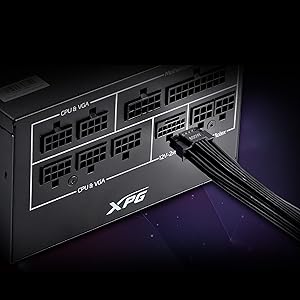
Pilt: detailne view of the 12V-2x6 connector port on the XPG CORE Reactor II VE 650W PSU, designed for next-generation graphics cards.
5. Seadistamine ja installimine
Follow these steps to properly install your XPG CORE Reactor II VE 650W PSU into your computer system:
- Valmistage oma süsteem ette: Veenduge, et arvuti on täielikult välja lülitatud ja pistik seinakontaktist eemaldatud. Avage arvuti korpus.
- Eemaldage vana toiteplokk (kui see on olemas): Disconnect all cables from your old PSU and remove it from the case.
- Uue toiteploki paigaldamine: Insert the XPG CORE Reactor II VE 650W PSU into the designated PSU bay in your computer case. Secure it with the provided mounting screws.
- Ühendage olulised kaablid:
- Ühendage 24-pin ATX-kaabel emaplaadiga.
- Connect the 4+4-pin or 8-pin EPS/CPU cable(s) to your motherboard's CPU power connector(s).
- Connect the appropriate PCI-E (6+2-pin) or 12V-2x6 cable(s) to your graphics card(s).
- Ühendage SATA toitekaablid oma salvestusseadmete (kõvakettad, SSD-d) ja optiliste draividega.
- Connect Molex cables to any peripherals requiring them.
Ensure all modular cables are firmly seated into both the PSU and the respective components.
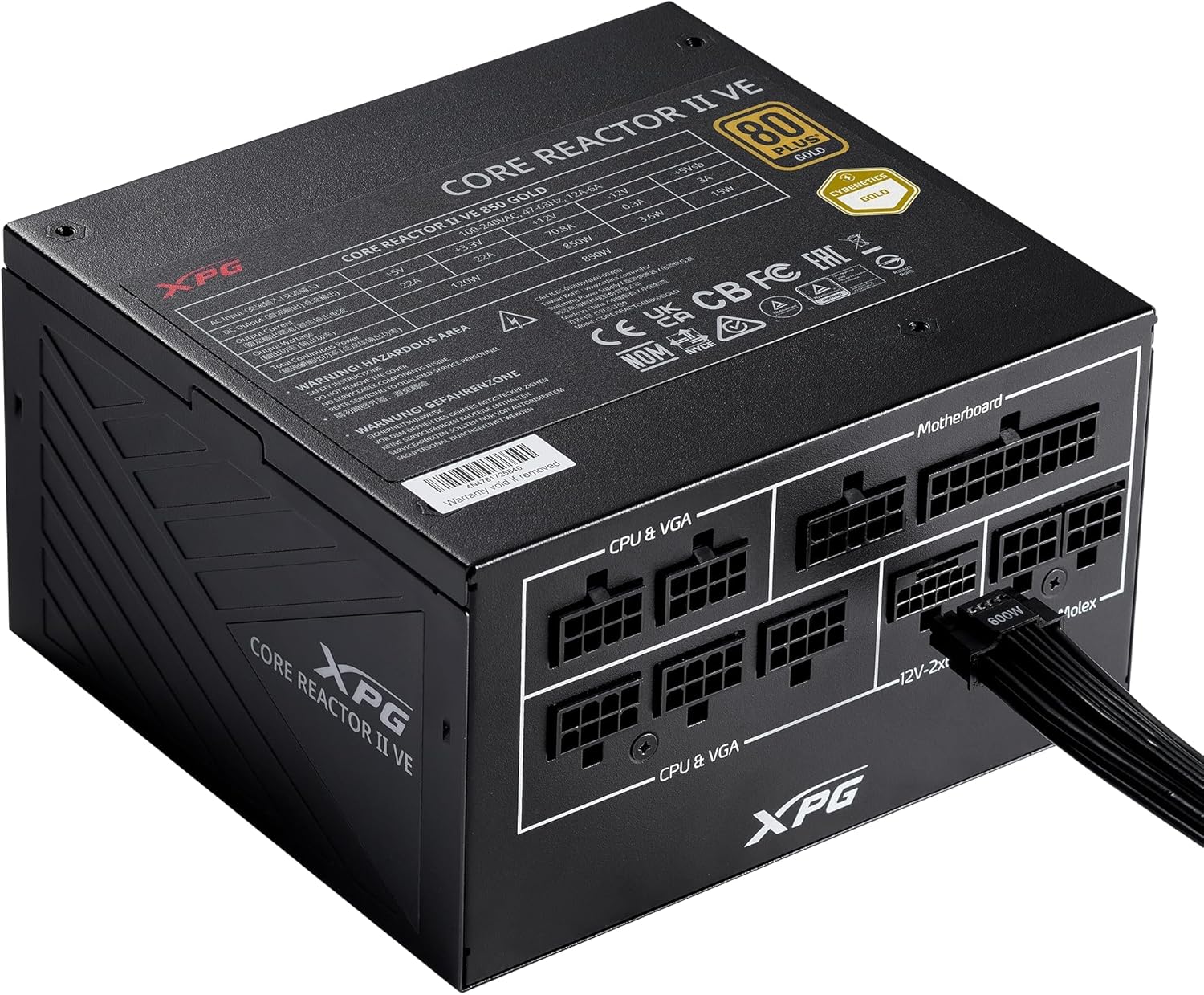
Image: The XPG CORE Reactor II VE 650W power supply with a 12V-2x6 cable connected to its modular port, illustrating a typical cable connection.
- Kaabli haldamine: Juhtmed on korpuse õhuvoolu ja esteetika parandamiseks korralikult paigutatud.
- Sulgege korpus ja ühendage toide: Close your computer case. Connect the AC power cord to the PSU's inlet and then to a wall outlet.
- Toide sisse: Flip the power switch on the back of the PSU to the 'ON' position and power on your computer.
6. Kasutusjuhised
The XPG CORE Reactor II VE 650W PSU operates automatically once installed and powered on. It features an FDB fan with intelligent fan control, which adjusts its speed based on the PSU's temperature and load to maintain optimal cooling and minimize noise.
The PSU is designed to provide stable and reliable power to your system. No user intervention is typically required during normal operation.
7. Hooldus
To ensure the longevity and optimal performance of your XPG CORE Reactor II VE 650W PSU, consider the following maintenance tips:
- Tolmu eemaldamine: Periodically clean the fan grille and the interior of your computer case to prevent dust buildup. Dust can impede airflow and lead to overheating. Use compressed air for this purpose, ensuring the system is powered off and unplugged.
- Kaabli kontroll: Occasionally check all modular cable connections to ensure they remain secure.
- Keskkond: Operate the PSU in a clean, dry, and well-ventilated environment.
8. Veaotsing
If you encounter issues with your XPG CORE Reactor II VE 650W PSU, refer to the following common troubleshooting steps:
- Toide puudub:
- Veenduge, et vahelduvvoolu toitejuhe oleks kindlalt ühendatud nii toiteploki kui ka seinakontaktiga.
- Check that the power switch on the back of the PSU is in the 'ON' position.
- Verify that the wall outlet is functional by plugging in another device.
- Confirm that the 24-pin ATX and 4+4-pin/8-pin EPS/CPU cables are correctly and firmly connected to the motherboard.
- Süsteemi ebastabiilsus/juhuslikud seiskamised:
- Ensure all power cables to components (motherboard, CPU, GPU, drives) are securely connected.
- Check for proper ventilation within your computer case. Overheating can cause instability.
- If you have recently added new components, ensure the 650W output is sufficient for your total system load.
- Ventilaator ei pöörle:
- The FDB fan features intelligent control and may not spin at low loads or temperatures. This is normal operation.
- If the fan does not spin under heavy load and the PSU feels excessively hot, contact support.
- Ebatavalised helid:
- A slight coil whine can sometimes occur under specific loads; this is generally not indicative of a fault.
- If you hear grinding or scraping noises, power off the system immediately and contact support.
Kui need sammud teie probleemi ei lahenda, vaadake lisateabe saamiseks jaotist Garantii ja tugi.
9. Tehnilised andmed
Key technical specifications for the XPG CORE Reactor II VE 650W PSU:
| Funktsioon | Spetsifikatsioon |
|---|---|
| Mudeli number | COREREACTORIIVE650G-BKCUS |
| Väljund vattage | 650 vatti |
| Tõhususe sertifitseerimine | 80 PLUS Gold, CYBENETICS Gold |
| ATX-standard | ATX 3.1 / EPS v2.92 |
| Vormitegur | ATX |
| Jahutusmeetod | Air (FDB 120mm Fan) |
| Toiteallika disain | Täismoodul |
| Toote mõõtmed (P x L x K) | 5.86 x 5.9 x 3.38 tolli (140 x 150 x 86 mm) |
| Kauba kaal | 5.07 naela |
| Pistikute tüübid | ATX, Molex, PCI Express, SATA, 12V-2x6 |
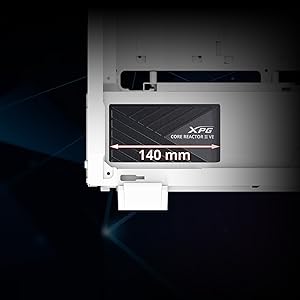
Image: A diagram illustrating the compact 140mm length of the XPG CORE Reactor II VE power supply, highlighting its compatibility with various PC cases.

Image: Visual representation of the multiple protection mechanisms integrated into the PSU, including OPP (Over Power Protection), OVP (Over Voltage Protection), SIP (Surge & Inrush Protection), SCP (Short Circuit Protection), UVP (Under Voltage Protection), OCP (Over Current Protection), OTP (Over Temperature Protection), and NLO (No Load Operation).
10. Garantii ja tugi
For warranty information, technical support, or service inquiries regarding your XPG CORE Reactor II VE 650W PSU, please visit the official XPG website or contact their customer support directly. Details can typically be found on the product packaging or the manufacturer's official support pages.
Garantiinõuete esitamiseks säilitage ostutõend.