1. Toote lõppview
The ION Audio Highlander is a high-powered, all-weather portable Bluetooth speaker designed to deliver rich sound and deep bass even at high volumes. Its durable construction makes it suitable for various environments, ensuring your music can accompany you wherever you go.
Peamised omadused:
- High-Power Audio: Delivers 120 Watts of speaker maximum output power for impactful sound.
- Bassivõim: Enhances low frequencies for maximum impact.
- Bluetooth 5.0 Enabled: Allows wireless streaming and control of your music from compatible devices.
- IPX5 veekindel: Designed to withstand splashes and rain, making it safe for outdoor use.
- Rechargeable 50-Hour Battery: Provides extended playtime on a single charge.
- Built-in Handles and Wheels: Facilitates easy transportation.
2. Pakendi sisu
Veenduge, et teie pakendis on kõik allpool loetletud esemed:
- ION Audio Highlander Portable Speaker
- Toitekaabel
3. Seadistusjuhend
3.1 Aku laadimine
Before first use, fully charge the Highlander speaker. The battery life is approximately 50 hours, but initial charging may take several hours.
- Connect the included power cable to the power input on the back of the Highlander speaker.
- Ühendage toitekaabli teine ots tavalisse seinakontakti.
- The charging indicator light will illuminate. The light will change or turn off once charging is complete.
3.2 Sisse-/väljalülitamine
To power the speaker on or off, locate the power button on the control panel.
- Sisselülitamiseks: Press and hold the Power button for a few seconds until the display illuminates.
- Väljalülitamiseks: Press and hold the Power button again for a few seconds until the display turns off.
3.3 Bluetoothi sidumine
Follow these steps to connect your Bluetooth device to the Highlander speaker:
- Ensure the Highlander speaker is powered on and in Bluetooth mode. The Bluetooth indicator on the display will flash, indicating it's ready to pair.
- On your Bluetooth device (smartphone, tablet, laptop), go to its Bluetooth settings.
- Otsi available devices. Select "ION Highlander" from the list.
- Once paired, the Bluetooth indicator on the speaker will stop flashing and remain solid. You can now play audio through the speaker.
- To disconnect, turn off Bluetooth on your device or select "Forget This Device" in your device's Bluetooth settings.
4. Kasutusjuhised
4.1 Juhtpaneel üleview
The top panel of the Highlander speaker features various controls for managing audio playback and settings.

- Toitenupp: Lülitab kõlari sisse või välja.
- Helitugevuse nupp: Reguleerib üldist helitugevust.
- Bluetoothi nupp: Käivitab Bluetoothi sidumisrežiimi.
- Bass Boost Boost: Aktiveerib või deaktiveerib bassi võimenduse funktsiooni.
- Ekraan: Shows current mode, battery status, and other information.
4.2 Adjusting Volume and Bass Boost
- Maht: Rotate the main volume knob clockwise to increase volume and counter-clockwise to decrease it.
- Bassivõim: Press the "Bass Boost" button to enhance the bass output. Press it again to return to normal audio.
4.3 Kaasaskantavusfunktsioonid
The Highlander is designed for easy transport:
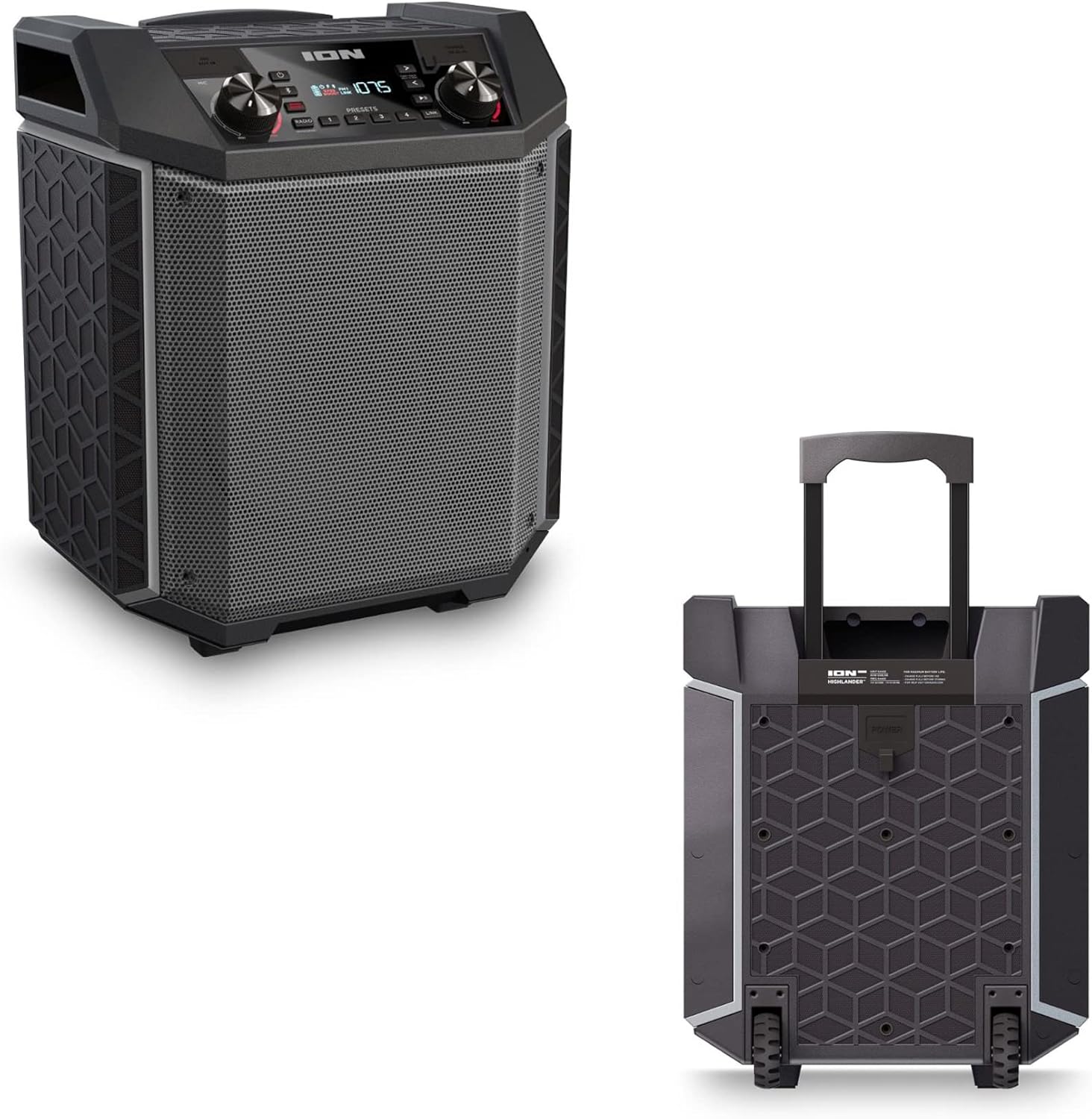

- Sissetõmmatav käepide: Pull up the integrated handle to roll the speaker like luggage.
- Rattad: Use the built-in wheels for smooth movement across various surfaces.
4.4 Veekindlus (IPX5)
The Highlander speaker is IPX5 water-resistant, meaning it can withstand splashes of water from any direction. It is suitable for use by the pool or in light rain.

Tähtis: Do not submerge the speaker in water. Ensure all port covers are securely closed when exposed to water.
5. Hooldus
5.1 Puhastamine
- Enne puhastamist lülitage kõlar alati välja ja eemaldage see toiteallikast.
- Välispindade pühkimiseks kasutage pehmet ja kuiva lappi.
- Tugeva mustuse korral kergelt dampLoputage lappi veega. Vältige tugevate kemikaalide, lahustite või abrasiivsete puhastusvahendite kasutamist.
- Do not spray cleaning liquids directly onto the speaker.
5.2 Säilitamine
- Hoidke kõlarit jahedas ja kuivas kohas, eemal otsesest päikesevalgusest ja äärmuslikest temperatuuridest.
- If storing for an extended period, ensure the battery is partially charged (around 50%) to maintain battery health. Recharge every few months if not in use.
5.3 Aku hooldus
- Väldi aku sagedast täielikku tühjenemist.
- Ärge jätke akut liiga kuuma ega külma kätte.
- If the battery performance significantly degrades, contact customer support for assistance.
6. Veaotsing
If you encounter issues with your Highlander speaker, refer to the table below for common problems and solutions.
| Probleem | Võimalik lahendus |
|---|---|
| Kõlar ei lülitu sisse. |
|
| Bluetooth-seadmega ei saa siduda. |
|
| Heli puudub või on vaikne. |
|
| Heli moonutamine. |
|
7. Tehnilised andmed
| Funktsioon | Detail |
|---|---|
| Mudeli nimi | Highlander |
| Kaubamärk | ION |
| Kõlari tüüp | Õues |
| Ühenduvustehnoloogia | Bluetooth 5.0 |
| Toiteallikas | Akutoitel |
| Aku tööiga | 50 tundi |
| Veekindluse tase | IPX5 (veekindel) |
| Kõlari maksimaalne väljundvõimsus | 120 vatti |
| Toote mõõtmed | 19.5" P x 19.5" L x 14" K |
| Kauba kaal | 23.2 naela |
| Materjal | Water-resistant plastic or rubber, with a black coating |
| Kaasatud komponendid | Toitekaabel |
| UPC | 657768542732 |
8. Garantii ja tugi
The ION Audio Highlander speaker comes with a Limited Warranty. For specific details regarding warranty coverage, duration, and terms, please refer to the warranty information provided with your purchase or visit the official ION Audio websaidile.
For technical support, troubleshooting assistance beyond this manual, or warranty claims, please contact ION Audio customer support through their official channels. Keep your proof of purchase handy when contacting support.


