1. Sissejuhatus
The SCHWAIGER SOEM0100 Energy Cost Meter is designed to help you monitor and manage the electricity consumption and associated costs of your household appliances. With its large, rotatable display and multiple viewing modes, it provides clear and accurate data, enabling informed decisions about energy usage. This manual will guide you through the setup, operation, and maintenance of your device.
Official Product Summary Video for SCHWAIGER SOEM0100. This video provides a brief overview of the energy cost meter's features and design.
2. Ohutusalane teave
- Enne kasutamist lugege hoolikalt läbi kõik juhised.
- Ärge ületage maksimaalset pesukogust 16 A / 3600 W. Overloading can cause damage to the device and connected appliances, and poses a fire hazard.
- This device is intended for indoor use only. Do not expose to moisture or extreme temperatures.
- Ärge võtke seadet lahti ega proovige seda parandada. Jätke kogu hooldus kvalifitseeritud personalile.
- Hoida lastele kättesaamatus kohas.
- Ensure the device is securely plugged into a wall socket and that the appliance is securely plugged into the meter.
3. Pakendi sisu
- 1x SCHWAIGER SOEM0100 Energy Cost Meter
- 1x Kasutusjuhend (käesolev dokument)
4. Toote lõppview
The SCHWAIGER SOEM0100 features a compact design with an integrated display and intuitive controls for easy operation.
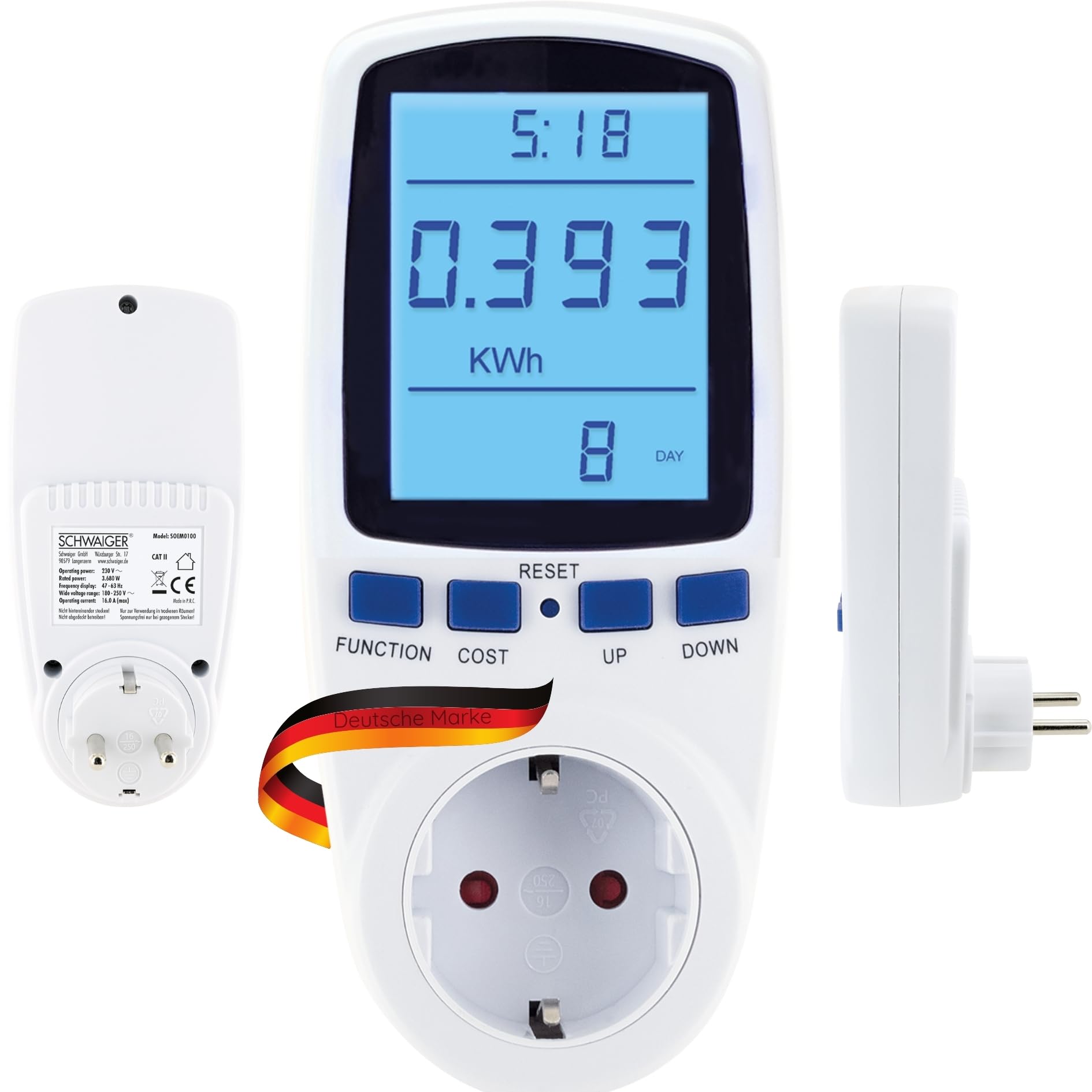


Juhtnupud ja ekraan:
- Kuva: Large, 180° rotatable, backlit LCD for clear visibility of measurement data.
- FUNKTSIOONI nupp: Cycles through the 7 different display modes (e.g., KWh, Watt, Voltage, Frequency, Cost, Total Time).
- COST nupp: Used to set the electricity cost per KWh.
- Reset-nupp: Resets accumulated data.
- ÜLES/ALLA nupud: Kasutatakse väärtuste muutmiseks sätete ajal.
5. Seadistamine
- Ühendage arvesti vooluvõrku: Insert the SCHWAIGER SOEM0100 into a standard wall socket.
- Esialgne sisselülitamine: The display will light up, and the device will be ready for use.
- Määra praegune kellaaeg (valikuline): If the device has a clock function, use the appropriate buttons (refer to specific button combinations if available, otherwise assume 'FUNCTION' or 'SET' to access time settings and 'UP/DOWN' to adjust).
- Set Electricity Cost:
- Vajutage nuppu KULU button. The cost setting will appear on the display.
- Kasutage UP ja ALLA buttons to adjust the cost per KWh according to your local electricity tariff.
- Vajutage KULU uuesti, et seadet kinnitada ja salvestada.
- Ühendage seade: Plug the appliance you wish to monitor into the socket on the front of the energy cost meter.

6. Kasutusjuhised
ViewMõõtmisandmete kogumine:
Vajutage nuppu FUNKTSIOON button repeatedly to cycle through the 7 different display modes. These modes typically include:
- Current Power (Watt): Shows the real-time power consumption of the connected appliance.
- Accumulated Energy (KWh): Displays the total energy consumed since the last reset.
- Voltage (V): Shows the current line voltage.
- Praegune (A): Näitab seadme poolt tarbitavat voolu.
- Sagedus (Hz): Shows the mains frequency.
- Elektrienergia maksumus: Calculates the total cost based on accumulated energy and your set tariff.
- Total Operating Time: Shows the duration the appliance has been connected and powered on.
Andmesalvestus:
The SCHWAIGER SOEM0100 features internal memory to store accumulated data (KWh, cost, total operating time) even during a power outage or when unplugged. This ensures continuous tracking of your energy usage.
Andmete lähtestamine:
To clear all accumulated data (KWh, cost, total operating time) and start a new measurement cycle, press and hold the RESET button for approximately 3-5 seconds until the display clears or resets to zero.
7. Hooldus
- Puhastamine: Pühkige seadet pehme ja kuiva lapiga. Ärge kasutage abrasiivseid puhastusvahendeid ega lahusteid.
- Hoiustamine: Kui seadet pikemat aega ei kasutata, eemaldage see vooluvõrgust ja hoidke seda jahedas, kuivas ja otsese päikesevalguse eest kaitstud kohas.
- Ülevaatus: Periodically check the device and its connections for any signs of damage. Do not use if damaged.
8. Veaotsing
| Probleem | Võimalik põhjus | Lahendus |
|---|---|---|
| Ekraan on tühi või ei sütti. | No power to the socket or device is faulty. | Check if the wall socket is live. Try plugging another device into the socket. If the problem persists, the meter may be faulty. |
| Incorrect readings or no readings. | Appliance not properly connected or meter malfunction. | Ensure the appliance is fully plugged into the meter. Try resetting the meter by holding the RESET button. |
| Cost calculation is incorrect. | Electricity cost per KWh is set incorrectly. | Re-enter the correct electricity cost per KWh using the COST and UP/DOWN buttons. |
| Device feels warm. | Normal operation for some loads, or device is overloaded. | Ensure the connected appliance does not exceed the maximum load of 16A / 3600W. If it continues to feel excessively hot, discontinue use. |
9. Tehnilised andmed
| Kaubamärk | SCHWAIGER |
| Mudel | SOEM0100 |
| Töövõimsus | 230V ~ 50Hz |
| Max Laadige | 16 A / 3600 W |
| Voltage Vahemik | 180-250V |
| Sagedusnäidik | 47-63 Hz |
| Kaal | 210 g |
| Kaasatud komponendid | Energiakulu arvesti |
Märkus: Toote spetsifikatsioonid võivad muutuda ette teatamata.

10. Garantii ja tugi
Garantii:
The SCHWAIGER SOEM0100 Energy Cost Meter comes with a 2-aastane garantii from the date of purchase. This warranty covers manufacturing defects and material faults under normal use. It does not cover damage caused by misuse, accidents, unauthorized modifications, or natural disasters.
Klienditugi:
For technical assistance, troubleshooting, or warranty claims, please contact SCHWAIGER customer support. You can find contact information on the official SCHWAIGER webveebisaidilt või oma jaemüüja kaudu.
Visit the official SCHWAIGER websait lisateabe saamiseks: SCHWAIGER Official Websaidile