Sissejuhatus
This manual provides essential information for setting up, operating, and maintaining your Microsoft Surface Studio 2+ All-In-One Desktop Computer. The Surface Studio 2+ is designed for productivity and creativity, featuring a versatile 28-inch PixelSense™ touchscreen display.
Palun lugege see kasutusjuhend hoolikalt läbi, et tagada seadme nõuetekohane kasutamine ja pikendada selle eluiga.
Mis on karbis
Veenduge, et pakendis on kõik esemed olemas:
- Surface Studio 2+ All-in-One Computer
- Surface Pen
- Pinna klaviatuur
- Hiir
- Power Cord with Grip-Release Cable
- Kiirjuhend
- Ohutus- ja garantiijuhend
Seadistamine
- Lahtipakkimine: Carefully remove the Surface Studio 2+ and its accessories from the packaging. Place the computer on a stable, flat surface.

Image: The Microsoft Surface Studio 2+ All-in-One computer displaying the Windows 11 desktop interface.
- Toiteühendus: Connect the power cord to the power port on the back of the Surface Studio 2+ base, then plug the other end into a wall outlet.

Pilt: Tagumine view of the Surface Studio 2+ base, highlighting the various ports including the power input.
- Ühendage välisseadmed: Connect the Surface Keyboard and Mouse. These devices typically connect wirelessly via Bluetooth. Follow the on-screen instructions during initial setup for pairing.
- Esialgne käivitamine: Press the power button, usually located on the back or side of the display. The computer will guide you through the Windows 11 Pro setup process, including language selection, network connection, and user account creation.
Kasutusjuhised
Ekraani reguleerimine
The Surface Studio 2+ features a unique Zero Gravity Hinge, allowing the display to be adjusted from an upright desktop mode to a flat studio mode for drawing and writing.

Image: A sequence showing the Surface Studio 2+ display being adjusted from an upright position to a nearly flat angle.
- Töölaua režiim: Gently push the top of the screen backward to tilt it into an upright position for traditional desktop use.
- Stuudiorežiim: Gently pull the top of the screen forward and down towards the base to transition it into a low-angle, flat position ideal for creative tasks with the Surface Pen.
Using the Surface Pen and Touchscreen
The 28-inch PixelSense™ touchscreen supports multi-touch gestures and is optimized for use with the included Surface Pen.
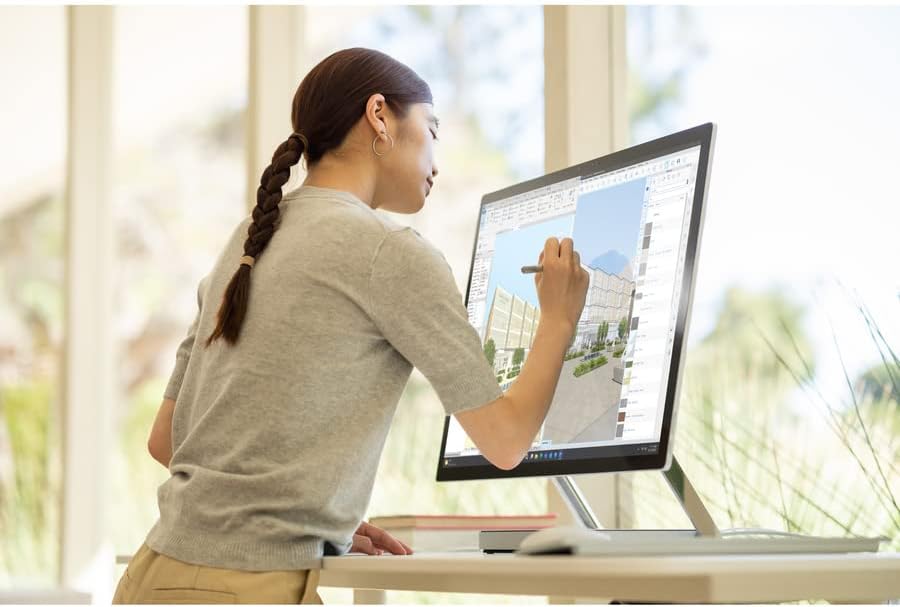
Image: A person using the Surface Pen to interact with the touchscreen of the Microsoft Surface Studio 2+ in studio mode.
- Puutežestid: Utilize standard Windows touch gestures for navigation, zooming, and scrolling.
- Surface'i pliiats: The Surface Pen allows for precise drawing, writing, and annotation directly on the screen. It can be magnetically attached to the side of the display for storage.
Windows 11 Pro
Your Surface Studio 2+ comes pre-installed with Windows 11 Pro. Familiarize yourself with the operating system's interface and features for optimal productivity.
- Menüü Start: Access applications, settings, and power options from the Start Menu.
- Tegumiriba: Kiireks juurdepääsuks kinnitage sageli kasutatavad rakendused tegumiribale.
- Seaded: Customize your device, manage accounts, and configure privacy settings through the Settings app.
Omadused
The Microsoft Surface Studio 2+ is equipped with advanced components for high performance:
- Protsessor: Intel Core i7 3 GHz processor for demanding tasks.
- Mälu: 32 GB DDR4 RAM for smooth multitasking.
- Hoiustamine: 1 TB Solid State Drive (SSD) for fast boot times and application loading.
- Graafika: NVIDIA GeForce RTX 3060 with 6GB dedicated memory for graphics-intensive applications and gaming.
- Kuva: 28-inch PixelSense™ touchscreen with 4500 x 3000 resolution.
- Operatsioonisüsteem: Windows 11 Pro.
- Ühenduvus: Integrated 802.11ax Wi-Fi and Bluetooth for wireless connections.
Hooldus
Seadme puhastamine
- Ekraan: Kasutage kergelt pehmet ebemevaba lappi damploputage veega või spetsiaalselt elektroonikale mõeldud ekraanipuhastusvahendiga. Vältige tugevatoimelisi kemikaale.
- Keha: Pühkige välispinnad pehme ja kuiva lapiga.
- Ventilatsioon: Ensure the ventilation openings on the base are clear of dust and obstructions to prevent overheating.
Tarkvaravärskendused
Kontrollige ja installige regulaarselt Windowsi värskendusi, et teie süsteemil oleksid uusimad turvapaigad ja jõudluse täiustused.
- Mine aadressile Seaded > Windows Update.
- Klõpsake Kontrollige värskendusi ja installige kõik saadaolevad värskendused.
Veaotsing
| probleem | Võimalik lahendus |
|---|---|
| Arvuti ei lülitu sisse. | Ensure the power cord is securely connected to both the computer and a working electrical outlet. Try a different outlet. |
| Ekraan on tühi. | Check power connection. Ensure the computer is powered on. If connected to an external display, verify display input settings. |
| Surface Pen or Mouse not responding. | Check battery levels. Re-pair the devices via Bluetooth settings in Windows. |
| Aeglane jõudlus. | Close unnecessary applications. Check for and install Windows updates. Run a disk cleanup. |
| WiFi-ühenduse probleemid. | Restart your router and the Surface Studio 2+. Check Wi-Fi settings in Windows to ensure it's enabled and connected to the correct network. |
Tehnilised andmed
| Funktsioon | Detail |
|---|---|
| Mudeli number | SBG-00001 |
| Ekraani suurus | 28 tolli |
| Ekraani eraldusvõime | 4500 x 3000 |
| Protsessor | Intel Core i7 (3 GHz) |
| RAM | 32 GB DDR4 |
| Kõvaketas | 1 TB SSD |
| Graafika kaasprotsessor | NVIDIA GeForce RTX 3060 |
| Graafikakaardi RAM-i maht | 6 GB |
| Operatsioonisüsteem | Windows 11 Pro |
| Traadita tüüp | 802.11ax, Bluetooth |
| Kauba kaal | 21.1 naela |
| Toote mõõtmed (PxLxK) | 25.1 x 0.5 x 17.3 tolli |
| Värv | Hõbedane |
Garantii ja tugi
Your Microsoft Surface Studio 2+ is covered by a manufacturer's warranty. Please refer to the included "Safety and Warranty Guide" for detailed information regarding warranty terms, conditions, and registration.
For technical support, driver downloads, or further assistance, please visit the official Microsoft Support website or contact Microsoft customer service.
Veebitugi: support.microsoft.com/surface


