1. Sissejuhatus
This manual provides essential information for the installation, operation, and maintenance of the Cisco Catalyst 9800-L Copper Uplink Wireless LAN Controller (Model C9800-L-C-K9). Please read this manual thoroughly before using the device to ensure proper functionality and safety.
2. Oluline ohutusteave
Vigastuste ja seadme kahjustuste vältimiseks järgige järgmisi ohutusnõudeid:
- Veenduge, et seade oleks paigaldatud hästi ventileeritavasse kohta, et vältida ülekuumenemist.
- Kasutage ainult sellele seadmele ettenähtud toiteallikat.
- Ärge jätke seadet niiskuse ega äärmuslike temperatuuride kätte.
- Enne hooldus- või puhastustöid ühendage seade vooluvõrgust lahti.
- Andke kõik hooldustööd kvalifitseeritud teeninduspersonalile.
3. Pakendi sisu
Veenduge, et pakendis on kõik esemed olemas:
- Cisco Catalyst 9800-L Wireless LAN Controller
- CD (dokumentatsiooni või tarkvaraga)
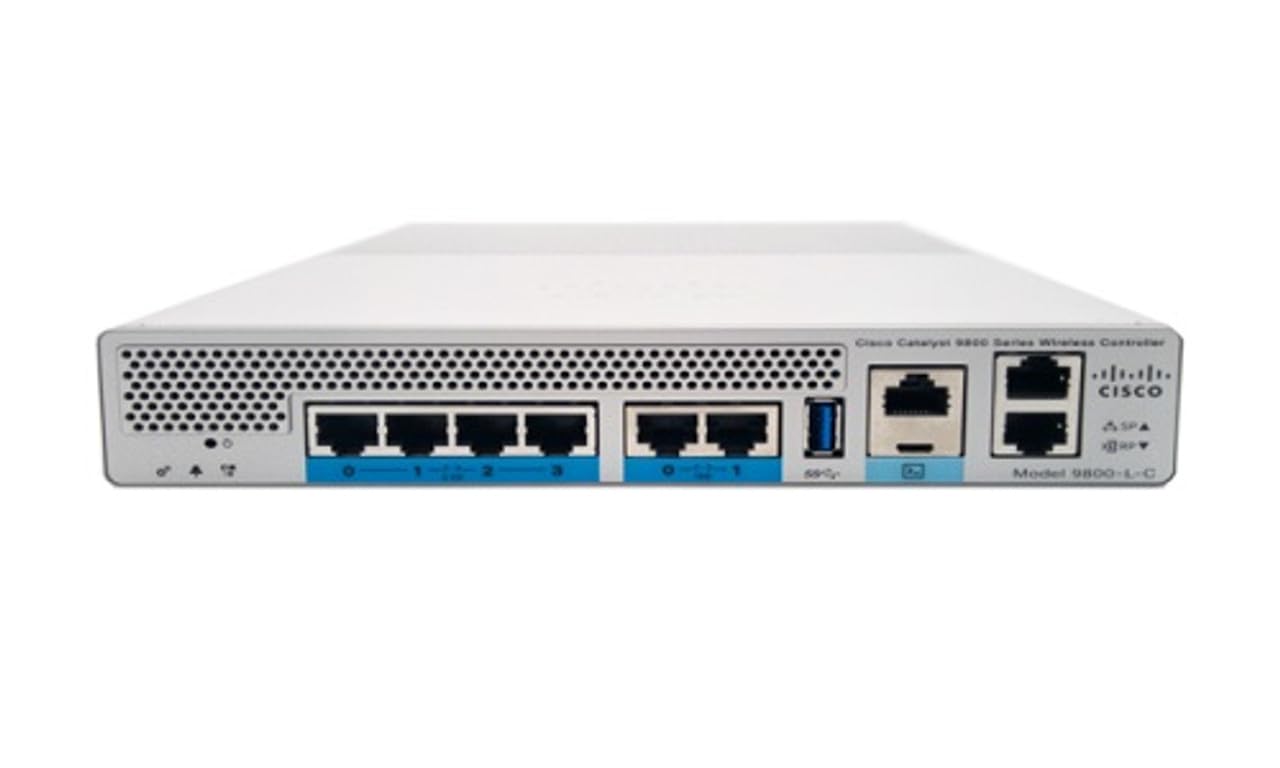
Joonis 1: Esiosa view of the Cisco Catalyst 9800-L Wireless LAN Controller. This image shows the compact design and port layout of the device.
4. Toote lõppview
The Cisco Catalyst 9800-L is a compact, fixed-configuration wireless LAN controller designed for small to medium-sized deployments. It provides centralized control for Cisco Aironet access points, offering robust wireless network management capabilities.
Peamised omadused:
- Managed, Layer 2.5 (Wireless Controller) functionality
- Copper uplink interfaces
- RJ45 interface type
- 11 ports for connectivity
- Designed for desktop environments
5. Seadistamine
5.1 Lahtipakkimine ja ülevaatus
- Eemaldage kontroller ettevaatlikult pakendist.
- Inspect the device for any signs of physical damage. If damage is found, contact your supplier immediately.
5.2 Füüsiline paigaldus
- Place the controller on a stable, flat surface, such as a desktop.
- Ensure adequate clearance around the device for proper airflow and ventilation.
5.3 Toiteühendus
- Connect the power cord to the power input on the rear of the controller.
- Plug the other end of the power cord into a grounded electrical outlet (220 Volts).
5.4 Võrguühendus
- Connect Ethernet cables from your network infrastructure to the RJ45 uplink ports on the controller.
- Connect access points to the appropriate downlink ports as required by your network design.
5.5 Esialgne konfiguratsioonipääs
- Refer to the included CD or Cisco's official documentation for detailed instructions on initial console access and software configuration.
- Typically, this involves connecting a console cable to the device and using a terminal emulator.
6. Kontrolleri kasutamine
6.1 Põhitoimingud
Once powered on and initially configured, the controller will begin managing connected access points. Monitor the status indicators on the device for operational status.
6.2 Access Point Management
The Cisco Catalyst 9800-L automatically discovers and provisions Cisco Aironet access points. Use the controller's management interface (CLI or GUI) to configure wireless networks, security policies, and guest access.
6.3 Võrgu konfigureerimine
Detailed network configuration, including VLANs, QoS, and routing, is performed through the controller's operating system. Consult Cisco's official documentation for advanced configuration guides.
7. Hooldusjuhised
- Püsivara värskendused: Regularly check for and apply the latest firmware updates from Cisco to ensure optimal performance and security.
- Puhastamine: Hoidke seadet puhtana ja tolmuvabalt. Puhastamiseks kasutage pehmet ja kuiva lappi. Ärge kasutage vedelaid ega aerosoolpuhastusvahendeid.
- Keskkonnatingimused: Ensure the operating environment remains within specified temperature and humidity ranges to prevent hardware failure.
- Varunduskonfiguratsioon: Periodically back up your controller's configuration to prevent data loss.
8. Veaotsing
Selles jaotises käsitletakse levinud probleeme, millega võite kokku puutuda:
| Probleem | Võimalik põhjus | Lahendus |
|---|---|---|
| Kontroller ei lülitu sisse | Power cable disconnected; Power outlet failure | Check power cable connections; Test power outlet with another device. |
| Access points not connecting | Incorrect network configuration; APs not discovered | Verify network settings on the controller; Ensure APs are on the same network segment or reachable via IP. |
| Slow wireless performance | Interference; Overloaded channels; Outdated firmware | Perform a site survey to identify interference; Optimize channel selection; Update controller and AP firmware. |
9. Tehnilised andmed
| Spetsifikatsioon | Detail |
|---|---|
| Kaubamärk | Cisco |
| Mudeli number | C9800-L-C-K9 |
| Portide arv | 11 |
| Liides | RJ45 |
| Lüliti tüüp | Managed, Layer 2.5 (Wireless Controller) |
| Platvorm | Zeta |
| Korpuse materjali tüüp | Vask |
| Voltage | 220 volti |
| Ühilduvad seadmed | Töölaud |
| Värv | Sinine |
| Kauba kaal | 3.09 kilogrammi |
| UPC | 657768416101 |
| ASIN | B0C3FQPCY4 |
10. Garantii teave
This Cisco Catalyst 9800-L Wireless LAN Controller (Renewed) comes with a 90-päevane piiratud garantii. For specific terms and conditions, please refer to the warranty documentation provided with your purchase or contact your reseller.
11. Klienditugi
For technical assistance, troubleshooting, or further inquiries regarding your Cisco Catalyst 9800-L Wireless LAN Controller, please visit the official Cisco support website or contact your authorized Cisco reseller. Ensure you have your model number (C9800-L-C-K9) and serial number available when seeking support.


