Sissejuhatus
This manual provides comprehensive instructions for the installation, operation, and maintenance of your Natec Cabassu G2 Midi Tower PC Case. Please read this manual thoroughly before beginning installation to ensure proper setup and optimal performance.
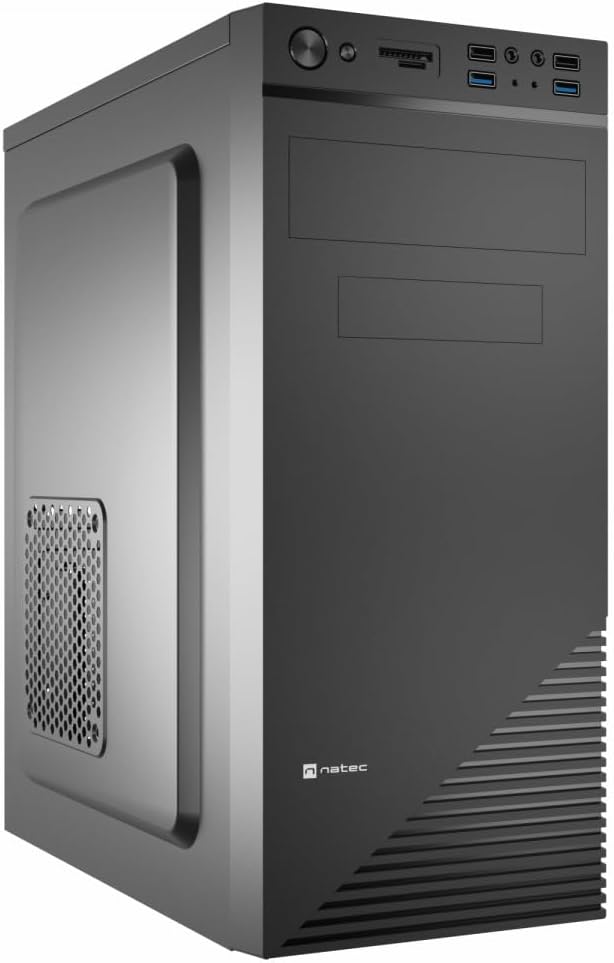
Figure 1: Natec Cabassu G2 Midi Tower PC Case. This image shows the front and left side of the black PC case, highlighting its sleek design and front panel layout.
Ohutusteave
- Enne mis tahes komponentide paigaldamist või eemaldamist ühendage alati toitejuhe seinakontaktist lahti.
- Handle components with care to prevent damage from static electricity.
- Keep the case away from water, moisture, and extreme temperatures.
- Ülekuumenemise vältimiseks tagage korralik ventilatsioon.
- Do not attempt to open the power supply unit.
Pakendi sisu
Veenduge, et pakendis on kõik esemed olemas:
- Natec Cabassu G2 Midi Tower PC Case
- Lisatarvikute komplekt (kruvid, vahetükid, kaablisidemed)
- Kasutusjuhend (see dokument)
Setup and Component Installation
1. Juhtumi ettevalmistamine
- Asetage ümbris tasasele ja stabiilsele pinnale.
- Remove the side panels by unscrewing the thumbscrews at the rear and sliding the panels backward.

Joonis 2: Interjöör view of the Natec Cabassu G2 case with the side panel removed, illustrating the internal layout for component installation.
2. Emaplaadi paigaldamine
- Paigaldage I/O-kaitse korpuse tagumisse avasse.
- Align the motherboard with the pre-installed standoffs. The Cabassu G2 supports Mini ITX, Micro ATX, and ATX motherboards.
- Kinnitage emaplaat kaasasolevate kruvidega.
3. Toiteallika paigaldamine
- Toiteplokk paigaldatakse korpuse põhja.
- Slide the power supply into its designated bay from the rear of the case.
- Secure it with screws from the rear.
4. Salvestusketta paigaldamine
- 2.5" Drives (SSDs/HDDs): The case features 3 x 2.5" drive bays. Mount drives using the provided screws in the designated locations.
- 3.5-tollised kõvakettad (kõvakettad): The case also supports 3.5" drives.
5. Laienduskaardi paigaldamine
- Remove the necessary expansion slot covers from the rear of the case (7 expansion slots available).
- Sisestage graafikakaart või muud laienduskaardid emaplaadi PCIe-pesadesse.
- Kinnitage kaardid kruvidega.

Joonis 3: Tagumine view of the Natec Cabassu G2 case, detailing the I/O shield cutout, power supply opening, and seven expansion slots.
6. Kaablite haldamine
Route cables behind the motherboard tray where possible to improve airflow and aesthetics. Use the included cable ties to secure bundles.
7. Esipaneeli kaablite ühendamine
Connect the front panel cables (USB 2.0, USB 3.0, audio, power switch, reset switch, HDD LED, power LED) to the corresponding headers on your motherboard. Refer to your motherboard manual for exact pin assignments.

Figure 4: Close-up of the Natec Cabassu G2 front panel, showing 2x USB 2.0 ports, 2x USB 3.0 ports, audio jacks, and power/reset buttons.
Kasutusjuhised
Sisse/välja lülitamine
- Toide sisse: Vajutage esipaneelil asuvat toitenuppu.
- Toide välja: Initiate shutdown through your operating system. For a forced shutdown, press and hold the power button for several seconds.
- Lähtesta: Press the reset button on the front panel to restart the system.
Using Front Panel Ports
The front panel provides convenient access to:
- 2 x USB 2.0 porti
- 2 x USB 3.0 porti
- Audio input (microphone) and output (headphone) jacks
Connect compatible devices to these ports as needed.
Hooldus
Puhastamine
- Puhastage korpuse välispinda regulaarselt pehme lapigaamp riie. Vältige abrasiivseid puhastusvahendeid.
- Use compressed air to remove dust from fan filters and internal components. Ensure the system is powered off and unplugged before cleaning.
Tolmufiltrid
The case may include removable dust filters. Periodically remove and clean these filters to maintain optimal airflow and cooling performance.
Veaotsing
| Probleem | Võimalik põhjus | Lahendus |
|---|---|---|
| Süsteem ei lülitu sisse. | Power cables not connected properly. Faulty power supply. | Check all power connections (motherboard, CPU, GPU, power supply to wall). Ensure power supply switch is ON. |
| Esipaneeli USB-pordid ei tööta. | Front panel USB cables not connected to motherboard. | Verify that the USB 2.0 and USB 3.0 headers are correctly connected to the motherboard. |
| Liigne ventilaatori müra. | Dust accumulation. Loose fan. | Clean dust from fans and filters. Ensure all fans are securely mounted. |
Tehnilised andmed
| Funktsioon | Detail |
|---|---|
| Mudeli nimi | Cabassu G2 |
| Kauba mudeli number | S5624687 |
| Juhtumi tüüp | Midi torn |
| Mõõdud (PxLxK) | 19.69 x 19.69 x 11.02 tolli (50 x 50 x 28 cm) |
| Kaal | 7.04 naela (3.19 kg) |
| Materjal | Akrüülnitriilbutadieenstüreen (ABS), legeerteras |
| Emaplaadi ühilduvus | Mini ITX, Micro ATX, ATX |
| 2.5-tollised kettapesad | 3 |
| Laienduspesad | 7 |
| Eesmised I / O-pordid | 2 × USB 2.0, 2 × USB 3.0, heli sisend/väljund |
| Fännide tugi | 120mm (rear, pre-installed if applicable) |
| Jahutusmeetod | Õhk |
| Toiteallika paigaldamine | Alumine kinnitus |
Garantii teave
Natec products are covered by a manufacturer's warranty. Specific warranty terms and conditions may vary by region and retailer. Please refer to the warranty card included with your product or visit the official Natec website for detailed information regarding warranty coverage and claims.
Toetus
For technical assistance, troubleshooting, or further inquiries, please visit the official Natec support webveebisaidilt või võtke ühendust nende klienditeenindusega. Kontaktandmed leiate tavaliselt toote pakendilt või ametlikult kaubamärgilt. websaidile.
Websait: www.natec-zone.com (Ntamplink, tegelik link võib erineda)