1. Sissejuhatus
This manual provides detailed instructions for the installation, operation, and maintenance of your darkFlash Aquarius Mesh Computer Case. Please read this manual thoroughly before beginning installation to ensure proper setup and safe use of your new computer chassis.
2. Ohutusalane teave
Järgige alati järgmisi ettevaatusabinõusid:
- Disconnect all power sources before installing or removing any components.
- Elektrostaatilise laengu (ESD) kahjustuste vältimiseks kandke antistaatilist randmepaela.
- Käsitsege komponente ettevaatlikult, et vältida füüsilisi kahjustusi.
- Hoidke väikesed osad ja tööriistad lastele kättesaamatus kohas.
- Ensure proper ventilation around the computer case.
3. Pakendi sisu
Veenduge, et pakis on kõik esemed olemas:
- darkFlash Aquarius Mesh Computer Case
- Tarvikute karp (kruvid, vahetükid, kaablisidemed jne)
- Kasutusjuhend (see dokument)
4. Seadistamine ja installimine
Follow these steps for proper component installation.
4.1. Juhtumi ettevalmistamine
Before installing components, remove the side panels. The Aquarius Mesh case typically features a tempered glass side panel and a solid metal panel.
- Locate the thumbscrews on the rear of the case securing the side panels.
- Unscrew the thumbscrews and carefully slide the panels backward, then lift them off.

Joonis 1: Esikülg ja külg view of the darkFlash Aquarius Mesh case. Note the mesh front panel and tempered glass side panel.

Joonis 2: Tagumine view of the darkFlash Aquarius Mesh case, showing expansion slots and rear fan mount.
4.2. Emaplaadi paigaldamine
The Aquarius Mesh supports ATX, Micro-ATX, and Mini-ITX motherboards.
- Paigaldage I/O-kaitse korpuse tagaküljel olevasse väljalõikesse.
- Align your motherboard with the pre-installed standoffs. Ensure the I/O ports align with the I/O shield.
- Kinnitage emaplaat lisatarvikute karbist leitud sobivate kruvidega.
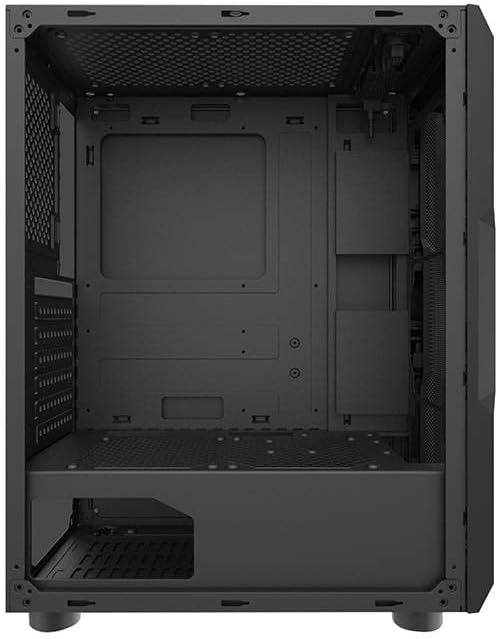
Joonis 3: Interjöör view of the darkFlash Aquarius Mesh case, highlighting the motherboard tray and cable routing options.
4.3. Toiteploki (PSU) paigaldamine
The PSU mounts at the bottom rear of the case.
- Slide the PSU into its designated compartment from the rear of the case.
- Align the screw holes and secure the PSU with screws.
4.4. Salvestusketta paigaldamine
The case provides mounting options for 3.5-inch HDDs and 2.5-inch SSDs.
- 3.5-tollised kõvakettad: Locate the drive cage usually beneath the PSU shroud or behind the motherboard tray. Slide the HDD into the bay and secure it with screws.
- 2.5-tollised SSD-d: Mount SSDs to dedicated brackets behind the motherboard tray or on the PSU shroud. Secure with screws.
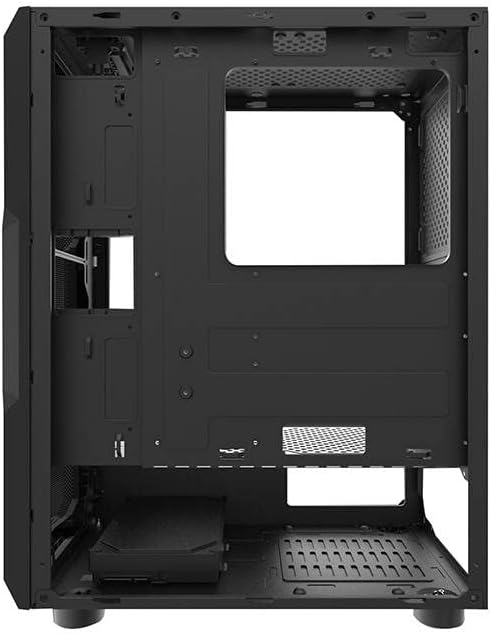
Joonis 4: Tagumine salong view of the darkFlash Aquarius Mesh case, showing the motherboard cutout and potential SSD mounting points.
4.5. Expansion Card Installation (e.g., GPU)
- Eemaldage korpuse tagaküljelt vajalikud laienduspesa katted.
- Insert the expansion card into the appropriate PCIe slot on the motherboard.
- Secure the card with the provided screws or retention clips.
4.6. Kaablite haldamine
Kasutage kaablite korrastamiseks emaplaadi sahtli taga olevaid kaablikanalite väljalõikeid ja kinnituspunkte. See parandab õhuvoolu ja esteetikat.
4.7. Reassembling the Case
Once all components are installed and cables are managed:
- Carefully reattach the side panels, ensuring they slide into place correctly.
- Secure the side panels with the thumbscrews.
5. Kasutusjuhised
After assembly, connect your peripherals and power cable.
- Connect your monitor, keyboard, mouse, and other peripherals to the motherboard's I/O ports.
- Ühendage toitekaabel toiteploki ja seinakontakti külge.
- Press the power button located on the top panel of the case to start your computer.

Joonis 5: Ülemine view of the darkFlash Aquarius Mesh case, showing the front I/O panel with power button, reset button, USB ports, and audio jacks.
6. Hooldus
Regular maintenance helps ensure optimal performance and longevity of your computer components.
- Tolmufiltrid: The Aquarius Mesh case features removable dust filters (e.g., on the front, top, and bottom). Regularly remove and clean these filters with water and mild soap, or by vacuuming, to maintain good airflow. Ensure they are completely dry before reinstallation.
- Salongi puhastamine: Periodically open the case and use compressed air to remove dust buildup from fans, heatsinks, and other components.
- Väline puhastus: Pühkige välispindu pehme, damp riie. Vältige tugevaid kemikaale.
7. Veaotsing
Probleemide ilmnemisel kaaluge järgmisi levinud lahendusi:
- Toide puudub:
- Veenduge, et toiteploki lüliti on asendis „ON”.
- Kontrollige kõiki emaplaadi ja komponentide toiteühendusi.
- Verify the power cable is securely plugged into the wall outlet and PSU.
- Ventilaatorid ei pöörle:
- Check fan connections to the motherboard or fan controller.
- Ensure fans are not obstructed by cables or dust.
- Esipaneeli sisend/väljund ei tööta:
- Verify that the front panel connectors (USB, audio, power/reset switches) are correctly connected to the motherboard headers. Refer to your motherboard manual for header locations.
8. Tehnilised andmed
| Funktsioon | Detail |
|---|---|
| Kaubamärk | tumeFlash |
| Mudeli number | Aquarius Mesh |
| Juhtumi tüüp | Keskmine torn |
| Materjal | Legeerteras |
| Värv | Must |
| Jahutusmeetod | Õhk |
| Soovitatav kasutamine | Arvuti |
| Kõvaketta vormitegur | 3.5 tolli |
9. Garantii ja tugi
Garantiiteabe või tehnilise toe saamiseks vaadake darkFlashi ametlikku veebilehte. webveebisaidilt või võtke ühendust nende klienditeenindusega. Hoidke ostutõendit garantiinõuete esitamiseks.
Lisateabe saamiseks võite külastada darkFlash official websaidile.


