Sissejuhatus
Thank you for choosing the Genai True Wireless Earphones. This manual provides detailed instructions on how to set up, operate, maintain, and troubleshoot your new earphones. Please read this manual carefully before use to ensure optimal performance and longevity of your device.
Toode läbiview
The Genai True Wireless Earphones feature a digital intelligence LED display on the charging case, tap control for easy operation, and Bluetooth 5.0 for stable connectivity. They are designed for comfortable in-ear wear and deliver clear stereo sound.
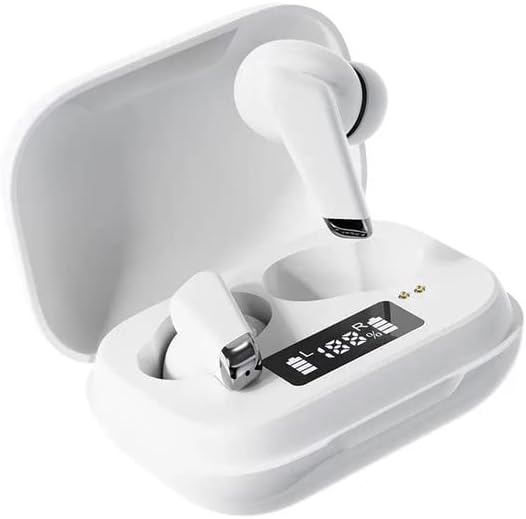
Image: Genai True Wireless Earphones in their charging case, showcasing the digital LED display indicating battery levels.
Peamised omadused:
- True Wireless Stereo (TWS): Seamless audio experience without cables.
- Puudutage Juht: Intuitive touch-sensitive controls for music and calls.
- Digital Intelligence LED Display: Shows real-time battery status of earbuds and charging case.
- Bluetooth 5.0: Tagab stabiilse ja tõhusa traadita ühenduse.
- Ergonoomiline kõrvasisese disainiga disain: Comfortable and secure fit.
Seadistusjuhend
1. Kõrvaklappide ja ümbrise laadimine
- Esmane tasu: Before first use, fully charge the charging case and earbuds. Place the earbuds into the charging case.
- Ühendage laadija: Ühenda laadimisümbris ühilduva USB-kaabli abil toiteallikaga.
- Monitori LED-ekraan: The digital LED display on the case will show the charging status and battery percentage. Ensure both earbuds and the case are fully charged before proceeding.

Image: The charging case with its digital LED display, indicating the charge level of both the case and the individual earbuds.
2. Seadmega sidumine
- Toide sisse: Open the charging case. The earbuds will automatically power on and enter pairing mode. You may hear an audible prompt.
- Bluetoothi aktiveerimine: Ava oma nutitelefonis või muus Bluetooth-toega seadmes Bluetoothi sätted ja luba Bluetooth.
- Valige seade: Look for "Genai Earphones" (or similar name) in the list of available devices and select it to connect.
- Kinnitus: Once successfully paired, you will hear a confirmation sound, and the earbuds will be ready for use.

Image: A visual representation of the Bluetooth 5.0 chipset, highlighting the stable wireless connection technology.
Kasutusjuhised
The Genai True Wireless Earphones feature intuitive tap controls. The specific functions may vary slightly, but common controls are listed below:
Toide sisse/välja
- Toide sisse: Open the charging case, or long-press the touch area on both earbuds for a few seconds.
- Toide välja: Place the earbuds back into the charging case and close the lid, or long-press the touch area on both earbuds for several seconds until they power off.
Muusika taasesitus
- Esita/peata: Üks puudutus kummalgi kõrvaklapil.
- Järgmine lugu: Topeltpuudutage paremat kõrvaklappi.
- Eelmine lugu: Topeltpuudutage vasakul kõrvaklapil.
Kõnehaldus
- Kõnele vastamine/lõpetamine: Sissetuleva või aktiivse kõne ajal puudutage üks kord kummalgi kõrvaklapil.
- Keeldu kõnest: Sissetuleva kõne ajal vajutage pikalt kummalgi kõrvaklapil.
Hääleabiline
- Hääleabi aktiveerimine: Kolmikpuudutus kummalgi kõrvaklapil (funktsionaalsus võib seadmeti erineda).

Image: An illustration showing an earbud comfortably and ergonomically fitted within the ear canal.
Hooldus
Puhastamine
- Kõrvaklappide ja laadimisümbrise puhastamiseks kasutage pehmet, kuiva ja ebemevaba lappi.
- Ärge kasutage abrasiivseid puhastusvahendeid, lahusteid ega aerosoolpihusteid.
- Gently clean the ear tips and speaker mesh to remove any earwax or debris.
Säilitamine
- Hoidke kõrvaklappe laadimisümbrises, kui neid ei kasutata, et neid kaitsta ja laetuna hoida.
- Vältida hoidmist äärmuslike temperatuuride, otsese päikesevalguse või kõrge õhuniiskuse käes.
Veaotsing
- Earbuds not pairing with each other or with device:
- Veenduge, et mõlemad kõrvaklapid on laetud.
- Asetage mõlemad kõrvaklapid tagasi laadimiskarpi, sulgege kaas, oodake paar sekundit ja avage kaas uuesti.
- On your device, forget/delete the "Genai Earphones" from the Bluetooth list and try pairing again.
- Heli puudub või on vaikne:
- Kontrollige nii seadme kui ka kõrvaklappide helitugevust.
- Veenduge, et kõrvaklapid oleksid teie seadmega korralikult ühendatud.
- Puhastage kõrvaklappide kõlarivõrk prahist.
- Laadimisprobleemid:
- Veenduge, et laadimiskaabel oleks kindlalt ühendatud nii korpuse kui ka toiteallikaga.
- Veenduge, et toiteallikas on aktiivne.
- Puhastage nii kõrvaklappide kui ka ümbrise laadimiskontaktid.
Tehnilised andmed
| Funktsioon | Detail |
|---|---|
| Mudel | B0BX5G53VT |
| Ühenduvustehnoloogia | Traadita (Bluetooth 5.0) |
| Kõrvaklappide tüüp | Poolavatud |
| Juhtide arv | 2 |
| Laadimismeetod | Laadimiskarp |
| Kõrvaklappide patjade materjal | Silikoon |
| Juhi läbimõõt | 10 mm |
| Täielik harmooniline moonutus | 0.02% |
| Impedantsi vahemik | Kuni 32 Ω |
| Materjal | Silikoon |
| Kõrvade paigutus | Kõrvas |
| Vormitegur | Tõeline traadita ühendus |
Garantii ja tugi
The Genai True Wireless Earphones come with a 12-kuuline garantii from the date of purchase, covering manufacturing defects. For any quality problems or support inquiries, please contact the seller directly through your purchase platform.
We are committed to ensuring 100% customer satisfaction. If you encounter any issues, please do not hesitate to reach out for assistance, including full refunds or replacements as applicable.