1. Sissejuhatus
The SONICAKE EQ Equalizer is a professional 10-band graphic equalizer pedal designed with an analog circuit. It features ten carefully selected frequency bands, allowing musicians to precisely and quickly shape their instrument's tone. This pedal is suitable for a variety of instruments and is built with a true bypass circuit to maintain signal integrity.
This manual provides detailed instructions for the setup, operation, and maintenance of your EQ Equalizer pedal to ensure you achieve the best possible sound.
2. Toote omadused
- 100% Analog 10-Band Equalizer: Based on classic EQ effect pedal frequency bands.
- Adjustable Gain Range: ±15dB adjustable gain range for each band, suitable for various instruments.
- Precise Tone Shaping: 11 high-quality sliders for quick and accurate parameter control.
- True Bypass Circuit: Ensures a clean signal path when the effect is disengaged.
- Vastupidav konstruktsioon: Aluminium-alloy casing for lightweight yet robust performance.
3. Juhtnupud ja funktsioonid
Familiarize yourself with the controls of your SONICAKE EQ Equalizer pedal:

Pilt: Esikülg view of the SONICAKE EQ Equalizer pedal with numbered control labels.
- Input Jack (1/4 inch): Connect your instrument or the output of a preceding effect pedal here.
- DC 9V toite sisend: Connect a standard 9V DC center-negative power supply (not included).
- Output Jack (1/4 inch): Connect this to your amplifier or the input of the next effect pedal in your chain.
- Frequency Band Sliders (31.25Hz to 16kHz): Ten individual sliders to boost or cut specific frequency ranges by ±15dB. Adjust these to shape your tone.
- Level Slider: Controls the overall output volume of the pedal. Use this to match the volume when the effect is engaged or disengaged.
- Jalglüliti: Engages or disengages the equalizer effect. This pedal features true bypass, ensuring your signal remains unaffected when the pedal is off. The LED indicator above the footswitch illuminates when the effect is active.

Pilt: Ülalt-alla view of the SONICAKE EQ Equalizer pedal, showing all sliders and the footswitch.

Image: A hand demonstrating the adjustment of the frequency sliders on the EQ Equalizer pedal.
4. Seadistamine
Follow these steps to set up your EQ Equalizer pedal:
- Toiteühendus: Connect a standard 9V DC center-negative power supply (not included) to the DC 9V input jack (2). Ensure the power supply meets the specified voltage ja polaarsuse nõuded.
- Instrumendi sisend: Connect your instrument (e.g., guitar) or the output of a previous effect pedal to the Input Jack (1) on the right side of the pedal.
- Väljundühendus: Connect the Output Jack (3) on the left side of the pedal to your amplifier's input or the input of the next effect pedal in your signal chain.
- Toide sisse: Kui kõik ühendused on kindlad, lülitage seade sisse amptõsteseade ja muud seadmed.

Pilt: Nurk view of the EQ Equalizer pedal, highlighting the DC 9V power input and its central negative polarity requirement.
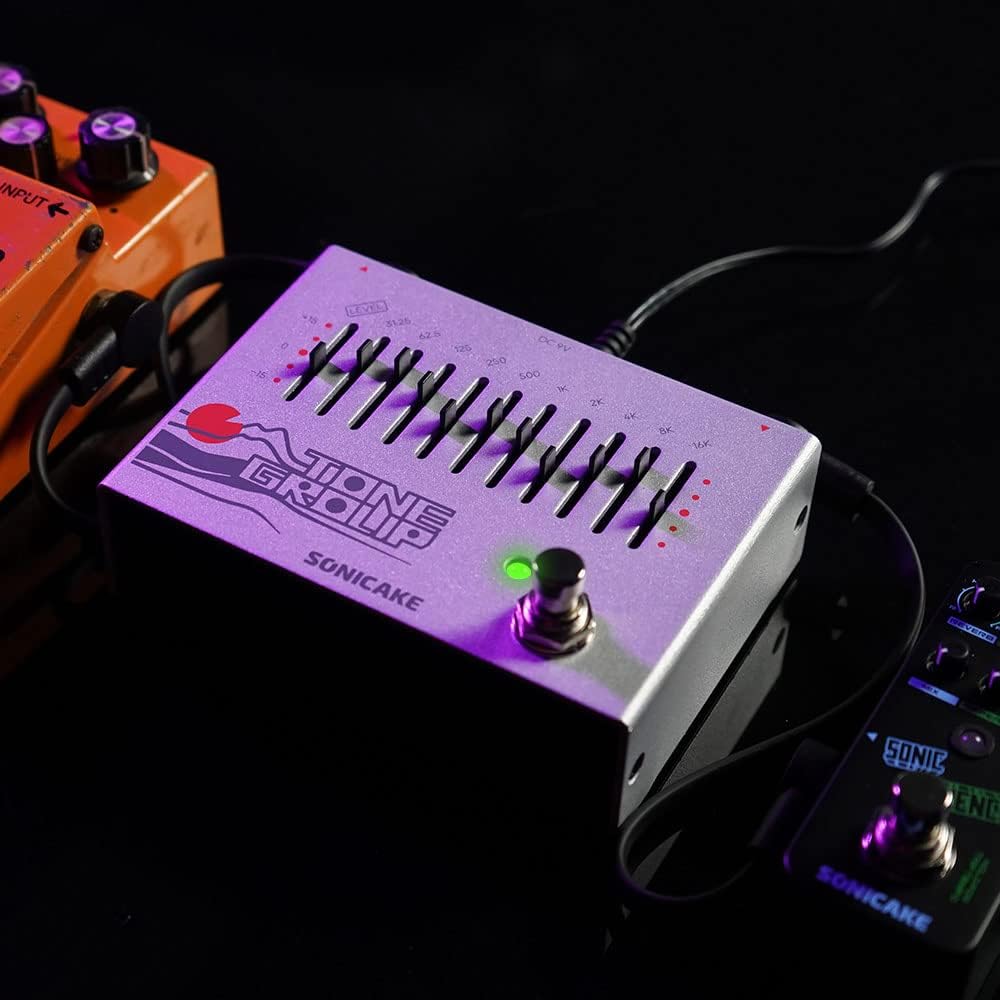
Image: The EQ Equalizer pedal integrated into a pedalboard setup, demonstrating typical connections.
5. Kasutusjuhised
To operate your SONICAKE EQ Equalizer pedal:
- Engage/Disengage Effect: Press the footswitch (6) to toggle the equalizer effect on or off. The LED indicator will light up when the effect is active.
- Adjusting Frequency Bands: Use the ten frequency band sliders (4) to boost or cut specific frequencies. Moving a slider up boosts that frequency, while moving it down cuts it. Experiment with different settings to find your desired tone.
- Adjusting Overall Level: Use the Level slider (5) to control the overall output volume of the pedal. This is useful for compensating for volume changes introduced by EQ adjustments or for matching the volume with other pedals in your chain.
- Tooni kujundamise näpunäited:
- Low Frequencies (31.25Hz - 125Hz): Affect bass and sub-bass. Boosting can add warmth and fullness; cutting can reduce muddiness.
- Mid Frequencies (250Hz - 2kHz): Crucial for presence and clarity. Boosting around 500Hz-1kHz can add body; cutting can reduce harshness. Boosting 2kHz can add bite.
- High Frequencies (4kHz - 16kHz): Control treble and brilliance. Boosting can add sparkle and air; cutting can reduce hiss or harshness.

Pilt: Lähivõte view of the footswitch on the EQ Equalizer pedal, illustrating its true bypass functionality.
6. Hooldus
To ensure the longevity and optimal performance of your pedal:
- Puhastamine: Pedaali välispinna puhastamiseks kasutage pehmet ja kuiva lappi. Vältige abrasiivseid puhastusvahendeid ega lahusteid.
- Hoiustamine: Hoidke pedaali kuivas kohas, eemal äärmuslikest temperatuuridest, niiskusest ja otsesest päikesevalgusest.
- Toiteallikas: Always use a regulated 9V DC center-negative power supply. Incorrect power can damage the unit.
- Ühendused: Kontrollige regulaarselt kõiki kaabliühendusi kulumise ja rebenemise suhtes.
7. Veaotsing
If you encounter issues with your EQ Equalizer pedal, consider the following:
- Heli puudub:
- Veenduge, et toiteallikas on õigesti ühendatud ja töötab.
- Kontrollige kõiki instrumendi kaableid õige ühenduse ja toimimise osas.
- Veenduge, et ampLifier on sisse lülitatud ja selle helitugevus on suurendatud.
- Ensure the pedal's Level slider is not set to minimum.
- Nõrk või moonutatud heli:
- Check the power supply; insufficient power can cause distortion.
- Veenduge, et instrumendi kaablid poleks vigased.
- Adjust the Level slider to prevent signal clipping.
- Soovimatu müra/sumin:
- Use a high-quality, regulated power supply.
- Veenduge, et kõik kaablid on korralikult varjestatud ja ühendatud.
- Proovige pedaal teistest toiteallikatest või lärmakatest seadmetest isoleerida.
8. Tehnilised andmed
| Mudeli number | QDS |
| Kauba kaal | 12.7 untsi (0.36 kilogrammi) |
| Toote mõõtmed | Mõõtmed 3.54" P x 2.16" L x 4.88" K (9 x 5.5 x 12.4 cm) |
| Toiteallikas | DC Power Supply (9V Center Negative, not included) |
| Voltage | 9 volti |
| Signaali formaat | Analoog |
| Ühenduse tüüp | 1/4-tolline audiopesa |
| Riistvara liides | 1/4-tolline heli |
9. Garantii ja tugi
For warranty information, technical support, or service inquiries regarding your SONICAKE EQ Equalizer pedal, please refer to the documentation included with your purchase or visit the official SONICAKE webveebisait. Hoidke ostutõendit alles garantiinõuete esitamiseks.


