1. Sissejuhatus
Thank you for choosing the AONIMI 42800mAh Solar Charger Power Bank. This robust and versatile portable charger is designed to keep your devices powered in various environments, especially outdoors. Featuring a massive 42800mAh capacity, multiple output ports, and an integrated LED flashlight, it is an ideal companion for camping, hiking, travel, and daily use. This manual provides essential information on how to safely and effectively use and maintain your power bank.
2. Ohutusalane teave
Please read all safety instructions carefully before using the product to ensure safe and optimal performance.
- Do not expose the power bank to extreme temperatures (above 60°C/140°F) or direct sunlight for prolonged periods, as this may damage the battery.
- Avoid dropping, disassembling, or attempting to repair the device yourself. Refer to qualified service personnel for any repairs.
- Keep the power bank away from water, moisture, and flammable materials. While it is IP67 waterproof, prolonged submersion is not recommended.
- The solar charging feature is intended for emergency use only. For daily charging, always use a wall adapter and cable to ensure efficient and complete charging.
- This power bank features a built-in intelligent chip that protects against over-discharge, over-charge, short-circuit, and overheating.
- Use only certified charging cables and adapters to prevent damage to the power bank and connected devices.

Figure 2.1: Superior Safety Protection features of the power bank.
3. Pakendi sisu
Palun kontrollige pakendilt järgmisi esemeid:
- 1 x AONIMI 42800mAh Solar Charger Power Bank
- 1 x USB-C laadimiskaabel
- 1 x Kasutusjuhend (käesolev dokument)

Joonis 3.1: Tootepakendi sisu.
4. Toote lõppview
The AONIMI Solar Charger Power Bank is designed for durability and multi-device compatibility. It features a large solar panel on one side for emergency charging and multiple output ports for various devices.

Joonis 4.1: Esiosa view of the AONIMI Solar Charger Power Bank.
Põhikomponendid:
- Päikesepaneel: Located on the top surface, used for emergency solar charging.
- USB-A väljundpordid (x4): Standard USB ports for charging most mobile devices.
- USB-C Input/Output Port (x1): A versatile port for both charging the power bank and charging compatible devices with Power Delivery (PD).
- LED indikaatorid: Display the remaining battery capacity and charging status.
- LED taskulamp: Integrated high-brightness flashlight for illumination.
- Toitenupp: Activates the power bank and controls the flashlight.
5. Seadistamine
Before first use, it is crucial to fully charge your AONIMI Solar Charger Power Bank using a wall adapter.
Esmane laadimine:
- Ühenda kaasasolev USB-C-kaabel toitepanga USB-C-porti.
- Plug the other end of the USB-C cable into a compatible USB wall adapter (not included).
- Ühendage seinaadapter vooluvõrku.
- The LED indicators will light up, showing the charging progress. All four LEDs will be solid when fully charged.
- Allow the power bank to charge completely before its first use. This ensures optimal battery performance and longevity.

Figure 5.1: Primary charging method via USB wall adapter (left) versus emergency solar charging (right).
6. Kasutusjuhised
6.1 Väliste seadmete laadimine
The power bank can charge up to five devices simultaneously using its multiple output ports.
- Ühenda seadme laadimiskaabel ühe USB-A väljundporti või USB-C sisend-/väljundporti akupangal.
- Ühendage kaabli teine ots mobiilseadmega.
- Akupank hakkab automaatselt teie seadet laadima. LED-indikaatorid näitavad aku järelejäänud laetuse taset.
- Laadimise peatamiseks ühendage seade lihtsalt lahti.
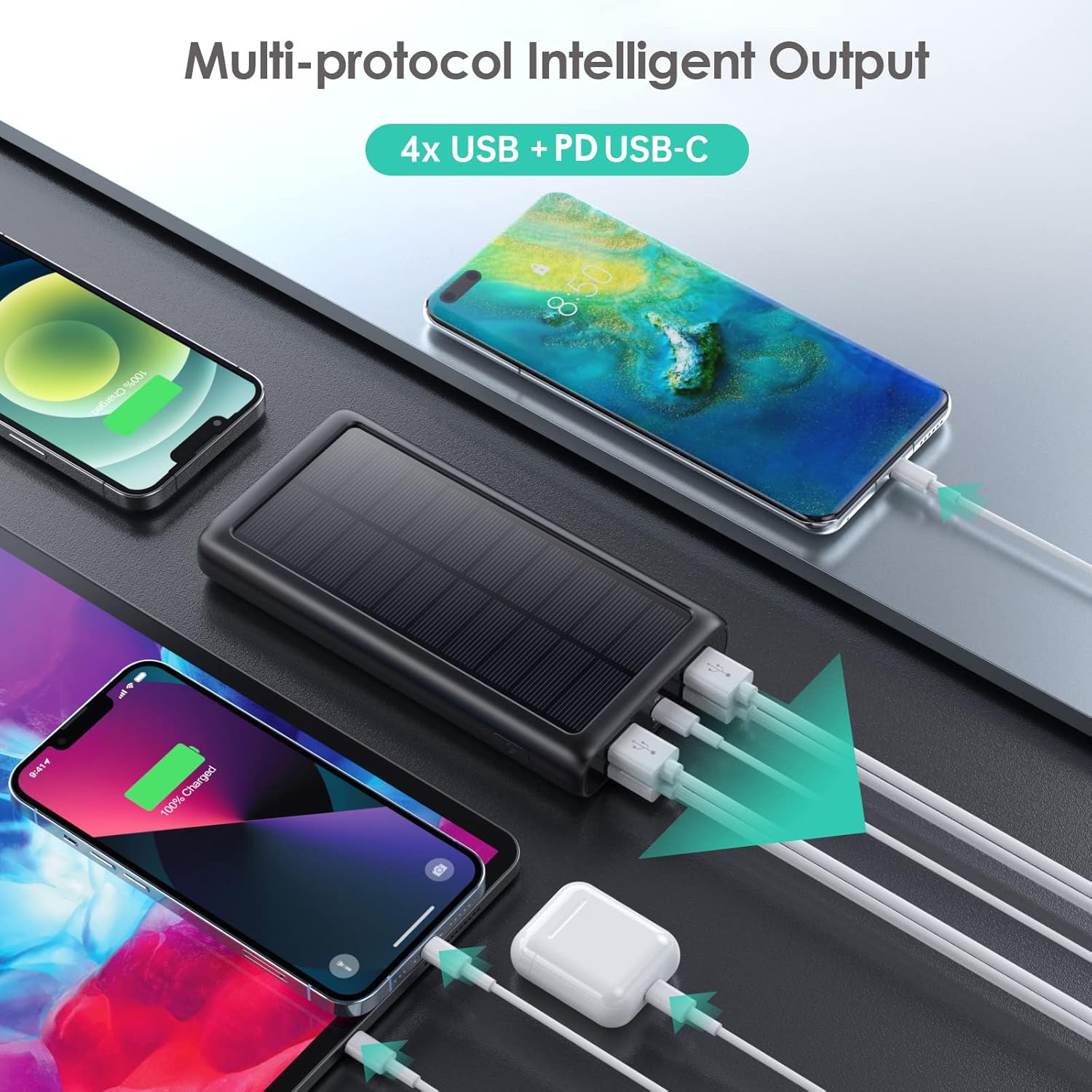
Joonis 6.1: Mitme seadme samaaegne laadimine.
6.2 Akupanga laadimine
There are two ways to recharge your power bank:
A. Via USB-C Wall Adapter (Recommended)
This is the fastest and most efficient way to charge the power bank.
- Connect the USB-C cable to the power bank's USB-C port and a compatible wall adapter.
- The LED indicators will flash to show charging status and become solid when fully charged.
B. Via Solar Panel (Emergency Use Only)
The solar panel is designed for emergency power replenishment when no other power source is available. Due to variations in sunlight intensity and conversion rates, solar charging is significantly slower than wall charging.
- Place the power bank in direct sunlight. Ensure the solar panel is facing the sun.
- A green indicator light will illuminate to confirm solar charging is active.
- The LED battery indicators will show slow charging progress.
6.3 LED-taskulambi kasutamine
The integrated LED flashlight is a useful feature for outdoor activities or emergencies.
- Taskulambi sisselülitamiseks: Double-press the power button quickly.
- To cycle through modes: Once the flashlight is on, single-press the power button to switch between Strong Light, SOS, and Strobe modes.
- To turn off the flashlight: Double-press the power button quickly again.

Figure 6.2: The LED flashlight in use, demonstrating its various modes.
7. Hooldus
Proper care and maintenance will extend the lifespan of your power bank.
- Puhastamine: Pühkige akupanka pehme ja kuiva lapiga. Ärge kasutage tugevaid kemikaale ega abrasiivseid puhastusvahendeid.
- Hoiustamine: Store the power bank in a cool, dry place away from direct sunlight and extreme temperatures. If storing for long periods, charge it to about 50-75% capacity every 3 months to prevent battery degradation.
- Vastupidavus: The power bank is IP67 rated, meaning it is protected against dust ingress and can withstand immersion in water up to 1 meter for 30 minutes. It is also shockproof. However, avoid intentional abuse or prolonged exposure to harsh conditions.

Figure 7.1: The power bank's IP67 waterproof, dustproof, and shockproof capabilities.
8. Veaotsing
If you encounter issues with your power bank, please refer to the following common problems and solutions:
| Probleem | Võimalik põhjus | Lahendus |
|---|---|---|
| Toitepank ei lae | Loose cable connection; faulty cable/adapter; power bank fully discharged. | Ensure cables are securely connected. Try a different USB-C cable and wall adapter. If fully discharged, it may take longer to initiate charging. |
| Devices not charging from power bank | Power bank is out of charge; loose cable connection; incompatible device. | Recharge the power bank. Ensure device charging cable is securely connected. Verify device compatibility (most USB/Type-C charged devices are supported). |
| Solar charging is very slow | Solar charging is an emergency feature; low sunlight intensity; panel not in direct sun. | This is normal. Solar charging is significantly slower than wall charging. Ensure the panel is in direct, strong sunlight. Use wall charging for primary power. |
| Taskulamp ei tööta | Incorrect operation; power bank is out of charge. | Double-press the power button quickly to activate. Ensure the power bank has sufficient charge. |
9. Tehnilised andmed
| Funktsioon | Spetsifikatsioon |
|---|---|
| Mudeli number | HX200K3 |
| Aku mahutavus | 42800 mAh |
| Sisend (tüüp-C) | 5V/3A |
| Sisend (päikesepaneel) | Emergency power sources only |
| Väljund (tüüp-C) | 5V/3A |
| Väljund (USB-A x4) | 5 V / 2.1 A (igaüks) |
| Mõõtmed | 16 x 8.23 x 2.54 cm (5.91 x 2.95 x 0.6 tolli) |
| Kaal | 372 g |
| Veekindluse reiting | IP67 |
| Eriomadused | LED Flashlight (Strong, SOS, Strobe), Multi-Protection System |
10. Garantii ja tugi
AONIMI is committed to providing high-quality products and excellent customer service.
- This product comes with lifetime technical support.
- For any questions, concerns, or technical assistance, please contact AONIMI customer service.
- Please refer to your purchase platform or product packaging for specific warranty details and contact information.
