1. Sissejuhatus
This manual provides essential information for setting up, operating, and maintaining your Beelink Mini S13 Mini PC. Please read it thoroughly before using the device to ensure proper function and longevity.

Image: The Beelink Mini S13 Mini PC in a typical desktop setup.
2. Pakendi sisu
Veenduge, et pakendis on kõik esemed olemas:
- 1 x Beelink Mini S13 N150 Mini PC
- 1 x kasutusjuhend
- 1 x HDMI kaabel
- 1 x toiteadapter
- 1 x seinale kinnitatav kronstein

Image: Contents of the Beelink Mini S13 package.
3. Seadistusjuhised
3.1 Connecting the Mini PC
- Ekraaniga ühenduse loomine: Use the provided HDMI cable to connect the Mini PC to your monitor or TV. The Mini S13 supports dual 4K 60Hz displays.
- Ühendage välisseadmed: Plug in your USB keyboard, mouse, and any other USB devices into the available USB 3.2 Gen2 ports.
- Ühendage võrguga: For wired internet, connect an Ethernet cable to the 2.5G LAN port. For wireless internet, the device supports WiFi 6.
- Ühendage toide: Plug the power adapter into the DC Jack on the Mini PC, then connect it to a power outlet.
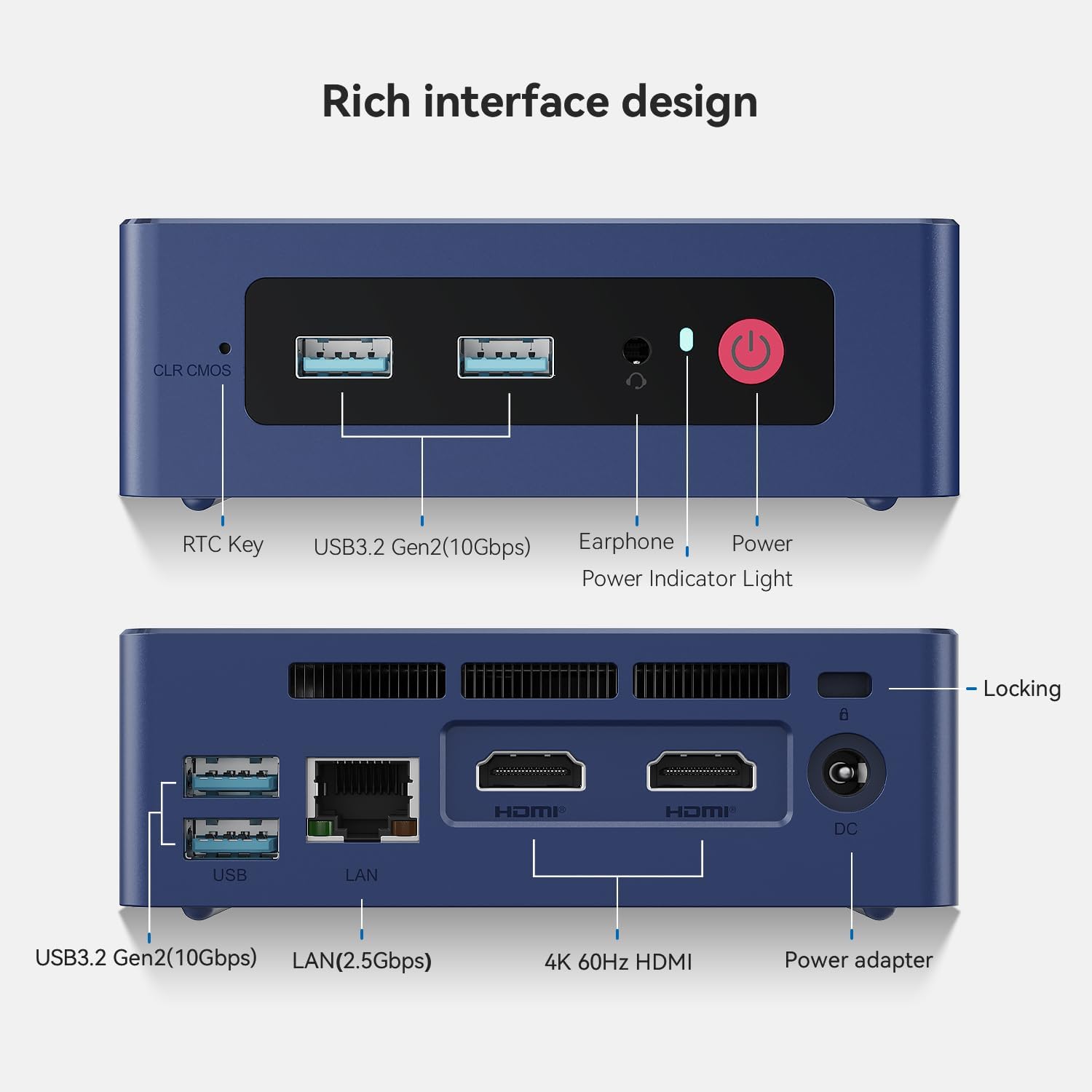
Image: Front and rear interfaces of the Mini S13.
3.2 Esimene käivitus
- Vajutage Mini PC esiküljel asuvat toitenuppu. Toiteindikaator süttib.
- Follow the on-screen instructions to complete the initial operating system setup.
3.3 Seinakinnitus
The included wall-mounted bracket allows you to attach the Mini PC to the back of a VESA-compatible monitor or to a wall. Secure the bracket using appropriate screws, then slide the Mini PC into place.
4. Kasutusjuhised
4.1 Toide sisse/välja
- Toide sisse: Vajutage toitenuppu.
- Toide välja: Kasutage operatsioonisüsteemi väljalülitusfunktsiooni. Teise võimalusena vajutage ja hoidke toitenuppu 5 sekundit all, et arvuti sundvälja lülitada (kasutage ainult vajadusel).
4.2 Kahe ekraani seadistamine
The Mini PC supports connecting two displays simultaneously via its two HDMI ports. This feature enhances multitasking and productivity.

Image: Dual-screen display setup for enhanced work efficiency.
4.3 Võrguühendus
- Juhtmega võrk: Ühendage Etherneti kaabel 2.5G LAN-porti, et saada kiire juhtmega internet.
- Wireless Network (WiFi 6): Access network settings in your operating system to connect to available WiFi 6 networks.
- Bluetooth 5.2: Pair Bluetooth devices such as keyboards, mice, or headphones through your operating system's Bluetooth settings.

Image: Wireless connectivity features including WiFi 6 and Bluetooth 5.2.
4.4 Salvestusruumi laiendamine
The Mini PC comes with a 512GB SATA3 SSD and supports dual-channel storage expansion up to 4TB. You can add or upgrade M.2 SSDs (NVMe 2280 or SATA3 SSDs) in the available slots.

Image: Dual SSD high-speed storage slots for expansion.
5. Hooldus
5.1 Puhastamine
- Puhastage Mini PC välispinda regulaarselt pehme ja kuiva lapiga.
- Ensure ventilation openings are free from dust and debris to maintain optimal airflow. Use compressed air if necessary.
5.2 Jahutussüsteem
The Mini S13 features a silent fan and heat sink system designed for efficient cooling. Avoid blocking the air vents to prevent overheating and ensure stable performance.

Image: CPU silent fan and heat sink system.
5.3 Tarkvaravärskendused
Süsteemi stabiilsuse, turvalisuse ja optimaalse jõudluse tagamiseks hoidke oma operatsioonisüsteemi ja draivereid ajakohasena.
6. Veaotsing
- Kuvarit pole:
- Check HDMI cable connections to both the Mini PC and the monitor.
- Veenduge, et monitor on sisse lülitatud ja õigele sisendallikale seatud.
- Proovige teist HDMI-kaablit või monitori, kui see on saadaval.
- Toide puudub:
- Verify the power adapter is securely connected to the Mini PC and a working power outlet.
- Veenduge, et toitenupp oleks kindlalt vajutatud.
- Võrguühenduse probleemid:
- Juhtmega ühenduste korral kontrollige Etherneti kaabli ja ruuteri olekut.
- For wireless connections, ensure WiFi is enabled in the operating system and you are connected to the correct network with the correct password.
- Taaskäivitage ruuter/modem.
- System Slowdown/Overheating:
- Ensure the Mini PC's ventilation openings are not blocked.
- Sulgege taustal töötavad mittevajalikud rakendused.
- Check for excessive dust accumulation and clean as described in the Maintenance section.
7. Tehnilised andmed
| Funktsioon | Detail |
|---|---|
| Protsessor | 13th Gen Intel Alder Lake-N150 (4C/4T, up to 3.6GHz) |
| Graafika | Intel UHD Graphics 24EU 1000MHz |
| RAM | 12 GB LPDDR5 4800 MT/s |
| Säilitamine | 512GB SATA3 SSD (Expandable up to 4TB dual-channel) |
| Kuva väljund | 2 x HDMI (max 4K 60Hz), kahe ekraani tugi |
| USB-pordid | 4 × USB 3.2 Gen2 (10 Gbps) |
| Võrk | 2.5G LAN, WiFi 6 (802.11ax), Bluetooth 5.2 |
| Heli | 1 x 3.5mm Phone Jack (Two-in-One) |
| Toite sisend | 5.5*2.5 DC Jack, 12V/3A Adapter |
| Mõõtmed | 4.52 x 4.01 x 1.54 tolli (115 x 102 x 39 mm) |
| Operatsioonisüsteem | OS (Pre-installed Windows 11 Home typically) |
| Lisafunktsioonid | RTC Key, CLR CMOS Button, Wake On LAN, Auto Power ON |
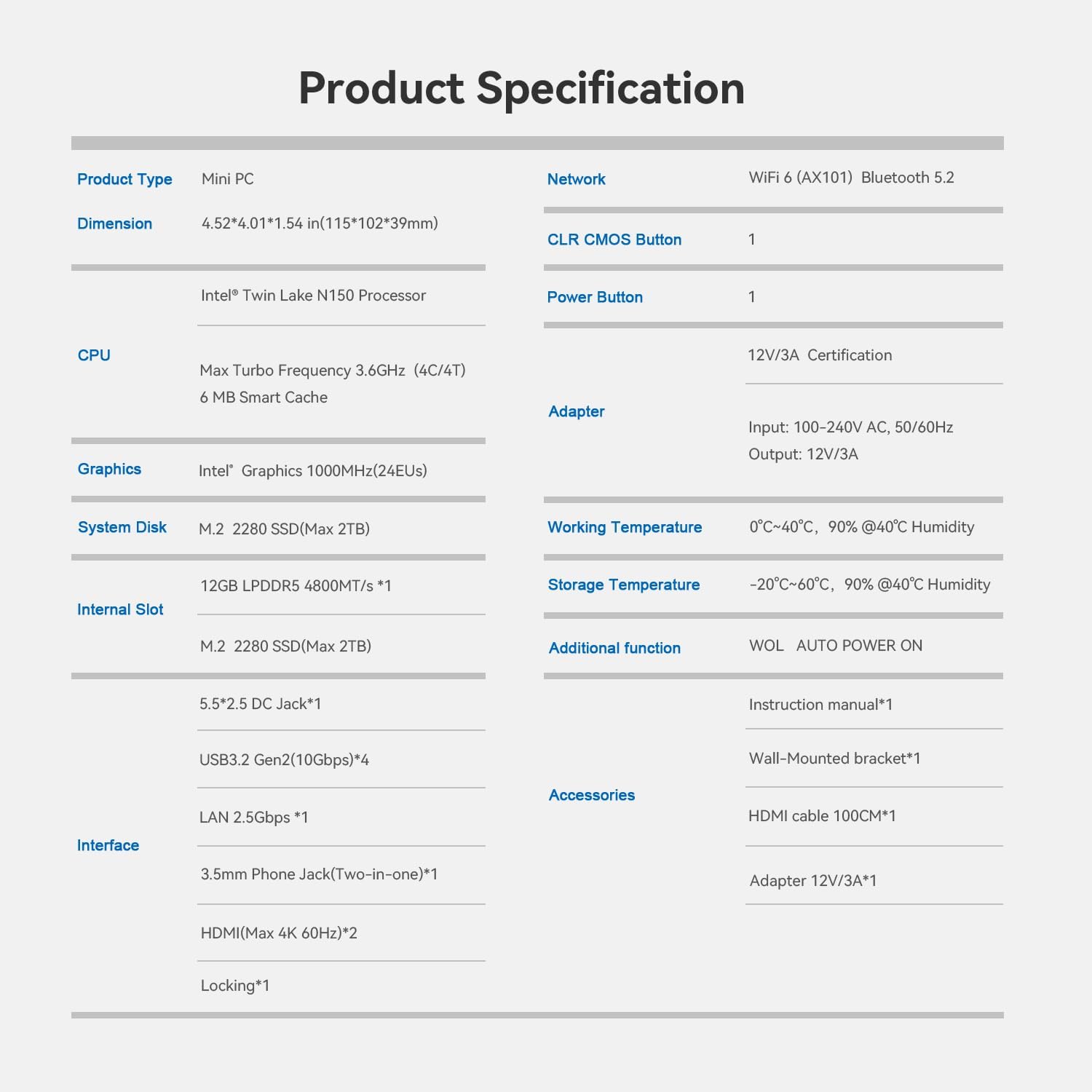
Image: Product Specification Table.
8. Garantii ja tugi
Beelink provides customer support and warranty services for its products. For specific warranty details and support inquiries, please refer to the following:
- Garantii: Typically includes a 1-year free maintenance period.
- Tehniline tugi: Lifetime technical support is generally provided.
- Klienditeenindus: 7 days a week, 24 hours a day customer service.
- Tagastab: Products are typically eligible for refund/replacement within 30 days of purchase.
For assistance, you can contact Beelink support through the platform where you purchased the product (e.g., Amazon's 'Your Account' -> 'Your Orders' -> 'Click Get Help').

Image: Beelink After-Sales Service Information.


