1. Sissejuhatus
Thank you for choosing the Nexxt Indoor Smart Camera. This manual provides essential information for the safe and efficient use of your new device. Please read it thoroughly before installation and operation, and retain it for future reference.
This 1080p HD fixed room camera is designed to provide reliable indoor surveillance with features such as night vision, two-way audio communication, motion detection, and seamless integration with smart home ecosystems like Amazon Alexa and Google Assistant.
2. Ohutusalane teave
- Ensure the camera is powered by the provided power adapter. Using unauthorized adapters may damage the device and void the warranty.
- Do not expose the camera to water, moisture, or extreme temperatures. It is designed for indoor use only.
- Vältige kaamera asetamist otsese päikesevalguse kätte või soojusallikate lähedusse.
- Ärge proovige kaamerat ise lahti võtta ega parandada. Jätke kogu hooldus kvalifitseeritud töötajatele.
- Keep the camera and its accessories out of reach of children and pets.
- Ensure stable Wi-Fi connectivity for optimal performance.
3. Pakendi sisu
Veenduge, et pakendis on kõik esemed olemas:
- NEXXT Indoor Smart Camera (NHC-I710)
- Toiteadapter
- Seista
- Kasutusjuhend (see dokument)

Image: The retail packaging of the NEXXT Indoor Smart Camera, showing the camera and key features.
4. Toote lõppview
The Nexxt Indoor Smart Camera offers a range of features for comprehensive home monitoring:
- Full HD 1080p eraldusvõime: Pakub selget ja üksikasjalikku videofootage.
- Automaatne öönägemine: Integrated infrared LEDs enable clear monitoring in low-light conditions up to 30 feet.
- Kahepoolne suhtlus: Built-in microphone and speaker allow for real-time audio interaction.
- Liikumistuvastus: Annab märku liikumise tuvastamisest kaamera vaateväljas view.
- Kohalik ja pilvesalvestus: Supports microSD cards (sold separately) and Microsoft Azure cloud storage (subscription sold separately) for recording.
- Nutika kodu integreerimine: Compatible with Amazon Alexa and Google Assistant for voice control and integration into smart routines.
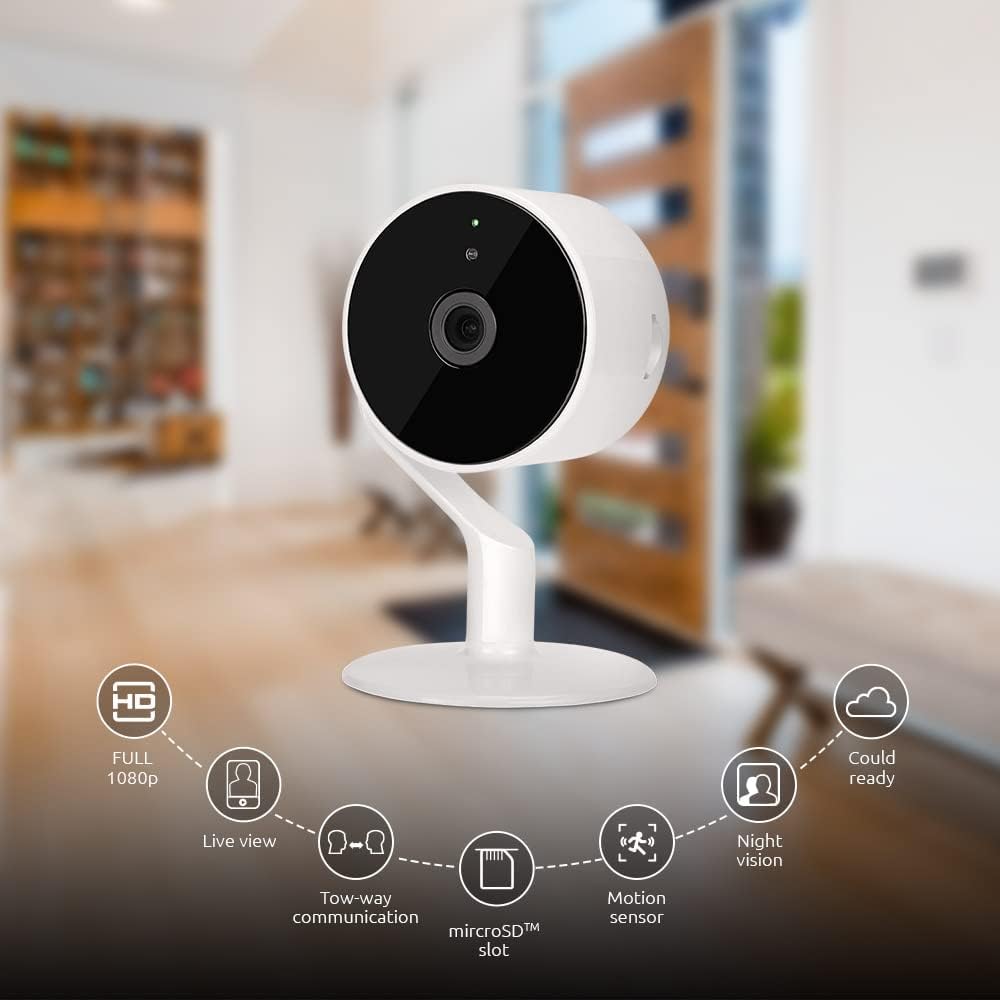
Image: The NEXXT Indoor Smart Camera highlighting its key features: Full HD 1080p, Live View, Two-way communication, microSD slot, Motion sensor, Night vision, and Cloud ready.
5. Seadistamine
5.1 Sisselülitamine
- Place the camera on a stable, flat surface or mount it using appropriate hardware (not included).
- Ühendage toiteadapter kaamera toitesisendi porti.
- Plug the power adapter into a standard electrical outlet. The camera will power on and its indicator light will begin to flash, indicating it's ready for pairing.
5.2 Rakenduse installimine ja sidumine
To control and monitor your camera, you need to download the Nexxt Home App:
- Laadige alla Järgmine kodurakendus alates Google Play pood (for Android devices) or the Apple App Store (for iOS devices).
- Open the Nexxt Home App and create a new account or log in if you already have one.
- Sidumise alustamiseks puudutage ikooni „+” või „Lisa seade”.
- Select "Camera" or the specific camera model from the list of devices.
- Follow the on-screen instructions in the app to connect the camera to your home Wi-Fi network. This typically involves scanning a QR code displayed on your phone with the camera.
- Once connected, the camera's indicator light will turn solid, and you will see the camera added to your app.

Image: Illustration showing the NEXXT Indoor Smart Camera being set up to function as a webcam, connecting to a laptop.
6. Kasutusjuhised
6.1 Otseülekanne View
From the Nexxt Home App, tap on your camera's name to access the live video feed. You can view reaalajas footage of your monitored area.

Image: The NEXXT Indoor Smart Camera on a desk, with text indicating "Full HD resolution" and its ability to provide 1080p high-quality video day or night.
6.2 Kahepoolne kõne
Otseses ajal view, tap the microphone icon in the app to enable two-way audio. You can speak through your phone, and your voice will be projected through the camera's speaker. Tap the icon again to end communication.

Image: An illustration depicting communication between a person using a phone and another person near the camera, symbolizing the two-way talk feature.
6.3 Öine nägemine
The camera automatically switches to night vision mode in low-light conditions. You can also manually toggle night vision on/off within the app settings for the camera.

Image: A split image showing a room in daylight on one side and the same room in night vision on the other, demonstrating the camera's night vision capability.

Image: A smartphone screen displaying the Nexxt Home app interface with a night vision toggle switch, overlaid on a room scene, indicating active night vision monitoring.
6.4 Liikumistuvastus ja märguanded
Configure motion detection sensitivity and alert preferences in the app. When motion is detected, you will receive notifications on your smartphone.

Image: A person sleeping in bed with a motion detection icon overlaid, indicating advanced motion detection with an effective range of up to 30 feet.

Image: A woman holding a smartphone displaying the Nexxt Home app, with text indicating that advanced human identification technology helps reduce false alarms and unwanted notifications.
6.5 Salvestamine ja säilitamine
The camera supports local storage via a microSD card (up to 128GB, not included) and cloud storage via Microsoft Azure (subscription required, sold separately). Insert the microSD card into the designated slot on the camera. Manage recording settings and view salvestatud footage through the Nexxt Home App.
6.6 Juurdepääsu jagamine
You can securely share your camera's security feed with multiple approved devices, allowing family members or trusted individuals to also monitor your home.

Image: Two smartphones displaying the Nexxt Home app, with text stating "Everyone Can Keep Watch" and explaining that the security feed can be securely shared with multiple approved devices.
6.7 Nutika kodu integreerimine
The Nexxt Indoor Smart Camera is compatible with Amazon Alexa and Google Assistant. Follow the instructions in your Alexa or Google Home app to link your Nexxt Home account and enable voice commands for your camera.
7. Hooldus
- Puhastamine: Kaamera objektiivi ja korpuse puhastamiseks kasutage pehmet ja kuiva lappi. Ärge kasutage vedelaid puhastusvahendeid ega aerosoole.
- Hoiustamine: Kui kaamerat pikemaks ajaks hoiule ei panda, ühendage see vooluvõrgust lahti ja hoidke jahedas ja kuivas kohas.
- Püsivara värskendused: Regularly check the Nexxt Home App for available firmware updates to ensure optimal performance and security.
8. Veaotsing
- Kaamera ei loo ühendust WiFi-ga:
- Veenduge, et teie WiFi-võrk on 2.4 GHz. Kaamera ei toeta 5 GHz WiFi-ühendust.
- Kontrollige oma WiFi-parooli õigsust.
- Liiguta kaamera oma Wi-Fi ruuterile lähemale.
- Taaskäivitage ruuter ja kaamera.
- Ei otse view or choppy video:
- Kontrollige oma internetiühenduse kiirust.
- Ensure the camera has a strong Wi-Fi signal.
- Close and reopen the Nexxt Home App.
- Liikumishoiatusi ei saadud:
- Veenduge, et liikumistuvastus oleks rakenduse seadetes lubatud.
- Check your phone's notification settings for the Nexxt Home App.
- Liikumistuvastuse tundlikkuse reguleerimine.
- Kahesuunaline heli ei tööta:
- Ensure your phone's microphone is enabled for the Nexxt Home App.
- Kontrollige helitugevuse seadeid oma telefonis ja rakenduses.
9. Tehnilised andmed
| Funktsioon | Spetsifikatsioon |
|---|---|
| Mudeli nimi | NHC-I710 |
| Video jäädvustamise eraldusvõime | 1080p HD |
| Kasutamine siseruumides/välistingimustes | Siseruumides |
| Ühenduvustehnoloogia | Juhtmeta (Wi-Fi) |
| Ühenduvusprotokoll | WiFi (2.4 GHz) |
| Toiteallikas | Juhtmega elekter |
| Öise nägemise ulatus | 30 jalga |
| Kontrolleri tüüp | Amazon Alexa, Google'i assistent |
| Paigaldustüüp | Lauaplaadi kinnitus |
| Kauba mõõtmed (P x L x K) | 3 x 7 x 3 tolli |
| Kauba kaal | 6.7 untsi (0.19 kilogrammi) |
| UPC | 798302056152 |
| Rahvusvaheline kaitse hinnang | IP65 |
10. Garantii ja tugi
The Nexxt Indoor Smart Camera comes with a 2-aastane garantii alates ostukuupäevast. Palun hoidke ostutõend garantiinõuete esitamiseks alles.
For technical support, troubleshooting assistance, or warranty inquiries, please visit the official Nexxt Solutions website or contact their customer support through the Nexxt Home App.
Järgmised lahendused Websait: www.nexxtsolutions.com