Sissejuhatus
Thank you for choosing the Havit Gaming Mouse MS955. This optical gaming mouse features a USB interface, adjustable DPI settings, and RGB backlighting, designed to enhance your gaming experience. This manual provides essential information for setting up, operating, and maintaining your mouse.
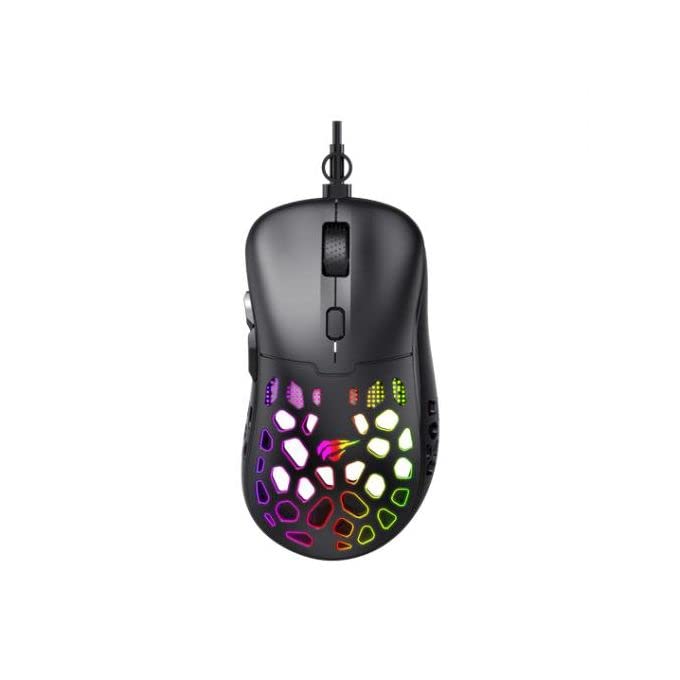
Pilt: Ülalt-alla view of the Havit Gaming Mouse MS955, showcasing its ergonomic design and vibrant RGB lighting through the honeycomb shell.
Seadistamine
- Pakkige hiir lahti: Carefully remove the Havit Gaming Mouse MS955 from its packaging.
- Ühendage arvutiga: Locate an available USB port on your computer. Insert the USB connector of the mouse into the USB port.
- Draiveri installimine: The mouse is plug-and-play. Your operating system (Windows XP, Windows 7, Linux, etc.) will automatically detect and install the necessary drivers. No additional software installation is typically required for basic functionality.
- Testi funktsionaalsus: Once connected, move the mouse and click the buttons to ensure it is working correctly.
Kasutusjuhised
The Havit Gaming Mouse MS955 features 6 programmable buttons and adjustable DPI settings for precise control.

Pilt: Külg view of the Havit Gaming Mouse MS955, highlighting the left-side buttons and scroll wheel.
- Vasakklõpsu nupp: Primary button for selection and interaction.
- Paremklõpsu nupp: Secondary button for context menus and alternative actions.
- Kerimisratas: Kasutatakse dokumentide sirvimiseks ja web pages. It also functions as a clickable middle button.
- DPI reguleerimise nupp: Located behind the scroll wheel. Press this button to cycle through different DPI sensitivity levels (800-1200-2400-3200 DPI). Each press changes the sensitivity, allowing you to adapt to various gaming or work scenarios.
- Külgmised nupud: Two buttons are located on the left side of the mouse. These are typically used for 'forward' and 'backward' navigation in web browsers or can be programmed for in-game actions.
RGB valgustus
The Havit Gaming Mouse MS955 features an integrated RGB backlight system. The lighting effects are typically automatic and may change with DPI settings or cycle through various colors. There are no dedicated buttons for controlling the RGB lighting directly on the mouse.
Hooldus
- Puhastamine: To clean the mouse, disconnect it from your computer. Use a soft, dry cloth to wipe the surface. For stubborn dirt, a slightly damp cloth can be used, ensuring no liquid enters the mouse. Do not use harsh chemicals or abrasive cleaners.
- Hoiustamine: Hoidke hiirt puhtas ja kuivas kohas, eemal äärmuslikest temperatuuridest ja otsesest päikesevalgusest.
- Kaabli hooldus: Vältige USB-kaabli liigset painutamist või väänamist, et vältida kahjustusi.
Veaotsing
- Hiir ei reageeri:
- Veenduge, et USB-kaabel oleks kindlalt arvuti töötavasse USB-porti ühendatud.
- Proovige hiir ühendada teise USB-porti.
- Taaskäivitage arvuti.
- DPI ei muutu:
- Vajutage DPI nuppu kindlalt. Veenduge, et vajutate õiget nuppu.
- The mouse cycles through fixed DPI settings; there is no visual indicator other than cursor speed change.
- RGB tuled ei tööta:
- Veenduge, et hiir on arvutiga korralikult ühendatud.
- The RGB lighting is automatic; if the mouse is functioning otherwise, the lighting should also be active.
Tehnilised andmed
| Funktsioon | Detail |
|---|---|
| Kaubamärk | Havit |
| Mudel | MS955 |
| Liidese tüüp | USB |
| Mõõtmed | 115.2 x 63 x 37.6 mm |
| Võtmete arv | 6 |
| Kiibistik | NST5311 |
| DPI eraldusvõime | 800-1200-2400-3200 DPI |
| Operation Voltage | 5V |
| Võtme eluiga | 3,000,000 XNUMX XNUMX klikki |
| Kaabli pikkus | 1.5 m |
| Liikumise tuvastamine | Optiline |
| Käe orientatsioon | Õige |
| Soovitatav kasutamine | Mängimine |
| Operatsioonisüsteemid | Linux, Windows 7, Windows XP |
| Värv | Must |
Garantii ja tugi
For warranty information or technical support, please refer to the documentation included with your purchase or visit the official Havit webveebisait. Hoidke ostutõendit garantiinõuete esitamiseks.