1. Sissejuhatus
Welcome to the Philips Series 9000 Electric Shaver S9696/50. This manual provides essential information for the safe and effective use, maintenance, and care of your new shaver. Please read these instructions thoroughly before first use and keep them for future reference.

Image 1.1: The Philips Series 9000 Electric Shaver S9696/50.
2. Ohutusalane teave
To ensure safe operation, always observe the following precautions:
- Always unplug the shaver before cleaning or if not in use.
- Keep the shaver away from water when plugged in. This appliance is designed for wet and dry use, but the charging adapter must remain dry.
- Do not use the shaver if it is damaged.
- Clean the shaver thoroughly after each use and dry it completely to prevent bacterial growth.
- Exercise caution when shaving, as skin irritation may occur, especially during initial uses.
- See seade ei ole mõeldud kasutamiseks piiratud füüsiliste, sensoorsete või vaimsete võimetega või kogemuste ja teadmiste puudumisega inimestele, välja arvatud juhul, kui nende ohutuse eest vastutav isik on neid jälginud või seadme kasutamist juhendanud.
3. Pakendi sisu
Your Philips Series 9000 Electric Shaver S9696/50 package includes the following items:
- Philips Series 9000 Shaver Body
- Kiire puhastuskast
- Kiiresti puhastatav kassett
- Säilituskohver
- Laadimiskaabel
- USB laadimisadapter
- Puhastuspintsel
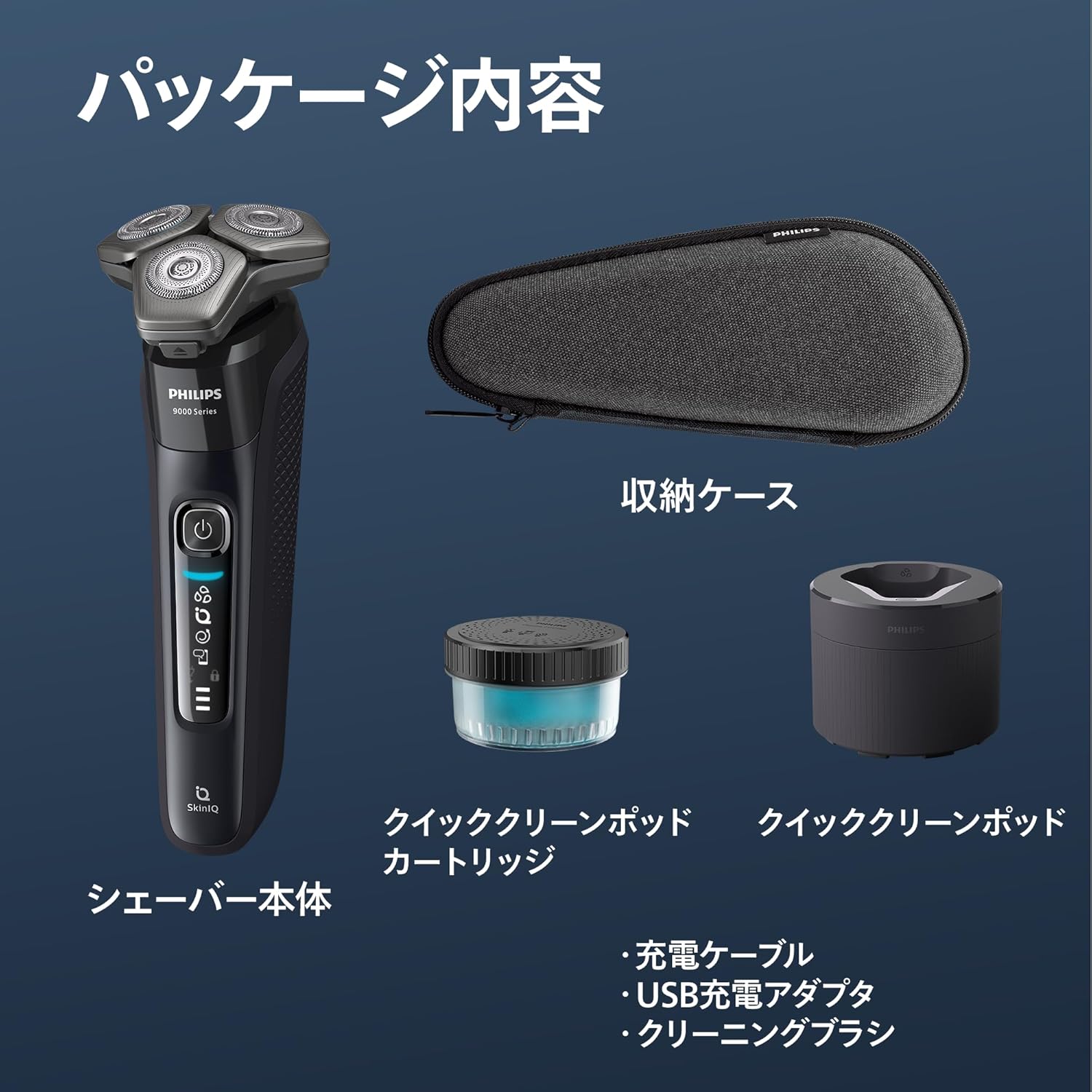
Image 3.1: All items included in the Philips Series 9000 Shaver package.
4. Seadistamine
4.1 Pardli laadimine
- Connect the charging cable to the shaver and the USB charging adapter.
- Ühendage adapter seinakontakti.
- The battery indicator on the shaver will show charging progress. A full charge typically takes approximately 1 hour and provides up to 60 minutes of shaving time.
4.2 Initial Cleaning (Quick Clean Pod)
For optimal hygiene and performance, it is recommended to clean the shaver using the Quick Clean Pod before first use or after several shaves.
- Open the Quick Clean Pod and insert a fresh Quick Clean Pod Cartridge.
- Asetage pardel pea allapoole kiirpuhastuspadrunisse.
- The cleaning cycle will start automatically, powered by the shaver's battery. The cleaning process takes approximately 1 minute.
- After cleaning, remove the shaver and allow it to air dry.

Image 4.1: The Philips Shaver placed in the Quick Clean Pod for cleaning.
5. Kasutusjuhised
5.1 Raseerimistehnikad
The Philips Series 9000 Shaver is designed for both wet and dry shaving. For best results, ensure your skin is clean before shaving.
- Kuiv raseerimine: Kiireks ja mugavaks raseerimiseks kasutage pardlit kuival nahal.
- Märg raseerimine: For a more comfortable shave, use with shaving foam or gel. This can help reduce skin irritation.
Move the shaver in small, circular motions over your face, applying gentle pressure. The 360-D Flexhead adapts to the contours of your face, ensuring maximum skin contact and reducing missed hairs.

Image 5.1: The 360-D Flexhead design, which conforms to facial contours.
5.2 SkinIQ tehnoloogia
The shaver features SkinIQ tehnoloogia, which senses your beard density 125 times per second and automatically adjusts the motor power to match the thickness of your whiskers. This ensures an efficient and comfortable shave, even in dense areas.
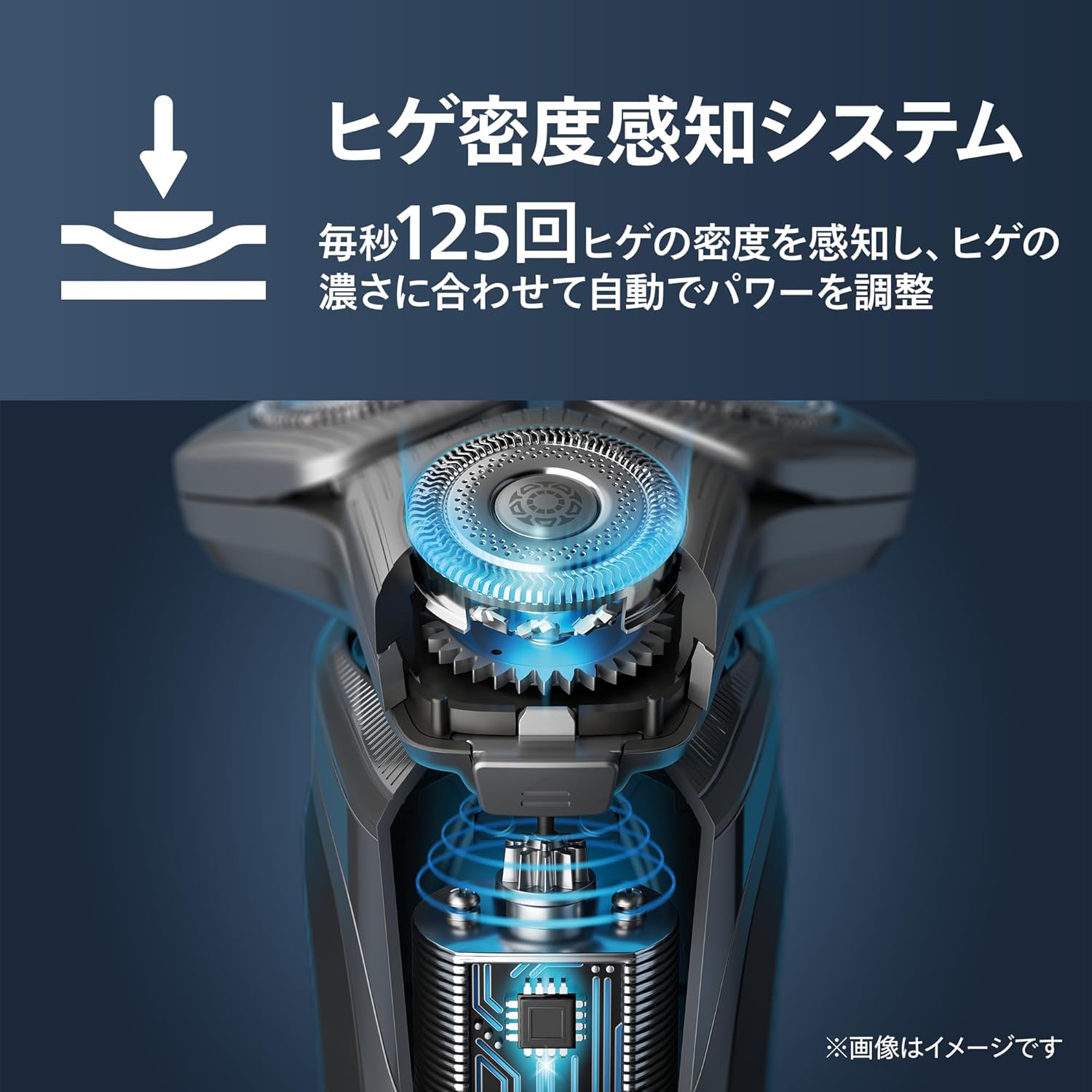
Image 5.2: Diagram illustrating the SkinIQ Technology sensing beard density.
5.3 Super Lift & Cut Technology
Varustatud Super Lift & Cut Technology, the shaver's 72 self-sharpening blades work in two stages: the first blade lifts the hair, and the second blade cuts it below skin level for a close and smooth shave. The micro-bead coating on the shaving head reduces friction by 25% compared to non-coated materials, minimizing skin irritation.

Pilt 5.3: Lähivõte view of the shaver blades, highlighting the Super Lift & Cut mechanism.

Image 5.4: Illustration of the micro-bead coating for reduced skin friction.
6. Hooldus
6.1 Igapäevane koristamine
After each shave, rinse the shaver head under warm running water. For a more thorough clean, detach the shaving head and rinse both the head and the shaver body. Allow all parts to air dry completely before reassembling.
6.2 Quick Clean Pod Cleaning
For a deeper clean and lubrication, use the Quick Clean Pod regularly (e.g., once a week or as needed). Follow the steps outlined in Section 4.2. Replace the Quick Clean Pod Cartridge when indicated or after approximately 30 cleaning cycles.
6.3 Pardlipeade vahetamine
For optimal performance, it is recommended to replace the shaving heads every 12 months. Replacement heads can be purchased from authorized Philips retailers or online.
7. Veaotsing
- Pardel ei lülitu sisse: Ensure the shaver is fully charged. If the issue persists, try a different power outlet or charging cable.
- Halb raseerimistulemus: Puhastage lõikepead hoolikalt. Kui jõudlus ei parane, võib lõikepead vaja minna välja vahetada.
- Nahaärritus: Ensure you are using proper shaving technique (gentle circular motions). Consider wet shaving with foam or gel. If irritation persists, consult a dermatologist.
- Quick Clean Pod not working: Ensure the shaver is correctly placed in the pod and the cartridge is properly inserted. Check if the shaver has sufficient battery charge.
8. Tehnilised andmed
| Funktsioon | Spetsifikatsioon |
|---|---|
| Mudeli number | S9696/50 |
| Kaubamärk | Philips |
| Tera materjal | Metal (72 self-sharpening blades) |
| Pea tüüp | Rotary (360-D Flexhead) |
| Toiteallikas | Akutoitel (taaslaetav) |
| Eriomadused | Compact, Cordless, SkinIQ Technology, Super Lift & Cut, Micro-bead coating, Wet & Dry use |
| Soovitatav kasutamine | Habeme ajamine |
| Toote mõõtmed | 6.7 x 6.5 x 18 cm |
| Kaal | 1 kg |
| Aku tüüp | Tootespetsiifiline (kaasa arvatud) |
9. Garantii ja tugi
This Philips product comes with a standard manufacturer's warranty. Please refer to the warranty card included in your package for specific terms and conditions, or visit the official Philips webveebisaiti, kust leiate üksikasjalikku teavet garantiitingimuste ja toote registreerimise kohta.
For technical support, replacement parts, or further assistance, please visit the Philips support webveebisaidilt või võtke ühendust nende klienditeenindusega. Kontaktandmed leiate Philipsi veebisaidilt webveebisaidil või tootega kaasasolevas dokumentatsioonis.
Veebitugi: www.philips.com/support


