1. Sissejuhatus
This manual provides detailed instructions for the operation and maintenance of your Soundmaster DAB280SW Portable DAB+ and FM RDS Digital Radio. The DAB280SW is a versatile portable radio featuring DAB+ and FM RDS reception, a headphone jack, and a practical carrying handle. It offers excellent sound quality and user-friendly controls, including preset station memory and alarm functions.
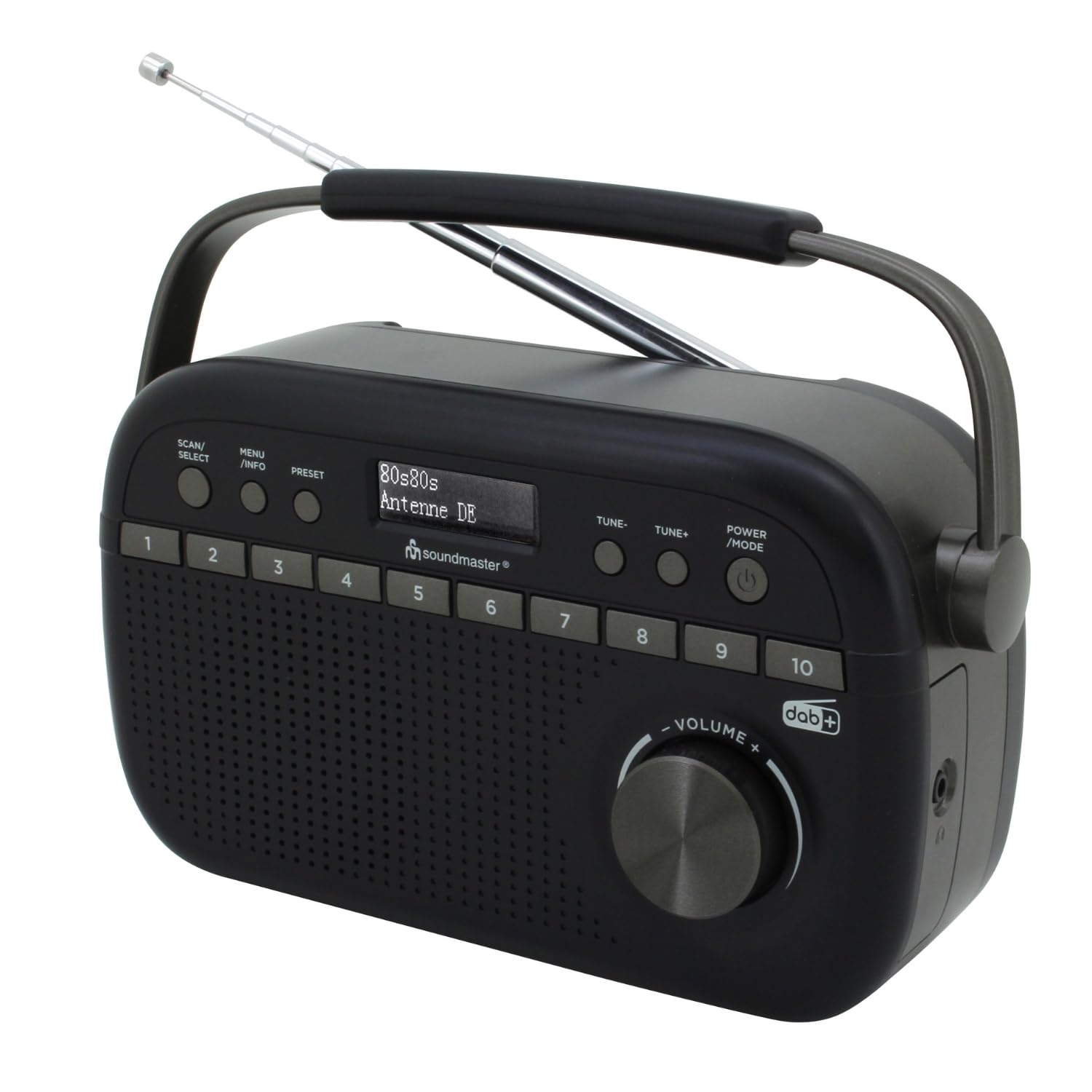
Image 1.1: The Soundmaster DAB280SW Portable DAB+ and FM RDS Digital Radio, showcasing its compact design and carrying handle.
2. Ohutusalane teave
- Enne seadme kasutamist lugege hoolikalt läbi kõik juhised.
- Tulekahju või elektrilöögi vältimiseks ärge jätke seadet vihma ega niiskuse kätte.
- Tagage seadme ümber piisav ventilatsioon. Ärge blokeerige ventilatsiooniavasid.
- Kasutage ainult ettenähtud toiteadapterit või akusid.
- Ärge avage c-dasing. Kõik hooldustööd suunake kvalifitseeritud personalile.
- Hoidke seadet otsese päikesevalguse, soojusallikate ja tugevate magnetväljade eest.
- Hävitage patareisid vastutustundlikult vastavalt kohalikele eeskirjadele.
3. Pakendi sisu
Palun kontrollige, kas kõik esemed on olemas:
- Soundmaster DAB280SW Portable Radio
- AC Power Adapter (if included)
- Kasutusjuhend
4. Toote omadused
- DAB+ Digital Radio Tuner
- FM - RDS Radio Tuner
- 10 preset station memory buttons for quick access
- Total of 40 presets available (20 DAB+, 20 FM)
- Dual alarm times
- Une- ja edasilükkamisfunktsioonid
- 3.5 mm kõrvaklappide pesa
- Portable design with carrying handle
- Battery or AC powered operation
5. Juhtnupud ja ekraan
Familiarize yourself with the controls on your radio:
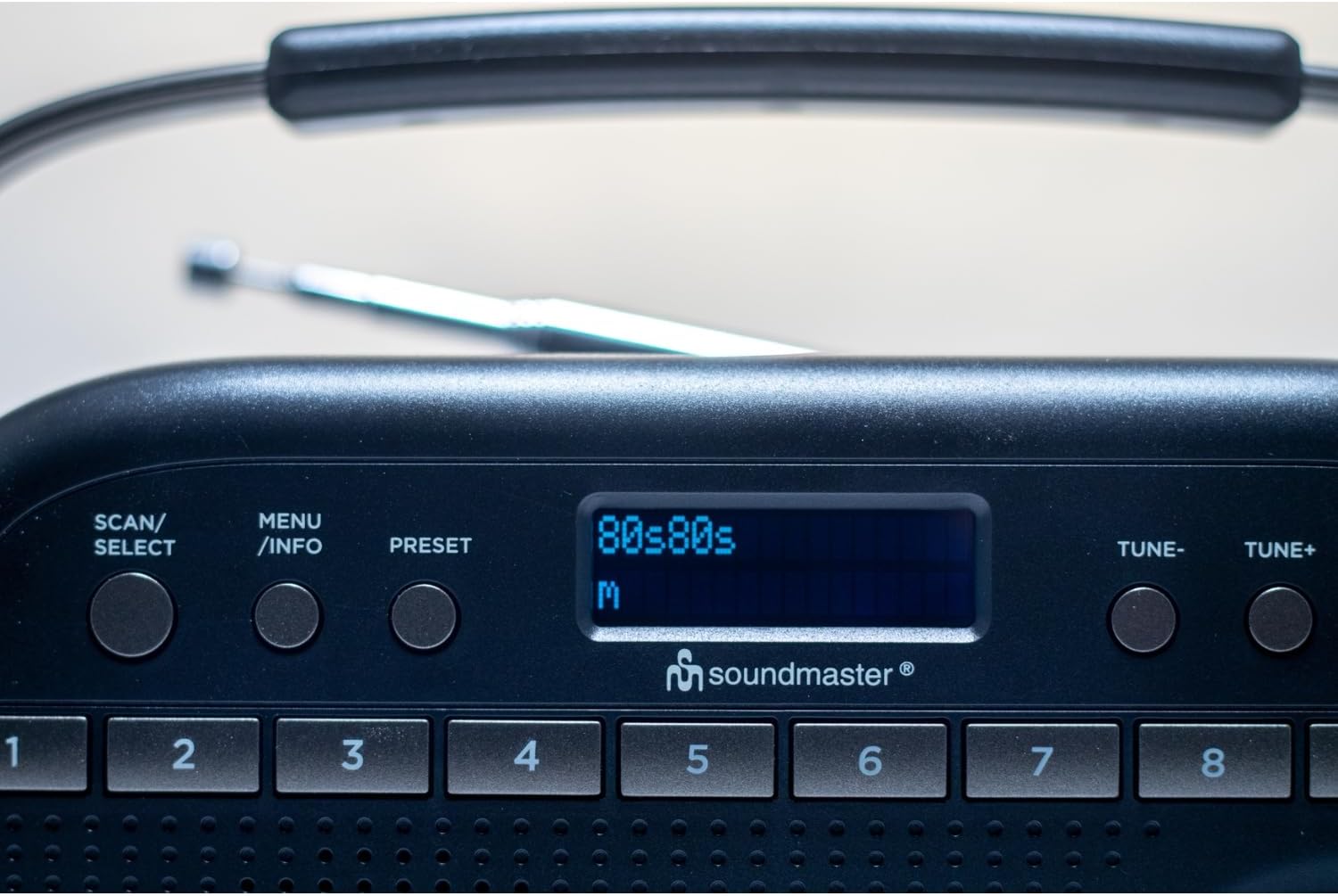
Pilt 5.1: Ülemine osa view of the radio showing the display, SCAN/SELECT, MENU/INFO, PRESET buttons, and preset buttons 1-8.
- POWER/MODE Button: Press to turn the unit on or off. Press repeatedly to switch between DAB+ and FM modes.
- HÄÄLESTAMISE / HÄÄLESTAMISE+ nupud: Used to manually tune frequencies in FM mode or navigate through DAB+ stations/menu options.
- SCAN/SELECT Button: Initiates a scan for stations in DAB+ or FM mode. Also confirms selections in menu.
- MENÜÜ/INFO nupp: Accesses the menu settings. Press repeatedly to cycle through information display (e.g., program type, signal strength).
- PRESET nupp: Used to save and recall favorite stations.
- Eelseadistatud nupud (1–10): Direct access buttons for your stored favorite stations.
- VOLUME nupp: Pöörake heliväljundi taseme reguleerimiseks.
- Kuva: Shows station information, time, menu options, and other relevant data.
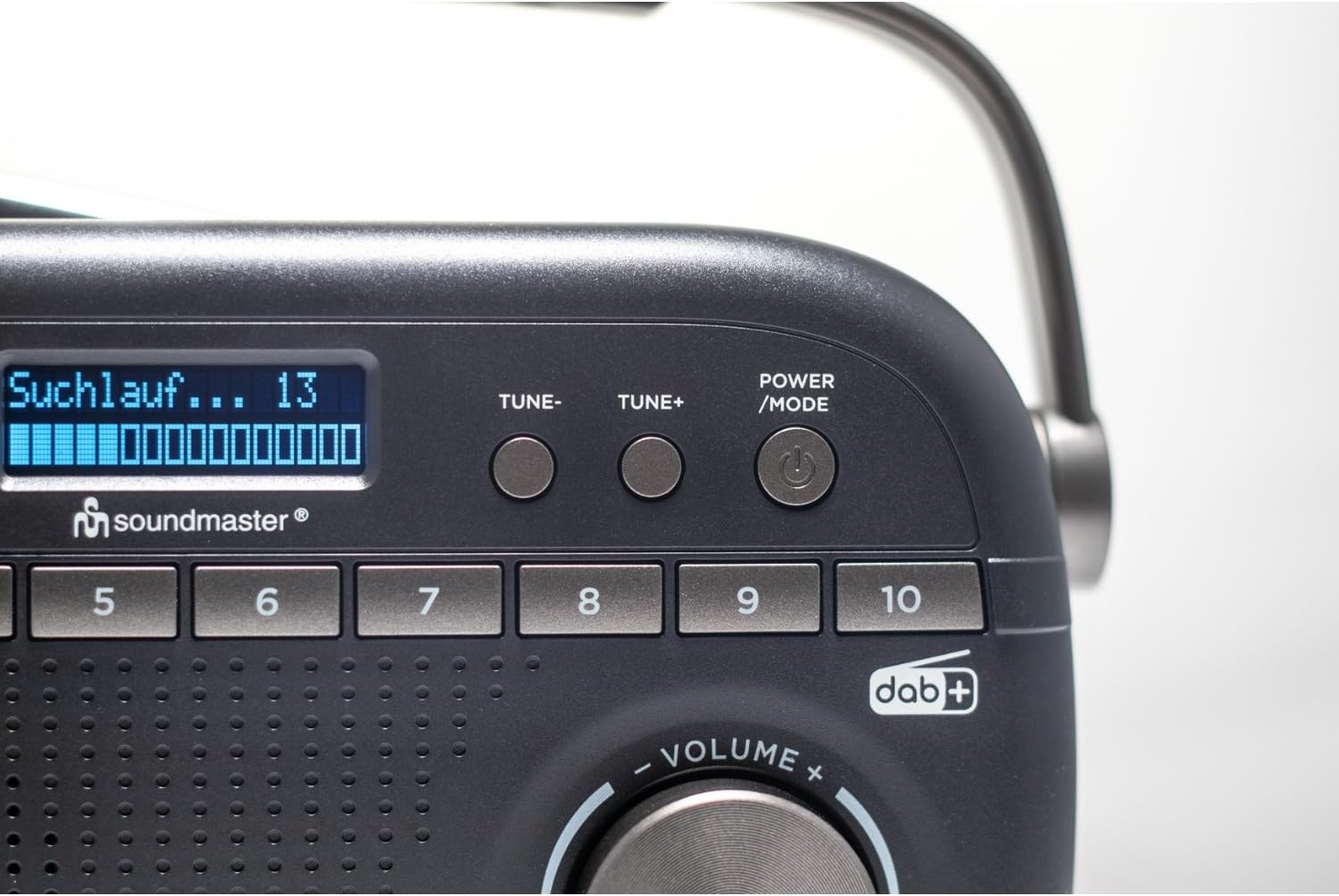
Image 5.2: Close-up of the radio display showing a 'Suchlauf...' (scanning) message, indicating station search in progress.
6. Seadistamine
6.1 Seadme toiteallikaga varustamine
The DAB280SW can be powered by either the included AC power adapter or batteries.
- Vahelduvvoolu toide: Connect the AC power adapter to the DC IN jack on the rear of the unit and plug the other end into a standard wall outlet.
- Aku võimsus: Open the battery compartment on the rear of the unit. Insert the required number of batteries (type not specified, typically C or AA) ensuring correct polarity (+/-). Close the battery compartment securely.

Pilt 6.1: tagumine view of the radio, illustrating the battery compartment cover and the AC power input socket.
6.2 Antenni reguleerimine
For optimal reception, fully extend the telescopic antenna located on the rear of the unit. Adjust its position and angle to achieve the best signal quality for both DAB+ and FM broadcasts.
7. Kasutusjuhised
7.1 Toide sisse/välja
Vajutage nuppu TOIDE/REŽIIM button to turn the radio on. Press and hold the TOIDE/REŽIIM nuppu raadio väljalülitamiseks.
7.2 Selecting DAB+ or FM Mode
Kui raadio on sisse lülitatud, vajutage nuppu TOIDE/REŽIIM button repeatedly to cycle between DAB+ and FM radio modes. The current mode will be displayed on the screen.
7.3 DAB+ raadio kasutamine
- Esmakordne seadistamine: When you first power on the radio in DAB+ mode, it will automatically perform a full scan for available stations. This may take a few minutes.
- Käsitsi skannimine: To initiate a full scan at any time, press the SKANNA / VALI nuppu.
- Jaamade valimine: After a scan, use the TUNE- or TUNE+ buttons to scroll through the list of available DAB+ stations. Press SKANNA / VALI oma valiku kinnitamiseks.

Image 7.1: The official DAB+ digital radio logo, indicating support for digital audio broadcasting.
7.4 FM-raadio kasutamine
- Automaatne skannimine: FM-režiimis vajutage nuppu SKANNA / VALI button to automatically scan for and stop at the next available strong station.
- Käsitsi häälestamine: Kasutage TUNE- or TUNE+ buttons to manually adjust the frequency in small increments. Press and hold these buttons for faster tuning.
7.5 Eelseadistuste salvestamine ja tagasikutsumine
The radio allows you to store up to 20 DAB+ and 20 FM stations as presets.
- Eelseadistuse salvestamiseks: Häälesta soovitud jaamale. Vajuta ja hoia all PRESSET button until 'Preset Store' appears on the display. Use the TUNE- or TUNE+ buttons to select a preset number (1-10 for direct access, or 11-20 via menu). Press SKANNA / VALI to confirm. Alternatively, for direct access presets (1-10), press and hold the desired numbered preset button.
- Eelseadistuse tagasikutsumiseks: Vajutage lühidalt nuppu PRESSET nuppu, seejärel kasutage TUNE- or TUNE+ to select the desired preset number and press SKANNA / VALI. For direct access presets (1-10), simply press the corresponding numbered preset button.
7.6 Alarm, Sleep, and Snooze Functions
The DAB280SW includes dual alarm times, a sleep timer, and a snooze function. Refer to the detailed menu options for setting these features:
- Alarmide seadistamine: Vajutage nuppu MENÜÜ / INFO button to enter the menu. Navigate to the 'Alarm' option using TUNE- or TUNE+ ja vajutage SKANNA / VALI. Follow the on-screen prompts to set Alarm 1 and Alarm 2, including time, source (DAB/FM/Buzzer), and duration.
- Unetaimer: In the menu, select 'Sleep'. Choose a duration (e.g., 15, 30, 60 minutes) after which the radio will automatically turn off.
- Kordus: When an alarm sounds, press any button (except POWER/MODE) to activate the snooze function, which will temporarily silence the alarm for a short period.
7.7 Kõrvaklappide kasutamine
To listen privately, plug 3.5mm stereo headphones into the headphone jack located on the side of the unit. The internal speaker will automatically mute.
8. Hooldus
- Puhastamine: Pühkige seadet pehme ja kuiva lapiga. Ärge kasutage abrasiivseid puhastusvahendeid ega lahusteid.
- Patarei vahetus: If using batteries, replace them when the low battery indicator appears on the display or when performance degrades. Ensure to use fresh batteries of the correct type and dispose of old batteries properly.
- Hoiustamine: Kui raadiosaatjat pikemat aega hoiustate, eemaldage patareid, et vältida leket.
9. Veaotsing
- Toide puudub: Check if the AC adapter is securely connected or if batteries are inserted correctly and are not depleted.
- Halb vastuvõtt: Fully extend and adjust the telescopic antenna. Try moving the radio to a different location, away from other electronic devices that may cause interference. Perform a full scan for stations.
- Heli puudub: Check the volume level. Ensure headphones are not plugged in if you intend to use the speaker.
- DAB+ Stations Missing: Perform a full DAB+ scan. DAB+ coverage may vary by location; check local availability.
- Ekraan ei tööta: Try turning the unit off and on again. If the issue persists, contact customer support.
10. Tehnilised andmed
| Funktsioon | Spetsifikatsioon |
|---|---|
| Mudel | DAB280SW |
| Tuneri tehnoloogia | DAB+, FM RDS |
| Toetatud raadiobändid | FM (up to 108 MHz) |
| Eelseadistatud jaamad | 40 (20 DAB+, 20 FM) |
| Heliväljund | 3.5 mm kõrvaklappide pesa |
| Toiteallikas | AC Power Adapter, Battery Powered |
| Toote mõõtmed (P x L x K) | 25 x 6 x 12 cm |
| Kauba kaal | 0.6 kilogrammi |
| Eriomadused | Portable, Dual Alarm, Sleep/Snooze |

Image 10.1: The Soundmaster DAB280SW radio with its approximate dimensions (25cm length, 6cm width, 12cm height) indicated.
11. Garantii ja tugi
Your Soundmaster DAB280SW radio comes with a standard manufacturer's warranty. Please refer to the warranty card included in your package for specific terms and conditions. For technical support, troubleshooting assistance, or warranty claims, please contact your retailer or the Soundmaster customer service department. Contact information can typically be found on the manufacturer's webveebilehel või toote pakendil.


