1. Sissejuhatus
The FEITIAN ePass K9 Plus is a versatile USB security key designed for robust multi-factor authentication. It supports USB-A and NFC connectivity, offering FIDO U2F, FIDO2, and PIV functionalities. This device enhances security by providing a convenient and safer alternative or addition to traditional passwords, helping to prevent account takeovers and cyber-attacks.
2. Põhiomadused
- FIDO2 + FIDO U2F certified security key with PIV function.
- FIPS 140-2 Level 2 certified for enhanced security.
- Secured by NXP semiconductors.
- Driverless operation across all major browsers.
- Supports desktops, laptops, and tablets via USB-A and/or NFC.
- Supports iOS/Android phones via NFC.
- Protects accounts from phishing and other cyber-attacks.
- Prevents unauthorized device access.
- Features: 2 slots, OATH-HOTP, OATH-TOTP, Static Password, Challenge Response, AES, ECDSA, SHA256, NIST-FIPS 140-2, OpenPGP, Smart Card (PIV), RSA 2048, RSA 1024, ECC P384, ECC P256.
3. Toote lõppview
3.1 Füüsiline kirjeldus
The ePass K9 Plus features a compact, key-like design with a USB-A connector on one end and an integrated NFC module. It includes a tactile button for authentication prompts and a small hole for attachment to a keyring.

Pilt 1: esikülg view of the FEITIAN ePass K9 Plus USB Security Key, showing the USB-A connector and the NFC touch area with an indicator light.
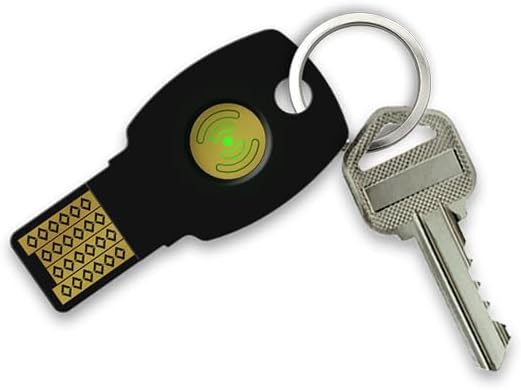
Image 2: The FEITIAN ePass K9 Plus security key shown attached to a keyring alongside a traditional house key, illustrating its compact size and portability.
3.2 Pakendi sisu
- FEITIAN ePass K9 Plus USB Security Key
- Kiirjuhend (võib piirkonniti erineda)

Pilt 3: esikülg view of the FEITIAN ePass K9 Plus retail packaging, displaying the product name and FIDO certification logo.

Pilt 4: Tagasi view of the FEITIAN ePass K9 Plus retail packaging, showing a QR code for the user manual and product certifications.
4. Seadistamine
4.1 Esialgne ühendus
- For USB-A: Insert the ePass K9 Plus into an available USB-A port on your computer, laptop, or tablet. The device is designed to be driverless and should be recognized automatically by your operating system.
- For NFC: Ensure your mobile phone or NFC-compatible device has NFC enabled. The key will communicate wirelessly when placed near the device's NFC reader.
4.2 Registration with Accounts
To use the ePass K9 Plus for authentication, you must first register it with your desired online accounts or services that support FIDO U2F or FIDO2. The registration process typically involves:
- Navigate to the security settings or two-factor authentication section of your account (e.g., Google, Microsoft, Twitter).
- Select the option to add a security key or FIDO device.
- Follow the on-screen prompts. When instructed, insert the ePass K9 Plus into a USB-A port or tap it against your NFC-enabled device.
- Touch the button on the security key when prompted to confirm registration.
- Assign a name to your security key for easy identification (optional).
5. Kasutusjuhised
5.1 USB-A Authentication
When logging into a service that requires your ePass K9 Plus via USB-A:
- Enter your username and password as usual.
- When prompted by the service, insert your ePass K9 Plus into an available USB-A port.
- Touch the button on the security key to complete the authentication.
5.2 NFC Authentication
When logging into a service that requires your ePass K9 Plus via NFC (e.g., on a mobile phone or NFC-enabled tablet):
- Enter your username and password as usual.
- When prompted by the service, hold your ePass K9 Plus near the NFC reader area of your device.
- The device will vibrate or provide an audible cue when the key is successfully read.
5.3 Toetatud teenused
The FEITIAN ePass K9 Plus is compatible with a wide range of services and platforms, including but not limited to:
- Windows Log-In
- Twitter, Google Accounts, Microsoft Accounts, Facebook
- Salesforce, Zoho, Dropbox, DUO Security
- Microsoft Azure Entra ID, Microsoft Active Directory
- Coinbase, Bank of America, Okta, Ping Identity, eBay
- Many other websites, applications, computers, laptops, and devices that accept USB Security Keys.
5.4 Videodemonstratsioon
Video 1: An official FEITIAN video demonstrating the features and usage of the ePass Security Key, including its smart design, durability, optional features, and passwordless authentication capabilities via USB and NFC.
6. Täiustatud funktsioonid
6.1 PIV (Personal Identity Verification)
The ePass K9 Plus supports PIV, allowing it to function as a smart card for secure identity verification, digital signatures, and encryption in enterprise and government environments. Specific setup and usage instructions for PIV will depend on your organization's infrastructure and software.
6.2 OATH-HOTP/TOTP
The key can generate One-Time Passwords (OTPs) using both HMAC-based (HOTP) and Time-based (TOTP) algorithms. This functionality can be configured using FEITIAN's management software, which may be required for initial setup of these features.
7. Tehnilised andmed
| Funktsioon | Detail |
|---|---|
| Mudeli nimi | ePass K9 Plus |
| Toote mõõtmed (PxLxK) | 1.75 x 1 x 0.12 tolli (4.45 x 2.54 x 0.3 cm) |
| Kauba kaal | 0.099 untsi (2.8 grammi) |
| Välkmälu tüüp | USB |
| Riistvara ühenduvustehnoloogia | USB tüüp A |
| Ühenduvustehnoloogia | NFC, USB |
| Erifunktsioon | Veekindel (IP67) |
| Värv | Must |
| Sertifikaadid | FIDO2, FIDO U2F, FIPS 140-2 Level 2 |
8. Veaotsing
8.1 Key Not Recognized
- USB-A: Try a different USB port or a different computer to rule out port issues. Ensure the key is fully inserted.
- NFC: Ensure NFC is enabled on your mobile device. Try repositioning the key over the NFC reader area, as the exact location can vary by device. Remove any thick phone cases that might interfere with NFC communication.
8.2 Authentication Failure
- Ensure you are touching the button on the key when prompted during USB-A authentication.
- Verify that the security key has been correctly registered with the specific account you are trying to access.
- Check your internet connection if authenticating with an online service.
8.3 Märgutule käitumine
The ePass K9 Plus typically has an indicator light (often green) that illuminates or flashes during authentication. If the light does not respond, ensure the key is properly connected or positioned for NFC.
9. Hooldus ja hooldus
- Keep the security key clean and free from dust and debris. Use a soft, dry cloth for cleaning.
- Avoid exposing the key to extreme temperatures or direct sunlight for prolonged periods.
- While the key is water-resistant (IP67), avoid intentional submersion or exposure to harsh chemicals.
- Store the key in a safe place to prevent loss or physical damage.
10. Tugi ja ressursid
For further assistance, detailed documentation, or to download any necessary software (e.g., for OATH-HOTP/TOTP configuration), please refer to the official FEITIAN website or the comprehensive user manual:
- Official FEITIAN Websait: www.ftsafe.com
- ePass FIDO-NFC Plus K9 Manual (PDF): Laadige alla PDF-juhend


