1. Sissejuhatus
Thank you for choosing the Karlsson LED Mirror Alarm Clock. This digital alarm clock features a modern design with a clear LED display integrated into a silver mirror surface, showing time and temperature. This manual provides essential information for the safe and efficient use of your device.
Mis on karbis:
- Karlsson LED Mirror Alarm Clock
- USB-toitekaabel

Joonis 1: Esiosa view of the Karlsson LED Mirror Alarm Clock, showing the time (15:08) and temperature (19°C) on its reflective display.
2. Ohutusalane teave
- Ärge jätke seadet vee ega liigse niiskuse kätte.
- Vältige äärmuslikke temperatuure, otsest päikesevalgust või tolmust keskkonda.
- Hoida lastele kättesaamatus kohas.
- Use only the provided USB cable or a compatible power adapter.
- When inserting batteries, ensure correct polarity (+/-).
- Ärge segage vanu ja uusi patareisid ega erinevat tüüpi patareisid.
- Eemaldage patareid, kui seadet pikemat aega ei kasutata.
3. Toote lõppview
Tutvuge oma äratuskella komponentide ja juhtnuppudega.
Esikülg:
- Aja kuvamine: Shows current time in 12-hour or 24-hour format.
- Temperatuuri näidik: Shows ambient temperature in Celsius or Fahrenheit.
Tagumised juhtnupud:
- SET nupp: Used to enter setting modes (time, alarm).
- ÜLES nupp: Kasutatakse väärtuste suurendamiseks või menüüdes navigeerimiseks.
- ALLA nupp: Kasutatakse väärtuste vähendamiseks või menüüdes navigeerimiseks.
- MODE/V Button: Used to switch display modes or activate voice control (if available).
- Reset-nupp: Lähtestab seadme tehaseseadetele.
- DC 5V sisend: USB-toitekaabli ühendamiseks.
- Akupesa: Mahutab 3 x AAA patareid varutoiteallikana.
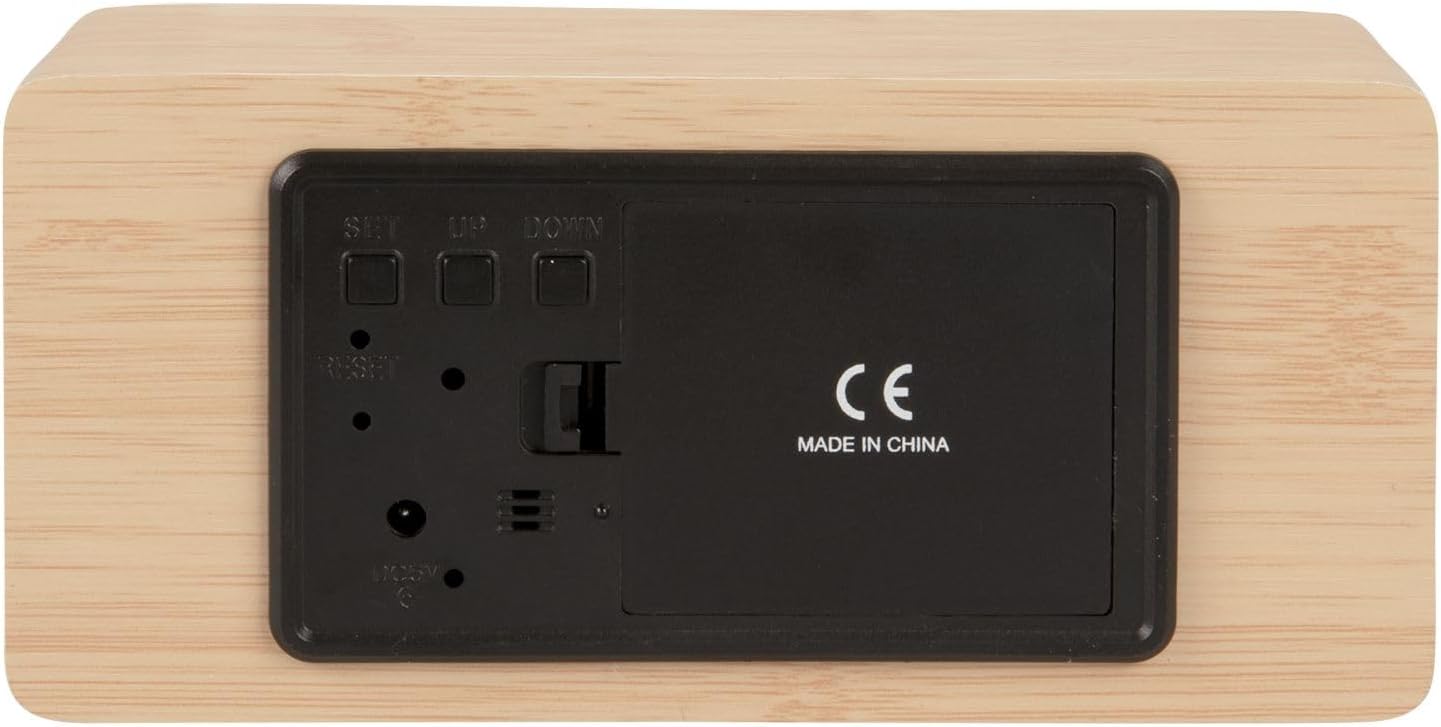
Joonis 2: Tagumine view of the alarm clock, highlighting the SET, UP, DOWN buttons, power input, and battery compartment.
4. Seadistamine
Seadme toide:
The alarm clock can be powered via the included USB cable or by 3 x AAA batteries (not included) for backup.
- USB-toide: Connect the small end of the USB cable to the DC 5V input port on the back of the alarm clock. Connect the other end to a USB power adapter (not included) or a powered USB port.
- Aku varundamine: Open the battery compartment cover on the back of the clock. Insert 3 x AAA batteries, ensuring correct polarity. Close the cover securely. Batteries are primarily for backup and may not power the display continuously.

Joonis 3: The USB power cable provided for connecting the alarm clock to a power source.
5. Kasutusjuhised
Kellaaja määramine:
- Vajutage ja hoidke all nuppu SET nuppu, kuni tunninumbrid hakkavad vilkuma.
- Kasutage UP or ALLA nupud kellaaja reguleerimiseks.
- Vajutage SET uuesti, et kinnitada tunnid ja liikuda minutite seadistamisele.
- Kasutage UP or ALLA nuppe minutite reguleerimiseks.
- Vajutage SET minutite kinnitamiseks ja aja seadistamise režiimist väljumiseks.
Alarmi seadistamine:
- Vajutage nuppu SET button once (do not hold) to cycle through display modes until 'AL' or an alarm icon appears.
- Vajutage ja hoidke all nuppu SET button again until the alarm hour digits flash.
- Kasutage UP or ALLA nuppe, et määrata soovitud äratuse tund.
- Vajutage SET to confirm the alarm hour and move to alarm minute setting.
- Kasutage UP or ALLA nuppe, et määrata soovitud äratuse minutid.
- Vajutage SET kinnitamiseks ja äratuse seadistusrežiimist väljumiseks.
- Äratuse aktiveerimiseks/deaktiveerimiseks vajutage nuppu UP button while in normal time display mode. An alarm icon will appear/disappear on the display.
Switching Display Modes (12/24 Hour, Temperature Unit):
- Tavalises kellaaja kuvamise režiimis vajutage nuppu UP button to switch between 12-hour and 24-hour formats.
- Vajutage nuppu ALLA nuppu Celsiuse (°C) ja Fahrenheiti (°F) temperatuuriühikute vahel vahetamiseks.
6. Hooldus
- Clean the alarm clock with a soft, dry cloth.
- Do not use abrasive cleaners, solvents, or harsh chemicals, as these may damage the mirror surface or casing.
- Ensure the device is unplugged and batteries are removed before cleaning.
7. Veaotsing
- Ekraan on tühi: Check if the USB cable is securely connected to a power source. If using batteries, ensure they are inserted correctly and are not depleted.
- Äratus ei helise: Verify that the alarm is set and activated (alarm icon visible on display). Check the alarm volume if adjustable (this model may not have adjustable volume).
- Incorrect time/settings: Vajutage nuppu RESET button on the back of the unit using a thin object (e.g., a paperclip) to restore factory settings, then re-set the time and alarm.
- Temperatuuri näit tundub ebatäpne: Ensure the clock is placed in a location away from direct heat sources or drafts that could affect ambient temperature readings.
8. Tehnilised andmed
| Mudeli number | PTG-KA5879WD |
| Materjal | Puidust spoon |
| Mõõdud (P x L x K) | 15 cm x 7 cm x 4.5 cm (umbes 5.9 x 2.76 x 1.77 tolli) |
| Kaal | 245 g (umbes 0.54 naela) |
| Värv | Light wood casing, silver mirror display |
| Kuva tüüp | Digitaalne LED |
| Erifunktsioon | Alarm |
| Toiteallikas | USB powered (cable included), 3 x AAA batteries (not included) for backup |
9. Garantii ja tugi
This product is manufactured by Karlsson. For any support inquiries, warranty information, or service requests, please refer to the retailer where the product was purchased or visit the official Karlsson website for contact details. Please retain your proof of purchase for warranty claims.


