1. Sissejuhatus
Thank you for choosing the COMAOGO T002-W Mini Projector. This manual provides essential information for setting up, operating, and maintaining your projector to ensure optimal performance and longevity. The T002-W is a versatile projector featuring 9500 Lumens brightness, 1080P support, 5G WiFi, and Bluetooth 5.1 connectivity, designed for an immersive viewkogemus kuni 220 tolli.
2. Pakendi sisu
Palun kontrollige pakendilt järgmisi esemeid:
- 1 x COMAOGO T002-W Mini Projector
- 1x kaugjuhtimispult
- 1 x toitekaabel
- 1 x HDMI kaabel
- 1 x AV kaabel
- 1 x kasutusjuhend
3. Toote lõppview
Tutvuge projektori komponentide ja liidestega.

Image: COMAOGO T002-W Projector with 5G and 2.4G WiFi capabilities, showing wireless screen synchronization with a tablet and smartphone.
The projector features various ports for connectivity, including HDMI, USB, VGA, AV, and a TF card slot, along with a 3.5mm audio output. It also supports dual-band 5G and 2.4G WiFi for stable wireless connections and Bluetooth 5.1 for audio devices.

Image: COMAOGO T002-W Projector connected to various devices including a laptop, game console, and streaming stick, highlighting its multiple input ports (AV, HDMI, USB, TF, VGA).
4. Seadistamine
4.1 Paigutus
Position the projector on a stable, flat surface or mount it on a tripod. Ensure there are no obstructions to the ventilation vents. For optimal viewing, the projection distance should be between 1.5 meters and 5.5 meters, yielding a screen size from 45 inches to 220 inches.
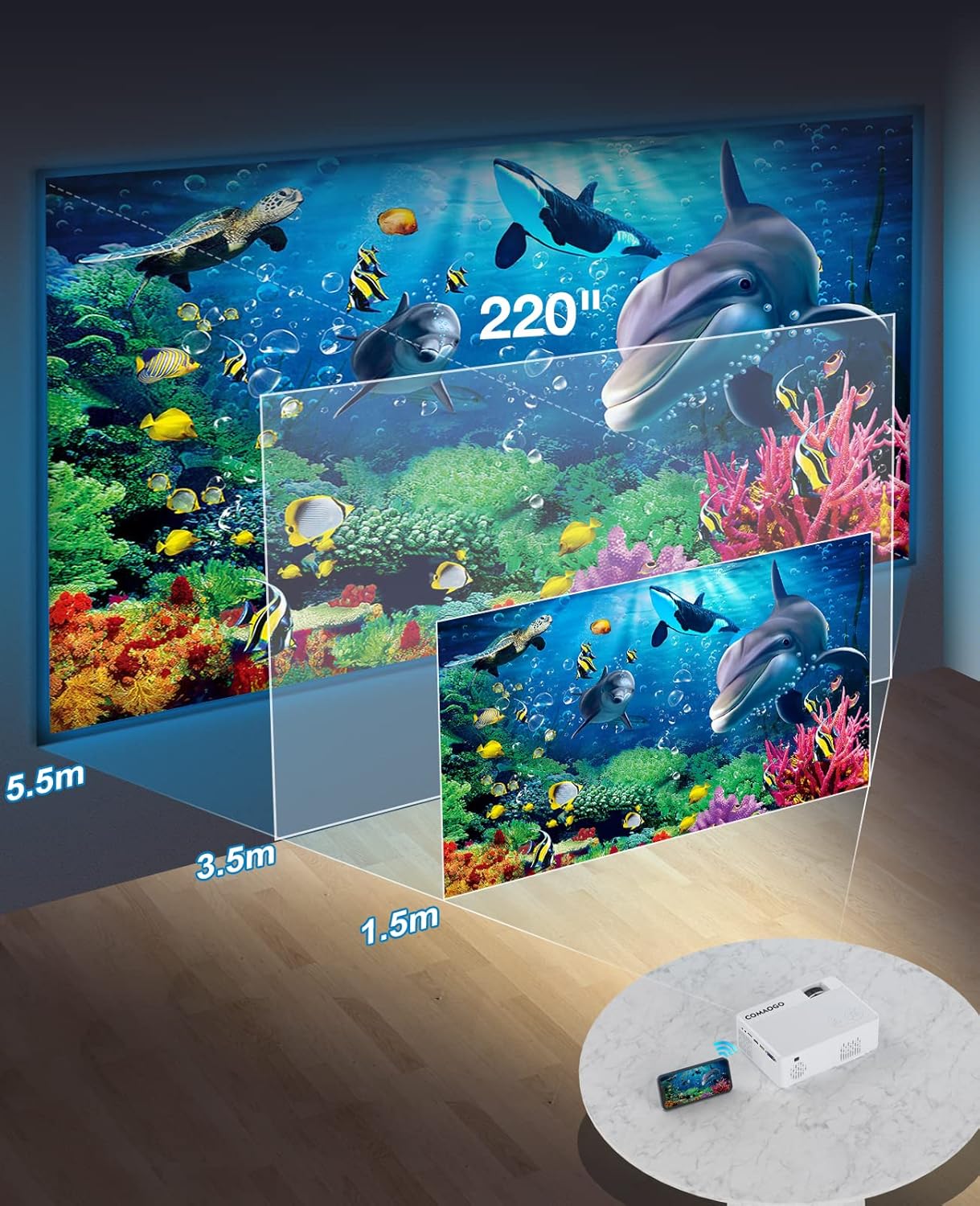
Image: Diagram illustrating the projection distances (1.5m to 5.5m) and corresponding screen sizes (45 to 220 inches) for the COMAOGO T002-W Projector.
4.2 Toiteühendus
Connect the power cable to the projector's power input and then plug it into a power outlet (AC 220V).
4.3 Fookus ja trapetsikorrektsioon
To achieve a clear and rectangular image:
- Fookuse reguleerimine: Pöörake projektori objektiivi teravustamisrõngast, kuni pilt on terav.
- Keystone'i parandus: Adjust the keystone correction dial (if available, or via menu settings) to correct trapezoidal distortion, ensuring the image is rectangular. The projector supports ±15° keystone correction.

Image: Illustration of keystone correction and focus adjustment for the COMAOGO T002-W Projector, showing how to achieve a clear, rectangular image.
5. Kasutusjuhised
5.1 Toide sisse/välja
- Toide sisse: Vajutage projektori või kaugjuhtimispuldi toitenuppu.
- Toide välja: Press the power button again to turn off the projector.
5.2 Sisendallika valik
Use the "Source" button on the remote control or the projector's control panel to select the desired input source (e.g., HDMI, USB, VGA, AV).
5.3 Traadita ühenduvus (WiFi)
The projector supports dual-band 5G and 2.4G WiFi for stable screen mirroring.
- Navigate to the WiFi settings on the projector's menu.
- Select your desired WiFi network (5G for faster, more stable connection; 2.4G for longer range and better penetration).
- Sisestage ühenduse loomiseks parool.
- For screen mirroring, select the appropriate option (e.g., "iOS Cast" or "Android Cast") on the projector and follow the on-screen instructions to connect your smartphone or tablet.
5.4 Bluetooth-ühenduvus
Connect external Bluetooth audio devices like speakers or headphones.

Image: COMAOGO T002-W Projector demonstrating Bluetooth 5.1 connection with a speaker and headphones.
- Minge projektori menüüs Bluetoothi sätete juurde.
- Veenduge, et teie Bluetooth-seade oleks sidumisrežiimis.
- Valige sidumiseks loendist oma seade.
- Note: The projector's Bluetooth function is for connecting output devices (speakers, headphones) only.
5.5 Juhtmega ühendused
Ühendage erinevaid seadmeid saadaolevate portide abil:
- HDMI: Connect laptops, PCs, game consoles (Xbox), TV sticks (Roku, Chromecast), DVD players.
- USB: Meedia esitamine files directly from USB drives.
- VGA: Ühendage vanemad arvutid või sülearvutid.
- OF: Connect legacy video devices.
- TF kaart: Insert a TF card to play media files.
- Important: Copyright-protected content from services like Netflix or Disney+ is not directly supported via screen mirroring. For these services, use an HDMI connection with a compatible adapter (e.g., Lightning Digital AV Adapter for iOS devices) or a streaming stick.
6. Hooldus
6.1 Objektiivi puhastamine
Use a soft, lint-free cloth or lens cleaning paper to gently wipe the projector lens. Avoid using abrasive materials or harsh chemicals that could damage the lens coating.
6.2 Jahutussüsteem
The projector features an updated cooling system designed to reduce noise and maintain optimal operating temperature. Ensure the ventilation vents are clear of dust and obstructions to prevent overheating. Regular cleaning of the vents with a soft brush or compressed air is recommended.
7. Veaotsing
Kui teil tekib projektoriga probleeme, vaadake järgmisi levinud lahendusi.
- Pilt puudub:
- Kontrollige toiteühendust ja veenduge, et projektor on sisse lülitatud.
- Verify the input source selection matches your connected device.
- Ensure all cables (HDMI, VGA, etc.) are securely connected.
- Reguleeri fookust ja trapetsimoonutuse korrektsiooni.
- Heli puudub:
- Adjust the projector's volume.
- Välise kõlari kasutamisel veenduge, et need on korralikult ühendatud ja sisse lülitatud.
- Check Bluetooth connection for external audio devices.
- Ensure the audio output from your source device is enabled.
- WiFi/ekraani peegeldamise probleemid:
- Veenduge, et nii projektor kui ka teie seade oleksid ühendatud sama WiFi-võrguga.
- Check for strong WiFi signal.
- Restart both the projector and your source device.
- For Android devices, ensure "Wireless Projection" or "Screen Mirroring" is enabled. For iOS, use "Screen Mirroring" from Control Center.
- Pilt on udune:
- Reguleeri objektiivi teravustamisrõngast.
- Veenduge, et projektsioonikaugus jääks soovituslikku vahemikku.
- Pilt on trapetsikujuline:
- Reguleerige trapetsimoonutuse korrektsiooni nuppu või sätet.
For further assistance or software updates, please contact COMAOGO customer support.
8. Tehnilised andmed
| Funktsioon | Spetsifikatsioon |
|---|---|
| Kaubamärk | KOMAOGO |
| Mudel | T002-W |
| Heledus | 9500 luumenit (220 ANSI) |
| Kontrastsuse suhe | 6000:1 |
| Natiivne eraldusvõime | 1280 x 720 |
| Toetatud eraldusvõime | 1080P |
| Projektsiooni suurus | 45" - 220" |
| Projektsiooni kaugus | 1.5–5.5 meetrit |
| Keystone korrigeerimine | ±15° |
| WiFi-ühenduvus | Dual-band (5G + 2.4G) |
| Bluetooth | Bluetooth 5.1 |
| Riistvara liides | 3.5mm Audio, TF Card, USB 2.0, VGA, HDMI |
| Sisseehitatud kõlar | Jah |
| Müra tase | 45 detsibelli |
| Energiatarve | 48 vatti |
| Mõõtmed | 20.32 x 15.24 x 7.62 cm |
| Kaal | 1 kilogramm |
9. Ametlik tootevideo
Watch this video for a visual guide on the COMAOGO T002-W Mini Projector's features and operation.
Video: An official product video demonstrating the features and usage of the COMAOGO T002-W Mini Projector, including connectivity and display capabilities.
10. Garantii ja tugi
The COMAOGO T002-W Mini Projector comes with a standard manufacturer's warranty. For warranty claims, technical support, or inquiries regarding software updates, please contact COMAOGO customer service through the retailer where you purchased the product or visit the official COMAOGO websaidile.
SOFTWARE UPDATES can be provided; please contact us if needed.


