1. Sissejuhatus
This manual provides essential information for the safe and efficient assembly, operation, and maintenance of your Tempur-Pedic TP7000 Mesh Back Fabric Task Chair. Please read all instructions carefully before use and retain this manual for future reference.
2. Ohutusalane teave
- Maksimaalne kandevõime: This chair is designed to support a maximum weight of 250 pounds (113 kg). Exceeding this limit may cause damage to the chair or personal injury.
- Kasutusotstarve: This chair is intended for office and task use. Do not use it for purposes other than its intended design.
- Kokkupanek: Ensure all components are securely fastened before using the chair. Periodically check all bolts and screws for tightness.
- Stabiilsus: Avoid standing on the chair or using it as a step stool. Do not lean excessively to one side or the back, as this may cause the chair to tip over.
- Lapsed: Keep children away from the chair during assembly. Do not allow children to play on or around the chair.
3. Pakendi sisu
Enne kokkupaneku alustamist kontrollige, et kõik osad oleksid olemas ja kahjustamata. Kui mõni osa on puudu või kahjustatud, ärge jätkake kokkupanekut. Abi saamiseks võtke ühendust klienditoega.
- Tooli seljatugi (võrkkangas)
- Chair Seat (Fabric with Tempur Material)
- Käetoed (2)
- Tooli alus (5-tärni ratastega)
- Gaasi tõste silinder
- Mehhanismi plaat
- Riistvarakomplekt (kruvid, seibid, kuuskantvõti)
4. Seadistamine ja kokkupanek
Follow these steps to assemble your Tempur-Pedic TP7000 Task Chair. It is recommended to assemble the chair on a soft, non-abrasive surface to prevent damage.
- Kinnitage rattad alusele: Sisestage viis ratast tooli aluse iga jala otsas olevatesse aukudesse. Lükake kindlalt, kuni need oma kohale klõpsavad.
- Sisestage gaasitõstuk: Asetage gaasitõste silinder kokkupandud tooli aluse keskmisesse auku.
- Kinnitage mehhanismiplaat istmele: Align the mechanism plate with the pre-drilled holes on the underside of the chair seat. Secure it using the provided screws and Allen wrench. Ensure the front of the mechanism faces the front of the seat.
- Käetugede kinnitamine istmele: Attach the armrests to the sides of the chair seat using the designated screws. Do not fully tighten yet.
- Attach Backrest to Seat/Mechanism: Align the backrest with the mounting points on the mechanism plate or seat. Secure with screws. Once the backrest is attached, fully tighten all armrest screws.
- Ühendage istmekomplekt gaasitõstukiga: Asetage kokkupandud iste ja seljatugi ettevaatlikult gaasitõstuki silindrile, veendudes, et gaasitõstuki kooniline ots sobib kindlalt mehhanismiplaadiga.


5. Kasutusjuhend (reguleerimine)
Your Tempur-Pedic TP7000 chair offers several adjustments to customize your seating experience for optimal comfort and support.
- Istme kõrguse reguleerimine: To raise the seat, lift the lever located under the right side of the seat while taking your weight off the chair. To lower the seat, lift the lever while seated. Release the lever at the desired height.
- Käetoe kõrguse reguleerimine: Press the button on the side of each armrest and move the armrest up or down to your preferred height. Release the button to lock it in place.
- Kallutuse lukustamine/avamine: The chair features a single reclining position. To allow the chair to recline, pull the lever (usually the same as the height adjustment lever, or a separate one) outwards. To lock the chair in an upright position, push the lever inwards.
- Kalde pinge reguleerimine: Rotate the round knob located under the front of the seat to adjust the tension of the recline. Turn clockwise to increase tension (making it harder to recline) and counter-clockwise to decrease tension (making it easier to recline).
6. Hooldus
Nõuetekohane hooldus pikendab teie tooli eluiga ja annab sellele hea välimuse.
- Puhastamine: The fabric seat and mesh back should be spot cleaned only. Use a mild detergent and a damp cloth. Do not saturate the fabric. Test any cleaning solution on an inconspicuous area first.
- Ülevaatus: Kontrollige regulaarselt kõiki polte, kruvisid ja ühendusi, et need oleksid kindlalt kinni. Vajadusel pingutage.
- Rattad: Hoidke rattad sujuva liikumise tagamiseks juustest ja prahist vabad.
- Vältige tugevaid kemikaale: Do not use abrasive cleaners, solvents, or strong detergents, as these can damage the chair's materials.
7. Veaotsing
Kui teil tekib tooliga probleeme, vaadake järgmisi levinud probleeme ja lahendusi:
- Tool vajub vajuma või ei püsi püsti:
Lahendus: The gas lift cylinder may be faulty. Contact customer support for a replacement. - Tooli kriuksumine:
Lahendus: Kontrollige kõiki kruvisid ja polte ning pingutage neid. Kui kriuksumine jätkub, võib liikuvatele osadele kanda väikese koguse silikoonmäärdeainet. - Rattad ei veere sujuvalt:
Lahendus: Eemaldage rataste ümbert kõik juuksed ja praht. Puhastage rattadamp riie. - Chair Does Not Recline:
Lahendus: Veenduge, et kallutusluku hoob on vabastatud (väljapoole tõmmatud). Pinge vähendamiseks reguleerige kallutuspinge nuppu vastupäeva.
8. Tehnilised andmed
| Funktsioon | Detail |
|---|---|
| Kaubamärk | Tempur-Pedic |
| Mudel | TP7000 |
| Värv | Cobalt (Seat), Black (Mesh Back) |
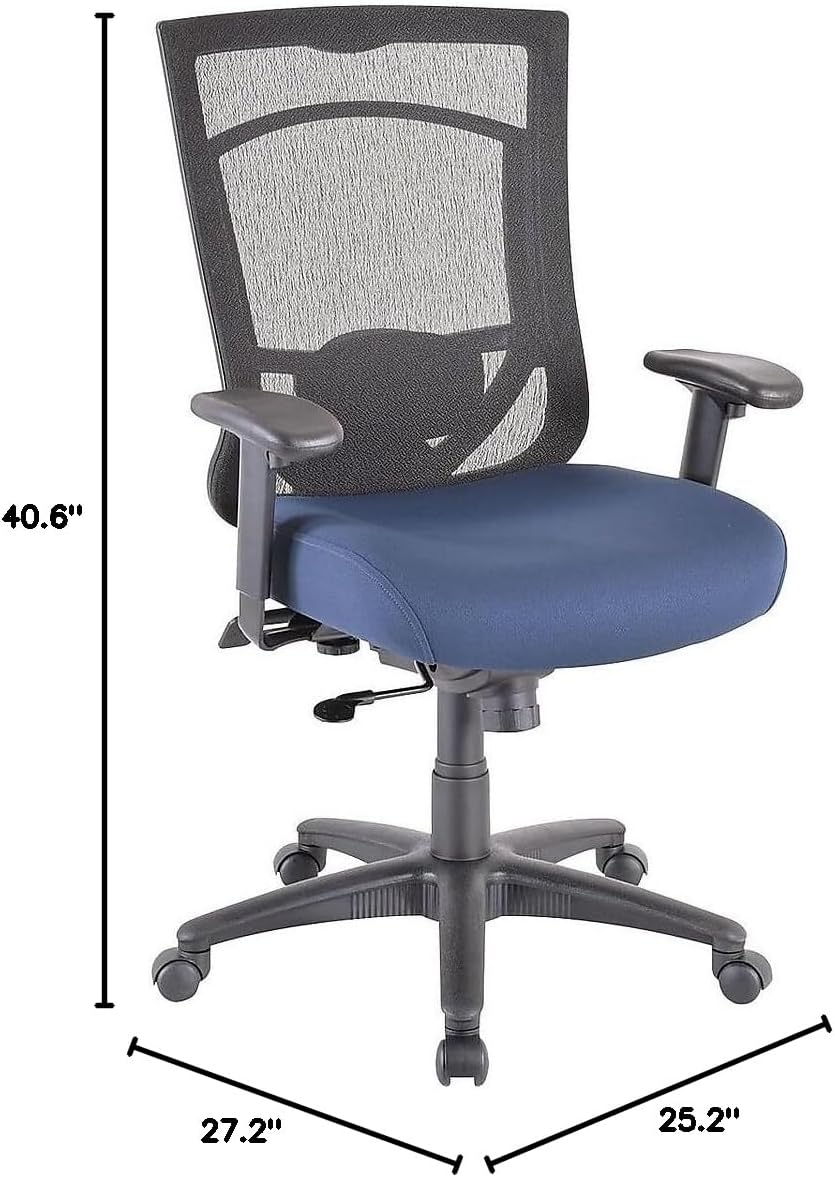
| Üldmõõtmed (K x L x S) | 40.6-44.1" x 27.2" x 25.2" |
| Istme mõõtmed (L x S) | 20.9 cm x 20.1 cm |
| Back Dimensions (W x H) | 20.9 cm x 22.4 cm |
| Maksimaalse kaalu soovitus | 250 naela (113 kg) |
| Materjal | Mesh Back, Fabric Seat with Authentic Tempur Material |
| Eriomadused | Adjustable Height, Adjustable Armrests, Tilt Lock, Tilt Tension |
| Toote hooldusjuhised | Kohapeal puhas |
| Soovitatav päevane kasutus | 8-10 tundi |
9. Garantii ja tugi
Your Tempur-Pedic TP7000 Mesh Back Fabric Task Chair is backed by a Eluaegne piiratud garantii. This warranty covers defects in materials and workmanship under normal use. Specific terms and conditions apply.
For warranty claims, technical support, or to order replacement parts, please contact Tempur-Pedic customer service. Refer to your purchase documentation or the official Tempur-Pedic websaidilt kõige ajakohasemad kontaktandmed.
When contacting support, please have your model number (TP7000) and proof of purchase readily available.


