Sissejuhatus
This manual provides detailed instructions for the installation, operation, and maintenance of your MYPIN Solar Wireless PTZ Security Camera. Please read this manual thoroughly before using the product to ensure proper function and safety. Keep this manual for future reference.
Toode läbiview
Mis on kaasas
- MYPIN PTZ Security Camera
- Päikesepaneel
- Rechargeable Lithium-ion Battery (pre-installed or included separately)
- Kinnitusklamber ja kruvid
- USB laadimiskaabel
- Kasutusjuhend
Põhifunktsioonid
- 1080p Full HD video: Pakub selget ja üksikasjalikku videofootage.
- Värviline öönägemine: Equipped with infrared LEDs and white light for clear night vision, including full-color options.
- Solar Powered & Rechargeable Battery: Continuous power supply through the solar panel, with a built-in rechargeable battery for uninterrupted operation.
- AI Smart Recognition & PIR Motion Detection: Advanced AI technology distinguishes between humans, pets, and vehicles, reducing false alarms.
- Kahesuunaline heli: Built-in speaker and anti-noise microphone allow for real-time two-way communication.
- PTZ-funktsioonid: Pan 335°, Tilt 90°, and 4x digital zoom for flexible viewnurgad.
- IP65 ilmastikukindel: Designed to withstand various weather conditions, suitable for outdoor use.
- Traadita ühenduvus: Supports 2.4 GHz Wi-Fi for easy installation (5 GHz Wi-Fi not supported).
- Mitmed salvestusvõimalused: Supports cloud storage (7-day free playback, max 1GB) and local storage via Micro SD card (up to 128GB, not included).
- Nutika kodu integreerimine: Ühildub Amazon Alexaga hääljuhtimise ja otseülekande jaoks view.

Image: MYPIN Solar Wireless PTZ Security Camera with its solar panel.
Seadistamine
1. Esialgne laadimine
Before first use, fully charge the camera's built-in battery using the provided USB cable and a 5V/2A power adapter (not included). A full charge ensures optimal performance, especially during initial setup and periods of low sunlight.
2. App Installation & Account Creation
- Laadige alla VicoHome rakendus oma nutitelefoni rakenduste poest (iOS või Android).
- Avage rakendus ja järgige ekraanil kuvatavaid juhiseid uue konto loomiseks või sisselogimiseks, kui teil see juba on.
3. Camera Pairing with App
- Veenduge, et teie kaamera on sisse lülitatud.
- In the VicoHome app, tap the "+" icon to add a new device.
- Valige loendist oma kaamera mudel.
- Follow the app's instructions to connect the camera to your 2.4 GHz Wi-Fi network. You may need to scan a QR code displayed on your phone with the camera lens.
- Kui ühendus on loodud, pange kaamerale nimi ja viige seadistusprotsess lõpule.
4. Solar Panel and Camera Mounting
The camera and solar panel can be installed in two ways: integrated or separated. Choose a location that provides optimal sunlight exposure for the solar panel and a clear view kaamera jaoks.
- Päikesepaneeli paigutus: Mount the solar panel in a location that receives direct sunlight for several hours daily. Ensure the cable can reach the camera.
- Kaamera paigutus: Use the provided mounting bracket and screws to securely attach the camera to a wall or other stable surface. Adjust the camera angle for optimal surveillance coverage.

Image: Illustration of two installation methods for the solar panel and camera, showing both integrated and separate mounting options.
Kasutusjuhised
1. Ela View ja taasesitus
- Open the VicoHome app and select your camera to view elav sööt.
- Juurdepääs salvestatud foo-letage through the playback feature in the app.
2. PTZ juhtimine
Otses view interface, use the on-screen controls to pan (335° horizontally) and tilt (90° vertically) the camera lens. You can also use the digital zoom feature to get a closer look.
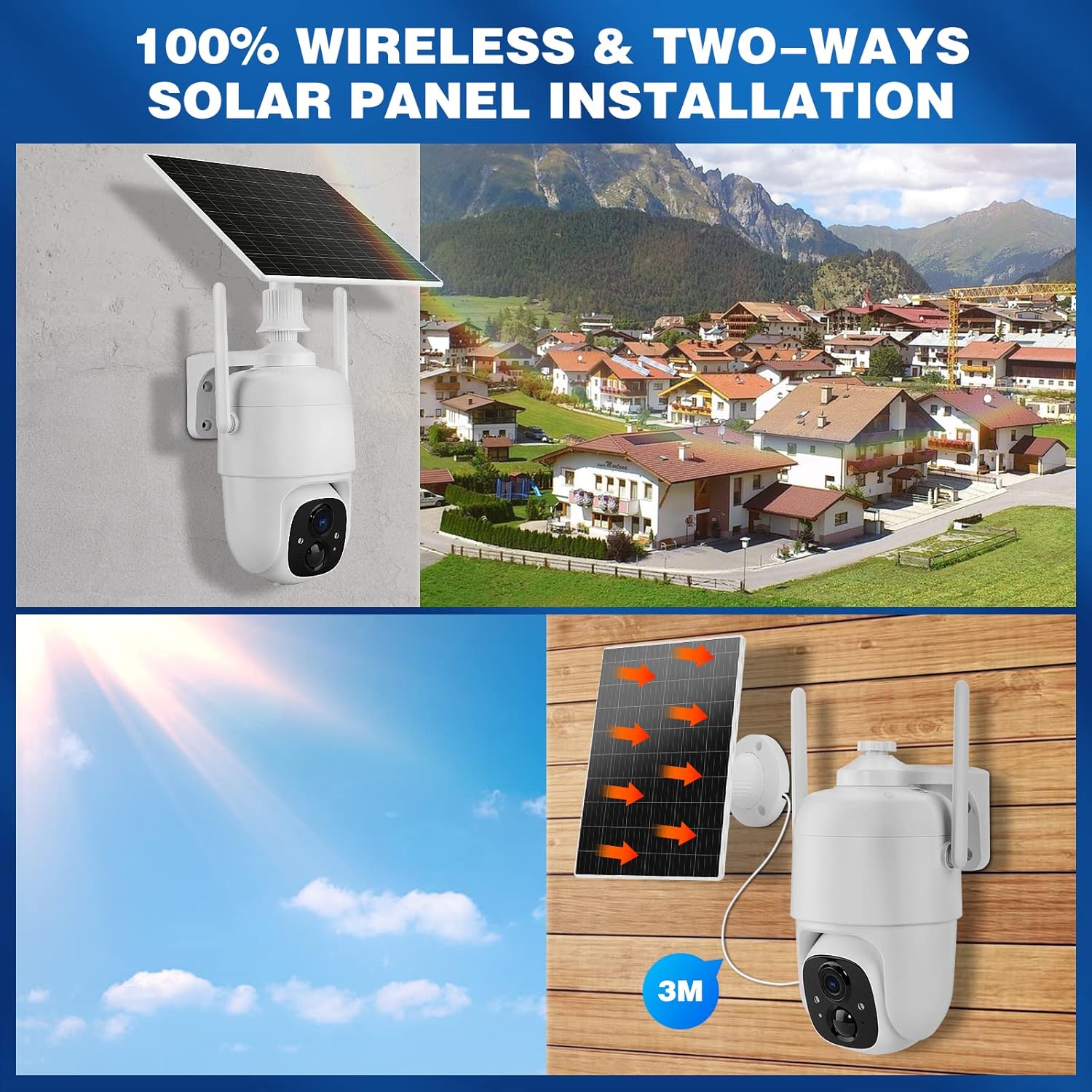
Image: Demonstrates controlling the camera's pan and tilt functions using a smartphone app.
3. Kahesuunaline heli
Puuduta rakenduse otseülekandes mikrofoniikooni. view to speak through the camera's speaker. The camera's built-in microphone will capture audio from the camera's vicinity, allowing for two-way communication.

Image: A person speaking through the camera to a delivery person, demonstrating the two-way audio feature.
4. Liikumistuvastus ja märguanded
- Configure motion detection sensitivity and activity zones within the VicoHome app.
- Enable AI Smart Recognition to differentiate between humans, pets, and vehicles for more accurate alerts.
- Saa koheselt oma nutitelefonile teavitusi, kui liikumine tuvastatakse.

Image: A person walking past a gate, triggering a PIR human detection alert on a smartphone.
5. Öönägemise režiimid
The camera offers both infrared (IR) night vision and full-color night vision. You can switch between these modes in the app settings based on your preference and lighting conditions.

Pilt: Lõhe view showing the difference between color night vision and standard IR night vision at night.
6. Salvestusvalikud
- Pilvesalvestus: The camera offers 7 days of free cloud playback (up to 1GB). Additional cloud plans may be available through the app.
- Micro SD kaart: Insert a Micro SD card (up to 128GB, not included) into the designated slot for local video storage.
7. Amazon Alexa integratsioon
To integrate with Amazon Alexa, enable the VicoHome skill in the Alexa app and link your VicoHome account. You can then use voice commands to view your camera's live feed on compatible Alexa-enabled devices.

Image: A MYPIN camera and an Amazon Echo Show displaying the camera's live feed, illustrating Alexa integration.
Hooldus
1. Puhastamine
- Pühkige kaamera objektiivi ja päikesepaneeli regulaarselt pehme lapigaamp lapiga tolmu ja prahi eemaldamiseks.
- Ärge kasutage tugevaid kemikaale ega abrasiivseid puhastusvahendeid.
2. Aku hooldus
- Ensure the solar panel is free from obstructions to maximize charging efficiency.
- If the camera is stored for an extended period, charge the battery periodically to prevent deep discharge.
3. Püsivara värskendused
Check the VicoHome app regularly for firmware updates. Keeping your camera's firmware updated ensures optimal performance, security, and access to new features.
Veaotsing
| Probleem | Lahendus |
|---|---|
| Kaamera ei loo Wi-Fi-ga ühendust | Ensure your Wi-Fi is 2.4 GHz. Check Wi-Fi signal strength. Restart your router and camera. Re-pair the camera in the app. |
| Kehv video kvaliteet | Check your Wi-Fi connection speed. Clean the camera lens. Ensure adequate lighting for optimal image capture. |
| Aku ei lae | Ensure the solar panel is clean and receives direct sunlight. Check the connection cable between the solar panel and camera. Charge directly via USB if necessary. |
| Vale liikumise hoiatused | Adjust motion detection sensitivity in the app. Utilize AI Smart Recognition to filter out non-human movements. Define specific activity zones. |
| Kahesuunaline heli ei tööta | Check microphone and speaker settings in the app. Ensure your phone's volume is up. Verify network connection stability. |
Tehnilised andmed
- Mudel: HS0366
- Video eraldusvõime: 1080p täis -HD
- Panoraamnurk: 335°
- Kaldenurk: 90°
- Digitaalne suum: 4x
- Öine nägemine: Infrared and Color Night Vision
- Traadita ühenduvus: WiFi 2.4 GHz (IEEE 802.11b/g/n)
- Toiteallikas: Solar Powered, Rechargeable Lithium-ion Battery (5 Watt-hours)
- Ilmastikukindlus: IP65
- Töötemperatuur: -10 °C kuni 45 °C (14 °F kuni 113 °F)
- Hoiustamine: Cloud Storage (up to 1GB free for 7 days), Micro SD Card (up to 128GB, not included)
- Heli: Two-Way Audio (built-in microphone and speaker)
- Liikumistuvastus: PIR with AI Human/Pet/Vehicle Recognition
- Materjal: Metallist
- Mõõdud: Ligikaudu 20.2 x 19.7 x 13.9 cm
- Kaal: Umbes 1.27 kg

Image: The MYPIN camera and solar panel installed outdoors during winter, highlighting its IP65 waterproof rating and operating temperature range.
Garantii ja tugi
For warranty information and technical support, please refer to the contact details provided with your purchase or visit the official MYPIN webveebisait. Hoidke ostutšekk ostutõendina garantiinõuete korral.


