1. Sissejuhatus
This manual provides detailed instructions for the safe and effective use of your WORKPRO 12-in-1 Ratcheting Multi-Bit Screwdriver Set and 6.4-inch Electricians Scissors. Please read this manual thoroughly before operation and retain it for future reference. This product combines a versatile ratcheting screwdriver with a comprehensive set of bits and a pair of specialized electricians scissors designed for cutting, stripping, and crimping.
2. Toote lõppview
2.1 Screwdriver Components
- Ratcheting Screwdriver Handle: Ergonomically designed for comfortable grip and high torque output. Features a slip-resistant surface.
- 12-in-1 Multi-Bit Storage: Integrated storage within the handle for convenient access to various bits.
- Double-ended Bits: Six S2 steel double-ended bits (1/4 inch hex shank, 3-1/2 inch length) providing 12 different drive types.
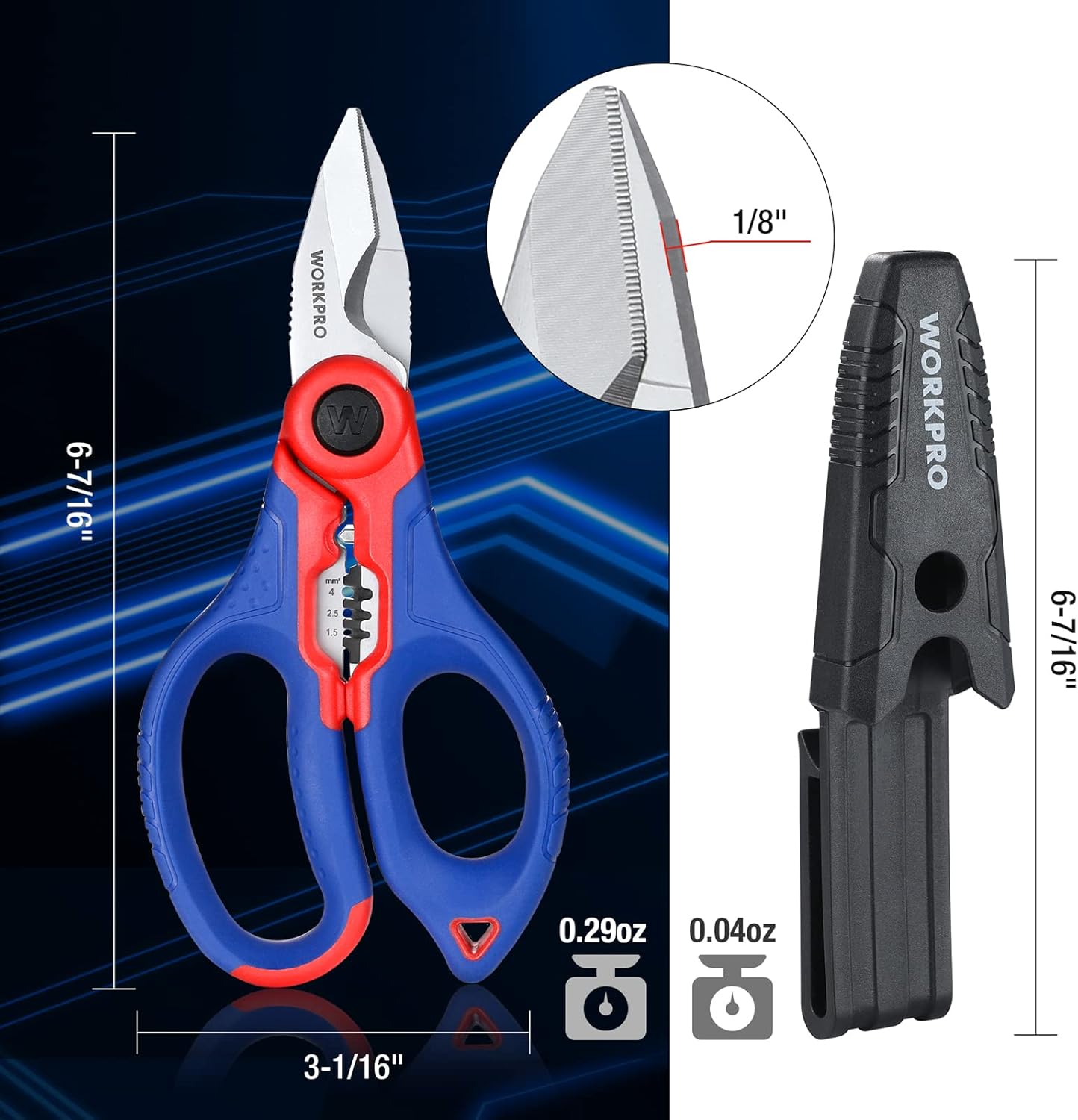
Image: WORKPRO Ratcheting Screwdriver with integrated bit storage. The handle opens to reveal multiple double-ended bits stored inside.
2.2 Electricians Scissors Components
- Roostevabast terasest terad: High-hardness blades with non-slip serrated edges for precise cutting. Blade thickness: 3.8mm.
- Wire Stripper: Integrated wire stripping notches suitable for AWG 16, 14, 12 (1.5, 2.5, 4mm²).
- Crimping Terminal: For crimping cable terminals up to 2.5mm².
- Ergonoomilised käepidemed: Non-slip TPR material handles with a hanging hole design.

Image: WORKPRO 6.4-inch Electricians Scissors. The scissors feature blue and red ergonomic handles and stainless steel blades with a wire stripping and crimping mechanism near the pivot.
3. Seadistamine ja kokkupanek
3.1 Screwdriver Bit Installation
- Select the desired double-ended bit from the integrated storage in the handle.
- Pull the blue collar on the screwdriver handle forward to release the bit holder.
- Insert the chosen bit into the hex shank receiver.
- Release the collar to secure the bit in place. Ensure the bit is firmly seated before use.

Image: Illustration of the screwdriver's quick load/release mechanism. A hand is shown pulling the blue collar to insert or remove a double-ended bit.
3.2 Electricians Scissors
The electricians scissors come pre-assembled and ready for use. No additional setup is required.
4. Kasutusjuhised
4.1 Using the Ratcheting Screwdriver
- Select Ratchet Direction: Rotate the black collar near the bit holder to select the desired ratcheting direction: forward (tighten), reverse (loosen), or locked (non-ratcheting).
- Rakendage survet: Place the selected bit into the screw head. Apply firm, steady pressure to the handle.
- Pöörake: Rotate the handle in the chosen direction. The ratcheting mechanism allows for continuous turning without repositioning your hand.

Image: Close-up of the screwdriver's ratchet switch, indicating 'Reverse' and 'Forward' settings with arrows.
4.2 Using the Electricians Scissors
- Cutting Wires/Cables: Use the main blades to cut wires and soft cables up to AWG12 (diameter 8.5mm, cross-sectional area 50mm²). Position the wire between the blades and squeeze the handles firmly.
- Traadi eemaldamine: Locate the appropriate stripping notch for AWG 16, 14, or 12 wire sizes. Insert the wire into the notch, close the handles gently to cut the insulation, then pull the wire to remove the insulation.
- Crimping Cable Terminals: Use the crimping area near the pivot for cable terminals up to 2.5mm². Place the terminal in the crimping area and squeeze the handles to secure the crimp.

Image: Demonstrates the cutting ability of the electricians scissors on a red wire and a green wire, showing clean cuts. Text indicates cutting capacity for wire/cable up to AWG12 and soft cable up to 0(1/0)AWG.

Image: Shows the electricians scissors performing crimping on a cable terminal and stripping insulation from a red wire, highlighting these specific functions.
5. Hooldus
5.1 Üldine hooldus
- Keep both tools clean and dry after each use.
- Store the screwdriver bits inside the handle to prevent loss and corrosion.
- Avoid dropping the tools, as this can damage the precision mechanisms and blades.
5.2 Puhastamine
- Wipe down the screwdriver handle and bits with a clean, dry cloth. For stubborn grime, a slightly damp võib kasutada lappi, millele järgneb põhjalik kuivatamine.
- Clean the scissor blades with a dry cloth. If necessary, use a small amount of rubbing alcohol to remove residue, then dry completely.
- Do not use abrasive cleaners or solvents that could damage the materials.
5.3 Lubrication (Scissors)
Periodically apply a small drop of light machine oil to the pivot point of the electricians scissors to ensure smooth operation. Wipe off any excess oil.
6. Veaotsing
6.1 Screwdriver Bit Not Holding
- Ensure the bit is fully inserted into the hex shank receiver.
- Verify that the blue collar has been released and has returned to its locked position.
6.2 Ratchet Mechanism Not Engaging
- Check that the black collar is set to either the 'forward' or 'reverse' position, not the locked (middle) position.
- Veenduge, et mehhanismi ei takistaks praht.
6.3 Scissors Blades Sticking or Dull
- Clean the blades and pivot point thoroughly to remove any accumulated residue.
- Apply a small amount of lubricant to the pivot point.
- If blades are dull from extensive use, consider professional sharpening or replacement if performance is significantly impacted.
7. Tehnilised andmed
| Komponent | Spetsifikatsioon |
|---|---|
| Screwdriver Type | Ratcheting Multi-Bit |
| Bittide arv | 6 double-ended bits (12 drive types) |
| Biti materjal | S2 teras |
| Bit Shank Size | 1/4-tolline kuuskant |
| Screwdriver Handle Material | Ergonomic, Slip-resistant |
| Scissors Length | 6.4 tolli |
| Scissors Blade Material | Roostevaba teras |
| Scissors Blade Edge | Serrated, Precise Arc Cut |
| Scissors Blade Thickness | 3.8 mm |
| Wire Stripping Capacity | AWG 16, 14, 12 (1.5, 2.5, 4mm²) |
| Pressimisvõime | Cable terminals up to 2.5mm² |
| Cable Cutting Capacity | Up to AWG12, Soft Cable Up To 0(1/0)AWG, Diameter 8.5mm, Cross-sectional area 50mm² |
| Handle Material (Scissors) | TPR (termoplastne kumm) |
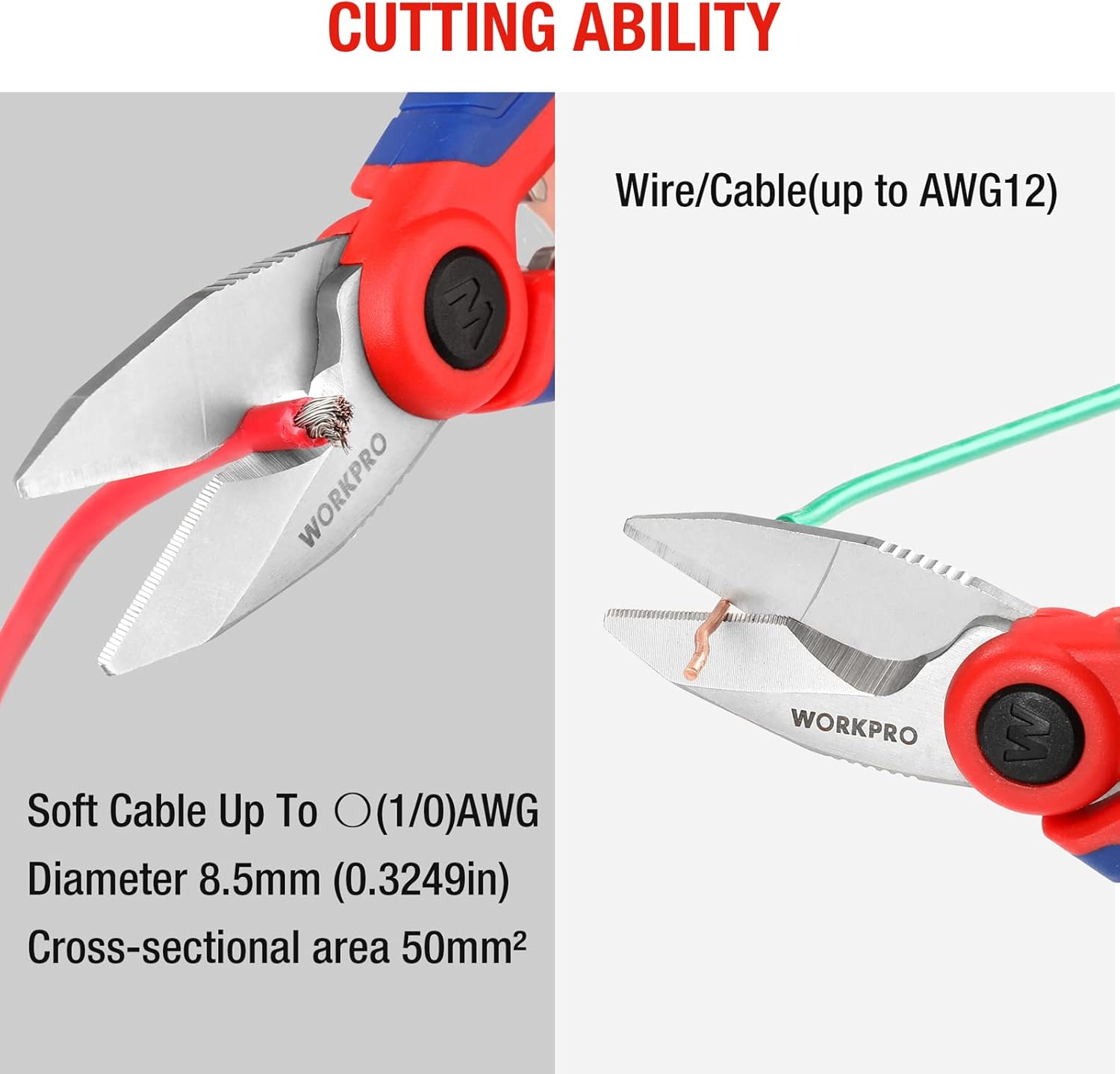
Image: Diagram showing the dimensions of the WORKPRO Electricians Scissors, including overall length (6-7/16 inches) and width (3-1/16 inches).
8. Ohutusalane teave
- Always wear appropriate personal protective equipment, such as safety glasses, when using these tools.
- Hoidke tööriistad lastele kättesaamatus kohas.
- Ärge kasutage kruvikeerajat kangi ega peitlina.
- Do not use the electricians scissors on live electrical circuits. Always ensure power is disconnected before working on electrical wiring.
- Inspect tools for damage before each use. Do not use damaged tools.
- Use the correct bit size for the fastener to prevent stripping the screw head or damaging the bit.
- Ensure a stable footing and good balance when operating tools.
9. Garantii ja tugi
WORKPRO products are manufactured to high-quality standards. For warranty information or technical support, please refer to the product packaging or contact WORKPRO customer service directly. Keep your purchase receipt as proof of purchase.
Lisateabe saamiseks külastage ametlikku WORKPRO veebilehte websaidil või võtke ühendust nende klienditoe kanalitega.


