1. Sissejuhatus
This manual provides comprehensive instructions for the setup, operation, and maintenance of your Cherry MW 9100 Wireless Rechargeable Mouse. The MW 9100 is a compact, versatile mouse offering dual connectivity options (Bluetooth or 2.4 GHz USB receiver) and a convenient rechargeable battery.
Põhifunktsioonide hulka kuuluvad:
- Compact design with charging functionality.
- Flexible operation: use while charging via USB-C cable.
- Dual connectivity: Bluetooth or 2.4 GHz USB receiver.
- Magnetic storage for the USB receiver, ideal for travel.
- Adjustable DPI settings for varied usage.
2. Pakendi sisu
Veenduge, et pakendis on kõik esemed olemas:
- Cherry MW 9100 Wireless Rechargeable Mouse
- USB-C laadimiskaabel
- 2.4 GHz USB-vastuvõtja
- Kaitsekott
- Kasutusjuhend (see dokument)
3. Seadistamine
3.1 Hiire laadimine
The Cherry MW 9100 mouse features a built-in rechargeable battery. Before initial use, or when the battery is low, connect the included USB-C cable to the mouse and to a USB power source (e.g., computer USB port, USB wall adapter). The mouse can be used normally while charging.

3.1. pilt: Üles view of the Cherry MW 9100 mouse, showing the charging indicator light.
3.2 Hiire ühendamine
The MW 9100 offers two connection methods: 2.4 GHz wireless via USB receiver or Bluetooth.
3.2.1 2.4 GHz traadita ühendus
- Locate the USB receiver. It is magnetically stored in a compartment on the underside of the mouse.
- Sisestage USB-vastuvõtja arvuti vabasse USB-porti.
- On the underside of the mouse, slide the switch to the "RF" position.
- Hiir peaks automaatselt arvutiga ühenduse looma.
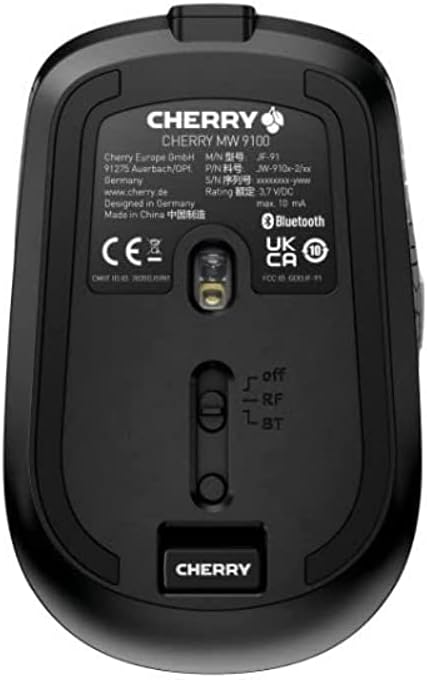
3.2. pilt: Underside of the Cherry MW 9100 mouse, highlighting the USB receiver storage and the connection mode switch.
3.2.2 Bluetooth-ühendus
- On the underside of the mouse, slide the switch to the "BT" (Bluetooth) position.
- Press and hold the small pairing button located near the connection switch on the underside of the mouse until the LED indicator on the mouse starts blinking, indicating pairing mode.
- Avage oma arvutis või seadmes Bluetoothi seaded ja otsige uusi seadmeid.
- Select "Cherry MW 9100" from the list of available devices to complete the pairing process.
4. Kasutusjuhised
4.1 Põhifunktsioonid
The Cherry MW 9100 mouse features standard left and right click buttons, a scroll wheel (which also functions as a middle click button), and two side buttons for navigation (typically forward/back).
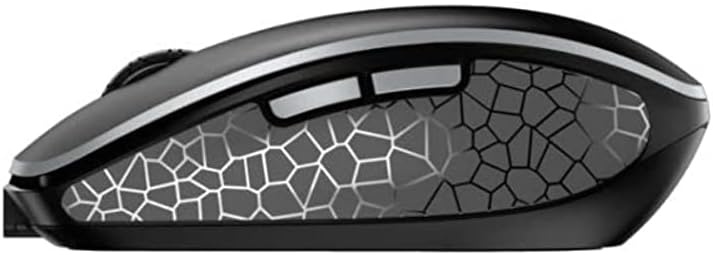
4.1. pilt: Külg view of the Cherry MW 9100 mouse, illustrating the ergonomic design and side buttons.
4.2 DPI reguleerimine
The mouse includes a DPI (Dots Per Inch) button, usually located near the scroll wheel, allowing you to adjust the cursor sensitivity. Press this button to cycle through different DPI settings to match your preference or task requirements.

4.2. pilt: A hand demonstrating the comfortable grip on the Cherry MW 9100 mouse during use.
5. Hooldus
To ensure optimal performance and longevity of your Cherry MW 9100 mouse:
- Puhastamine: Hiire pinna puhastamiseks kasutage pehmet ja kuiva lappi. Kangekaelse mustuse korral kasutage kergelt kuiva lappi.amp Võib kasutada lappi, aga veenduge, et seadmesse ei satuks niiskust. Vältige karme kemikaale või abrasiivseid materjale.
- Hoiustamine: When not in use, especially during travel, store the mouse in the provided protective pouch to prevent scratches and damage.
- Aku hooldus: Avoid fully discharging the battery frequently. Recharge the mouse when the low battery indicator appears.
6. Veaotsing
| Probleem | Võimalik põhjus | Lahendus |
|---|---|---|
| Hiir ei reageeri | Low battery, incorrect connection mode, USB receiver not connected, Bluetooth not paired. |
|
| Intermittent connection (Bluetooth) | Interference, device driver issues, distance from device. |
|
| Kursori liikumine on ebakindel või aeglane | Dirty optical sensor, low battery, incorrect DPI setting. |
|
7. Tehnilised andmed
| Funktsioon | Detail |
|---|---|
| Kaubamärk | Kirss |
| Mudeli number | JW-9100US-2 |
| Ühenduvustehnoloogia | Bluetooth, 2.4 GHz USB Wireless |
| Liikumise tuvastamine | Optiline |
| Eriomadused | Lightweight, Portable, Rechargeable |
| Toote mõõtmed | 4 x 3 x 2 tolli |
| Kauba kaal | 6.4 untsi |
| Värv | Must |
8. Garantii ja tugi
Garantiiteabe ja tehnilise toe saamiseks pöörduge Cherry ametliku esindaja poole. website or contact Cherry customer service directly. Keep your proof of purchase for warranty claims.
Tootja: KIRSS
Websait: www.cherry.de


