1. Sissejuhatus
The Amazon Echo Show 5 (3rd Gen) is a smart display designed to integrate seamlessly into your daily life. It features a 5.5-inch screen and enhanced audio capabilities, providing visual and auditory interactions with Alexa. This device is refurbished, tested, and certified to function like a new unit, and comes with the same limited warranty.
The device is constructed with sustainability in mind, utilizing 100% post-consumer recycled polyester yarn for its fabric and 100% recycled aluminum. Its packaging is also 100% recyclable.
2. Mis on karbis
Upon unboxing your Amazon Echo Show 5 (3rd Gen), you should find the following items:
- Echo Show 5 (3. põlvkonna) seade
- Power adapter (22W) and cable (4.9ft)
- Kiirjuhend
3. Seadistusjuhend
Follow these steps to set up your Echo Show 5:
- Toide sisse: Connect the included power adapter to your Echo Show 5 and plug it into a wall outlet. The device will automatically power on.
- Järgige ekraanil kuvatavaid juhiseid: The device will guide you through the initial setup process on its 5.5-inch touch screen.
- Ühendage Wi-Fi-ga: Select your Wi-Fi network from the list and enter the password. The Echo Show 5 supports dual-band Wi-Fi (802.11a/b/g/n/ac). It does not support ad-hoc (peer-to-peer) networks.
- Log in to Amazon Account: Enter your Amazon account credentials when prompted.
- Isikupärasta seaded: Configure your time zone, location, and other preferences.
- Tutvuge funktsioonidega: Once setup is complete, you can begin interacting with Alexa and exploring the device's capabilities.
The device utilizes Amazon Wi-Fi Simple Setup technology for an easier connection process to your Wi-Fi network.
4. Operating Your Echo Show 5
The Echo Show 5 allows for various interactions through voice commands and its touch screen.
4.1. Ekraani funktsioonid
The 5.5-inch touch screen provides visual information and controls:
- Teave lühidalt: View news headlines, weather forecasts, and calendar events.
- Photo Display: Set the background to a rotating slideshow of your favorite photos. You can invite family and friends to share photos.
- Sisu Viewing: Stream shows, view song titles, and follow along with recipes.

4.2. Helifunktsioonid
The device features a full-range 1.75-inch built-in speaker, offering enhanced bass and clearer vocals for audio playback.
- Muusika ja taskuhäälingud: Stream audio content from services like Amazon Music and Spotify.
- Bluetoothi ühenduvus: Toetab Advanced Audio Distribution Pro'dfile (A2DP) for streaming audio from your mobile device to the Echo Show 5, or from the Echo Show 5 to a Bluetooth speaker. Audio/Video Remote Control Profile (AVRCP) allows voice control of connected mobile devices. Bluetooth speakers requiring PIN codes are not supported.


4.3. Kaamera funktsioonid
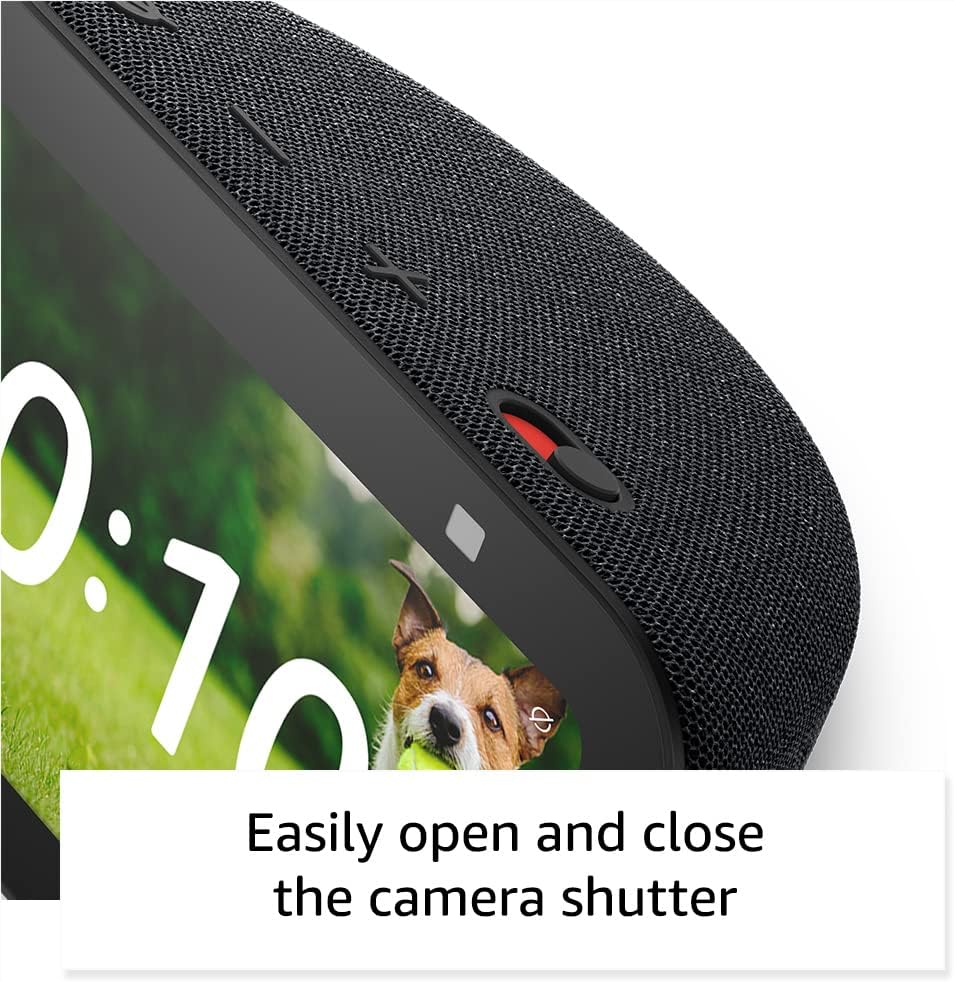
The Echo Show 5 includes a 2 MP camera with a built-in shutter.
- Videokõned: Use the camera to make video calls to friends and family who have the Alexa app or another Echo device with a screen.
- Kodune jälgimine: Check in on your home, family, or pets using the built-in camera. You can also view ühilduvad video uksekellad.


4.4. Nutika kodu juhtimine
Control compatible smart devices such as lights and thermostats using voice commands or the touch screen, even when you are away from home. The device supports Wi-Fi, Bluetooth Low Energy Mesh, and Matter for smart home compatibility.
4.5. Privaatsusfunktsioonid
The Echo Show 5 incorporates multiple layers of privacy controls:
- Mic/Camera Off Button: A physical button to electronically disconnect the microphone and camera.
- Sisseehitatud kaamera katik: Füüsiline liugur kaamera objektiivi katmiseks.
- Wake Wordi tehnoloogia: The device only begins recording and sending audio to the cloud after detecting the wake word (e.g., "Alexa").
- Voogedastuse indikaatorid: Visual indicators show when the device is actively streaming to the cloud.
- Häälsalvestuste haldamine: Võimalus view ja kustutage oma helisalvestised.
- Ring Video Encryption: Toetab viewing end-to-end encrypted Ring video.
4.6. Ligipääsetavuse funktsioonid
The Echo Show 5 includes various accessibility features to personalize Alexa to your abilities. These can be accessed via Seaded → Ligipääsetavus.
- Puuduta Alexa kasutamiseks: Juurdepääs Alexale puutetundliku ekraanipaanide või klaviatuuri kaudu.
- Adaptiivne kuulamine: Annab Alexale rohkem aega rääkimise lõpetamiseks enne, kui ta vastab.
- Eelistatud kõnetempo: Kontrolli, kui kiiresti või aeglaselt Alexa räägib.
- Subtiitrid: Alexa Captioning, Call Captioning, and Closed Captioning provide text captions for supported content.
- Näita ja räägi: Aitab pimedatel või nägemispuudega kasutajatel tooteid tuvastada, öeldes: „Alexa, mida ma käes hoian?”
- HäälView Ekraanilugeja: Võimaldab juurdepääsu pimedatele või nägemispuudega kasutajatele.
- Ekraani suurendaja: Võimaldab ekraanil sisse/välja suumida ja panoraamida.
- Teavita, kui läheduses: Esitab seadme lähedal tuvastamisel teavitushelisid.
- Kindle'i ettelugemine: Alexa saab Kindle'i raamatuid valjusti ette lugeda.
- Reaalajas tekst: Võimaldab videokõnes reaalajas teksti sisestada.
- Additional features include Color Inversion, Color Correction, and Request Sound.
5. Hooldus
Echo Show 5 pikaealisuse ja optimaalse jõudluse tagamiseks järgige neid hooldusjuhiseid:
- Puhastamine: Use a soft, lint-free cloth to gently wipe the screen and exterior. Avoid abrasive cleaners, solvents, or aerosol sprays.
- Paigutus: Place the device on a stable, flat surface away from direct sunlight, heat sources, and excessive moisture. Ensure adequate ventilation around the device.
- Tarkvaravärskendused: The device receives guaranteed software security updates for at least four years after its last availability for purchase as a new unit. Ensure your device is connected to Wi-Fi to receive these updates automatically.
- Toitetsükkel: If the device becomes unresponsive, unplug it from the power outlet, wait for 10 seconds, and then plug it back in.
6. Veaotsing
If you encounter issues with your Echo Show 5, try the following solutions:
- Toide puudub: Ensure the power adapter is securely connected to both the device and a working wall outlet. Try a different outlet.
- WiFi-ühenduse probleemid:
- Kontrollige, kas teie WiFi-ruuter töötab korralikult.
- Taaskäivitage ruuter ja modem.
- On the Echo Show 5, go to Settings → Network and try reconnecting to your Wi-Fi network.
- Veenduge, et seade oleks teie WiFi-ruuteri leviala piires.
- Alexa ei reageeri:
- Ensure the microphone is not muted (the light ring will be red). Press the mic/camera off button if it is.
- Speak clearly and directly to the device.
- Try restarting the device by unplugging and replugging it.
- Kuvamisprobleemid: If the screen is unresponsive or frozen, try restarting the device.
- Heliprobleemid:
- Kontrollige seadme helitugevust.
- Ensure no external Bluetooth speakers are connected if you intend to use the internal speaker.
- Kaamera ei tööta: Ensure the camera shutter is open and the camera is not disabled via the mic/camera off button.
For further assistance, refer to the Amazon support websaidil või võtke ühendust klienditeenindusega.
7. Tehnilised andmed
| Funktsioon | Detail |
|---|---|
| Mudel | Echo Show 5 (3rd Gen) - 2023 release |
| Mõõdud (L x S x K) | 5.8 x 3.6 x 3.2 tolli (147 mm x 91 mm x 82 mm) |
| Kaal | 16.1 untsi (456 grammi) |
| Ekraan | 5.5" puutetundlik ekraan |
| Kaamera | 2 MP sisseehitatud katikuga |
| Protsessor | MediaTek MT 8169 B |
| Wi-Fi ühenduvus | Dual-band 802.11a/b/g/n/ac (does not support ad-hoc networks) |
| Bluetooth-ühenduvus | A2DP support for audio streaming, AVRCP for voice control (Bluetooth speakers requiring PIN codes not supported) |
| Heli | Full range 1.75” built-in speaker |
| Nutika kodu ühilduvus | WiFi, Bluetoothi madala energiatarbega võrk, Matter |
| Keele tugi | inglise ja hispaania keel |
8. Garantii ja tugi
Your Amazon Echo Show 5 (3rd Gen) comes with a 1-year limited warranty and service. As a refurbished device, it receives the same limited warranty as a new device.
For detailed warranty information and terms of service, please refer to the documentation provided with your device or visit the official Amazon support website. Information regarding software security updates is also available through Amazon's official channels.


