1. Toote lõppview
The iTOMA CKS209 is a versatile alarm clock radio designed to enhance your bedside experience. It features dual wireless charging capabilities for your smartphone and earbuds, along with two additional USB ports for other devices. Enjoy your favorite music via Bluetooth 5.1 technology or tune into digital FM radio. The clock includes dual alarms with customizable wake-up modes, a large 1.4-inch orange LED display with auto and manual dimmer control, and a 2-level orange night light.
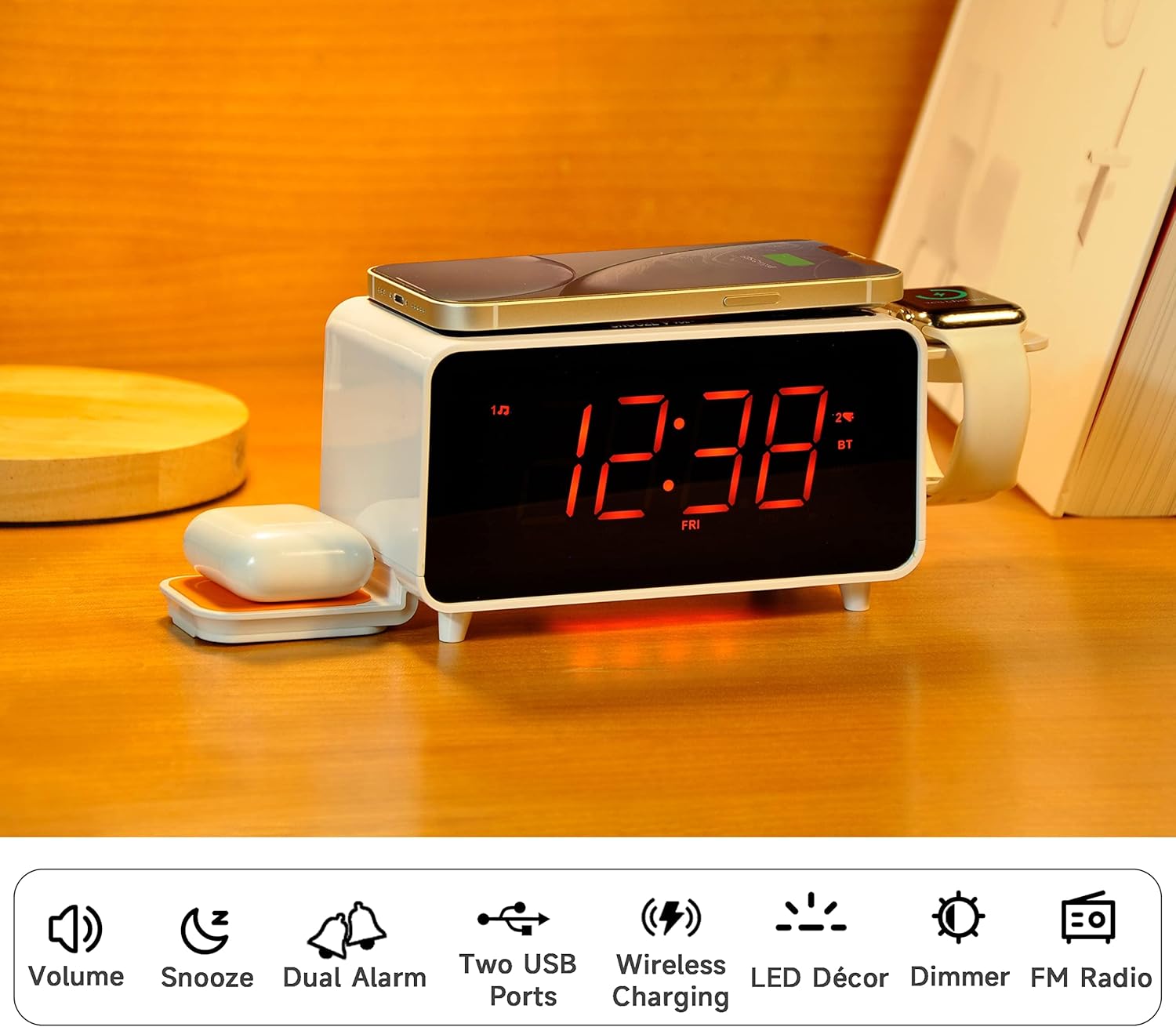
Image: The iTOMA CKS209 alarm clock radio displaying the time, with a smartphone wirelessly charging on top, earbuds on a side wireless charging pad, and a smartwatch on its holder.
Peamised omadused:
- Juhtmeta laadimine: 15W ultra-fast wireless charger for smartphones and 3W foldable earphone wireless charger. Includes a watch wireless charging support holder (charging cable not included).
- Bluetooth 5.1: Seamless audio streaming from your Bluetooth-enabled devices.
- Kaks USB-porti: One USB-A and one USB-C port (5V 2.1A) for additional device charging.
- Smart Dual Alarm: Set two independent alarms with options to wake to radio or buzzer. Features snooze, crescendo wake-up, 15-level volume control, and 4 alarm week modes (Every day, single day, weekdays, weekends).
- 1.4" Orange LED Display: Clear 12/24-hour format display with 3-level dimmer brightness and auto-dimmer function.
- Öövalgus: 2-level orange night light for ambient illumination.
- Digitaalne FM-raadio: 20 programmable preset stations with external wire antenna for enhanced reception.
- Varu aku: Maintains time and alarm settings during power interruptions.
2. Seadistamine
2.1 Toiteühendus
- Unpack the iTOMA CKS209 unit and all accessories.
- Connect the provided AC adapter to the DC IN jack on the back of the unit.
- Plug the AC adapter into a standard wall outlet. The display will light up, and the clock will automatically set the time.
2.2 Initial Time Setting (Manual)
While the clock features auto-time setting, you can manually adjust the time, date, and year if needed.
- Vajutage ja hoidke all nuppu KELLAKOMPLEKT button located on the top panel until the year flashes on the display.
- Kasutage TUNE +/- buttons (or rotate the SNOOZE/VOL dial) to adjust the year.
- Vajutage KELLAKOMPLEKT again to confirm and move to the month setting. Repeat the process for month, day, hour, and minute.
- Vajutage KELLAKOMPLEKT one last time to save your settings.
2.3 Time Zone and Daylight Saving Time (DST)
- Vajutage ja hoidke all nuppu SLEEP/AJAVÖÖND button to enter time zone setting.
- Kasutage TUNE +/- buttons (or rotate the SNOOZE/VOL dial) to select your desired time zone.
- Vajutage SLEEP/AJAVÖÖND again to toggle DST ON or OFF.
- Vajutage SLEEP/AJAVÖÖND viimast korda kinnitamiseks ja väljumiseks.
Video: This video demonstrates the time setting and Bluetooth operation for a similar iTOMA CKS207 model, which shares similar functionalities with the CKS209.
3. Kasutusjuhised
3.1 Juhtmeta laadimine
The iTOMA CKS209 features multiple wireless charging options:
- Smartphone Wireless Charging: Place your Qi-compatible smartphone on the top charging pad. The charging indicator on the display will illuminate to confirm charging.
- Earbud Wireless Charging: Place your Qi-compatible earbuds on the foldable 3W wireless charging pad located on the side.
- Smartwatch Holder: Utilize the integrated holder for your smartwatch. Note: A separate smartwatch charging cable (not included) is required and connects to one of the USB ports.
Image: A smartphone is placed on the top surface of the iTOMA CKS209, indicating wireless charging in progress.
Image: A close-up of the side of the iTOMA CKS209 showing the integrated holder designed for a smartwatch.
3.2 USB laadimisporti
In addition to wireless charging, the unit provides two USB ports (one Type-A and one Type-C) on the back for wired charging of other devices.
- Connect your device's USB charging cable to either the USB-A or USB-C port on the back of the alarm clock.
- Ensure your device is properly connected and charging.
Image: A smartphone is connected via a USB cable to one of the charging ports on the back of the iTOMA CKS209.
3.3 Bluetooth-kõlar
Voogedastage heli juhtmevabalt oma Bluetooth-toega seadmetest.
- Vajutage nuppu SISSE/VÄLJA nuppu seadme sisselülitamiseks.
- Vajutage nuppu REŽIIM button repeatedly until 'BT' appears on the display and starts flashing, indicating pairing mode.
- On your mobile device, enable Bluetooth and search for 'iTOMA CKS209' (or similar model name).
- Select the device to pair. Once connected, 'BT' will stop flashing and remain solid.
- You can now play audio from your device through the alarm clock speaker. Adjust volume using the Vol +/- buttons or your mobile device.

Image: A smartphone displaying music playback is positioned near the iTOMA CKS209, indicating a Bluetooth connection.
3.4 FM -raadio
Kuula oma lemmik FM-raadiojaamu.
- Vajutage nuppu SISSE/VÄLJA nuppu seadme sisselülitamiseks.
- Vajutage nuppu REŽIIM nuppu korduvalt, kuni ekraanile ilmub FM-sagedus.
- For automatic station search, press and hold the TUNE +/- buttons. The radio will scan and save available stations.
- For manual tuning, short press the TUNE +/- nuppe sageduse samm-sammult reguleerimiseks.
- Reguleerige helitugevust nupu abil Vol +/- nupud.
3.5 Kahekordne äratuskell
Seadistage kuni kaks sõltumatut äratuskella.
- Vajutage nuppu AL1 or AL2 button to select the desired alarm. The alarm time will flash on the display.
- Kasutage TUNE +/- buttons (or rotate the SNOOZE/VOL dial) to set the desired alarm hour and minute.
- Vajutage AL1 or AL2 again to select the wake-up source (Buzzer or FM Radio).
- Vajutage AL1 or AL2 again to select the alarm week mode (Every day, single day, weekdays, or weekends).
- Vajutage AL1 or AL2 one last time to confirm and activate the alarm. The alarm indicator will appear on the display.
- Äratuse deaktiveerimiseks vajutage vastavat nuppu AL1 or AL2 button until the alarm indicator disappears from the display.
- Korduse funktsioon: Kui äratus kõlab, vajutage UINAK button to temporarily silence the alarm for 9 minutes.

Image: The iTOMA CKS209 alarm clock radio displaying the time on a bedside table, ready for use.
3.6 Display & Dimmer Control
Adjust the brightness of the 1.4-inch orange LED display.
- Vajutage lühidalt nuppu HIMMEM button to cycle through 3 brightness levels (High, Medium, Low).
- The unit also features an auto-dimmer function that adjusts display brightness based on ambient light conditions.
Image: A visual representation of the iTOMA CKS209 display at different brightness levels, from bright to invisible, and the auto-dimmer setting.
3.7 Öövalgus
Activate the ambient orange night light.
- Vajutage nuppu LED button to turn the night light ON.
- Vajutage nuppu LED button again to cycle through 2 brightness levels.
- Vajutage nuppu LED button a third time to turn the night light OFF.
4. Hooldus
To ensure the longevity and optimal performance of your iTOMA CKS209, follow these maintenance guidelines:
- Puhastamine: Use a soft, dry cloth to clean the exterior of the unit. Do not use liquid cleaners or abrasive materials, as they may damage the finish.
- Ventilatsioon: Veenduge, et seade oleks ülekuumenemise vältimiseks hästiventileeritavas kohas. Ärge blokeerige ühtegi ventilatsiooniava.
- Toitejuhe: Kontrollige toitejuhet regulaarselt kahjustuste suhtes. Kui see on kahjustatud, lõpetage kasutamine ja võtke ühendust klienditoega.
- Hoiustamine: Kui seadet pikemaks ajaks hoiustate, eemaldage see vooluvõrgust ja hoidke seda jahedas ja kuivas kohas.
5. Veaotsing
If you encounter any issues with your iTOMA CKS209, please refer to the following common troubleshooting steps:
- Toide puudub/ekraan välja lülitatud:
- Veenduge, et vahelduvvooluadapter oleks kindlalt ühendatud nii seadme kui ka töötava seinakontaktiga.
- Kontrollige, kas pistikupesa töötab, ühendades sellega teise seadme.
- Juhtmeta laadimine ei tööta:
- Veenduge, et teie seade on Qi-ühilduv.
- Veenduge, et teie seade oleks laadimisalusel õigesti keskel.
- Eemalda kõik paksud telefoniümbrised või metallesemed, mis võivad laadimist segada.
- Veenduge, et seade on sisse lülitatud.
- Bluetoothi sidumisprobleemid:
- Ensure the alarm clock is in Bluetooth pairing mode ('BT' flashing).
- Veenduge, et Bluetooth oleks teie mobiilseadmes lubatud.
- Move your mobile device closer to the alarm clock.
- Kui seade on eelnevalt paaristatud, proovige see lahti siduda ja uuesti siduda.
- FM-raadio staatiline/halb vastuvõtt:
- Extend the external wire antenna fully for better reception.
- Reposition the antenna or the unit to find a location with better signal strength.
- Alarm ei kõla:
- Ensure the alarm (AL1 or AL2) is activated and its indicator is visible on the display.
- Kontrollige alarmi helitugevuse seadet.
- Verify the alarm time and day settings are correct.
6. Tehnilised andmed
| Funktsioon | Detail |
|---|---|
| Kaubamärk | iTOMA |
| Mudeli number | CKS209-CA |
| Värv | Orange Led Display |
| Toote mõõtmed | 16.8 x 3.81 x 9.1 cm |
| Kauba kaal | 820 g |
| Materjal | Plastikust |
| Kuva tüüp | LED |
| Eriomadused | Auto Dimmable, Charging Port, Charging Station, Foldable, Multiple Time Zone |
| Juhtmeta laadimine | 15W (Phone), 3W (Earbuds) |
| USB laadimine | USB-A, USB-C (5V 2.1A) |
| Bluetoothi versioon | 5.1 |
| FM sagedus | 87.5-108 MHz |
7. Garantii ja tugi
For warranty information, technical support, or any inquiries regarding your iTOMA CKS209, please refer to the documentation included in your product packaging or visit the official iTOMA websait. Abi saamiseks võite pöörduda ka otse müüja poole.


